agence-adeliom/sylius-happy-cms-plugin
| Install | |
|---|---|
composer require agence-adeliom/sylius-happy-cms-plugin |
|
| Latest Version: | v2.3.0-alpha.2 |
| PHP: | ^8.4 || ^8.5 |
| License: | MIT |
| Last Updated: | Sep 25, 2026 |
| Links: | GitHub · Packagist |
Sylius Happy CMS Plugin — CMS & Page Builder for Sylius
Visual page builder in the Sylius admin, content blocks, media manager, menus, SEO and multilingual pages for Sylius 1.13 / 1.14 and Sylius 2.x.
Overview • Versions • Installation • Documentation
Overview
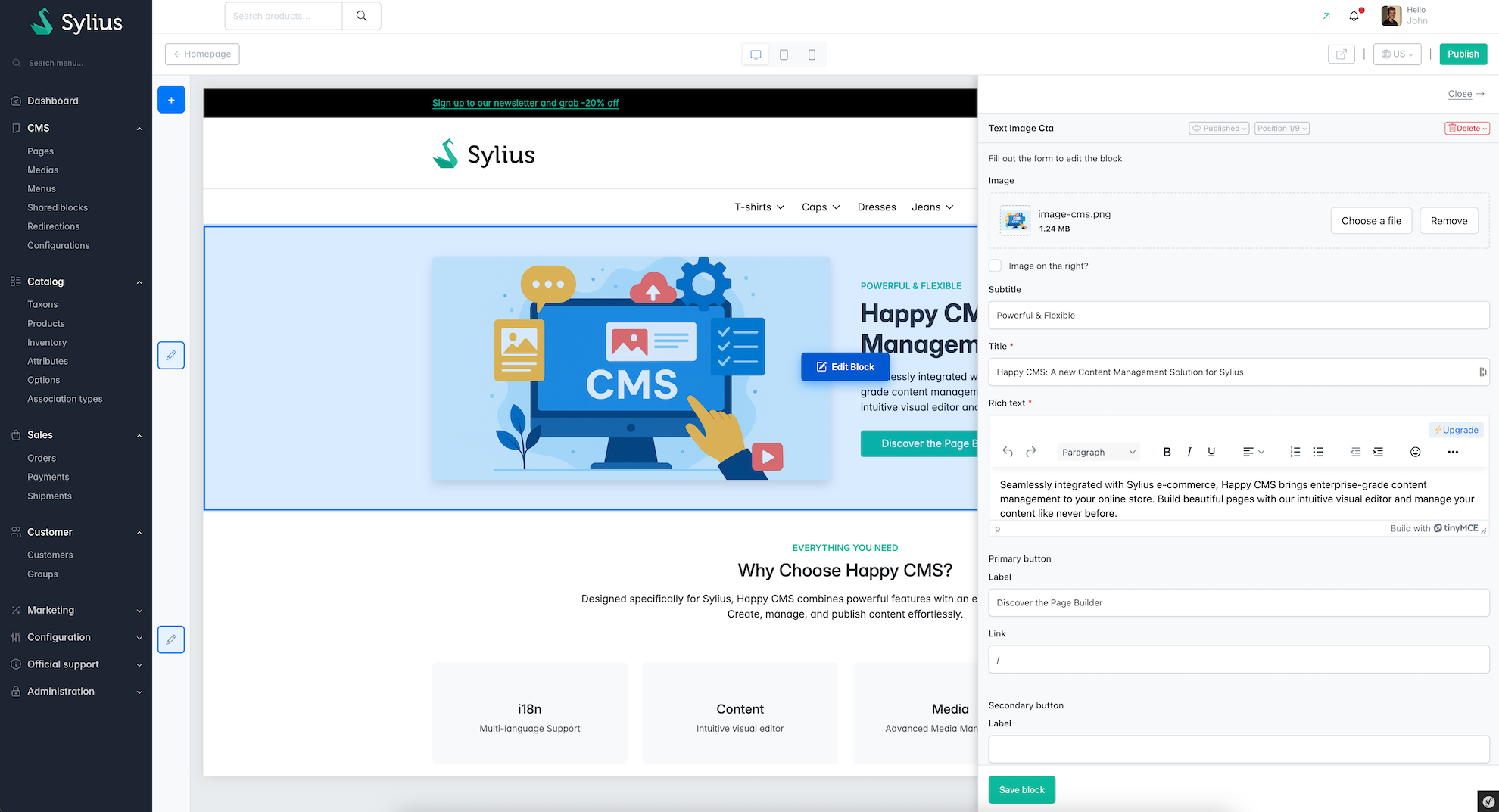
Happy CMS is a CMS plugin for Sylius with a visual page builder in the back office (Sylius admin). Merchants and content editors build and edit pages from content blocks and see a live preview of the shop page, without writing code. Developers keep full control: pages are Sylius routable resources, blocks are Symfony form types and Twig templates.
It works with Sylius 1.13, 1.14, 2.0, 2.1, 2.2 and 2.3: each Sylius version has its own plugin branch (see Versions).
Back-office page builder
- Visual editor in the Sylius admin: compose pages with flexible content blocks (text, WYSIWYG, image, gallery, CTA, accordion, key features…).
- Live preview: the real shop page is rendered next to the editor, in an iframe, while you edit.
- Responsive preview: switch between desktop, tablet and mobile resolutions.
- Per-locale editing: edit and preview every translation of a page.
- Shared blocks: reusable blocks (reassurance banner, footer CTA…) used across several pages.
CMS features
- Pages and custom routable resources: create your own entities (blog, FAQ, brand pages, landing pages…) with their own URLs, routes, templates and logic.
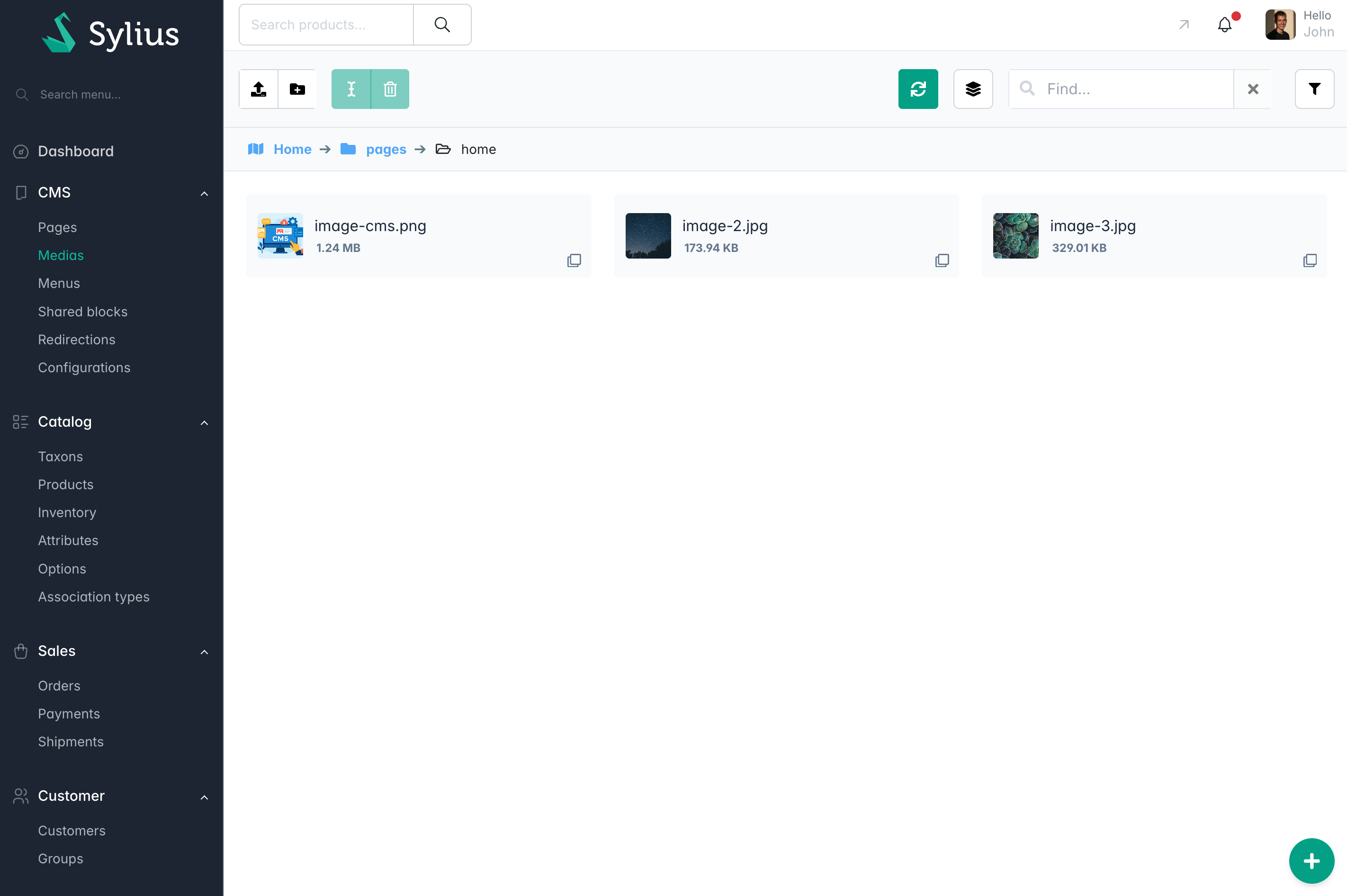
- Media Management: organize images, videos and documents used in CMS pages, built on the Flysystem storage abstraction layer.
- SEO: meta title, meta description, robots, sitemap and URL management for every page.
- Multilingual: full support for Sylius locales and translated URLs.
- Menu Management: hierarchical menus for the shop navigation.
- Custom blocks: use the default blocks, override them, or create your own.
- Developer helpers: Maker commands to generate entities, repositories, admin CRUD and blocks.
- AI: AI assistant to help write page content (requires an API key).
- CRUD: integrated with Sylius Easy CRUD Plugin for simplified Sylius resource CRUD management.
Installation and documentation
Versions
The plugin supports Sylius 1.x and every Sylius 2.x minor release, not only Sylius 2.3. The
2.3.xbranch (the one you are probably reading) targets Sylius 2.3 only. Older Sylius versions are supported by older plugin versions, each maintained on its own Git branch with its own README.
Pick the line matching the Sylius version of your project. Running composer require agence-adeliom/sylius-happy-cms-plugin without a constraint also lets Composer select the compatible version.
| Your Sylius version | Plugin version | Composer constraint | Git branch | PHP | Symfony | Maintained | Installation guide |
|---|---|---|---|---|---|---|---|
| 2.3 | 2.3.x | ^2.3 |
2.3.x |
8.4, 8.5 | 7.4, 8.x | Yes | This README |
| 2.1, 2.2 | 2.1.x | ~2.1.0 |
2.1.x |
8.3, 8.4, 8.5 | 7.4 | Yes | 2.1.x README |
| 2.0 | 2.0.x | ~2.0.0 |
2.0.x |
8.2, 8.3, 8.4 | 6.4, 7.x | No | 2.0.x README |
| 1.13, 1.14 | 1.14.x | ^1.14 |
1.x |
8.2, 8.3, 8.4 | 6.4, 7.x | No | v1.14.12 README |
Upgrading between versions
- Sylius 1.x → Sylius 2.0 (plugin 1.14 → 2.0, BC break): Sylius 2 migration guide.
- Plugin 2.0 → 2.1 (new content model persistence and new page builder, BC break): content block migration guide.
- Plugin 2.1 → 2.3 (Sylius 2.3 / Symfony 8 support): upgrade Sylius to 2.3, then require
agence-adeliom/sylius-happy-cms-plugin:^2.3.
Feature preview
Installation
These steps install the 2.3.x version (Sylius 2.3). For another Sylius version, follow the installation guide linked in the Versions table.
1. Install via Composer
composer require agence-adeliom/sylius-happy-cms-plugin --no-scripts
composer require --dev symfony/maker-bundle --no-scripts
2. Enable the Bundle
Add the plugin to config/bundles.php:
<?php

return [
    // ...
    Adeliom\SyliusEasyCrudPlugin\SyliusEasyCrudPlugin::class => ['all' => true],
    Adeliom\SyliusHappyCMSPlugin\SyliusHappyCMSPlugin::class => ['all' => true],

    Symfony\Bundle\MakerBundle\MakerBundle::class => ['dev' => true, 'test' => true],
];
3. Import Configuration
In config/packages/_sylius.yaml:
imports:
  - { resource: "@SyliusEasyCrudPlugin/config/config.yaml" }
  - { resource: "@SyliusHappyCMSPlugin/config/config.yaml" }
4. Import Routes
In config/routes.yaml:
sylius_happy_cms:
  resource: "@SyliusHappyCMSPlugin/config/routes.yaml"

sylius_easy_crud:
  resource: "@SyliusEasyCrudPlugin/config/routes.yaml"
5. Configure your firewall to protect preview routes
All admin users with ROLE_ALLOWED_TO_SWITCH AND ROLE_HAPPY_CMS_CONTENT_BUILDER will be able to preview CMS routable entities.
In config/packages/security.yaml
security:
    firewalls:
        #...
        admin_happy_cms_content_builder:
            switch_user: { role: ROLE_ALLOWED_TO_SWITCH }
            context: admin
            pattern: "%sylius.security.shop_regex%"
            request_matcher: Adeliom\SyliusHappyCMSPlugin\Security\PreviewRequestMatcher
            provider: sylius_admin_user_provider
    #...
    role_hierarchy:
        ROLE_ADMINISTRATION_ACCESS: [ ROLE_HAPPY_CMS_CONTENT_BUILDER ]
5.1 Allow the page builder iframes (X-Frame-Options)
The page builder displays admin and front pages (preview) inside iframes, so every response must allow same-origin framing.
Send a single X-Frame-Options: SAMEORIGIN header, from one source only:
-
If you use NelmioSecurityBundle, use
SAMEORIGIN, notDENY, on the whole site:# config/packages/nelmio_security.yaml nelmio_security: clickjacking: paths: '^/.*': SAMEORIGINand remove the Sylius subscriber, which also sets this header on every response (
src/Kernel.php):final class Kernel extends BaseKernel implements CompilerPassInterface { use MicroKernelTrait; public function process(ContainerBuilder $container): void { $container->removeDefinition('sylius.event_subscriber.x_frame_options'); } } -
Remove
Header set X-Frame-Options SAMEORIGINfrompublic/.htaccess(Sylius recipe, Apache) and do not set the header in the web server (Caddyfile, nginx) or the ingress either. -
Serve the admin and the shop on the same host, otherwise
SAMEORIGINblocks the preview (use CSPframe-ancestorsin that case).
Two conflicting headers (DENY, SAMEORIGIN) make the browser fall back to DENY, and the page builder breaks with:
Refused to display '…' in a frame because it set multiple 'X-Frame-Options' headers with conflicting values ('DENY, SAMEORIGIN'). Falling back to 'deny'.
page-builder.js: Uncaught SecurityError: Failed to read a named property 'href' from 'Location': Blocked a frame with origin "…" from accessing a cross-origin frame.
Check with curl -skI https://your-shop.local/en_US/ | grep -i x-frame-options: exactly one SAMEORIGIN line is expected.
5. Generate default files in your project (entities, repositories and admin classes) :
Actually, we don't have Symfony recipes, so we created a command to generate files automatically.
php bin/console make:happy-cms:install
This command will :
- Create all entities, repositories and admin class
- update config/routes.yaml by adding route properly declared
- update config/packages/sylius_resource.yaml by adding sylius routes properly declared
- update config/packages/sylius_happy_cms.yaml by adding new files properly declared
If something goes wrong, you can do those actions manually, check detailed configuration.
6. Install Assets
php bin/console assets:install
7. Update database
php bin/console doc:mig:diff
php bin/console doc:mig:mig
php bin/console cache:clear
# To compile our symfony UX components, you need to re run npm install and npm run build in the root of your project
npm install
npm run build
8. (Optional) Configure AI Development Guides
If you're using AI assistants (like Claude Code, GitHub Copilot, or Cursor), configure them to use the plugin's specialized guides:
For Claude Code users:
Create or update CLAUDE.md in your project root:
# Project Instructions

[Your existing project instructions...]

## Sylius Happy CMS Plugin

This project uses [Sylius Happy CMS Plugin](https://github.com/agence-adeliom/sylius-happy-cms-plugin) for content management.

### AI Development Guides

Import the AI development guides for efficient development:

- **Happy CMS development guides**: `vendor/agence-adeliom/sylius-happy-cms-plugin/docs/agents/CLAUDE.md`
For other AI assistants:
Create or update .cursorrules, AGENTS.md, or your AI configuration file with similar content pointing to the guides in vendor/agence-adeliom/sylius-happy-cms-plugin/docs/agents/.
Add "See @CLAUDE.md"
Documentation
- Override default Sylius homepage
- Routing
- Seo
- Medias
- Blocks
- Menu
- AI
- Full plugin configuration
- Contribution
Start by read the documentation, then you can :
- Use bundles commands to create new routable resources (blog, faq, brand pages, etc.) see here
- Use bundle commands to create new content blocks (flex or shared)
If this plugin helped you, please consider giving it a ⭐ on GitHub!
Made with ❤️ by Adeliom




Related Packages
A multi-framework Composer library installer