ahmed-aliraqi/laravel-media-uploader
| Install | |
|---|---|
composer require ahmed-aliraqi/laravel-media-uploader |
|
| Latest Version: | v8.1.0 |
| PHP: | ^7.4|^8.0 |
| Laravel: | 5 – 12 |
| License: | MIT |
| Last Updated: | Nov 25, 2025 |
| Links: | GitHub · Packagist |
Laravel Media Uploader




This package used to upload files using laravel-media-library before saving model.
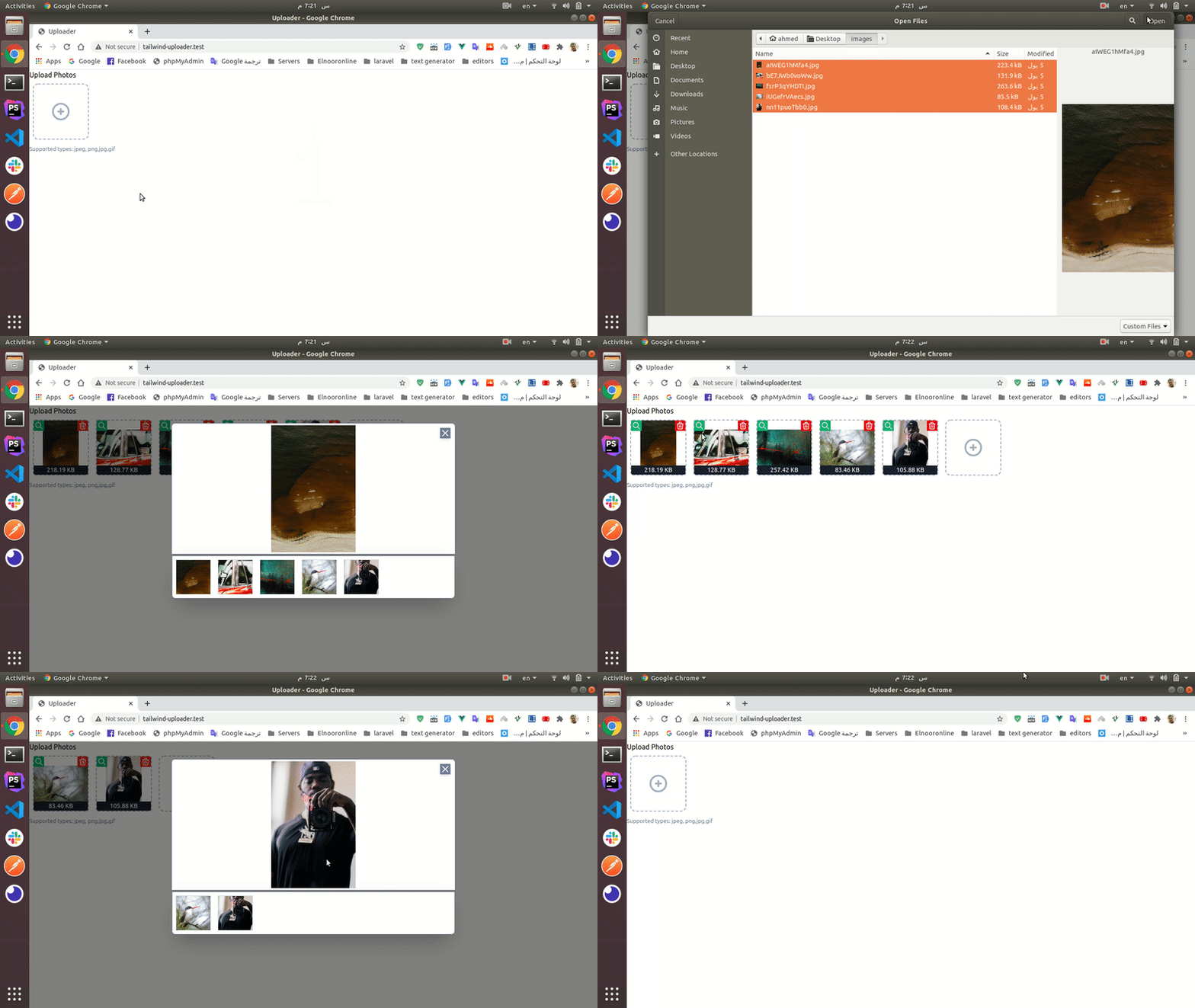
In this package all uploaded media will be processed.
- All videos will converted to
mp4. - All audios will converted to
mp3. - All images
width&height&ratiowill be saved as custom property. - All videos & audios
durationwill be saved as custom property.
Requirements
- PHP >= 7.4
- You should be ensured that the ffmpeg was installed on your server
Installation
composer require ahmed-aliraqi/laravel-media-uploader
The package will automatically register a service provider.
You need to publish and run the migration:
php artisan vendor:publish --provider="AhmedAliraqi\LaravelMediaUploader\Providers\UploaderServiceProvider" --tag="migrations"

php artisan migrate
Publish laravel-media-library migrations:
php artisan vendor:publish --provider="Spatie\MediaLibrary\MediaLibraryServiceProvider" --tag="migrations"
php artisan migrate
If you want to customize
attachmentsvalidation rules, you should publish the config file:
php artisan vendor:publish --provider="AhmedAliraqi\LaravelMediaUploader\Providers\UploaderServiceProvider" --tag="config"
If you want to customize validation translations, you should publish the
langfiles:
php artisan vendor:publish --provider="AhmedAliraqi\LaravelMediaUploader\Providers\UploaderServiceProvider" --tag="uploader:translations"
This is the default content of the config file:
<?php

return [
    /*
     * Regenerate uploaded media after assign to model
     */
    'regenerate-after-assigning' => true,

    'documents_mime_types' => [
        'application/msword',
        'application/vnd.openxmlformats-officedocument.wordprocessingml.document', // .doc & .docx
        'application/vnd.ms-powerpoint',
        'application/vnd.openxmlformats-officedocument.presentationml.presentation', // .ppt & .pptx
        'application/vnd.ms-excel',
        'application/vnd.openxmlformats-officedocument.spreadsheetml.sheet', // .xls & .xlsx
        'text/plain',
        'application/pdf',
        'application/zip',
        'application/x-rar',
        'application/x-rar-compressed',
        'application/octet-stream',
    ],
];
Use
HasUploadertrait in your model:
<?php

namespace App;


use Spatie\MediaLibrary\InteractsWithMedia;
use Spatie\MediaLibrary\MediaCollections\Models\Media;
use Spatie\MediaLibrary\HasMedia;
use AhmedAliraqi\LaravelMediaUploader\Entities\Concerns\HasUploader;

class Blog extends Model implements HasMedia
{
    use InteractsWithMedia, HasUploader;
    ...
}
In your controller use
addAllMediaFromTokens()method to assign the uploaded media to model using the generated tokens:
class BlogController extends Controller
{
        public function store(Request $request)
        {
            $blog = Blog::create($request->all());

            $blog->addAllMediaFromTokens();

            return back();
        }
}
If you do not add any arguments in
addAllMediaFromTokens()method will add all tokens inrequest('media')with any collection.If you want to save specific collection name add it to the second argument.
// specified collection name
$blog->addAllMediaFromTokens([], 'pictures');

// specified tokens
$blog->addAllMediaFromTokens($request->input('tokens', []), 'pictures');
Front End Basic Usage
<div id="app">
    <file-uploader
            :unlimited="true"
            collection="avatars"
            :tokens="{{ json_encode(old('media', [])) }}"
            label="Upload Avatar"
            notes="Supported types: jpeg, png,jpg,gif"
            accept="image/jpeg,image/png,image/jpg,image/gif"
    ></file-uploader>
</div>

<script src="https://cdn.jsdelivr.net/npm/vue/dist/vue.js"></script>
<script src="https://cdn.jsdelivr.net/npm/laravel-file-uploader"></script>
<script>
  new Vue({
    el: '#app'
  })
</script>
Or Install Component Via NPM
npm i laravel-file-uploader --save-dev
Now you should register the component in your
resources/js/app.js:
// app.js

import FileUploader from 'laravel-file-uploader';

Vue.use(FileUploader);
Usage
<file-uploader :media="{{ $user->getMediaResource('avatars') }}"
               :unlimited="true"
               collection="avatars"
               :tokens="{{ json_encode(old('media', [])) }}"
               label="Upload Avatar"
               notes="Supported types: jpeg, png,jpg,gif"
               accept="image/jpeg,image/png,image/jpg,image/gif"
></file-uploader>
Attributes
| Attribute | Rule | Type | Description |
|---|---|---|---|
| media | optional - default: [] |
array | used to display an existing files |
| unlimited | optional - default:false |
boolean | upload unlimited files - if let it false will not be multiple select |
| max | optional - default:12 |
int | the maximum uploaded files - if 1 will not me multiple select |
| accept | optional - default: * |
string | the accepted mime types |
| form | optional - default: false |
string | the form id of the uploaded media |
| notes | optional - default null |
string | the help-block that will be displayed under the files |
| label | optional - default null |
string | the label of the uploader |
| collection | optional - default default |
string | the media library collection that the file will store in |
| tokens | optional - default: [] |
array | the recently uploaded files tokens, used to display recently uploaded files in validation case |
| max-width | optional - default: 1200 |
string | The maximum width of uploaded image |
| max-height | optional - default: 1200 |
string | The maximum height of uploaded image |
API
- Upload Files
- endpoint: /api/uploader/media/upload
- method: POST
- body:
- files[]: multipart form data
- response:
- Display Recently Uploaded Files
- endpoint: /api/uploader/media
- method: GET
- params:
- tokens[]: temporary token
- response:
- Delete Files
- endpoint: /api/uploader/media/{id}
- method: DELETE
- response:



Related Packages
Powerful PHP database abstraction layer (DBAL) with many features for database s...
Laravel Serializable Closure provides an easy and secure way to serialize closur...
Cli error handling for console/command-line PHP applications.
Version History
| Version | Released | PHP | Laravel | License |
|---|---|---|---|---|
| v8.1.0 | ^7.4| | ~5.7| | MIT | |
| v8.0.1 | ^7.4| | ~5.7| | MIT | |
| v8.0.0 | ^7.4| | ~5.7| | MIT | |
| v7.1.0 | ^7.4| | ~5.7| | MIT | |
| v7.0.0 | >=7.4 | >=5.7 | MIT | |
| v6.3.5 | ^7.4| | ~5.7| | MIT | |
| v6.3.4 | ^7.4| | ~5.7| | MIT | |
| v6.3.3 | ^7.4| | ~5.7| | MIT | |
| v6.3.2 | ^7.4| | ~5.7| | MIT | |
| v6.3.1 | ^7.4| | ~5.7| | MIT | |
| v6.3.0 | ^7.4| | ~5.7| | MIT | |
| v6.2.0 | ^7.4| | ~5.7| | MIT | |
| v6.1.2 | ^7.4| | ~5.7| | MIT | |
| v6.1.1 | ^7.4| | ~5.7| | MIT | |
| v6.1.0 | ^7.4| | ~5.7| | MIT | |
| v6.0.1 | ^7.4| | ~5.7| | MIT | |
| v6.0.0 | ^7.4| | ~5.7| | MIT | |
| v5.1.1 | ^7.4| | ~5.7| | MIT | |
| v5.1.0 | ^7.4 | ~5.7| | MIT | |
| v5.0.2 | ^7.4 | ~5.7| | MIT | |
| v5.0.1 | ^7.4 | ~5.7| | MIT | |
| v5.0.0 | ^7.4 | ~5.7| | MIT | |
| v4.1.2 | ^7.4 | ~5.7| | MIT | |
| v4.1.1 | ^7.4 | ~5.7| | MIT | |
| v4.1.0 | ^7.4 | MIT | ||
| v4.0.0 | ~5.7| | MIT | ||
| v3.0.1 | ~5.7| | MIT | ||
| v3.0.0 | ~5.7| | MIT | ||
| v2.1.0 | ~5.7| | MIT | ||
| v2.0.1 | ~5.7| | MIT |
Showing the latest 30 of 33. See every release on Packagist