asignua/filament-chat
| Install | |
|---|---|
composer require asignua/filament-chat |
|
| Latest Version: | v1.5.0 |
| PHP: | ^8.3 |
| Laravel: | 12 · 13 |
| License: | MIT |
| Last Updated: | Oct 16, 2026 |
| Links: | GitHub · Packagist |
Filament Chat





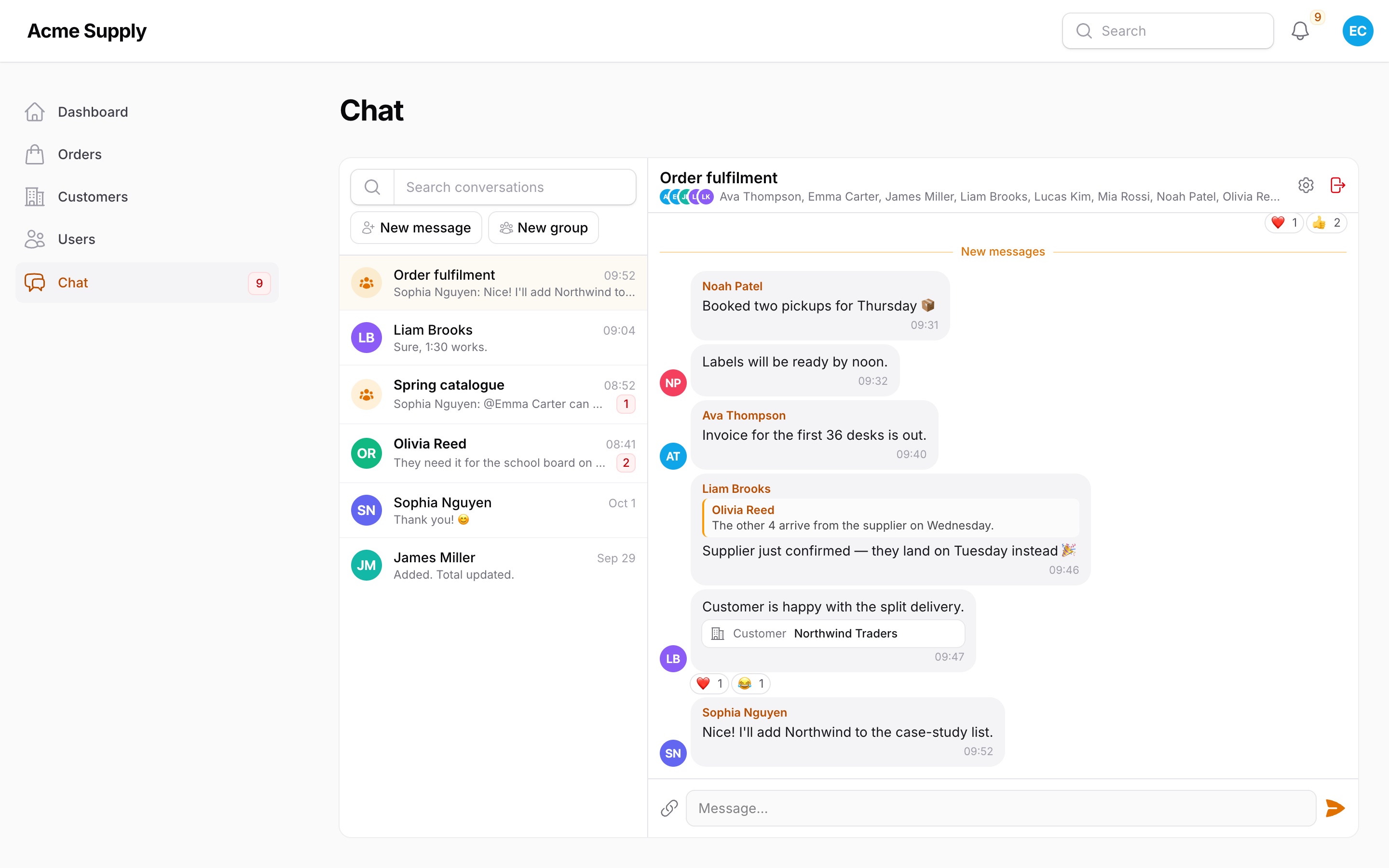
Team chat for Filament panels. Direct messages and groups, @mentions, editing, reactions, read receipts, a slide-over you can pin next to any page — and messages that point at your panel's records: drag a link to a record into the chat and it becomes a card.
Works with or without a websocket server: turn real-time on with one environment variable (Laravel Reverb, Pusher, Ably), or let the chat poll.
- Screenshots
- Features
- Requirements
- Installation
- Configuration — users, features, messages, interface, models & tables
- Record references — which records, who sees them, drag & drop, "Discuss in chat"
- Real-time delivery — Reverb, Docker, nginx, Pusher, polling
- Notifications
- Translations — your language, your own wording
- Upgrading from 1.1
- Customising — own models, audit trail, events
- Extending — your own window, render hooks, protected methods, the
MessageSentevent - Integration notes — custom themes, panels built by a package, several panels
- Troubleshooting
- AI agents
- Testing
Screenshots
The Chat page — conversations, reactions, read receipts and record cards:
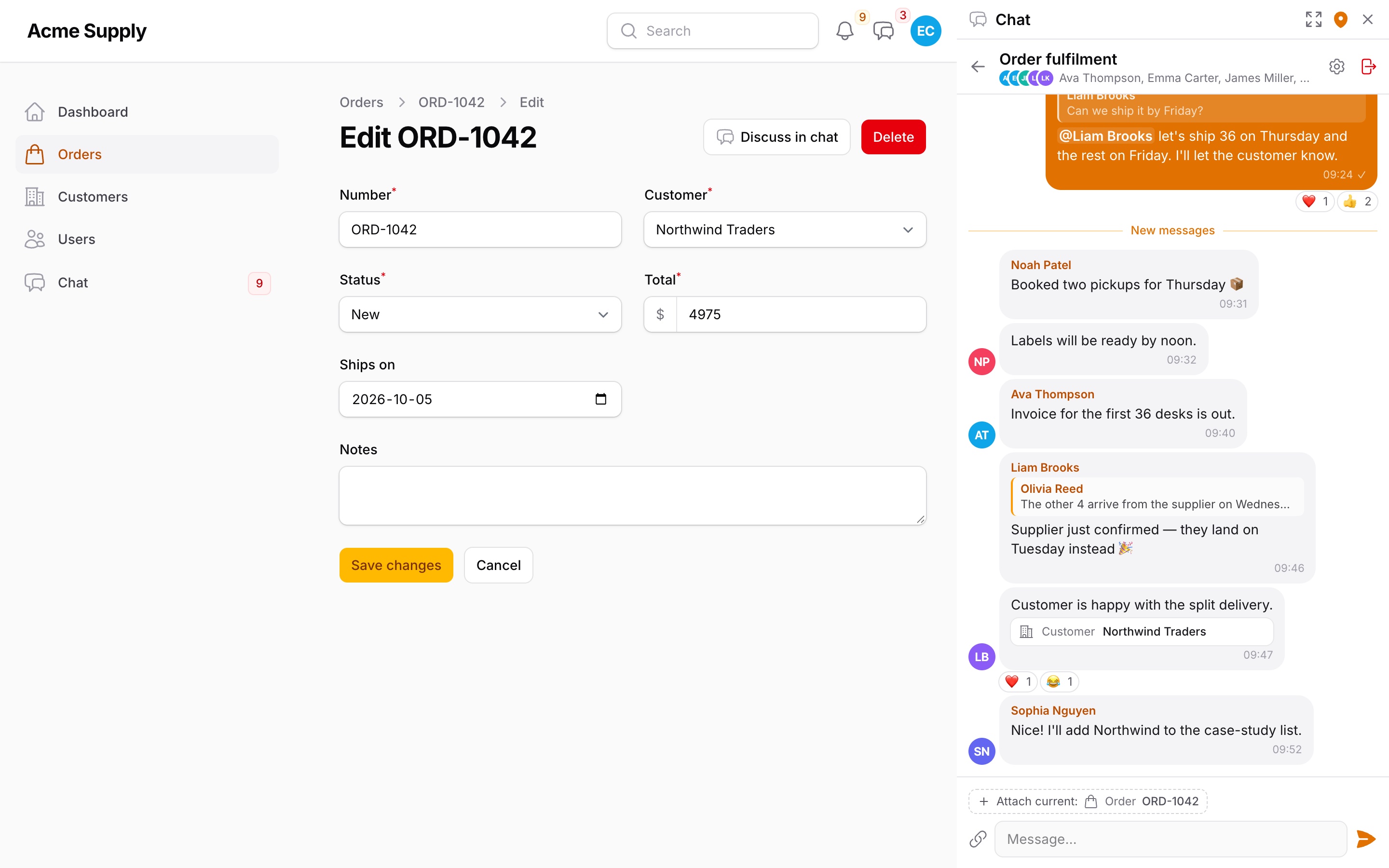
The slide-over pinned next to a record page, with "Attach current":
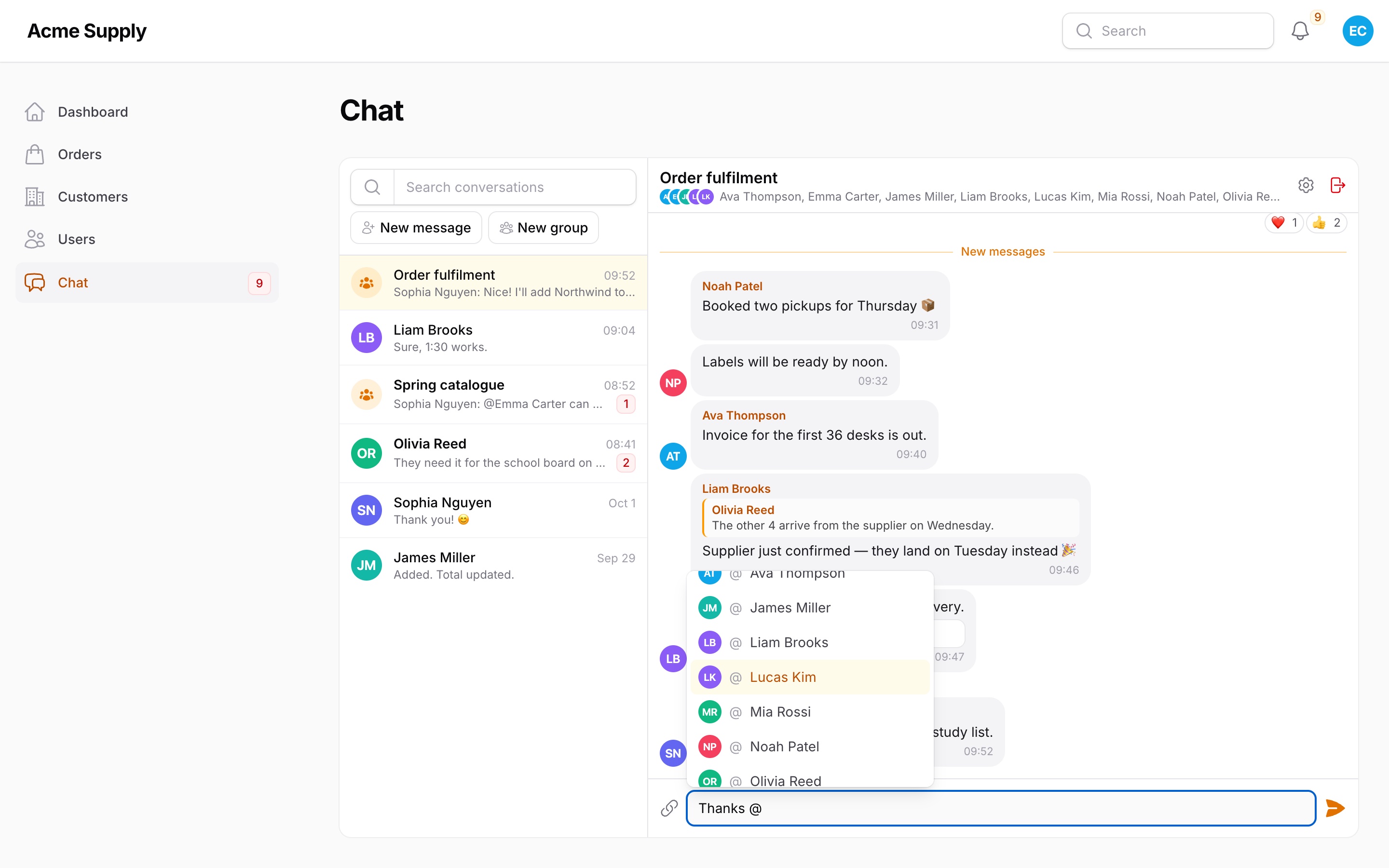
@mentions with autocomplete:
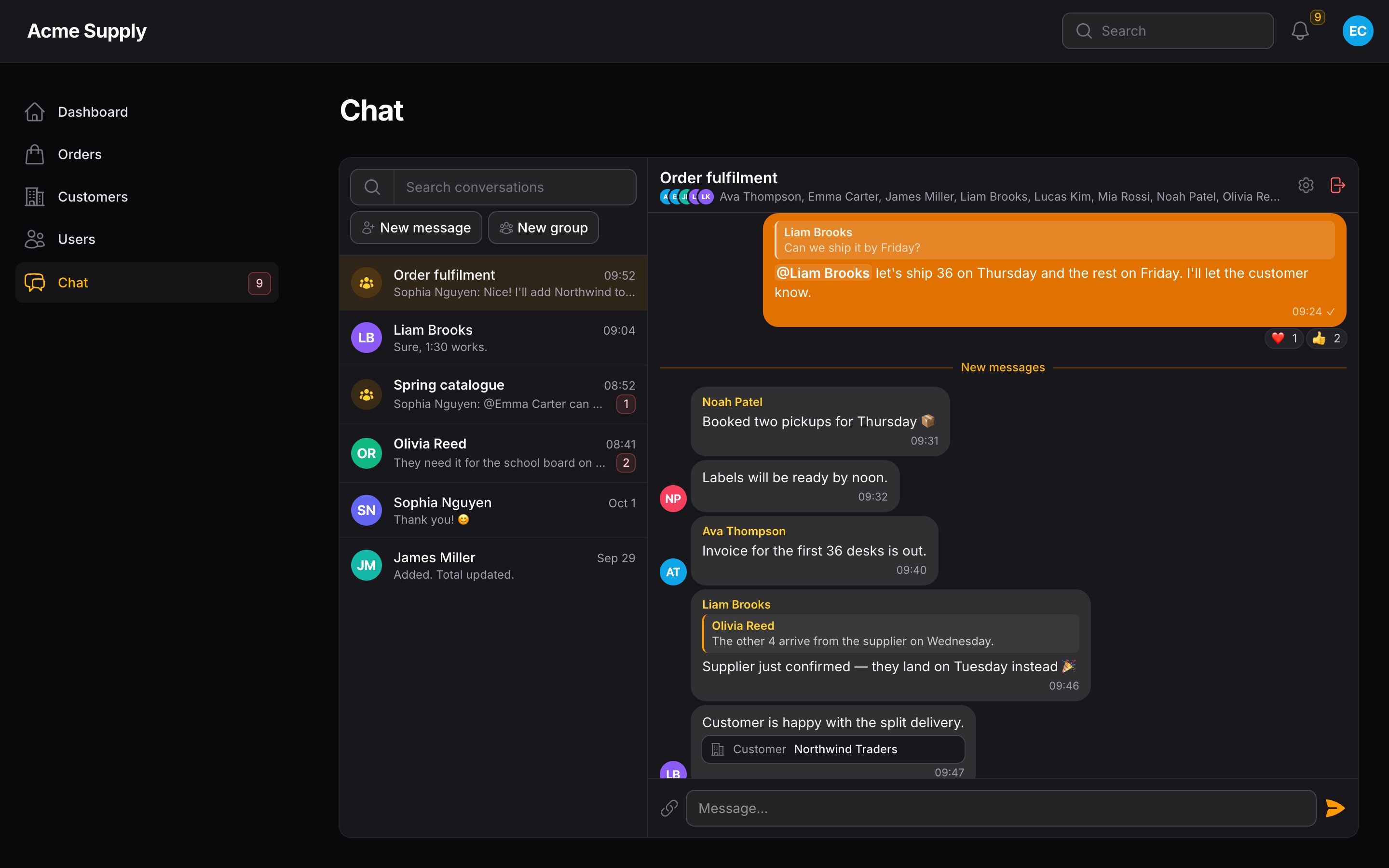
Dark mode:
Features
| Conversations | Direct messages (one per pair) and groups: title, members, leave. The creator manages a group; whoever leaves keeps the history up to that moment. A member added to a group — or added back after leaving — sees its whole history, including what was written while they were away; none of it counts as unread. |
| @mentions | Type @ for the list of members. A mention is highlighted (your own name stands out) and always rings the bell. |
| Editing | ✏️ on your message or ↑ in an empty composer; edited messages are marked. Optional time window. |
| Reactions | Six emoji, one per person per message. |
| Read receipts | ✓ sent, ✓✓ read — in a group, read by every active member (the hint lists who has not). |
| Replies | ↩ on a message quotes it above your answer; a click on the quote jumps to the original, loading earlier messages if needed. |
| Avatars | Next to the last message of a series in groups, in the @ list and the member line; direct conversations in the list always show the person. From Filament's avatar provider or ->avatarUsing(); initials when there is no picture. |
| New messages | Opening a conversation scrolls to a line where the unread part starts (up to five pages back, otherwise it opens at the bottom); sending your own message clears the line. |
| Record references | Attach a record with a picker, by dropping a link to its page, or "Attach current" in the slide-over. |
| Where | A full Chat page and a top-bar button with a slide-over; on wide screens the slide-over can be pinned as a split screen that stays open across pages. |
| Unread | Counters in the navigation, on the button, in the browser tab title and on the favicon; a bell notification on the first unread message of a conversation and on every mention; a "Reply" toast. |
| Privacy | A conversation is visible to its members only — admins included. Messages are never deleted. |
| Languages | English, Ukrainian, German, Spanish, French, Italian, Dutch, Polish, Brazilian Portuguese, Turkish; add yours. |
Every feature can be switched off.
Requirements
- PHP 8.3+
- Laravel 12 or 13
- Filament 5
Installation
composer require asignua/filament-chat
php artisan filament-chat:install --migrate
filament-chat:install publishes config/filament-chat.php and the migration (4 tables), runs the
migrations with --migrate, links the agent skill with --skill and tells you what
is left. Bell notifications use Laravel's notifications table — php artisan make:notifications-table
if your app does not have it yet.
Register the plugin in your panel provider:
use Asignua\FilamentChat\FilamentChatPlugin;

public function panel(Panel $panel): Panel
{
    return $panel
        // ...
        ->databaseNotifications()
        ->plugin(FilamentChatPlugin::make());
}
That's it: a Chat page in the navigation and a chat button next to the user menu. The chat polls for news until you turn real-time on.
The stylesheet ships compiled and is linked after your panel's theme — no custom theme and no
@source lines are needed. It is published by php artisan filament:assets; if you commit
published assets, re-run it after upgrading the package.
Configuration
Every setting lives in config/filament-chat.php (commented — read it once) and can also be set on
the plugin, which wins. Closures — who can be written to, how people are called, per-type rules for
references — exist on the plugin only, so the config stays cacheable.
Users
FilamentChatPlugin::make()
    // Who can be written to and added to groups. Default: everybody in the users table.
    ->users(fn (Builder $query) => $query->where('is_active', true)->whereHas('roles'))
    // How a person is called. Default: users.name_attribute, then Filament's HasName, then `name`.
    ->userName(fn (User $user): string => "{$user->first_name} {$user->last_name}")
    // A person's avatar URL; null — initials. Default: Filament's avatar provider
    // (HasAvatar::getFilamentAvatarUrl(), the `avatar_url` attribute, then the panel's default provider).
    ->avatarUsing(fn (User $user): ?string => $user->profile_photo_url),
// config/filament-chat.php
'users' => [
    'model' => null,                    // null = auth.providers.users.model
    'name_attribute' => null,           // e.g. 'full_name' — an attribute or accessor
    'search_columns' => ['name'],       // e.g. ['first_name', 'last_name'] — the conversation search; their order also sorts the first 20 people a recipient select opens with
    'broadcast_key' => null,            // e.g. 'ulid' — names the private channel (default: the primary key)
],
Features
| Key | Plugin | Default | Off means |
|---|---|---|---|
features.groups |
->groups(false) |
true |
direct messages only; "New group" and "Manage group" disappear, the server refuses to create or change groups. Groups that already exist stay in the list and keep working (messages, leaving) |
features.reactions |
->reactions(false) |
true |
no emoji picker or chips; the server refuses reactions |
features.mentions |
->mentions(false) |
true |
no @ autocomplete, nothing highlighted or notified (mentions stored in old messages are not highlighted either) |
features.read_receipts |
->readReceipts(false) |
true |
no ✓ / ✓✓ |
features.avatars |
->avatars(false) |
true |
no pictures or initials next to messages, in the @ list or the member line |
features.replies |
->replies(false) |
true |
no ↩ button and no new quotes; quotes already stored stay visible |
features.editing.enabled / .window |
->editing(true, 15) |
true, null |
no editing; window — minutes after sending, null — any time |
Switching a feature off never deletes data.
Messages
'messages' => [
    'page_size' => 30,      // loaded at once and per "Show earlier messages"
    'max_length' => 5000,
],
Interface
| Key | Plugin | Default |
|---|---|---|
ui.dock |
->dock(false) |
true — the top-bar button and slide-over; off: the Chat page only |
ui.pinnable |
->pinnable(false) |
true — "pin" the slide-over as a split screen (from lg) |
ui.tab_badge |
->tabBadge(false) |
true — unread count in the tab title and on the favicon |
ui.color |
->color('fuchsia') |
primary — group avatars and author names |
ui.slug |
->slug('messages') |
chat |
ui.navigation.group / .sort / .icon |
->navigationGroup() / ->navigationSort() / ->navigationIcon() |
null / 90 / chat bubbles |
->navigationGroup() and ->navigationIcon() also accept enums and closures (translated group names).
Record references
A message may point at a record of your panel — an order, a customer, a page. It shows as a card with the record's icon, type and title, linking to its page.
Which records
Register resources on the plugin:
use Asignua\FilamentChat\Support\References\ReferenceType;

FilamentChatPlugin::make()
    ->references([
        ReferenceType::resource(OrderResource::class),
        ReferenceType::resource(CustomerResource::class)->color('warning'),
    ]),
From the resource the chat takes the label, icon, record title, the link (the edit page for those who may edit, the view page for the rest) and the search of the picker (the globally searchable attributes). Everything can be overridden:
ReferenceType::make('invoice', Invoice::class)
    ->label('Invoice')
    ->icon(Heroicon::OutlinedDocumentCurrencyDollar)
    ->color('success')
    ->title(fn (Invoice $invoice): string => $invoice->number)
    ->url(fn (Invoice $invoice): ?string => InvoiceResource::getUrl('view', ['record' => $invoice]))
    ->search(fn (string $search) => Invoice::where('number', 'like', "%{$search}%")->limit(20)->get())
    ->searchColumns(['number', 'customer_name'])   // instead of ->search()
    ->visibleUsing(fn (Invoice $invoice): bool => auth()->user()->can('view', $invoice)),
The key (invoice; order for ReferenceType::resource(OrderResource::class)) is stored with the
message — keep it stable.
Or every resource at once — no list to maintain:
// config/filament-chat.php
'references' => [
    'all_resources' => true,
    'except' => [ActivityLogResource::class, VisitorResource::class],
],

// or on the plugin
->references([
    ReferenceType::allResources()->except([ActivityLogResource::class]),
    ReferenceType::resource(OrderResource::class)->color('warning'), // explicit types win
]),
With "all resources" the key is the resource slug (orders, activity-log/activity-logs):
renaming a slug loses the link of old messages (they show "record deleted"). Register a type
explicitly where that matters.
Only models with an integer primary key can be referenced (the message stores the id in an integer
column). "All resources" skips models keyed by a UUID/ULID string, and registering one explicitly
throws an InvalidArgumentException. A ULID used only as the route key (with an integer id) is fine.
'references' => ['enabled' => false] turns references off completely.
Who sees a referenced record
A viewer who may not see the record gets its type only — no title, no link — and cannot attach it.
"May see" is references.authorize (or ->authorizeReferences() on the plugin):
| Value | Rule | A model without a policy |
|---|---|---|
'policy' (default) |
the model's view policy |
hidden |
'resource' |
the resource's canView() — Filament's own rule |
visible to everyone in the panel |
false |
no check | visible |
Watch out. Filament shows a resource whose model has no policy, but Laravel's
Gatedenies an ability nobody defined. With the default'policy', records of such a resource are visible in the panel yet can never be attached — dropping a link says so. Either add a policy (view→truefor a read-only resource) or switch to'resource'. A type's->visibleUsing()beats both.
Attaching
- Picker — the 🔗 button next to the composer: type, then search.
- Drag & drop — drop any link to a record page into an open conversation: a table row, a link in a column, a global search result, the address bar. Links of resources that are not referenceable say so ("Orders cannot be attached to messages").
- Attach current — the slide-over opened on a record page offers that record in one click.
Discuss in chat
A header action for record pages — to whom (a person or a group I am in) and the text; the record is attached:
use Asignua\FilamentChat\Actions\DiscussInChatAction;

protected function getHeaderActions(): array
{
    return [DiscussInChatAction::make()];
}
It shows only for records of a referenceable type; it works as a table row action too.
Real-time delivery
The chat works both ways — pick per environment:
FILAMENT_CHAT_REALTIME |
Behaviour |
|---|---|
false |
polling: an open conversation every 15 s, the unread counter every 60 s (polling.*) |
true |
new messages, reads, reactions and group changes arrive instantly; toasts appear on any page |
unset (null) |
on when the default broadcaster is reverb, pusher or ably |
Events carry identifiers only; the components re-read the data, so policies — not the socket
payload — decide what anyone sees. Each person listens on a private channel
filament-chat.user.{key}, authorised by the package. Events are broadcast immediately
(ShouldBroadcastNow) — no queue worker needed; if the socket is down the message is still saved
and the counters catch up by polling.
Laravel Reverb
php artisan install:broadcasting --reverb
BROADCAST_CONNECTION=reverb
FILAMENT_CHAT_REALTIME=true
php artisan reverb:start
That is all: by default (realtime.echo = 'plugin') the plugin brings Laravel Echo itself — it
reuses the Echo that Filament already ships — configured from the broadcasting connection. It also
registers /broadcasting/auth if your app has not (realtime.register_auth_route).
Where the browser connects. PHP publishes to REVERB_HOST:REVERB_PORT; the browser connects to
the page's own host, protocol and default port unless told otherwise:
FILAMENT_CHAT_WS_HOST=ws.example.com   # empty = the page's host
FILAMENT_CHAT_WS_PORT=8080             # empty = 443 on https, 80 on http
FILAMENT_CHAT_WS_SCHEME=https          # empty = the page's protocol
-
Local, no Docker:
reverb:starton 8080 →FILAMENT_CHAT_WS_PORT=8080. -
Docker / Sail: PHP publishes to the service (
REVERB_HOST=reverb,REVERB_PORT=8080), the browser to the published port (FILAMENT_CHAT_WS_PORT=8080or whatever you map). -
Production behind nginx: proxy the websocket on the same host and leave the three variables empty:
location ^~ /app/ {
    proxy_pass http://reverb:8080;
    proxy_http_version 1.1;
    proxy_set_header Upgrade $http_upgrade;
    proxy_set_header Connection "upgrade";
    proxy_set_header Host $host;
    proxy_read_timeout 60s;
}
Pusher / Ably / another connection
Any Pusher-compatible connection works the same way (BROADCAST_CONNECTION=pusher). Pusher Channels
(cloud) is addressed by its cluster from broadcasting.connections.pusher.options.cluster.
To publish chat events on a connection other than the app's default:
FILAMENT_CHAT_BROADCAST_CONNECTION=reverb.
Your own Echo
If your app already loads window.Echo (a Vite bundle), or you configured Filament's
filament.broadcasting.echo, set FILAMENT_CHAT_ECHO=host or =filament — the plugin then only
subscribes. An existing window.Echo is never replaced.
Notifications
| Key | Default | |
|---|---|---|
notifications.database |
true |
the bell: the first unread message of a conversation (the rest only grow the counter) and every mention. Needs ->databaseNotifications(), the notifications table and Notifiable on the user model. |
notifications.toasts |
true |
a "Reply" toast for a message in another conversation (real-time only) |
Translations
The chat follows your app's locale and ships with English, Ukrainian, German, Spanish, French,
Italian, Dutch, Polish, Brazilian Portuguese and Turkish. Every string lives in one file per language,
e.g. resources/lang/en/chat.php;
dates use the same locale (month names come from Carbon).
Another language — create lang/vendor/filament-chat/{locale}/chat.php in your app with the same
keys (copy the English file and translate it):
// lang/vendor/filament-chat/cs/chat.php
return [
    'chat' => 'Chat',
    'new_group' => 'Nová skupina',
    // ...
];
Change a few phrases — the same file with only the keys you want to change; the rest still comes from the package:
// lang/vendor/filament-chat/en/chat.php
return [
    'chat' => 'Messages',
];
Copy all package translations to edit them:
php artisan vendor:publish --tag=filament-chat-translations
Translated the chat into your language? A pull request with resources/lang/{locale}/chat.php is
very welcome.
Upgrading to 1.5
1.5 adds last_read_at to the participants in a third migration, add_last_read_at_to_filament_chat_participants:
php artisan vendor:publish --tag=filament-chat-migrations   # the migrations you already have are kept
php artisan migrate
Without it the chat keeps working; only the read time is not stored.
Upgrading from 1.1
1.2 adds one column (reply_to_id, replies) in a second migration, add_reply_to_filament_chat_messages.
Publish and run it:
php artisan vendor:publish --tag=filament-chat-migrations   # the 1.0/1.1 migration you already have is kept
php artisan migrate
(php artisan filament-chat:install --migrate does the same: it publishes whatever is missing.)
Without the new migration 1.2 keeps working, but replies stay off until you run it: the package checks
for the reply_to_id column.
The published migration reads the table name from tables.messages, so a renamed table is covered.
Only if your messages table was not created by the package's published migration (your app made it
some other way), add the column yourself, replacing chat_messages with your table name:
Schema::table('chat_messages', function (Blueprint $table): void {
    $table->foreignId('reply_to_id')->nullable()->constrained('chat_messages')->nullOnDelete();
});
Avatars and the "New messages" line need no migration. Don't want avatars or replies? Switch them off
(features.avatars, features.replies) — stored quotes stay visible either way.
Customising
Your own models and tables
Swap any model for a subclass and rename the tables before running the migration:
'models' => [
    'conversation' => App\Models\ChatConversation::class, // extends Asignua\FilamentChat\Models\Conversation
    // participant, message, reaction
],
'tables' => [
    'conversations' => 'chat_conversations',
    // participants, messages, reactions
],
An audit trail
Messages, reactions and read pointers are deliberately not audited — an audit feed would let admins
read other people's conversations. For conversations use a subclass with your logging trait, and
listen to Asignua\FilamentChat\Events\GroupMembersChanged ($conversation, $before, $after —
member names) for membership, which lives in a pivot the model diff cannot see.
Events
| Event | When |
|---|---|
Asignua\FilamentChat\Events\ChatUpdated |
anything changed in a conversation — broadcast to members |
Asignua\FilamentChat\Events\GroupMembersChanged |
a group was created, its members changed, someone left |
Asignua\FilamentChat\Events\MessageSent |
a message was stored by ChatService::send() ($message) — a plain event, dispatched after the commit |
Writing from your code
use Asignua\FilamentChat\Data\MessageData;
use Asignua\FilamentChat\Services\ChatService;

$chat = app(ChatService::class);
$conversation = $chat->startDirect($me, $colleague);
$chat->send($conversation, $me, MessageData::fromArray([
    'body' => 'Please check @Olga Green',
    'reference_type' => 'order',
    'reference_id' => $order->id,
]));

// A reply: the ulid of a message in the same conversation (a foreign one is dropped).
$chat->send($conversation, $colleague, MessageData::fromArray([
    'body' => 'Done',
    'reply_to' => $message->ulid,
]));
Always go through ChatService — it stores mentions, broadcasts and notifies, and checks membership
where a message is involved (send, edit, react). Group management does not check who asks:
updateGroup() changes any group it is given and leave() acts on the user passed in. Authorize
before calling them, as the chat's own actions do:
use Asignua\FilamentChat\Policies\ConversationPolicy;

abort_unless(Gate::allows('update', $conversation), 403);            // the creator, still a member
$chat->updateGroup($conversation, GroupData::fromArray($data));

abort_unless(Gate::allows(ConversationPolicy::LEAVE, $conversation), 403);
$chat->leave($conversation, auth()->user());
Extending
Seams for add-on packages (attachments, search, typing indicators …) that change the chat window without forking it. Nothing here changes the stock chat.
Your own window
FilamentChatPlugin::make()->windowComponent(App\Livewire\MyChatWindow::class); // or ui.window_component
The class must extend Asignua\FilamentChat\Livewire\ChatWindow; it is mounted on the Chat page and
in the slide-over. Override these protected methods (all optional):
| Method | Default | Use |
|---|---|---|
canSendWithoutBody(): bool |
false |
true lets send() store a message with no text and no record (the content is carried some other way) |
beforeMessageCommit(Message $message) |
no-op | runs inside the send transaction — store your own rows; a throw rolls the message back |
afterMessageSent(Message $message) |
no-op | after a successful send from this window — reset your own composer state |
modifyMessagesQuery(Builder $query): Builder |
$query |
shapes every feed query (page, "load older", unread line, jumps, read pointer): eager-load, or withTrashed() for a message model with soft deletes |
conversationChanged(?string $from, ?string $to) |
no-op | another conversation was opened (list, toast, search hit) or the person went back to the list ($to null): drop state that belongs to the old one — pending uploads, a draft. Ulids |
isMessageTombstone(Message $message): bool |
false |
true renders «Message deleted» instead of text, record, reactions, reply/edit/menu — also in a quote of it and in the conversation list preview |
openMessage(string $messageUlid) (public) jumps to a message of any of the person's
conversations: it opens the conversation first if needed, loads up to the message and flashes it. A
message of a conversation the person may not see, or written after they left a group, is ignored.
The message model comes from models.message; a subclass with SoftDeletes works (the free chat adds
none). A soft-deleted message is not counted as unread. The MessageRepository reads take an optional
trailing ?Closure $scope — that is how modifyMessagesQuery() reaches them.
Render hooks
use Asignua\FilamentChat\Enums\ChatHook;

FilamentChatPlugin::make()
    ->renderHook(ChatHook::COMPOSER_TOOLS, fn (ChatWindow $window, array $context) => view('my.attach-button'))
    ->renderHook(ChatHook::MESSAGE_MENU, fn (ChatWindow $window, array $context) => view('my.message-menu', ['message' => $context['message']]));
{{-- resources/views/my/message-menu.blade.php — values go into JS through @js(), never through e() --}}
<button type="button" wire:click="deleteMessage(@js($message->ulid))">…</button>
The closure returns Htmlable, a View, an HTML string or
null. The markup is rendered inside the Livewire component, so wire:click reaches the methods
of your window subclass and $wire is available to Alpine. $context['conversation'] is the open
conversation (null in SIDEBAR_BEFORE without one); the message hooks add message and mine.
Give the root element of your markup a wire:key.
Warning — trusted HTML. A string (or
Htmlable) is printed as it is. Put user data only into a Blade view ({{ }}escapes), and pass values intowire:click/ Alpine expressions with@js(...)orJs::from(...):e()escapes HTML but not a quote inside a JavaScript string.
ChatHook |
Place |
|---|---|
SIDEBAR_BEFORE |
top of the conversation list, above the search box |
HEADER_ACTIONS |
conversation header, before the group buttons |
FEED_BEFORE |
top of the feed |
MESSAGE_BODY_AFTER |
in the bubble, after the text and the record card |
MESSAGE_MENU |
the buttons beside a bubble |
COMPOSER_BEFORE / COMPOSER_AFTER |
first / last in the composer form |
COMPOSER_TOOLS |
in the input row, right before the send button |
Hooks can also be added from an add-on's service provider: app(ChatManager::class)->hooks->register($hook, $closure).
Browser events
The composer dispatches filament-chat-typing on every input and filament-chat-paste
(detail.event — the ClipboardEvent, for pasted images) — listen with x-on:filament-chat-typing.window
in a hook's markup. Other events are the constants on ChatWindow (EVENT_SCROLL, EVENT_HIGHLIGHT …).
Channels and scripts
The chat only authorizes its own per-person channel. An extension that needs more (a per-conversation
typing channel) registers it with plain Laravel — Broadcast::channel('my-ext.conversation.{ulid}', …)
— and listens in the browser through the Echo the chat already set up: window.Echo.private(…)
(window.Echo exists once the EchoLoaded event fired or when realtime.echo is plugin).
Whispers (client events) need them enabled on the socket server. Put the script in a hook's markup
(@script / Alpine x-init) or in a panel render hook of your own.
Integration notes
-
Custom themes. The stylesheet is linked after the panel's theme on purpose: a theme compiles the same Tailwind utilities (
.bg-white) and, loaded later, would beat the chat'sdark:variants. The other direction is closed too: every utility in the chat's CSS is emitted under.fchat-scope(the window, the slide-over and the Chat page carry it), so the chat cannot override the host'shidden lg:blockordark:bg-gray-900elsewhere. A published view that mounts the window outside those places needs afchat-scopeancestor. -
A panel built by a package (a CMS that owns its
PanelProvider): add the plugin when the panel registers —boot()is too late, the panel's routes already exist:// AppServiceProvider::register() $this->app->resolving(PanelRegistry::class, function (PanelRegistry $registry): void { $registry->get('cms', isStrict: false)?->plugin(FilamentChatPlugin::make()); }); -
Several panels. Register the plugin (and any add-on such as Chat Pro) on one panel only. Notification links, the private channel and add-on routes (attachment downloads) all assume a single chat panel; a second one is not supported.
-
Users of another panel (customers in a client cabinet): narrow
->users()to the people of the chat's panel. -
Search uses
LIKE: case-insensitive on MySQL/MariaDB and PostgreSQL; on SQLite for ASCII only.
Troubleshooting
| Symptom | Cause / fix |
|---|---|
| "… cannot be attached to messages" on a drop | the resource is not referenceable — register it or use all_resources |
| "This link does not lead to a record…" | not a record page of this panel (a list, another host) |
| A record shows its type but "no access" | references.authorize = 'policy' and the model has no policy — see Who sees |
| The slide-over is white on a dark panel | stale published assets — php artisan filament:assets |
| "Laravel Echo cannot be found" in the console | real-time is on but no Echo: realtime.echo is host/filament without one, or window.EchoFactory is missing (Filament's core scripts) |
| Messages arrive only after ~15 s | real-time is off (FILAMENT_CHAT_REALTIME), or the socket is not reachable from the browser — check FILAMENT_CHAT_WS_* and the browser's network tab |
403 on /broadcasting/auth |
the user is not logged in on the web guard, or broadcast_key differs between server and channel |
| No bell notifications | ->databaseNotifications() on the panel, the notifications table, Notifiable on the user |
AI agents
The package ships a skill for coding agents (Claude Code and others reading .claude/skills) —
installation, every option, record references, real-time setups and the traps above:
php artisan filament-chat:install --skill # links .claude/skills/filament-chat
It lives in resources/boost/skills/filament-chat/SKILL.md, where Laravel Boost looks for package skills.
Testing
composer test      # PHPUnit (Orchestra Testbench)
composer analyse   # Larastan
composer format    # Pint
npm run build      # rebuild resources/dist/filament-chat.css after changing views
License
MIT. See LICENSE.md.
Related Packages
Broadcasting-agnostic real-time chat between admin users, inside a Filament pane...
A beautiful AI chat widget plugin for Filament v3 with OpenAI integration
Tree view for Filament resources - drop-in replacement for Table with drag-and-d...
Email-like inbox messaging plugin for Filament v5 — threads, starring, trash, fo...
Version History
| Version | Released | PHP | Laravel | License |
|---|---|---|---|---|
| v1.5.0 | ^8.3 | ^12.0| | MIT | |
| v1.4.2 | ^8.3 | ^12.0| | MIT | |
| v1.4.1 | ^8.3 | ^12.0| | MIT | |
| v1.4.0 | ^8.3 | ^12.0| | MIT | |
| v1.3.0 | ^8.3 | ^12.0| | MIT | |
| v1.2.2 | ^8.3 | ^12.0| | MIT | |
| v1.2.1 | ^8.3 | ^12.0| | MIT | |
| v1.2.0 | ^8.3 | ^12.0| | MIT | |
| v1.1.1 | ^8.3 | ^12.0| | MIT | |
| v1.1.0 | ^8.3 | ^12.0| | MIT | |
| v1.0.1 | ^8.3 | ^12.0| | MIT | |
| v1.0.0 | ^8.3 | ^12.0| | MIT | |
| v0.1.1 | ^8.3 | ^12.0| | MIT | |
| v0.1.0 | ^8.3 | ^12.0| | MIT |