bbs-lab/nova-toast-ui-editor-field
Laravel Nova Toast UI Editor field


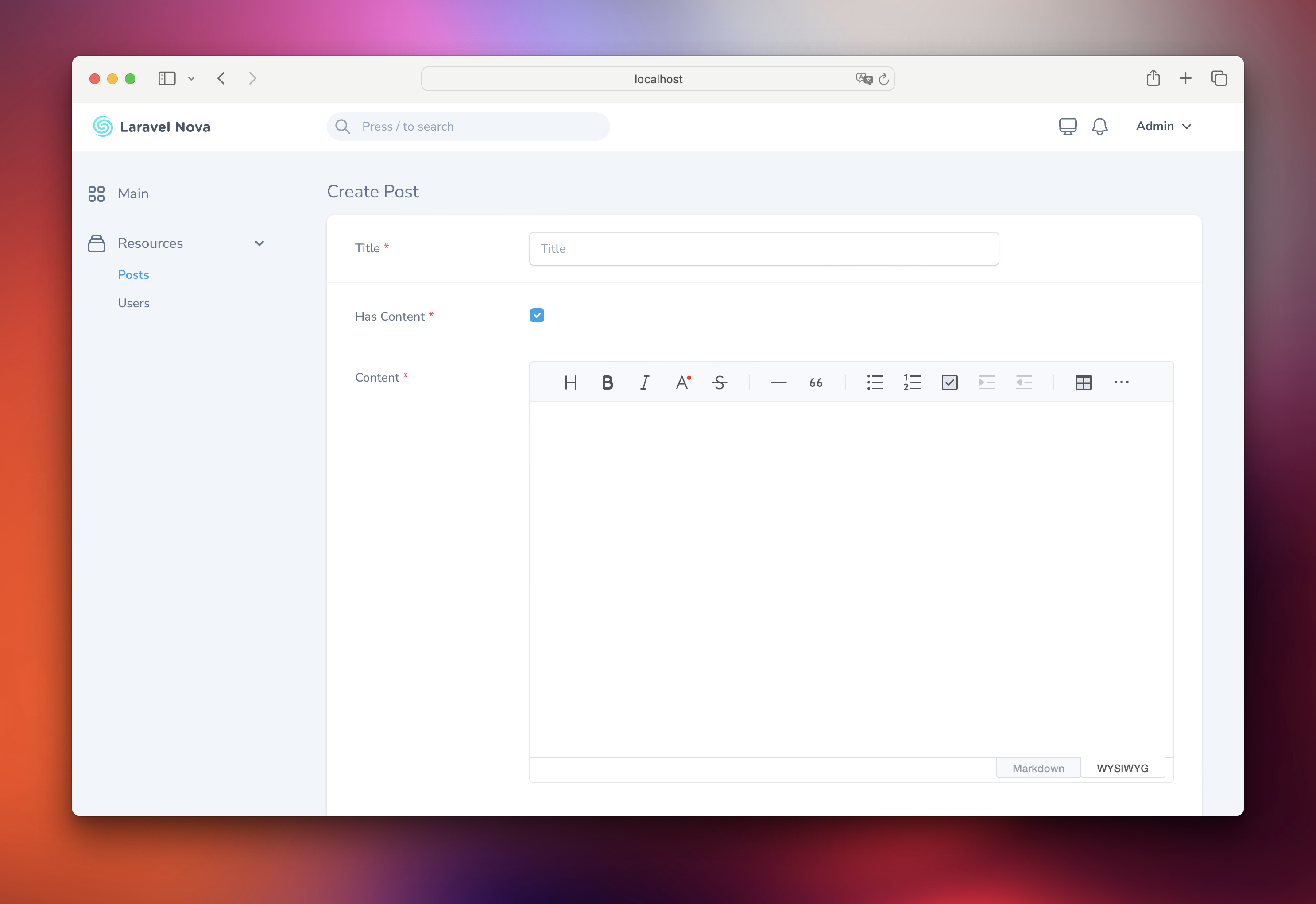
A Toast UI Editor field for Laravel Nova.
Contents
Installation
You can install the package via composer:
composer require bbs-lab/nova-toast-ui-editor-field
The package will automatically register itself.
You can publish the config-file with:
php artisan vendor:publish --provider="BbsLab\NovaToastUiEditorField\FieldServiceProvider" --tag="config"
This is the contents of the published config file:
<?php

declare(strict_types=1);

use BbsLab\NovaToastUiEditorField\Enums\ToastUiEditType;
use BbsLab\NovaToastUiEditorField\Enums\ToastUiPreviewStyle;

return [
    'allowIframe' => (bool) env('TOAST_UI_EDITOR_ALLOW_IFRAME', false),

    'height' => env('TOAST_UI_EDITOR_HEIGHT', 'auto'),

    'hideModeSwitch' => (bool)env('TOAST_UI_EDITOR_HIDE_MODE_SWITCH', false),

    'initialEditType' => env('TOAST_UI_EDITOR_INITIAL_EDIT_TYPE', ToastUiEditType::WYSIWYG->value),

    'language' => env('TOAST_UI_EDITOR_LANGUAGE', 'en-US'),

    'minHeight' => env('TOAST_UI_EDITOR_MIN_HEIGHT', '300px'),

    'plugins' => ['chart', 'tableMergedCell', 'uml', 'colorSyntax', 'codeSyntaxHighlight'],

    'previewStyle' => env('TOAST_UI_EDITOR_PREVIEW_STYLE', ToastUiPreviewStyle::TAB->value),

    'toolbarItems' => [
        [
            'heading',
            'bold',
            'italic',
            'strike',
        ],
        [
            'hr',
            'quote',
        ],
        [
            'ul',
            'ol',
            'task',
            'indent',
            'outdent',
        ],
        [
            'table',
            'image',
            'link',
        ],
        [
            'code',
            'codeblock',
        ],
    ],

    'usageStatistics' => (bool)env('TOAST_UI_EDITOR_USAGE_STATISTICS', false),

    'useCloudinary' => (bool) env('TOAST_UI_EDITOR_USE_CLOUDINARY', false),

    'cloudinary' => [
        'cloud_name' => env('CLOUDINARY_CLOUD_NAME', ''),
        'api_key' => env('CLOUDINARY_API_KEY', ''),
        'api_secret' => env('CLOUDINARY_API_SECRET', ''),
        'username' => env('CLOUDINARY_USERNAME', ''),
    ],

    'useCommandShortcut' => (bool)env('TOAST_UI_EDITOR_USE_COMMAND_SHORTCUT', true),
];
Usage
You can use the BBSLab\NovaToastUiEditorField\ToastUiEditor field in your Nova resource:
<?php

namespace App\Nova;

use BBSLab\NovaToastUiEditorField\ToastUiEditor;
use Illuminate\Http\Request;

class BlogPost extends Resource
{
    // ...

    public function fields(Request $request)
    {
        return [
            // ...

            ToastUiEditor::make('Content'),

            // ...
        ];
    }

}
[!IMPORTANT] The field will store the markdown content in the database.
Advanced usage
Dependent Fields
You may use the dependsOn method to conditionally display the field based on the value of another field. See the example below:
<?php

declare(strict_types=1);

namespace Workbench\App\Nova;

use BbsLab\NovaToastUiEditorField\Enums\ToastUiEditType;
use BbsLab\NovaToastUiEditorField\Enums\ToastUiLanguage;
use BbsLab\NovaToastUiEditorField\ToastUiEditor;
use Laravel\Nova\Fields\Boolean;
use Laravel\Nova\Fields\FormData;
use Laravel\Nova\Fields\ID;
use Laravel\Nova\Fields\Text;
use Laravel\Nova\Http\Requests\NovaRequest;

class Post extends Resource
{
    public static $model = \Workbench\App\Models\Post::class;

    public static $title = 'title';

    public static $search = [
        'id', 'title',
    ];

    public function fields(NovaRequest $request): array
    {
        return [
            ID::make()->sortable(),

            Text::make('Title')
                ->sortable()
                ->rules('required', 'max:255'),

            Boolean::make('Has Content')
                ->sortable()
                ->rules('required'),

            ToastUiEditor::make('Content')
                ->rules('nullable')
                ->fullWidth()
                ->hide()
                ->dependsOn('has_content', function (ToastUiEditor $field, NovaRequest $request, FormData $formData) {
                    if ($formData->has_content) {
                        $field
                            ->show()
                            ->rules('required');
                    } else {
                        $field->hide();
                    }
                }),
        ];
    }
}
[!TIP] More information about dependent fields can be found in the official documentation.
Toast UI Editor configuration
You may configure the underlying Toast UI Editor instance with the following field's methods. Checkout Toast UI - Vue Editor documentation.
[!NOTE] You may also configure defaults in config-file.
height(string $height)hideModeSwitch(bool $hideModeSwitch = true)initialEditType(ToastUiEditType $editType)language(ToastUiLanguage $language)minHeight(string $minHeight)plugins(array $plugins)previewStyle(ToastUiPreviewStyle $previewStyle)toolbarItems(array $toolbarItems)usageStatistics(bool $usageStatistics = true)useCommandShortcut(bool $useCommandShortcut = true)
Allow iframe in markdown/html
allowIframe(bool $allowIframe = true)
Use Cloudinary as image picker
useCloudinary(bool $useCloudinary = true)
[!IMPORTANT] You must configure your Cloudinary credentials as described in nova-toast-ui-editor-field config file.
Changelog
Please see CHANGELOG for more information on recent changes.
Security
If you discover any security related issues, please email paris@big-boss-studio.com instead of using the issue tracker.
Contributing
Please see CONTRIBUTING for details.
Credits
License
The MIT License (MIT). Please see License File for more information.
Related Packages
A Laravel Nova field container allowing to depend on other fields values
Laravel Nova tools for managing the Spatie media library.
A Laravel Nova field allows you to authenticate as your users.
Version History
| Version | Released | PHP | Laravel | License |
|---|---|---|---|---|
| v2.1.0 | ^8.1 | ^10.0| | MIT | |
| v2.0.0 | ^8.1 | ^10.0| | MIT | |
| v1.0.1 | ^8.1 | MIT | ||
| v1.0.0 | ^8.1 | MIT | ||
| v0.1.2 | >=7.1.0 | MIT | ||
| v0.1.1 | >=7.1.0 | MIT | ||
| v0.1.0 | >=7.1.0 | MIT |