bostos/reorderable-columns
Reorderable Columns


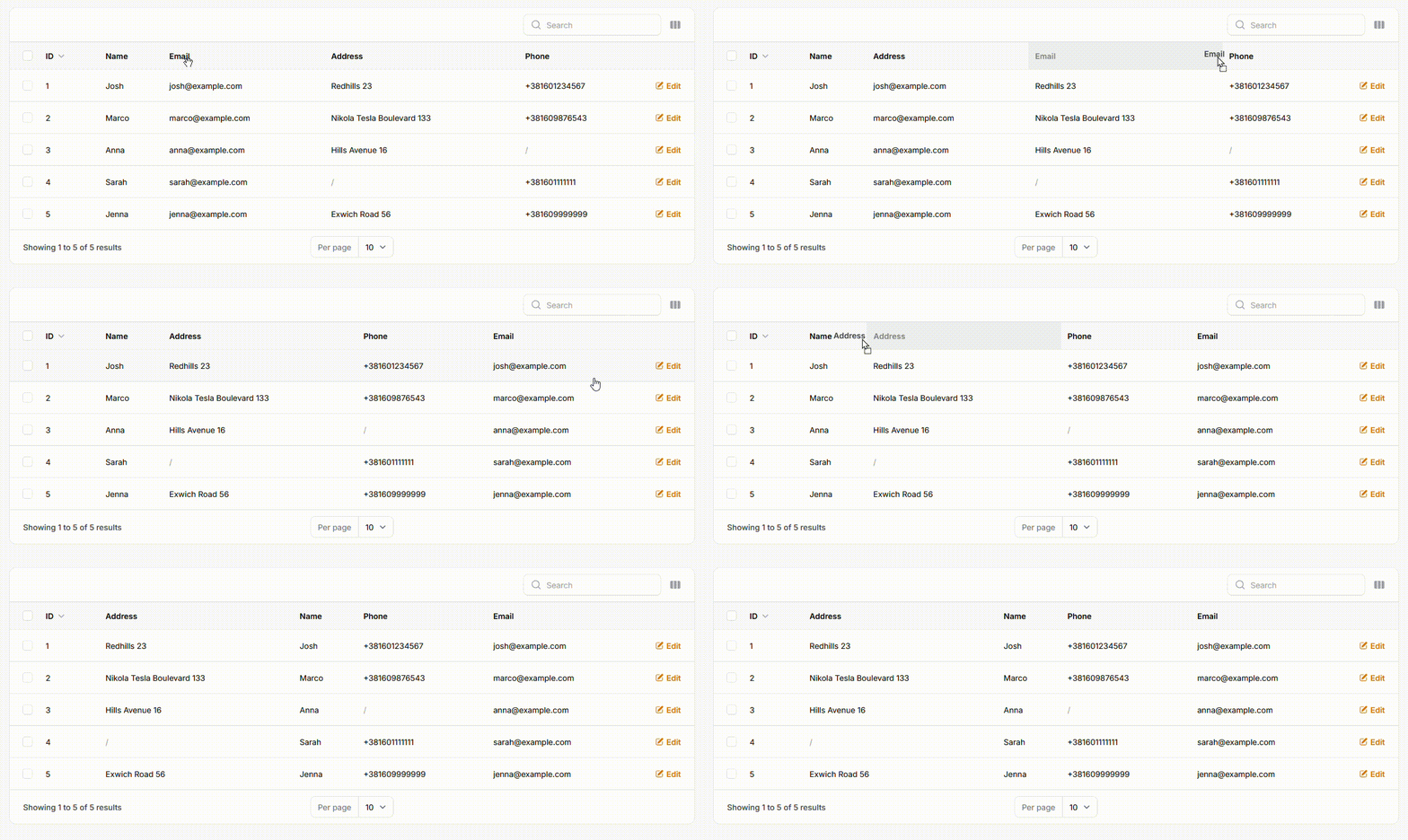
Reorderable Columns is a plugin for Filament that allows users to reorder table columns via drag-and-drop. The new column order can be saved either in the session or persisted in the database (per user).
Features
- Intuitive Drag & Drop: Easily reorder table columns to create your preferred layout
- Persistent Ordering: Column order is saved and automatically reapplied on next visit
- Flexible Storage Drivers:
- Database: Persist layouts per-user, so everyone gets their own custom view
- Session: Keep the layout for the current session, resetting on logout
- Seamless Integration: Designed to feel like a native Filament feature
- Smart Column Handling:
- Remembers the order of visible columns
- Automatically places newly added columns at the end of the table
📦 Installation
Install the package via Composer:
composer require bostos/reorderable-columns
Then, publish and run the migrations to create the reorderable_columns_orders table:
php artisan vendor:publish --tag="reorderable-columns-migrations"
php artisan migrate
Optionally, publish the configuration file:
php artisan vendor:publish --tag="reorderable-columns-config"
⚙️ Usage
Step 1: Register the Plugin in Your Panel Provider
In your AdminPanelProvider.php (or another panel provider), register the plugin inside the panel() method. You can choose the persistence strategy:
persistToSession()(default) – Saves order in the session (lost on logout).persistToDatabase()– Persists per-user column order in the database.
use Bostos\ReorderableColumns\ReorderableColumnsPlugin;

public function panel(Panel $panel): Panel
{
    return $panel
        // ... other configurations
        ->plugin(
            ReorderableColumnsPlugin::make()
                ->persistToSession() // or ->persistToDatabase()
        );
}
Step 2: Use the Trait in Your ListRecords Page
In your ListRecords page class (e.g. app/Filament/Resources/UserResource/Pages/ListUsers.php), use the HasReorderableColumns trait and override the $view property.
use Bostos\ReorderableColumns\Concerns\HasReorderableColumns;
use Filament\Resources\Pages\ListRecords;

class ListUsers extends ListRecords
{
    use HasReorderableColumns;

    protected static string $view = 'filament.resources.users.pages.list-users';
}
💡 Don't forget to create the custom view in Step 4.
Step 3: Enable Reordering on Your Table
In your resource file (e.g. UserResource.php), chain the ->reorderableColumns() method to your table definition. Provide a unique key (usually table or model name).
use Filament\Tables\Table;

public static function table(Table $table): Table
{
    return $table
        ->columns([
            // your columns
        ])
        ->filters([
            // your filters
        ])
        ->actions([
            // your actions
        ])
        ->reorderableColumns('users'); // Use a unique key
}
Step 4: Create a Custom Blade View
Since Filament’s table component doesn’t allow custom HTML attributes on the outer wrapper, you’ll need to override the view and wrap the table manually.
1. Create a custom view file
At the path defined in Step 2, create:
resources/views/filament/resources/users/pages/list-users-reorderable.blade.php
2. Copy the original view content
Copy the content from:
vendor/filament/filament/resources/views/resources/pages/list-records.blade.php
Paste it into your custom Blade file.
3. Wrap the table
Locate the line:
{{ $this->table }}
Wrap it in a div with a data-reorderable-columns attribute:
{{-- resources/views/filament/resources/users/pages/list-users-reorderable.blade.php --}}

<x-filament-panels::page>

    {{-- Required wrapper for reordering --}}
    <div data-reorderable-columns="users">
        {{ $this->table }}
    </div>

</x-filament-panels::page>
Make sure the value (users) matches the key passed in ->reorderableColumns().
📝 Changelog
Please refer to the CHANGELOG for details on recent changes.
🤝 Contributing
Contributions are welcome! Please see the CONTRIBUTING guide for details.
🔐 Security
If you discover a security vulnerability within this package, please send an e-mail to nikolast_metal@hotmail.com. All security vulnerabilities will be promptly addressed.
🧠 Credits
⚖️ License
The MIT License (MIT). See the LICENSE file for more details.
Related Packages
This plugin is built on top of Spatie's Laravel-health package
Version History
| Version | Released | PHP | License |
|---|---|---|---|
| v1.1.0 | ^8.1 | MIT | |
| v1.0.1 | ^8.1 | MIT | |
| v1.0.0 | ^8.1 | MIT |