cleaniquecoders/media-manager
| Install | |
|---|---|
composer require cleaniquecoders/media-manager |
|
| Latest Version: | 1.2.2 |
| PHP: | ^8.4 |
| Laravel: | 11 · 12 · 13 |
| License: | MIT |
| Last Updated: | Oct 24, 2026 |
| Links: | GitHub · Packagist |
Spatie Media Library Manager




A Laravel package that provides a complete media management solution built on top of Spatie Media Library. Manage your media files through a modern, user-friendly interface with Livewire components.
Features
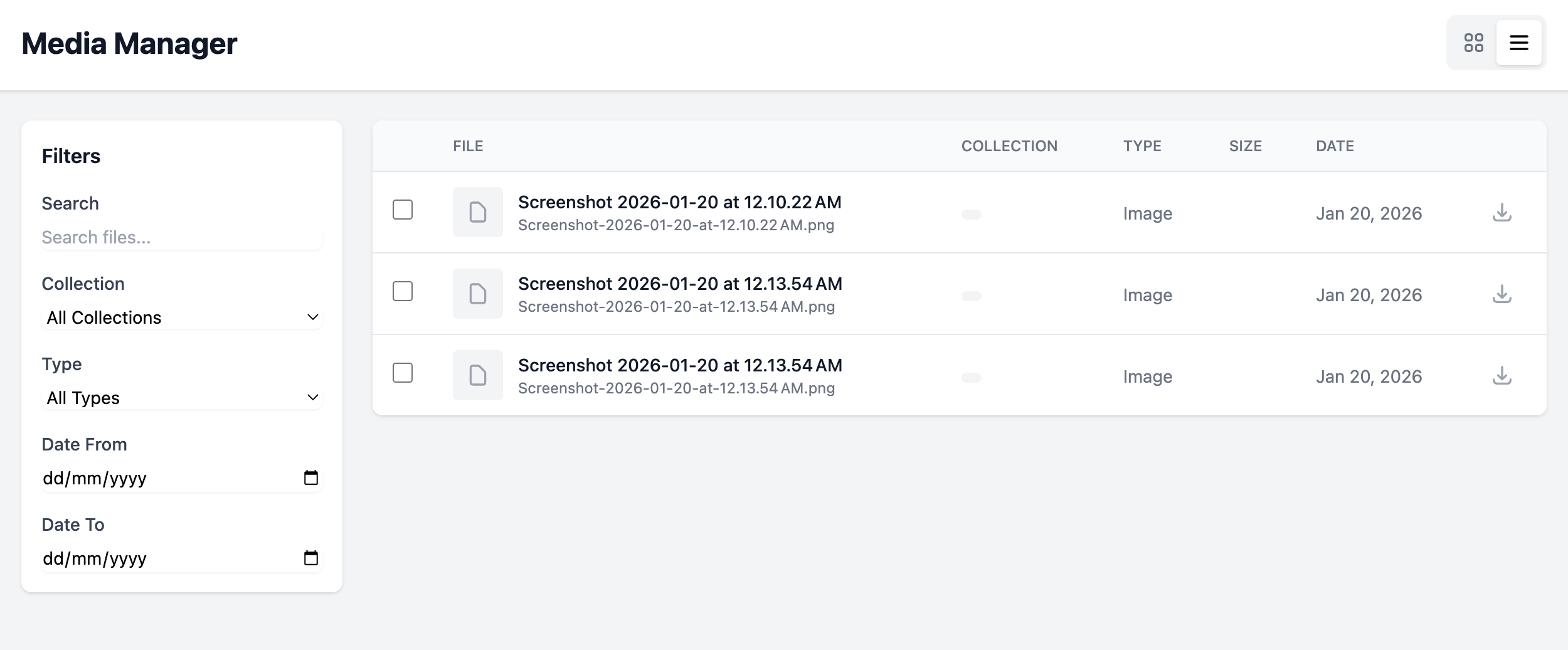
- Full-featured media browser with grid and list views
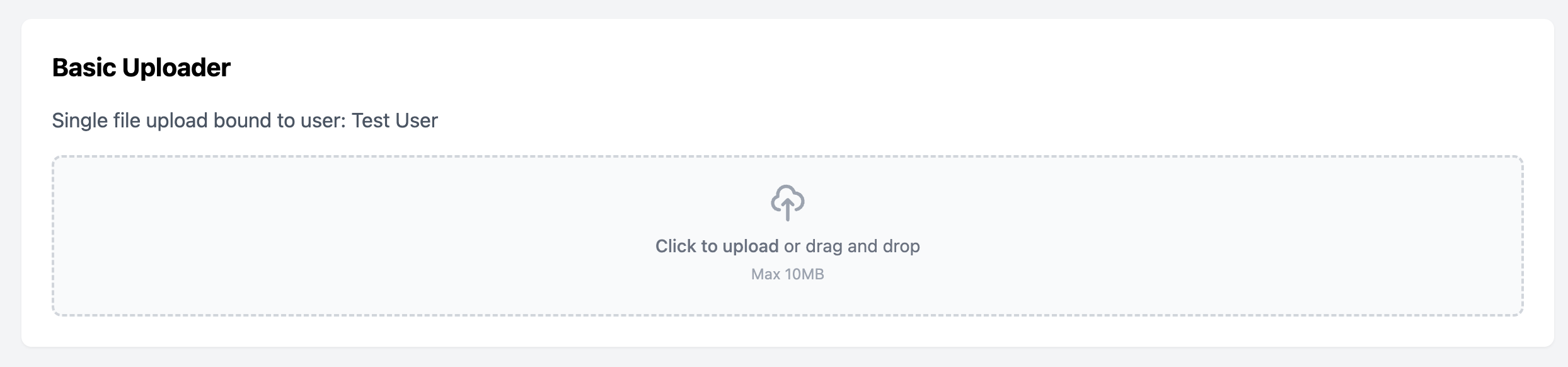
- Drag-and-drop file uploads with progress tracking
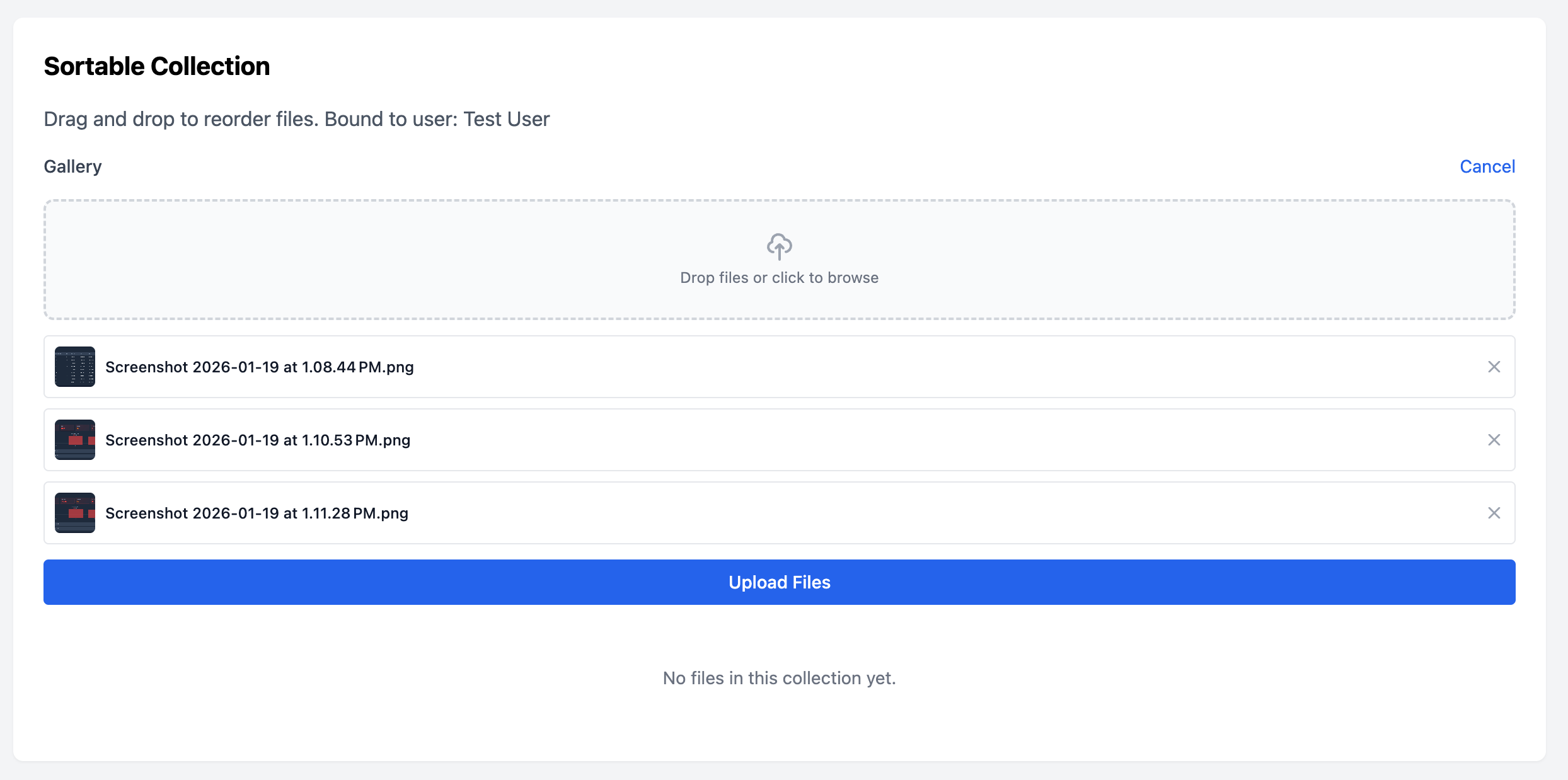
- Media collection management with reordering support
- Media picker for selecting existing files
- Search, filter, and bulk operations
- Custom properties and metadata support
- Authorization via Laravel gates
- Fully customizable views
Screenshots
Media Browser
Browse all your media files with filtering, searching, and bulk operations.
Media Uploader
Upload files to any model with drag-and-drop support.
Media Collection
Manage media collections inline with drag-and-drop reordering.
Installation
Install the package via Composer:
composer require cleaniquecoders/media-manager
Run the install command:
php artisan media-manager:install
Or manually publish and run migrations:
php artisan vendor:publish --tag="media-manager-migrations"
php artisan migrate
Optionally publish the config file:
php artisan vendor:publish --tag="media-manager-config"
Quick Start
1. Add the trait to your model
<?php

namespace App\Models;

use CleaniqueCoders\MediaManager\Concerns\HasMediaManager;
use Illuminate\Database\Eloquent\Model;
use Spatie\MediaLibrary\HasMedia;

class Post extends Model implements HasMedia
{
    use HasMediaManager;

    public function registerMediaCollections(): void
    {
        $this->addMediaCollection('featured')->singleFile();
        $this->addMediaCollection('gallery');
    }
}
2. Add components to your views
{{-- Media Browser - embed in your own view with your layout --}}
<livewire:media-manager::browser />

{{-- Media Uploader --}}
<livewire:media-manager::uploader
    :model="$post"
    collection="gallery"
    :max-files="10"
/>

{{-- Media Collection Editor --}}
<livewire:media-manager::collection
    :model="$post"
    collection="gallery"
    sortable
/>

{{-- Media Picker --}}
<livewire:media-manager::picker
    wire:model="selectedMediaIds"
    multiple
/>
3. Create a route for the media browser
Create your own route and view to display the browser:
// routes/web.php
Route::get('/media', function () {
    return view('media');
})->middleware(['web', 'auth']);
{{-- resources/views/media.blade.php --}}
<x-app-layout>
    <livewire:media-manager::browser />
</x-app-layout>
Using the Facade
use CleaniqueCoders\MediaManager\Facades\MediaManager;

// Upload files
MediaManager::upload($model, $file, 'collection');
MediaManager::uploadMultiple($model, $files, 'collection');

// Browse with filters
$media = MediaManager::browse(['collection' => 'gallery'], perPage: 24);

// Delete media
MediaManager::delete($media);
MediaManager::deleteMultiple([1, 2, 3]);
Moving Media Between Disks or Path Layouts
media-manager:move-disk copies Media Library files (originals, conversions and responsive
images) to another disk and/or another path layout, verifies every copy, and only then updates
the disk / conversions_disk columns of the media row (quietly: no model events, no
updated_at bump). Files are streamed, so it works with disks that have no local path, such as S3.
php artisan media-manager:move-disk --from=<disk> --to=<disk>
    [--from-path-generator=<class>] [--to-path-generator=<class>]
    [--collection=<name>] [--chunk=100] [--dry-run] [--delete-source] [--force]
| Option | Meaning |
|---|---|
--from / --to |
Source and destination disk (required). They may be equal for a re-layout. |
--from-path-generator / --to-path-generator |
A class implementing Spatie's PathGenerator. Each one defaults to the configured generator, including custom_path_generators. |
--collection |
Only move media of this collection. |
--chunk |
Rows per chunk (default 100). |
--dry-run |
Print what would move and change nothing. |
--delete-source |
Delete the moved source files, plus any of their directories left completely empty. Never deletes a directory that still holds other files. |
--force |
Skip the confirmation prompt (needed for unattended runs). |
Only the files a media row owns are touched: the original (file_name), its generated
conversions and the files listed in responsive_images. Directories are never listed and
copied wholesale, so a directory shared with unrelated files (for example {id}/ on a disk
used by several databases that each number media from 1) is safe. A missing original fails
that media; a missing conversion or responsive image is skipped.
Conversions are moved only when conversions_disk is the --from disk, so originals and
conversions stored on different disks can be moved separately. A media whose copy fails keeps
its row and its source files. The error is listed and the run continues with the next media.
The command exits with a failure code when any media failed.
The command works on the default connection of the configured media model, so in a multi-tenant application you run it once per tenant with your tenancy package's own runner.
Local disk to S3
php artisan media-manager:move-disk --from=media --to=s3 --dry-run
php artisan media-manager:move-disk --from=media --to=s3 --force
# once the application reads from s3 without problems:
php artisan media-manager:move-disk --from=media --to=s3 --delete-source --force
Re-running is safe. Files already at the destination with a matching size are not copied again, and an interrupted run finishes on the next pass.
Changing the path layout on the same disk
To move from DefaultPathGenerator ({id}/) to your own generator:
-
Deploy the new generator class, leaving
media-library.path_generatorunchanged. -
Copy the files into the new layout:
php artisan media-manager:move-disk --from=media --to=media \ --to-path-generator="App\\Support\\Media\\MyPathGenerator" --force -
Set
media-library.path_generatorto the new class and deploy. -
Sweep anything uploaded between steps 2 and 3, and remove the old files:
php artisan media-manager:move-disk --from=media --to=media \
    --from-path-generator="Spatie\\MediaLibrary\\Support\\PathGenerator\\DefaultPathGenerator" \
    --delete-source --force
The command refuses to run when --from equals --to and both generators resolve to the same class.
Documentation
For detailed documentation, see the docs directory:
- Getting Started - Installation and setup
- Components - All Livewire components
- Configuration - Configuration options
Testing
composer test
Changelog
Please see CHANGELOG for more information on what has changed recently.
Contributing
Please see CONTRIBUTING for details.
Security Vulnerabilities
Please review our security policy on how to report security vulnerabilities.
Credits
License
The MIT License (MIT). Please see License File for more information.
Related Packages
Traitify is a Laravel package designed to streamline and enhance your developmen...
Shrinkr is a Laravel package for shortening URLs, with custom slugs, analytics,...
Effortlessly manage your Laravel API versions with flexible, header-based versio...
Define, sign, dispatch and log outgoing webhooks in Laravel with retries, HMAC s...
Version History
| Version | Released | PHP | Laravel | License |
|---|---|---|---|---|
| 1.2.2 | ^8.4 | ^11.0|| | MIT | |
| 1.2.1 | ^8.4 | ^11.0|| | MIT | |
| 1.2.0 | ^8.4 | ^11.0|| | MIT | |
| 1.1.0 | ^8.4 | ^11.0|| | MIT | |
| 1.0.1 | ^8.4 | ^11.0|| | MIT | |
| 1.0.0 | ^8.4 | ^11.0|| | MIT |