cocosmos/filament-sticky-save-bar
| Install | |
|---|---|
composer require cocosmos/filament-sticky-save-bar |
|
| Latest Version: | v1.1.4 |
| PHP: | ^8.2 |
| Laravel: | 11 · 12 · 13 |
| License: | MIT |
| Last Updated: | Aug 8, 2026 |
| Links: | GitHub · Packagist |
Filament Sticky Save Bar


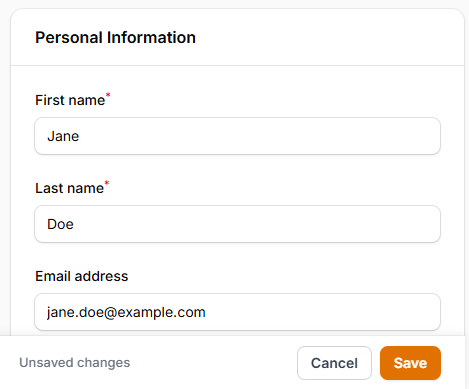
A Filament v5 plugin that displays a floating action bar at the bottom (or top) of the viewport when a form has unsaved changes — so users on long edit pages never have to scroll back up to save.
Features
- Automatically appears when the form is dirty (has unsaved changes)
- Disappears after a successful save
- Detects changes from all input types, including multiselect fields
- Reverts to hidden state if the user undoes all changes
- Hides when a modal is open
- Respects the Filament sidebar — never overlaps it
- Supports dark mode
- Translatable (8 languages included)
- Per-page opt-out via a trait
Requirements
- PHP 8.2+
- Filament 5.x
Installation
Install via Composer:
composer require cocosmos/filament-sticky-save-bar
Register the plugin in your panel provider:
use Cocosmos\FilamentStickySaveBar\StickySaveBarPlugin;

public function panel(Panel $panel): Panel
{
    return $panel
        // ...
        ->plugin(StickySaveBarPlugin::make());
}
Basic Usage
Once registered, the bar appears automatically on any page that contains a wire:submit form with unsaved changes.
Configuration
All options are set fluently on the plugin instance.
Label
Override the default "Unsaved changes" label:
StickySaveBarPlugin::make()
    ->label('You have unsaved changes')
Position
Pin the bar to the top of the viewport instead of the bottom:
use Cocosmos\FilamentStickySaveBar\Enums\Position;

StickySaveBarPlugin::make()
    ->position(Position::Top)
| Value | Description |
|---|---|
Position::Bottom |
(default) Pinned to the bottom of the viewport |
Position::Top |
Pinned to the top of the viewport |
Show On
Control when the bar becomes visible:
use Cocosmos\FilamentStickySaveBar\Enums\ShowOn;

StickySaveBarPlugin::make()
    ->showOn(ShowOn::Always)
| Value | Description |
|---|---|
ShowOn::Dirty |
(default) Only when the form is dirty and the native Save button has scrolled out of view |
ShowOn::DirtyAlways |
Whenever the form is dirty, regardless of whether the native Save button is in view |
ShowOn::Always |
Whenever the native Save button is out of view, regardless of dirty state |
Extra Buttons
Cancel
A Cancel button that navigates back. Enabled by default.
StickySaveBarPlugin::make()
    ->withCancel()        // enable (default)
    ->withCancel(false)   // disable
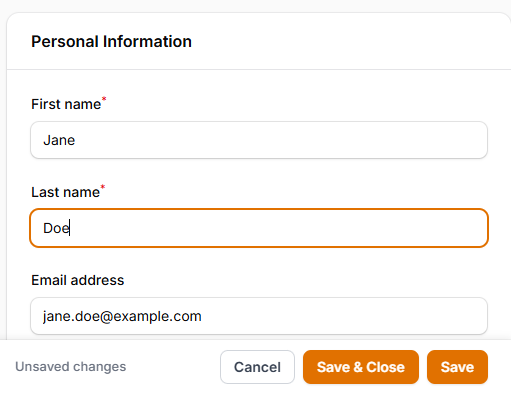
Save & Close
A Save & Close button that saves the form and then navigates back.
StickySaveBarPlugin::make()
    ->withSaveAndClose()        // enable
    ->withSaveAndClose(false)   // disable (default)
Discard
A Discard changes button that reloads the page, reverting all unsaved edits.
StickySaveBarPlugin::make()
    ->withDiscard()        // enable
    ->withDiscard(false)   // disable (default)
Enabled
Disable the plugin globally, or conditionally via a closure:
StickySaveBarPlugin::make()
    ->enabled(false)

// Or with a closure:
StickySaveBarPlugin::make()
    ->enabled(fn () => auth()->user()->isAdmin())
Per-Page Opt-Out
To disable the bar on a specific page, add the HasStickySaveBarDisabled trait to the page class:
use Cocosmos\FilamentStickySaveBar\Concerns\HasStickySaveBarDisabled;

class EditInvoice extends EditRecord
{
    use HasStickySaveBarDisabled;

    // ...
}
Custom Components
The bar detects dirty state from native input/change events and from Filament toggles. Some custom components change their state through Livewire actions instead — e.g. a repeater-style list with "move up", "move down", or "disable" buttons — which don't emit a native event, so the bar can't see them automatically.
For those cases, dispatch one of these events from your component. Any bubbling CustomEvent works (Alpine $dispatch, Livewire $dispatch, or plain dispatchEvent):
| Event | Effect |
|---|---|
sticky-save-bar:mark-dirty |
Force the bar to show |
sticky-save-bar:check |
Recompute dirty by comparing the form's current values against the baseline |
sticky-save-bar:reset |
Treat the current state as clean — re-baseline and hide the bar |
Example — show the bar whenever your component's Alpine state changes:
// inside your component's x-data / alpine:init
this.$watch('state', () => {
    this.$dispatch('sticky-save-bar:mark-dirty');
});
After your own save (or when the user reverts), dispatch sticky-save-bar:reset to mark the state clean again.
Translations
The plugin ships with translations for 8 languages: ar, de, en, es, fr, id, it, pt.
To publish and customise them:
php artisan vendor:publish --tag=sticky-save-bar-translations
The published files will appear in lang/vendor/sticky-save-bar/{locale}/sticky-save-bar.php.
Translation keys
| Key | Default (en) |
|---|---|
unsaved_changes |
Unsaved changes |
save |
Save |
cancel |
Cancel |
save_and_close |
Save & Close |
discard |
Discard changes |
Changelog
See CHANGELOG.md.
License
MIT — see LICENSE.
Related Packages
Add Sticky Notes to your FilamentPHP dashboard with tons of options and style
A Livewire component to display an unsaved changes bar with Alpine.js
A Filament package providing map field components for forms and infolists using...
Version History
| Version | Released | PHP | License |
|---|---|---|---|
| v1.1.4 | ^8.2 | MIT | |
| v1.1.3 | ^8.2 | MIT | |
| v1.1.2 | ^8.2 | MIT | |
| v1.1.1 | ^8.2 | MIT | |
| v1.1.0 | ^8.2 | MIT | |
| v1.0.1 | ^8.2 | MIT | |
| v1.0.0 | ^8.2 | MIT |