codprez/laravel-page-builder
Laravel Page Builder



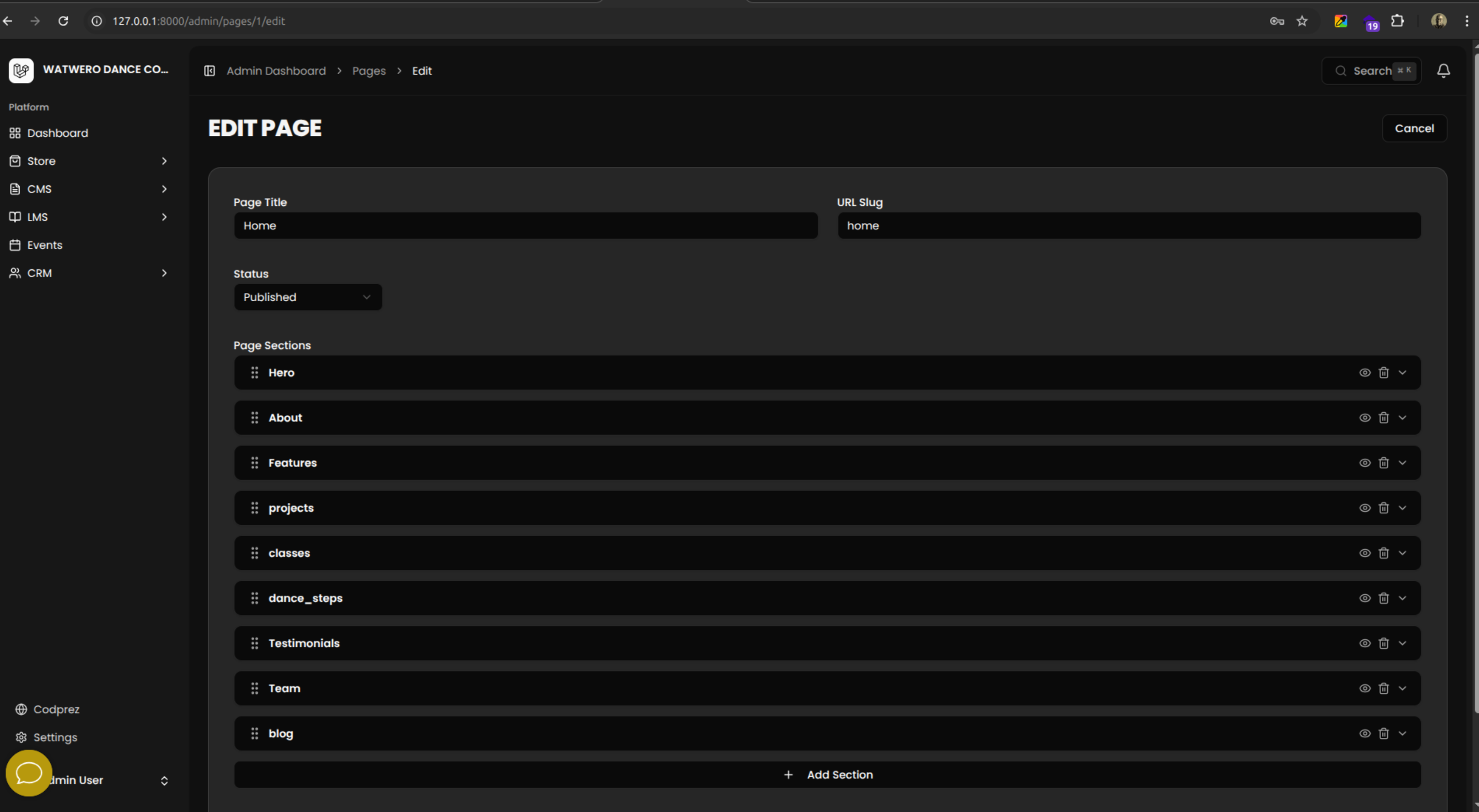
A predefined section-based page builder for Laravel + Inertia.js + React. Pages are composed of typed sections with a drag-and-drop editor, Eloquent models, API resources, per-section forms, and a section renderer.
Features
- 12 built-in section types: hero, about, features, stats, team, testimonials, CTA, gallery, FAQ, contact, rich text, and video
- Eloquent
PageandPageSectionmodels with JSON data casting - API Resources (
PageResource,PageSectionResource) ready for your controllers - Drag-and-drop React section editor powered by
@dnd-kit - Per-section forms with typed fields and image/media support
SectionRendererReact component for frontend rendering- Custom section registration via
PageBuilder::register() - Configurable media model integration
- Tailwind CSS v4 compatible frontend components
Requirements
- PHP ^8.2
- Laravel ^12.0
- Inertia.js v2
- React 19
@dnd-kit/core,@dnd-kit/sortable,@dnd-kit/utilitieslucide-react- Tailwind CSS v4
Installation
1. Install the package via Composer
composer require codprez/laravel-page-builder
2. Publish the config file
php artisan vendor:publish --tag=page-builder-config
3. Publish and run the migrations
php artisan vendor:publish --tag=page-builder-migrations
php artisan migrate
4. Install frontend dependencies
npm install @dnd-kit/core @dnd-kit/sortable @dnd-kit/utilities lucide-react
5. Copy frontend assets
Publish the frontend TypeScript types and React components into your application:
php artisan vendor:publish --tag=page-builder-resources
This copies the following into your resources/js directory:
types/page-builder.ts— TypeScript type definitionscomponents/page-builder/— React editor and renderer components
Configuration
After publishing, config/page-builder.php will contain:
return [
    'media_model' => \App\Models\Media::class,
];
The configured media model must expose id, url, and optionally thumbnail_url attributes. It is used by image fields in section forms and the ImageUpload / MediaSelector integration points.
Vite alias (@media-library)
Section forms import @media-library/components/... (same JavaScript tree as codprez/laravel-media-library). If you load the package from vendor/ with Vite, add an alias alongside @codprez/media-library (or in place of it), for example:
import path from 'path';

export default defineConfig({
    resolve: {
        alias: {
            '@codprez/page-builder': path.resolve(__dirname, 'vendor/codprez/laravel-page-builder/resources/js'),
            '@codprez/media-library': path.resolve(__dirname, 'vendor/codprez/laravel-media-library/resources/js'),
            '@media-library': path.resolve(__dirname, 'vendor/codprez/laravel-media-library/resources/js'),
        },
    },
});
Usage
Page and Section CRUD
Use the Page and PageSection models directly via Eloquent:
use Codprez\PageBuilder\Models\Page;
use Codprez\PageBuilder\Models\PageSection;

// Create a page
$page = Page::create([
    'title'            => 'Home',
    'slug'             => 'home',
    'status'           => 'published',
    'is_home'          => true,
]);

// Attach a section
$page->sections()->create([
    'type'       => 'hero',
    'order'      => 1,
    'is_visible' => true,
    'data'       => [
        'title'    => 'Welcome',
        'subtitle' => 'Build pages visually.',
    ],
]);

// Retrieve a page with its sections
$page = Page::with('sections')->where('slug', 'home')->firstOrFail();
Using PageResource in Controllers
use Codprez\PageBuilder\Http\Resources\PageResource;
use Codprez\PageBuilder\Models\Page;

class PageController extends Controller
{
    public function show(string $slug): PageResource
    {
        $page = Page::with(['image', 'sections'])->where('slug', $slug)->firstOrFail();

        return new PageResource($page);
    }

    public function index(): \Illuminate\Http\Resources\Json\AnonymousResourceCollection
    {
        return PageResource::collection(
            Page::with(['image', 'sections'])->orderBy('order')->get()
        );
    }
}
Rendering a Page with Inertia
use Inertia\Inertia;
use Codprez\PageBuilder\Http\Resources\PageResource;
use Codprez\PageBuilder\Models\Page;

class FrontController extends Controller
{
    public function show(string $slug): \Inertia\Response
    {
        $page = Page::with(['image', 'sections' => fn ($q) => $q->where('is_visible', true)->orderBy('order')])
            ->where('slug', $slug)
            ->where('status', 'published')
            ->firstOrFail();

        return Inertia::render('Pages/Show', [
            'page' => new PageResource($page),
        ]);
    }
}
Registering Custom Sections
Use PageBuilder::register() in a service provider to add your own section types:
use Codprez\PageBuilder\PageBuilder;

class AppServiceProvider extends ServiceProvider
{
    public function boot(): void
    {
        PageBuilder::register('my_section',
            requiredFields: ['title'],
            imageFields: ['image_id']
        );
    }
}
Custom sections will appear in the section picker inside the editor and can be rendered by adding a corresponding case to your SectionRenderer usage.
Frontend Setup
Types
After publishing resources, import types from the copied file:
import type { Page, PageSection, SectionType } from '@/types/page-builder'
SectionEditor
Use SectionEditor in your admin pages to allow drag-and-drop section management:
import { SectionEditor } from '@/components/page-builder/section-editor'
import { useForm } from '@inertiajs/react'
import type { PageSection } from '@/types/page-builder'

export default function EditPage({ page }: { page: Page }) {
    const { data, setData, put } = useForm({
        sections: page.sections,
    })

    return (
        <form onSubmit={e => { e.preventDefault(); put(`/pages/${page.id}`) }}>
            <SectionEditor
                sections={data.sections}
                onChange={sections => setData('sections', sections)}
            />
            <button type="submit">Save</button>
        </form>
    )
}
The SectionEditor component requires ImageUpload and MediaSelector components to be present in your application at @/components/image-upload and @/components/media-selector. Implement these to handle image uploads and media library selection according to your application's needs.
SectionRenderer
Use SectionRenderer to render published page sections on the frontend:
import { SectionRenderer } from '@/components/page-builder/section-renderer'
import type { Page } from '@/types/page-builder'

export default function ShowPage({ page }: { page: Page }) {
    return (
        <main>
            {page.sections.map(section => (
                <SectionRenderer key={section.id} section={section} />
            ))}
        </main>
    )
}
SectionPicker
To allow users to add new sections, use SectionPicker standalone:
import { SectionPicker } from '@/components/page-builder/section-picker'

<SectionPicker onSelect={type => addSection(type)} />
Section Types
| Type | Description |
|---|---|
hero |
Full-width hero with title, subtitle, background image, and CTA |
about |
About block with heading, body text, and optional image |
features |
Grid of feature cards with icon, title, and description |
stats |
Row of numeric statistics with labels |
team |
Team member grid with name, role, bio, and photo |
testimonials |
Customer/user testimonial carousel or grid |
cta |
Call-to-action banner with heading and button |
gallery |
Image gallery grid or masonry layout |
faq |
Accordion-style frequently asked questions |
contact |
Contact form or contact details block |
rich_text |
Free-form rich text / HTML content block |
video |
Embedded video block (YouTube, Vimeo, or direct URL) |
Contributing
Contributions are welcome. Please read CONTRIBUTING.md before submitting a pull request.
Changelog
See CHANGELOG.md for a history of changes.
License
This package is open-sourced software licensed under the MIT license.
Related Packages
MAD CMS reusable page builder, module system, and form builder for Laravel.
Headless CMS and Inertia React architecture toolkit and CLI generator for Larave...
A page builder CMS for Laravel projects using Vue, Inertia, Laravel, and Tailwin...
CMS Orbit core: server-driven Screen/Layout/Field engine rendered via Inertia +...
Version History
| Version | Released | PHP | Laravel | License |
|---|---|---|---|---|
| v1.4.0 | ^8.2 | ^10.0| | MIT | |
| v1.3.0 | ^8.2 | ^10.0| | MIT | |
| v1.2.9 | ^8.2 | ^10.0| | MIT | |
| v1.2.8 | ^8.2 | ^10.0| | MIT | |
| v1.2.7 | ^8.2 | ^10.0| | MIT | |
| v1.2.6 | ^8.2 | ^10.0| | MIT | |
| v1.2.5 | ^8.2 | ^10.0| | MIT | |
| v1.2.4 | ^8.2 | ^10.0| | MIT | |
| v1.2.3 | ^8.2 | ^10.0| | MIT | |
| v1.2.2 | ^8.2 | ^10.0| | MIT | |
| v1.2.1 | ^8.2 | ^10.0| | MIT | |
| v1.2.0 | ^8.2 | ^10.0| | MIT | |
| v1.1.0 | ^8.2 | ^10.0| | MIT | |
| v1.0.0 | ^8.2 | ^10.0| | MIT |