daljo25/filament-tabler-icons
| Install | |
|---|---|
composer require daljo25/filament-tabler-icons |
|
| Latest Version: | v3.49.0 |
| PHP: | ^8.2 |
| License: | MIT |
| Last Updated: | Oct 6, 2026 |
| Links: | GitHub · Packagist |
Filament Tabler Icons



A Filament 4.x / 5.x plugin that integrates the full Tabler Icons set, allowing you to use them seamlessly across Filament forms, tables, actions, resources, and navigation.
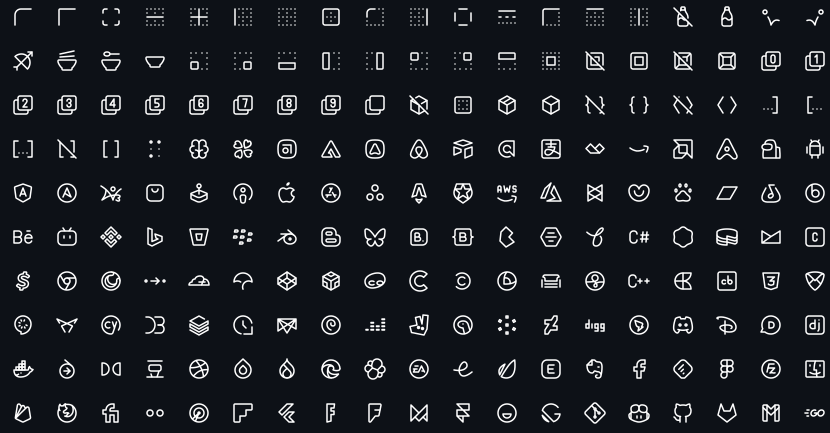
Tabler Icons is a free and open-source SVG icon set designed to work beautifully with modern UIs.
Requirements
- PHP 8.2+
- Laravel 10+
- Filament 4.x or 5.x
Installation
Install the package via Composer:
composer require daljo25/filament-tabler-icons
(Optional) You can publish the configuration file to customize the plugin's behavior:
php artisan vendor:publish --tag=filament-tabler-icons-config
Configuration
The configuration file allows you to control the automatic icon replacement and define custom overrides.
return [
    // Enable or disable automatic icon replacement
    'enabled' => true,

    // Define custom icon overrides
    'icons' => [
        'panels::global-search-field' => 'tabler-zoom-2',
    ],
];
Icon Aliases
You can override any of Filament's default icon aliases. For a full list of available aliases, check the official Filament documentation.
Automatic Icon Replacement
Once installed, this plugin automatically replaces all Filament UI icons with Tabler Icons, including:
Panels Icons
- Sidebar navigation icons
- Collapse/expand buttons
- Search field icon
- Filter buttons
- Dashboard icons
- User menu icons
- Theme switcher icons (Light, Dark, System)
- Database notifications icons
Notifications Icons
- Notification status icons (success, danger, warning, info)
- Close button icon
- Empty state icons
Widgets Icons
- Chart filter icons
This means you don't need to do anything—Tabler Icons will be used throughout your Filament admin panel automatically!
Usage
Import the enum
use Daljo25\FilamentTablerIcons\Enums\TablerIcon;
Forms
use Filament\Forms;
use Daljo25\FilamentTablerIcons\Enums\TablerIcon;

Forms\Components\TextInput::make('email')
    ->prefixIcon(TablerIcon::Mail)
    ->email()
    ->required();
Tables
use Filament\Tables;
use Daljo25\FilamentTablerIcons\Enums\TablerIcon;

Tables\Columns\IconColumn::make('active')
    ->boolean()
    ->trueIcon(TablerIcon::Check)
    ->falseIcon(TablerIcon::X);
Actions
use Filament\Actions;
use Daljo25\FilamentTablerIcons\Enums\TablerIcon;

Actions\Action::make('edit')
    ->icon(TablerIcon::Edit);
Resource Navigation Icon
use Filament\Resources\Resource;
use Daljo25\FilamentTablerIcons\Enums\TablerIcon;

final class UserResource extends Resource
{
    protected static string|BackedEnum|null $navigationIcon =
        TablerIcon::Users;
}
Icon Scaling (optional)
Since the enum implements ScalableIcon, you can control icon size:
use Filament\Support\Enums\IconSize;
use Daljo25\FilamentTablerIcons\Enums\TablerIcon;

TablerIcon::Settings->scale(IconSize::Large);
Available Icons
All icons are provided via the TablerIcon enum.
Icon names follow the official Tabler naming convention (kebab-case internally, PascalCase enum names).
You can browse the full icon set at: 👉 https://tabler.io/icons
Contributing
Contributions are welcome!
If you want to:
- add missing icons
- improve DX
- optimize performance
- improve documentation
Please open a pull request or issue.
Credits
- Daljomar Morillo (@daljo25)
- Tabler Icons
- Inspired by filament-lucide-icons
License
The MIT License (MIT). See LICENSE.md for more information.
Related Packages
A Filament plugin that integrates Lucide icons, allowing you to use them seamles...
Generate FontAwesome, Foundation Icons or any custom icon font icons to multiple...
A log viewer for Filament: read and clear Laravel log files from your panel
A package to easily make use of icons in your Laravel Blade views.
Version History
| Version | Released | PHP | License |
|---|---|---|---|
| v3.49.0 | ^8.2 | MIT | |
| v3.48.0 | ^8.2 | MIT | |
| v3.47.0 | ^8.2 | MIT | |
| v3.45.0 | ^8.2 | MIT | |
| v3.44.0 | ^8.2 | MIT | |
| v3.41.3 | ^8.2 | MIT | |
| v3.41.1 | ^8.2 | MIT | |
| v3.41.0 | ^8.2 | MIT | |
| v1.2.0 | ^8.2 | MIT | |
| v1.1.0 | ^8.2 | MIT | |
| v1.0.1 | ^8.2 | MIT | |
| v1.0.0 | ^8.2 | MIT |