devdojo/refine
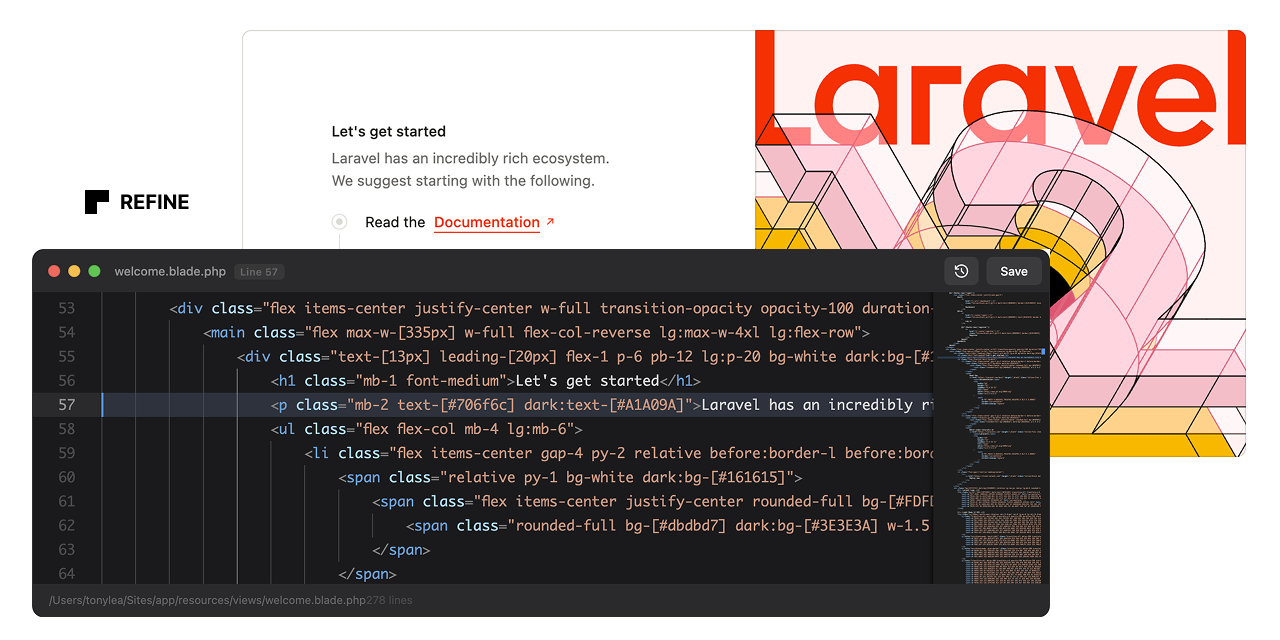
Refine Your Blade Views
Refine is a live Blade editor. It enables instant, in-browser editing of Blade templates. Right-click any element, click "Edit Code", and modify the source code directly.
[!WARNING]
This is still actively being developed so there may be a few issues. I have tested this with Blade Includes and Components; however, more testing is needed for Livewire and Volt.
Features
- One-Click Editing: Right-click any element and edit its Blade source instantly
- Automatic Source Tracking: Automatically instruments Blade views with source metadata
- Zero Configuration: Works out of the box after installation
- Smart DOM Traversal: Finds the originating Blade file even in nested components
- Instant Saves: Write changes directly to disk and hot-reload affected regions
- Backup System: Automatically backs up files before making changes
- Dev-Only: This package should not be installed in production.
Installation
Step 1: Install the Laravel Package
composer require devdojo/refine --dev
The package will auto-register via Laravel's package discovery.
Step 2: Load the Chrome Extension
Download the code from this repo and put the extension folder somewhere permanent on your computer. This could be your Documents folder or a folder in your home directory.
- Open Chrome and navigate to
chrome://extensions/ - Enable "Developer mode" (toggle in top-right corner)
- Click "Load unpacked"
- Navigate to the extension** folder you saved to your computer
- Select the folder and click "Open"
Step 3: Verify Installation
- Start your Laravel development server (
php artisan serveor Valet/Herd) - Visit any page in your application
- Open the browser console - you should see: "Refine: Content script loaded and ready"
- Visit
http://your-app.test/refine/status- you should see a JSON response confirming Refine is enabled
Usage
- Right-click any element on your page
- Click "Edit Code" from the context menu
- Edit the Blade source code in the floating editor
- Press Cmd/Ctrl+S or click Save to write changes
- Page auto-reloads to show your changes
Keyboard Shortcuts
Cmd/Ctrl + S- Save changesEscape- Minimize editorTab- Insert 4 spaces (proper indentation)
How It Works
Backend (Laravel)
- Blade Instrumentation: A Blade compiler hook automatically injects
data-sourceattributes into rendered HTML elements containing the view path and line number - API Endpoints: Two endpoints handle fetching source code and saving changes
- File Resolution: Automatically resolves view paths to absolute file paths
- Cache Clearing: Runs
php artisan view:clearafter saves to ensure changes are reflected
Frontend (Chrome Extension)
- Context Menu: Registers a "Edit Code" option in the right-click menu
- DOM Traversal: Finds the nearest parent element with a
data-sourceattribute - API Communication: Fetches source code from Laravel and sends updates back
- Floating UI: Renders a dark-themed code editor overlay with save/cancel actions
Configuration
Publish the configuration file:
php artisan vendor:publish --tag=refine-config
This creates config/refine.php where you can customize:
- Enabled State: Force enable/disable Refine
- Route Prefix: Change the API route prefix (default:
/refine) - Middleware: Add additional middleware to Refine routes
- Instrumentation: Customize which HTML tags get source attributes
- Backups: Configure automatic backup behavior
Security
Refine is strictly for local development. It includes multiple safety layers:
- Only activates when
APP_ENV=local - Middleware blocks all requests in non-local environments
- Routes only register when enabled
- Extension only works on localhost/
.testdomains
Never deploy Refine to production. Install it as a dev dependency only.
Architecture
Package Structure
vendor/devdojo/refine/
├── extension/              # Chrome extension (load this folder)
│   ├── manifest.json      # Extension configuration
│   ├── background.js      # Service worker for context menu
│   ├── content.js         # Content script with DOM logic & UI
│   └── icons/             # Extension icons
├── src/
│   ├── RefineServiceProvider.php
│   ├── Http/
│   │   ├── Controllers/
│   │   │   └── RefineController.php
│   │   └── Middleware/
│   │       └── RefineMiddleware.php
│   └── Services/
│       └── BladeInstrumentation.php
├── config/
│   └── refine.php
└── composer.json
API Endpoints
GET /refine/status
Returns Refine status and version.
GET /refine/fetch?ref={encoded}
Fetches source code for a given reference.
Response:
{
  "success": true,
  "data": {
    "file_path": "/path/to/file.blade.php",
    "view_path": "components.alert",
    "line_number": 12,
    "full_contents": "...",
    "total_lines": 45
  }
}
POST /refine/save
Saves updated source code.
Request:
{
  "ref": "encoded-source-reference",
  "contents": "updated file contents"
}
Response:
{
  "success": true,
  "message": "File saved successfully"
}
Supported Blade Features
- Standard Blade views
- Blade components (x-component syntax)
- Nested components and partials
- Layout inheritance
- View composers and creators
Troubleshooting
"No source reference found" error
Cause: The clicked element doesn't have a data-source attribute.
Solutions:
- Ensure
config('refine.enabled')returnstrue - Check that
APP_ENV=localin your.envfile - Clear view cache:
php artisan view:clear - Verify the element's parent tags are in the
target_tagsconfig array
Extension not loading
Solutions:
- Check Chrome's extension page for errors
- Reload the extension after making changes
- Check browser console for JavaScript errors
Changes not reflecting
Solutions:
- Hard refresh the page (Cmd/Ctrl + Shift + R)
- Clear view cache:
php artisan view:clear - Check file permissions on the view file
- Verify the backup directory is writable
CSRF token errors
Solutions:
- Ensure your layout includes
<meta name="csrf-token" content="{{ csrf_token() }}"> - Or include
@csrfin a form on the page
Limitations
- Only works on local development domains (localhost, *.test)
- Requires the CSRF token to be present in the page
- Cannot edit compiled PHP files, only Blade templates
- Page reload required to see changes (no true hot-reload)
Roadmap
Future enhancements being considered:
- Syntax highlighting in the editor
- Line number gutter
- Find and replace
- Multiple file tabs
- Diff view before saving
- Undo/redo history
- Component preview
- Hot module replacement (no page reload)
Contributing
This is an initial release. Contributions, bug reports, and feature requests are welcome.
License
MIT License. This is a developer tool provided as-is with no warranties.
Credits
Created by DevDojo for the Laravel community.
Related Packages
Powerful PHP database abstraction layer (DBAL) with many features for database s...
Laravel Serializable Closure provides an easy and secure way to serialize closur...
Cli error handling for console/command-line PHP applications.