emuniq/filament-browser-notifications
| Install | |
|---|---|
composer require emuniq/filament-browser-notifications |
|
| Latest Version: | v1.2.0 |
| PHP: | ^8.1 |
| Laravel: | 11 · 12 · 13 |
| License: | MIT |
| Last Updated: | Jul 1, 2026 |
| Links: | GitHub · Packagist |
Filament Browser Notifications


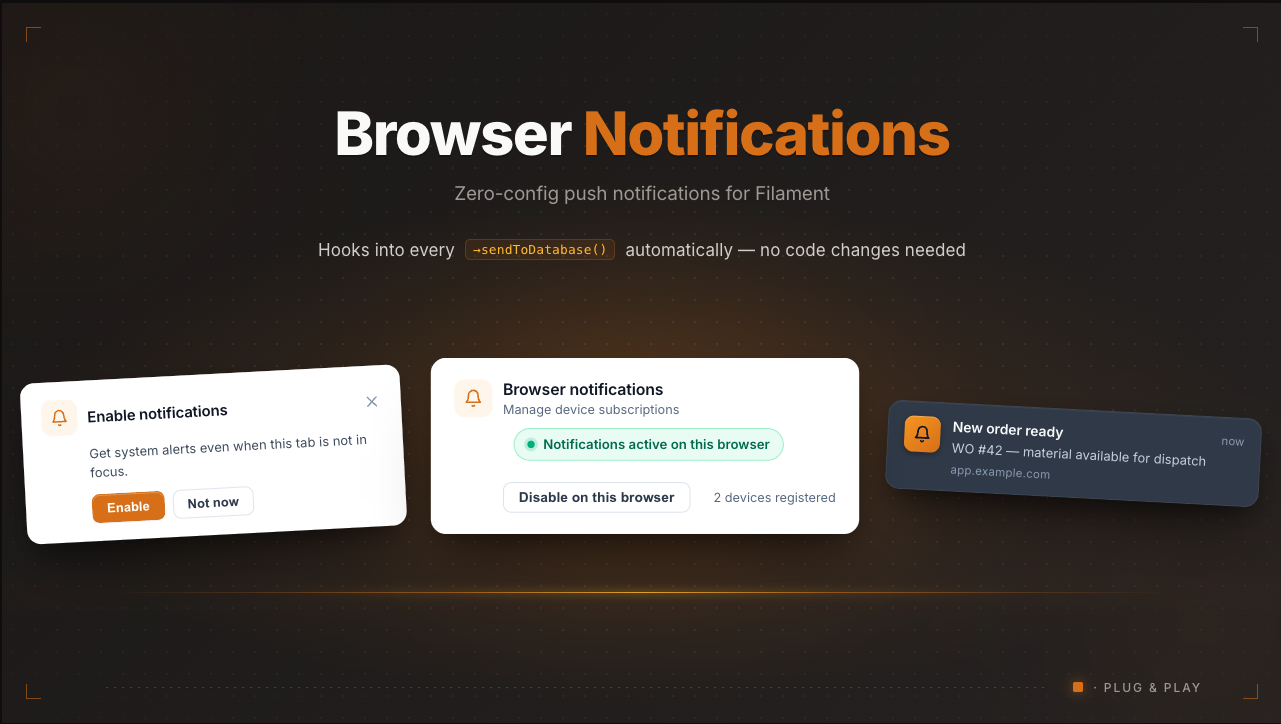
Every sendToDatabase() in your app automatically triggers a browser push notification — no code changes needed.
Screenshots
Subscription prompt — appears after a configurable delay, asking the user to enable push notifications.

Profile section (inactive) — auto-injected on the Edit Profile page. One-click to enable.

Profile section (active) — shows subscription status, device count, and a button to disable.

Installation
composer require emuniq/filament-browser-notifications
php artisan browser-notifications:install
That's it. The install command handles everything:
- Generates VAPID keys and adds them to
.env - Publishes and runs the
push_subscriptionsmigration - Adds the
HasPushSubscriptionstrait to your User model automatically
No manual plugin registration needed — it auto-registers on all Filament panels. No service worker publishing needed — it's served from a route automatically. No profile page changes needed — the subscription management section auto-injects.
Note: The trait step requires the process running
artisanto have write access to your User model (e.g.app/Models/User.php). In setups where the model is read-only for PHP (common in some Docker images), the command skips that step and prints instructions to add the trait by hand — it won't fail the install. To do it manually, add theHasPushSubscriptionstrait to your User model:use NotificationChannels\WebPush\HasPushSubscriptions; class User extends Authenticatable { use HasPushSubscriptions, Notifiable; }
How it works
Your existing code (unchanged)
|
|  Notification::make()->sendToDatabase($users)
|  $user->notify(new YourNotification)  // with 'database' channel
|
'-->  DatabaseNotification::created  <-- plugin hooks here automatically
       |
       +-- Extracts title, body, action URL from notification data
       +-- Throttles: groups burst notifications into one push
       +-- Dispatches queued job (non-blocking)
       |
       '-->  Web Push via VAPID --> Browser shows native OS notification
                                     |
                                     '--> Click: focuses app tab, navigates to action URL
Features
Core
- Zero-config piggyback on
DatabaseNotification::created— no per-notification wiring - VAPID-only — no Firebase, no external WebSocket servers, no third-party dependencies
- Queued delivery — push dispatch runs as a background job
- Smart click handling — focuses existing tab and navigates, or opens new tab
Throttle & Grouping
- Burst protection — multiple notifications within a configurable window (default 5s) are grouped into a single "You have N new notifications" push instead of spamming the user
- Configurable via
throttle_secondsin config (set to 0 to disable)
UI
- Non-intrusive subscription prompt — styled Filament section banner, not the raw browser popup
- Dismiss cooldown — "Not now" hides the prompt for 7 days (configurable via localStorage)
- Opt-out respected — if user disables from profile, no re-subscription or prompt until they re-enable
- Profile section auto-injected — subscription management appears on the Edit Profile page automatically
- Dark mode support via native Filament components
Plugin
- Auto-registers on all Filament panels
- Auto-patches User model during install
- Service worker served from route (no asset publishing)
- Panel favicon used as push notification icon
- Dead subscription cleanup (410 Gone auto-deleted by webpush package)
- iOS PWA support — serves
manifest.json, detects iOS Safari, guides users to Add to Home Screen - i18n ready — ships with English and Spanish
- Filament 3, 4, and 5 compatible
Requirements
- PHP 8.1+
- Laravel 10+ / Filament 3+
- HTTPS (required by the Web Push API)
- A queue worker (Horizon,
queue:work, etc.)
iOS Support
Push notifications on iOS require the app to be added to the Home Screen as a PWA. The plugin handles this automatically:
- Serves a
manifest.jsonwithdisplay: standaloneand icons from your panel favicon - Injects Apple PWA meta tags
- Detects iOS Safari without PWA and shows "Add to Home Screen" instructions in the profile section
- Once added to Home Screen, the standard VAPID push flow works normally
The manifest's start_url and theme_color are derived from your active Filament panel — the panel path and primary color respectively — so the installed PWA opens the right route with on-brand chrome. Override either one in config/browser-notifications.php if needed:
'manifest' => [
    'start_url' => '/backoffice', // null = derive from the panel path
    'theme_color' => '#10B981',   // null = derive from the panel primary color
],
Testing your setup
After installation, verify push notifications work:
php artisan browser-notifications:test 1        # queue the test push
php artisan browser-notifications:test 1 --sync  # send immediately
Configuration
Works out of the box. To customize, override the auto-registered plugin in your PanelProvider:
use Emuniq\FilamentBrowserNotifications\BrowserNotificationsPlugin;

->plugins([
    BrowserNotificationsPlugin::make()
        ->promptDelay(5)           // seconds before showing prompt (default: 2)
        ->dismissCooldownDays(14)  // days before re-prompting (default: 7)
        ->profileSection(false),   // disable auto-injected profile section
])
Publish the config for queue and throttle settings:
php artisan vendor:publish --tag=browser-notifications-config
// config/browser-notifications.php
return [
    'prompt_delay' => 2,
    'queue_connection' => null,
    'queue_name' => null,
    'cleanup_dead_subscriptions' => true,
    'throttle_seconds' => 5,  // 0 to disable grouping
];
Suppressing push for specific notifications
Add 'silent' => true via the notification's view data to skip the push (Filament's Notification has no ->data() method — use ->viewData()):
Notification::make()
    ->title('Low priority update')
    ->body('...')
    ->viewData(['silent' => true])  // no browser push for this one
    ->sendToDatabase($users);
Translations
Ships with English and Spanish:
php artisan vendor:publish --tag=browser-notifications-lang
Docker / read-only .env
Generate VAPID keys manually:
php artisan tinker --execute="echo json_encode(\Minishlink\WebPush\VAPID::createVapidKeys());"
Add to .env:
VAPID_PUBLIC_KEY=<publicKey>
VAPID_PRIVATE_KEY=<privateKey>
VAPID_SUBJECT=https://your-app.com
Architecture
sendToDatabase() / $user->notify()
    | DatabaseNotification::created (Eloquent event)
    v
SendWebPushOnDatabaseNotification (Listener)
    | Checks: has subscriptions? silent? throttle window?
    v
SendDatabaseNotificationWebPush (Queued Job, delayed if throttled)
    | Counts recent unread notifications
    | 1 notification: sends original title/body
    | N notifications: sends grouped "You have N new notifications"
    v
GenericWebPushNotification -> WebPushChannel -> VAPID -> Push endpoint
    v
Service Worker (sw.js) -> showNotification() -> notificationclick -> navigate
License
MIT
Maintained by Emuniq
This plugin is built and maintained by Emuniq — a Laravel & Filament consultancy based in Mexico. We help teams ship admin panels, custom Filament resources, and SaaS backoffices.
- 🌐 Website: emuniq.com
- 💼 Need a hand with your Filament project? Get in touch.
- ⭐ If this plugin saves you time, a GitHub star helps others find it.
Related Packages
A powerful notification system for FilamentPHP that handles multi-channel notifi...
A comprehensive PWA (Progressive Web App) plugin for Filament v3 and v4 admin pa...
Send notification to users using notification templates and multi notification c...
Manage your multi accounts inside your app using 1 table with multi auth and a l...
Version History
| Version | Released | PHP | License |
|---|---|---|---|
| v1.2.0 | ^8.1 | MIT | |
| v1.1.1 | ^8.1 | MIT | |
| v1.1.0 | ^8.1 | MIT | |
| v1.0.0 | ^8.1 | MIT |