envor/platform
| Install | |
|---|---|
composer require envor/platform |
|
| Latest Version: | v1.6.4 |
| PHP: | ^8.2 |
| Laravel: | 11 |
| License: | MIT |
| Last Updated: | Apr 27, 2026 |
| Links: | GitHub · Packagist |
Platform




Configure your platform
Installation
You can install the package via composer:
composer require envor/platform
You can publish the config file with:
php artisan vendor:publish --tag="platform-config"
This is the contents of the published config file(s):
// config/database.php
return [
        /*
    |--------------------------------------------------------------------------
    | Default Database Connection Name
    |--------------------------------------------------------------------------
    |
    | Here you may specify which of the database connections below you wish
    | to use as your default connection for all database work. Of course
    | you may use many connections at once throughout the application.
    |
    */

    'platform' => env('PLATFORM_DB_CONNECTION', 'sqlite'),
    'default' => env('DB_CONNECTION', 'sqlite'),
];

// config/auth.php
return [
    'passwords' => [
        'users' => [
            'provider' => 'users',
            'table' => 'password_reset_tokens',
            'connection' => env('PLATFORM_DB_CONNECTION', 'sqlite'),
            'expire' => 60,
            'throttle' => 60,
        ],
    ],
];

// config/platform.php

return [
    'landing_page_disk' => env('LANDING_PAGE_DISK', 'public'),
    'profile_photo_disk' => env('PROFILE_PHOTO_DISK', 'public'),
    'stores_contact_info' => env('STORES_CONTACT_INFO', true),
    'empty_logo_path' => 'profile-photos/no_image.jpg',
    'empty_phone' => '(_ _ _) _ _ _- _ _ _ _',
    'empty_fax' => '(_ _ _) _ _ _- _ _ _ _',
    'logo_path' => env('PLATFORM_LOGO_PATH'),
    'name' => env('PLATFORM_NAME'),
    'phone' => env('PLATFORM_PHONE_NUMBER'),
    'fax' => env('PLATFORM_FAX_NUMBER'),
    'street_address' => env('PLATFORM_STREET_ADDRESS'),
    'city_state_zip' => env('PLATFORM_CITY_STATE_ZIP'),
    'email' => env('PLATFORM_EMAIL'),
];

// config/session.php

<?php

return [
    'connection' => env('PLATFORM_DB_CONNECTION'),
];
Usage
Using the platform connection
Add the trait Envor\Platform\UsesPlatformConnection to your model:
class Business extends Model
{
    use \Envor\Platform\UsesPlatformConnection;
}
Using Platform UUID's
Add the uuid column to your model's table in a migration:
$table->uuid('uuid')->index()->unique();
Add the trait Envor\Platform\UsesPlatformUuids to your model:
class Business extends Model
{
    use \Envor\Platform\HasPlatformUuids;
}
Logos
Allows a model to have a logo, which can be updoaded, deleted and replaced by the user.
- Add
profile_photo_path(string) field to your model's database table
$table->text('profile_photo_path')->nullable();
- Add
\Envor\Platform\HasProfilePhototrait to your model.
It can be any model but we will use the user model as an example.
...
class User extends Authenticatable
{
    ...
    use \Envor\Platform\HasProfilePhoto;
    ...
}
Usage example
$user->updateProfilePhoto($request->file('photo'));
<img src="{{ $user->profile_photo_url }}" alt="{{ $user->name }}" class="rounded-full h-20 w-20 object-cover">
- Use the form (optional)
[!NOTE]
Requires livewire/volt and tailwind.
composer require livewire/volt
php artisan volt:install
Now you can add the form to any view:
@livewire('update-logo-form', ['model' => auth()->user()])
Screenshot:

Landing Pages
Allows a model to have an html "landing page", which can be uploaded, deleted and replaced by the user.
- publish and run migration
This will create a landing_pages table where landing page paths and relationship info will be stored.
php artisan vendor:publish --tag='platform-migrations'
php artisan migrate --path=database/migrations/platform
- Add
\Envor\Platform\HasLandingPagetrait to your model.
It can be any model but we will use the user model as an example:
...
class User extends Authenticatable
{
    ...
    use \Envor\Platform\HasLandingPage;
    ...
}
Usage example
$user->updateLandingPage($request->file('landing-page'));
<a href="{{ $user->url }}">Visit Landing Page</a>
- Use the form (optional)
[!NOTE]
Requires livewire/volt and tailwind.
composer require livewire/volt
php artisan volt:install
Now you can add the form to any view:
@livewire('update-landing-page-form', ['model' => auth()->user()])
Screenshot:

- Make The landing page the home page (optional)
In this example we will illustrate how it might be done for a user which has a domain property.
Add domain field to users table in a migration:
$table->string('domain')->nullable();
Then show the page on the home '/' route:
use Illuminate\Http\Request;

Route::get('/', function (Request $request) {

    $user = \App\Models\User::where('domain', $request->getHost())->first();

    if ($user?->landingPage) {
        return response()->file(Storage::disk($user->landingPageDisk())->path($user->landingPagePath()));
    }

    return view('welcome');

})->name('home');
Contact Info
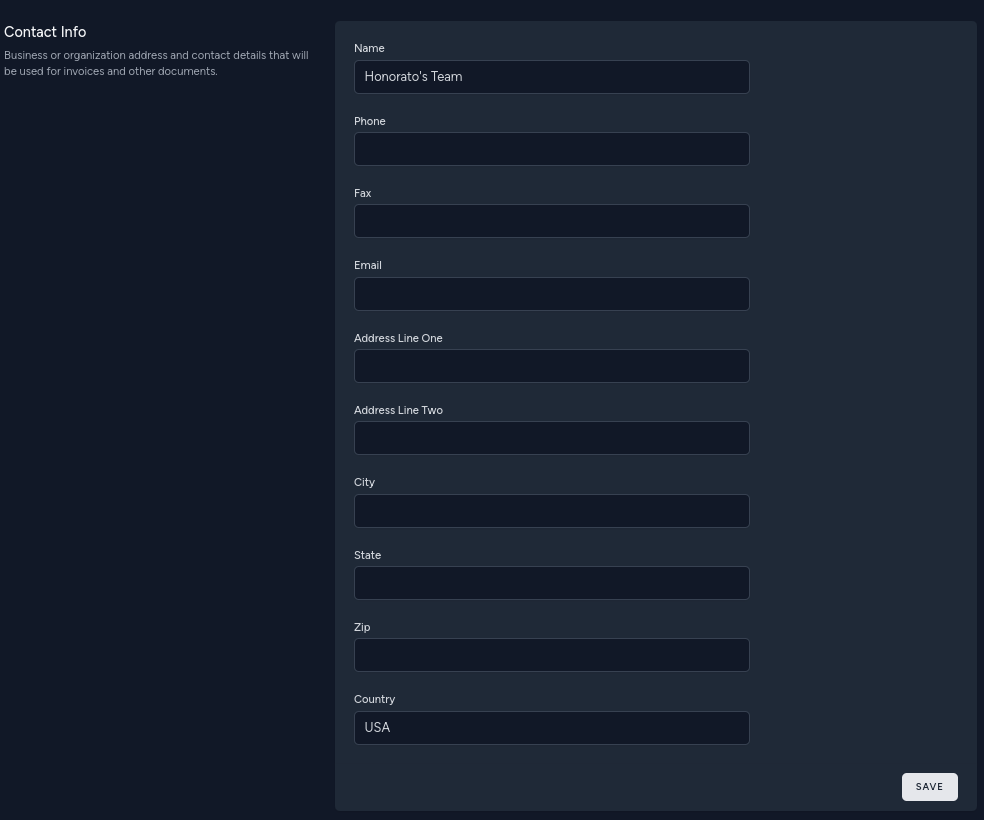
Allows a model to have address and other contact details
- Add contact data text (or json) field to your model's database table
$table->text('contact_data')->nullable();
- Add
\Envor\Platform\HasContactDatatrait to your model.
It can be any model but we will use the user model as an example:
...
class User extends Authenticatable
{
    ...
    use \Envor\Platform\HasContactData;
    ...
}
Usage example
$user->updateContactData([
    'name' => 'Jane Doe',
    'address' => [
        '1234 somewhere lane'
    ];
]);
- Use form (optional)
[!NOTE]
Requires livewire/volt and tailwind.
composer require livewire/volt
php artisan volt:install
Now you can add the form to any view:
@livewire('update-contact-info-form', ['model' => $user, 'readonly' => $user->id != auth()->id()])
Screenshot:
Testing
composer test
Changelog
Please see CHANGELOG for more information on what has changed recently.
Contributing
Please see CONTRIBUTING for details.
Security Vulnerabilities
Please review our security policy on how to report security vulnerabilities.
Credits
License
The MIT License (MIT). Please see License File for more information.
Related Packages
A theme framwork for your next web application. Theme inheritence, powered by La...
Platform for back-office applications, admin panel or CMS your Laravel app.
Desktop/mobile user agent parser with support for Laravel, based on Mobiledetect
Version History
| Version | Released | PHP | Laravel | License |
|---|---|---|---|---|
| v1.6.4 | ^8.2 | ^11.0 | MIT | |
| v1.6.3 | ^8.2 | ^11.0 | MIT | |
| v1.6.2 | ^8.2 | ^11.0 | MIT | |
| v1.6.1 | ^8.2 | ^11.0 | MIT | |
| v1.6.0 | ^8.2 | ^11.0 | MIT | |
| v1.5.2 | ^8.2 | ^11.0 | MIT | |
| v1.5.1 | ^8.2 | ^11.0 | MIT | |
| v1.5.0 | ^8.2 | ^11.0 | MIT | |
| v1.4.0 | ^8.2 | ^11.0 | MIT | |
| v1.3.10 | ^8.2 | ^11.0 | MIT | |
| v1.3.9 | ^8.2 | ^11.0 | MIT | |
| v1.3.8 | ^8.2 | ^11.0 | MIT | |
| v1.3.7 | ^8.2 | ^11.0 | MIT | |
| v1.3.6 | ^8.2 | ^11.0 | MIT | |
| v1.3.5 | ^8.2 | ^11.0 | MIT | |
| v1.3.4 | ^8.2 | ^11.0 | MIT | |
| v1.3.3 | ^8.2 | ^11.0 | MIT | |
| v1.3.2 | ^8.2 | ^11.0 | MIT | |
| v1.3.1 | ^8.2 | ^11.0 | MIT | |
| v1.3.0 | ^8.2 | ^11.0 | MIT | |
| v1.2.1 | ^8.2 | ^11.0 | MIT | |
| v1.2.0 | ^8.2 | ^11.0 | MIT | |
| v1.0.3 | ^8.2 | ^11.0 | MIT | |
| v1.0.2 | ^8.2 | ^11.0 | MIT | |
| v1.0.1 | ^8.2 | ^11.0 | MIT | |
| v1.0.0 | ^8.2 | ^11.0 | MIT |