filamentphp/advanced-export
| Install | |
|---|---|
composer require filamentphp/advanced-export |
|
| Latest Version: | v0.3.0 |
| PHP: | ^8.2 |
| License: | MIT |
| Last Updated: | Apr 1, 2026 |
| Links: | GitHub · Packagist |
Filament Advanced Export



Advanced export functionality for Filament resources with dynamic column selection, filtering, ordering, and background processing.
Features
- One-Command Setup - Configure export for any resource with a single command
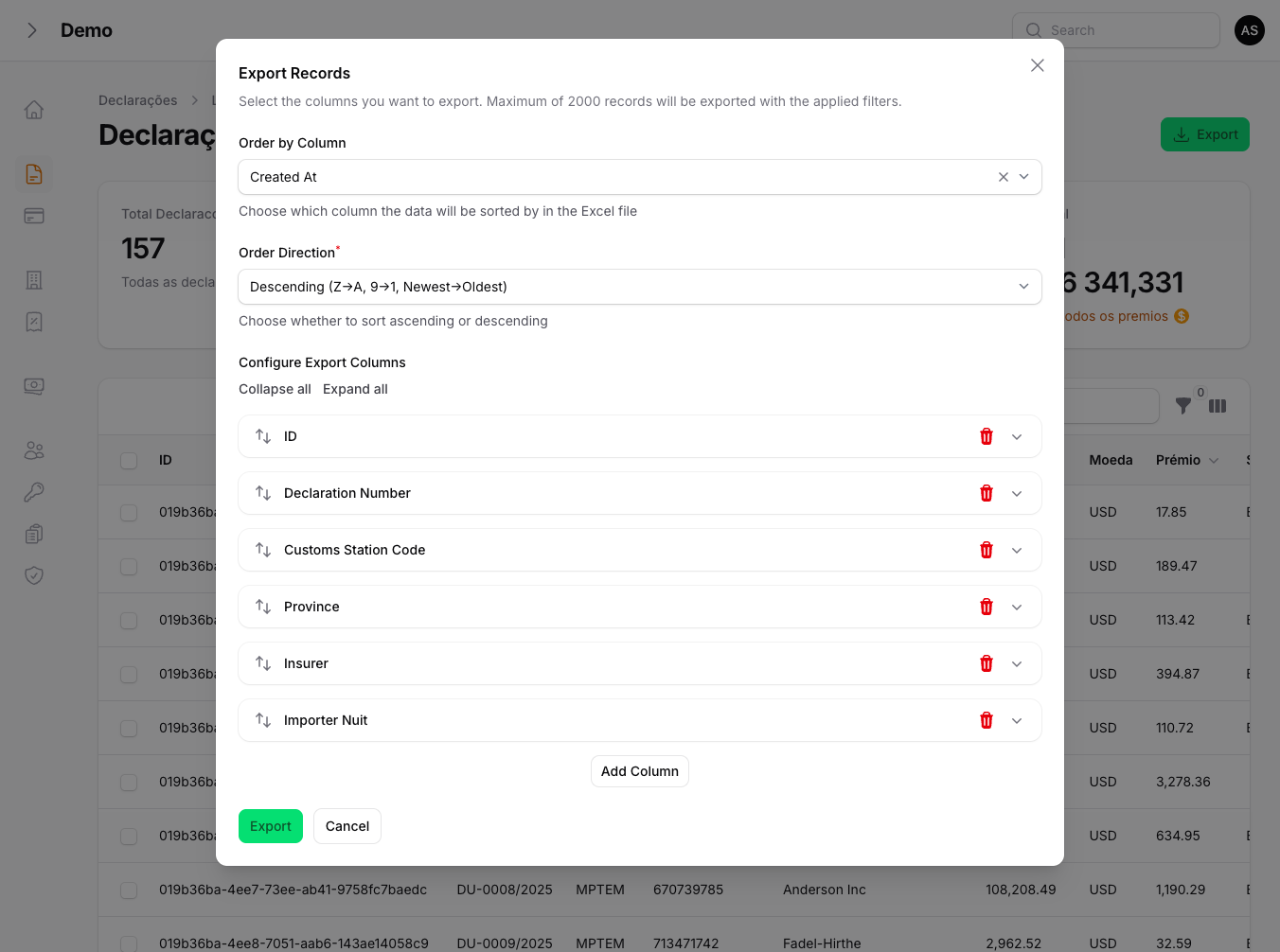
- Dynamic Column Selection - Users choose which columns to export
- Custom Column Titles - Rename columns in the exported file
- XLSX and CSV Formats - Export in Excel or CSV format via modal selector
- Record Count Preview - See how many records will be exported before exporting
- Configurable Ordering - Sort by any column with validated input (ascending or descending)
- Automatic Filter Support - Automatically respects active Filament table filters
- Configurable Fallback Filters - Override fallback filter names per resource or via config
- Background Processing - Queue large exports for async processing
- Secure Error Handling - Generic user notifications, detailed internal logging
- View-Based Templates - Customizable Blade views for export formatting
- FilamentShield Integration - Per-resource export permissions (Export:Titular, etc.)
- Bilingual Support - English and Portuguese translations included
- Artisan Commands - Generate views and model methods automatically
Requirements
- PHP 8.2+
- Laravel 11.0+, 12.0+ or 13.0+
- Filament 4.0+ or 5.0+
- Maatwebsite Excel 3.1+ or 4.0+
Installation
Install the package via Composer:
composer require filamentphp/advanced-export
Run the installation command:
php artisan export:install
This will:
- Publish the configuration file
- Publish translation files
- Register the plugin in your panel (interactive)
Manual Configuration
If you prefer manual setup, publish assets individually:
# Publish configuration
php artisan export:publish --config

# Publish views
php artisan export:publish --views

# Publish translations
php artisan export:publish --lang

# Publish stubs
php artisan export:publish --stubs

# Publish everything
php artisan export:publish --all
Quick Start
Option 1: One-Command Setup (Recommended)
The fastest way to add export functionality to any Filament resource:
php artisan export:resource "App\Filament\Resources\ClienteResource"
This single command will:
- Configure the Model - Add
Exportableinterface, trait, and export methods - Generate Views - Create both simple and advanced export Blade templates
- Update ListRecords - Add the
HasAdvancedExporttrait and export action
That's it! Your resource now has full export functionality.
Options
# Force overwrite existing files
php artisan export:resource "App\Filament\Resources\ClienteResource" --force
Option 2: Step-by-Step Setup
If you prefer more control, you can set up each component individually:
1. Configure the Model
php artisan export:model App\\Models\\Cliente
Or manually add the interface and methods:
<?php

namespace App\Models;

use Filament\AdvancedExport\Contracts\Exportable;
use Filament\AdvancedExport\Traits\InteractsWithExportable;
use Illuminate\Database\Eloquent\Model;

class Cliente extends Model implements Exportable
{
    use InteractsWithExportable;

    public static function getExportColumns(): array
    {
        return [
            'id' => 'ID',
            'nome' => 'Name',
            'email' => 'Email',
            'telefone' => 'Phone',
            'status' => 'Status',
            'created_at' => 'Created At',
        ];
    }

    public static function getDefaultExportColumns(): array
    {
        return [
            ['field' => 'id', 'title' => 'ID'],
            ['field' => 'nome', 'title' => 'Full Name'],
            ['field' => 'email', 'title' => 'Email Address'],
            ['field' => 'status', 'title' => 'Status'],
        ];
    }
}
2. Generate Export Views
php artisan export:views App\\Models\\Cliente
This creates:
resources/views/exports/clientes-excel.blade.php(simple export)resources/views/exports/clientes-excel-advanced.blade.php(advanced export)
3. Add Trait to ListRecords
<?php

namespace App\Filament\Resources\Cliente\Pages;

use App\Filament\Resources\ClienteResource;
use Filament\AdvancedExport\Traits\HasAdvancedExport;
use Filament\Actions\CreateAction;
use Filament\Resources\Pages\ListRecords;

class ListClientes extends ListRecords
{
    use HasAdvancedExport;

    protected static string $resource = ClienteResource::class;

    protected function getHeaderActions(): array
    {
        return [
            $this->getAdvancedExportHeaderAction(),
            CreateAction::make(),
        ];
    }
}
Automatic Filter Support
One of the key features of this package is automatic filter support. When users apply filters to your Filament table (e.g., ?filters[status][values][0]=pending), the export will automatically respect those filters.
How It Works
The package automatically:
- Extracts all active filters from the Filament table
- Checks if the filter column exists in the database table
- Applies the appropriate
WHEREorWHERE INclause
Supported Filter Types
| Filter Type | Example URL | Query Applied |
|---|---|---|
| Single value | ?filters[status][value]=active |
WHERE status = 'active' |
| Multiple values | ?filters[status][values][0]=pending&filters[status][values][1]=active |
WHERE status IN ('pending', 'active') |
| Date range | ?filters[created_at][from]=2024-01-01&filters[created_at][until]=2024-12-31 |
WHERE created_at BETWEEN ... |
Custom Filter Handling
For complex filters that don't map directly to columns, override the applyCustomFilter method:
class ListClientes extends ListRecords
{
    use HasAdvancedExport;

    protected function applyCustomFilter($query, string $filterName, mixed $filterValue): void
    {
        match ($filterName) {
            'has_orders' => $query->whereHas('orders'),
            'premium_customer' => $query->where('total_spent', '>', 10000),
            default => $this->applyGenericFilter($query, $filterName, $filterValue),
        };
    }
}
Configuration
The configuration file is published to config/advanced-export.php:
return [
    // Export limits
    'limits' => [
        'max_records' => 2000,
        'chunk_size' => 500,
        'queue_threshold' => 2000,
    ],

    // View configuration
    'views' => [
        'path' => 'exports',
        'simple_suffix' => '-excel',
        'advanced_suffix' => '-excel-advanced',
        'use_package_views' => false,
    ],

    // Date formatting
    'date_format' => 'd/m/Y H:i',

    // File generation
    'file' => [
        'extension' => 'xlsx',       // Default format: 'xlsx' or 'csv'
        'disk' => 'public',
        'directory' => 'exports',
        'supported_formats' => ['xlsx', 'csv'],  // Formats shown in modal
    ],

    // Action button appearance
    'action' => [
        'name' => 'export',
        'label' => null,
        'icon' => 'heroicon-o-arrow-down-tray',
        'color' => 'success',
    ],

    // Fallback filters (used when dynamic extraction fails)
    'fallback_filters' => [
        'created_at',
        'updated_at',
    ],

    // Queue settings
    'queue' => [
        'enabled' => true,
        'connection' => 'default',
        'queue' => 'exports',
    ],
];
CSV Export
The export modal includes a format selector. Users can choose between XLSX and CSV:
// config/advanced-export.php
'file' => [
    'extension' => 'xlsx',                    // Default format
    'supported_formats' => ['xlsx', 'csv'],   // Available in modal
],
CSV exports use the CsvExport class which implements FromCollection and WithHeadings for clean tabular output without view templates.
Record Count Preview
The export modal shows how many records will be exported before the user clicks the export button. This count respects active filters and the configured maximum limit.
Fallback Filter Configuration
When dynamic filter extraction fails (e.g., non-standard table implementations), the package falls back to a configurable list of filter names:
// config/advanced-export.php
'fallback_filters' => [
    'created_at',
    'updated_at',
    // Add your resource-specific filters here
],
You can also override per-resource:
class ListClientes extends ListRecords
{
    use HasAdvancedExport;

    protected function getFallbackFilterNames(): array
    {
        return ['created_at', 'updated_at', 'status', 'cliente_id'];
    }
}
Security
Error Handling
Export errors show a generic message to the user and log the full error internally:
- User sees: "An error occurred while processing the export. Please try again or contact support."
- Logs contain: Full exception message, stack trace, and context
Input Validation
- Order column is validated against the database schema and export columns list
- Order direction only accepts
ascordesc(case-insensitive), invalid values fall back todesc - Dot notation columns (e.g.,
client.name) are skipped gracefully in ordering -- overrideapplyCustomOrdering()to handle them with joins
Screenshots
Export Modal
Advanced Usage
Relationship Columns
You can export relationship data simply by using the relationship name as the column key:
public static function getExportColumns(): array
{
    return [
        'id' => 'ID',
        'declaration_number' => 'Declaration Number',
        'insurer' => 'Insurer',  // Will automatically load the relationship
        'status' => 'Status',
    ];
}
The package will automatically detect and load the relationship, displaying the related model's default display value.
For more specific relationship data (like a specific attribute), use dot notation:
public static function getExportColumns(): array
{
    return [
        'id' => 'ID',
        'insurer.name' => 'Insurer Name',      // Specific attribute
        'insurer.nuit' => 'Insurer NUIT',      // Another attribute
        'status' => 'Status',
    ];
}
Eager Loading Relationships
To optimize performance, specify relationships to eager load:
class ListDeclarations extends ListRecords
{
    use HasAdvancedExport;

    protected function getExportRelationshipsForModel(): array
    {
        return ['insurer', 'payments', 'createdBy'];
    }
}
Custom Ordering
The package validates order columns and directions automatically. Dot notation columns (relationship paths) are skipped by default.
To handle ordering by relationship columns, override applyCustomOrdering():
class ListClientes extends ListRecords
{
    use HasAdvancedExport;

    protected function applyCustomOrdering($query, string $orderColumn, string $orderDirection): void
    {
        // Direction is already validated ('asc' or 'desc') at this point
        if ($orderColumn === 'insurer.name') {
            $query->join('insurers', 'declarations.insurer_id', '=', 'insurers.id')
                  ->orderBy('insurers.name', $orderDirection);
            return;
        }

        // Call parent for standard column validation and ordering
        parent::applyCustomOrdering($query, $orderColumn, $orderDirection);
    }
}
Using Package Default Views
If you don't want to create custom views for each model:
// config/advanced-export.php
'views' => [
    'use_package_views' => true,
],
Artisan Commands
export:resource (Recommended)
Complete setup for a Filament resource in one command:
# Basic usage
php artisan export:resource "App\Filament\Resources\ClienteResource"

# Force overwrite existing files
php artisan export:resource "App\Filament\Resources\ClienteResource" --force
This command:
- Detects the model from the resource's
$modelproperty - Finds the ListRecords page from
getPages() - Runs
export:modelto configure the model - Runs
export:viewsto generate Blade templates - Updates the ListRecords page with the trait and action
export:install
Initial package setup:
php artisan export:install
php artisan export:install --panel=admin
php artisan export:install --no-interaction
export:model
Add export methods to a model:
php artisan export:model App\\Models\\Cliente
php artisan export:model App\\Models\\Cliente --columns=id,nome,email,created_at
php artisan export:model App\\Models\\Cliente --force
export:views
Generate export views for a model:
php artisan export:views App\\Models\\Cliente
php artisan export:views App\\Models\\Cliente --force
export:publish
Publish package assets:
php artisan export:publish --config
php artisan export:publish --views
php artisan export:publish --stubs
php artisan export:publish --lang
php artisan export:publish --migrations
php artisan export:publish --all
php artisan export:publish --all --force
Translations
The package includes translations for:
- English (
en) - Portuguese (
pt)
To add more languages, publish the translations and create new language files:
php artisan export:publish --lang
Then create resources/lang/vendor/advanced-export/{locale}/messages.php.
Background Processing with Notifications
The package includes a powerful background export feature with automatic database notifications. This is ideal for large exports that would otherwise timeout.
Using Background Export Action
Add the background export action to your ListRecords page:
use Filament\AdvancedExport\Traits\HasAdvancedExport;

class ListDeclarations extends ListRecords
{
    use HasAdvancedExport;

    protected function getHeaderActions(): array
    {
        return [
            $this->getAdvancedExportHeaderAction(),      // Synchronous export
            $this->getBackgroundExportAction(),          // Background export with notifications
            CreateAction::make(),
        ];
    }
}
How It Works
- User clicks "Background Export" button
- A confirmation modal appears
- Upon confirmation,
ProcessExportJobis dispatched to the queue - User sees a notification that the export is being processed
- When complete, a database notification appears with a download link
- If the export fails, a failure notification is sent
Requirements for Database Notifications
Make sure your Filament panel has database notifications enabled:
// app/Providers/Filament/AdminPanelProvider.php
public function panel(Panel $panel): Panel
{
    return $panel
        ->default()
        ->id('admin')
        ->databaseNotifications()  // Enable this!
        // ...
}
Running the Queue Workers
Background exports require queue workers. Run both the exports queue and the default queue (for notifications):
# In separate terminals or using a process manager like Supervisor:
php artisan queue:work --queue=exports
php artisan queue:work --queue=default
Or use a single worker for both:
php artisan queue:work --queue=exports,default
Dispatching Exports Programmatically
You can also dispatch exports directly:
use Filament\AdvancedExport\Jobs\ProcessExportJob;

ProcessExportJob::dispatch(
    modelClass: Cliente::class,
    filters: $activeFilters,
    fileName: 'clientes_export_2024.xlsx',
    viewName: 'exports.clientes-excel-advanced',
    columnsConfig: $columnsConfig,
    orderColumn: 'created_at',
    orderDirection: 'desc',
    relationships: ['tipoCliente', 'provincia'],
    userId: auth()->id()  // Required for notifications
);
Configuring the User Model
If you use a custom user model, configure it in config/advanced-export.php:
'user_model' => App\Models\User::class,
Filter Support in Background Exports
Background exports fully support all filter types:
| Filter Type | Automatically Handled |
|---|---|
| Direct columns | status, type |
| Relationship filters | insurer → insurer_id |
| Date ranges | created_at[from/until] |
| Multiple values | status[values][0,1,2] |
The ProcessExportJob automatically resolves relationship filter names to their actual column names (e.g., insurer → insurer_id).
Customizing Blade Views
The package uses Blade views to render Excel exports. You can customize these views to format data, add styling, or handle special fields.
View Types
| Type | Generated File | Purpose |
|---|---|---|
| Simple | {table}-excel.blade.php |
Exports all model attributes automatically |
| Advanced | {table}-excel-advanced.blade.php |
Exports only user-selected columns with custom titles |
View Variables
Both views receive these variables:
| Variable | Type | Description |
|---|---|---|
${tableName} |
Collection | The records to export (e.g., $declarations) |
$columnsConfig |
array | User-selected columns with titles (advanced only) |
Basic View Structure
@php use Carbon\Carbon; @endphp
<table>
    <thead>
    <tr>
        @foreach($columnsConfig as $columnConfig)
            <th>{{ $columnConfig['title'] ?? 'Untitled' }}</th>
        @endforeach
    </tr>
    </thead>
    <tbody>
    @foreach($declarations as $declaration)
        <tr>
            @foreach($columnsConfig as $columnConfig)
                @php $field = $columnConfig['field'] ?? ''; @endphp
                <td>
                    @switch($field)
                        {{-- Custom field handling here --}}
                        @default
                            {{ $declaration->{$field} ?? '-' }}
                    @endswitch
                </td>
            @endforeach
        </tr>
    @endforeach
    </tbody>
</table>
Custom Field Formatting
Use @switch statements to format specific fields:
@switch($field)
    {{-- Date formatting --}}
    @case('created_at')
        {{ $record->created_at?->format('d/m/Y H:i') ?? '-' }}
        @break

    {{-- Relationship data --}}
    @case('insurer')
        {{ $record->insurer->name ?? '-' }}
        @break

    {{-- Currency formatting --}}
    @case('amount')
        {{ number_format($record->amount, 2, ',', '.') }}
        @break

    {{-- Boolean values --}}
    @case('is_active')
        {{ $record->is_active ? 'Yes' : 'No' }}
        @break

    {{-- Enum/Status with translation --}}
    @case('status')
        {{ __("statuses.{$record->status}") }}
        @break

    {{-- Nested relationships --}}
    @case('client.province')
        {{ $record->client?->province?->name ?? '-' }}
        @break

    @default
        {{ $record->{$field} ?? '-' }}
@endswitch
Complete Custom View Example
Here's a full example for a declarations export:
{{-- resources/views/exports/declarations-excel-advanced.blade.php --}}
@php use Carbon\Carbon; @endphp
<table>
    <thead>
    <tr>
        @foreach($columnsConfig as $columnConfig)
            <th>{{ $columnConfig['title'] ?? __('advanced-export::messages.undefined_title') }}</th>
        @endforeach
    </tr>
    </thead>
    <tbody>
    @foreach($declarations as $declaration)
        <tr>
            @foreach($columnsConfig as $columnConfig)
                @php $field = $columnConfig['field'] ?? ''; @endphp
                <td>
                    @switch($field)
                        @case('id')
                            {{ $declaration->id ?? '-' }}
                            @break
                        @case('declaration_number')
                            {{ $declaration->declaration_number ?? '-' }}
                            @break
                        @case('insurer')
                            {{ $declaration->insurer->name ?? '-' }}
                            @break
                        @case('cif_value')
                            {{ number_format($declaration->cif_value ?? 0, 2, ',', '.') }}
                            @break
                        @case('status')
                            {{ ucfirst($declaration->status ?? '-') }}
                            @break
                        @case('created_at')
                            {{ $declaration->created_at?->format('d/m/Y H:i') ?? '-' }}
                            @break
                        @default
                            {{ $declaration->{$field} ?? '-' }}
                    @endswitch
                </td>
            @endforeach
        </tr>
    @endforeach
    </tbody>
</table>
Using Package Default Views
If you don't need custom formatting, enable the package's default views:
// config/advanced-export.php
'views' => [
    'use_package_views' => true,
],
The default views automatically:
- Format dates using
config('advanced-export.date_format') - Handle null values with
- - Convert booleans to Yes/No
- Serialize arrays/objects to JSON
Styling Excel Output
Maatwebsite Excel supports basic HTML styling:
<table>
    <thead>
    <tr style="background-color: #4CAF50; color: white; font-weight: bold;">
        @foreach($columnsConfig as $columnConfig)
            <th>{{ $columnConfig['title'] }}</th>
        @endforeach
    </tr>
    </thead>
    <tbody>
    @foreach($records as $record)
        <tr style="{{ $loop->even ? 'background-color: #f2f2f2;' : '' }}">
            {{-- cells --}}
        </tr>
    @endforeach
    </tbody>
</table>
Customizing the Export Button
Override trait methods to customize appearance:
class ListClientes extends ListRecords
{
    use HasAdvancedExport;

    protected function getExportActionLabel(): string
    {
        return 'Download Excel';
    }

    protected function getExportActionIcon(): string
    {
        return 'heroicon-o-document-arrow-down';
    }

    protected function getExportActionColor(): string
    {
        return 'primary';
    }

    protected function getExportModalHeading(): string
    {
        return 'Configure Your Export';
    }
}
FilamentShield Integration
If you use FilamentShield, the export button can be controlled per role/resource.
Step 1: Add the trait to your Resource
use Filament\AdvancedExport\Concerns\HasExportPermission;

class TitularResource extends Resource
{
    use HasExportPermission;
    // ...
}
This registers export as a permission prefix. When you run php artisan shield:generate, Shield will create Export:Titular automatically.
Step 2: That's it!
The export button will only be visible to users with the Export:{Resource} permission. Without Shield installed, the button is visible to everyone.
How it works
HasExportPermissiontrait on the Resource → tells Shield to generate theexportpermissionHasAdvancedExporttrait on the ListRecords → checks if user has the permission before showing the button- Without Shield → export is always allowed (no breaking changes)
Changelog
Please see CHANGELOG for more information on what has changed recently.
Contributing
Contributions are welcome! Please see CONTRIBUTING for details.
Security
If you discover any security-related issues, please email anselmokossa.apk@gmail.com instead of using the issue tracker.
Credits
License
The MIT License (MIT). Please see License File for more information.
Related Packages
Export and print Filament admin tables to CSV, XLSX, PDF, DOCX, JSON, and XML —...
Filament plugin for advanced Excel file data entry based on `SpartanNL/Laravel-E...
Export Filament tables to CSV, XLSX and PDF with preview and print support.
Transport Filament resources between projects with automatic dependency discover...
Version History
| Version | Released | PHP | Laravel | License |
|---|---|---|---|---|
| v0.3.0 | ^8.2 | ^11.0| | MIT | |
| v0.2.0 | ^8.2 | ^11.0| | MIT | |
| v0.1.1 | ^8.2 | ^11.0| | MIT | |
| v0.1.0 | ^8.2 | ^11.0| | MIT |