harvirsidhu/filament-cards
| Install | |
|---|---|
composer require harvirsidhu/filament-cards |
|
| Latest Version: | v1.1.0 |
| PHP: | ^8.2 |
| License: | MIT |
| Last Updated: | Sep 3, 2026 |
| Links: | GitHub · Packagist |
Filament Cards
Turn any Filament page into a card-based navigation hub — perfect for Settings hubs, Cluster front pages, Resource dashboards, or any place you want a clean grid of links instead of a sidebar tree.
It feels like part of Filament: same API patterns (label, schema, columnSpan, visible/hidden), respects your existing navigation config, and auto-discovers Cluster/Resource pages with full authorization checks.
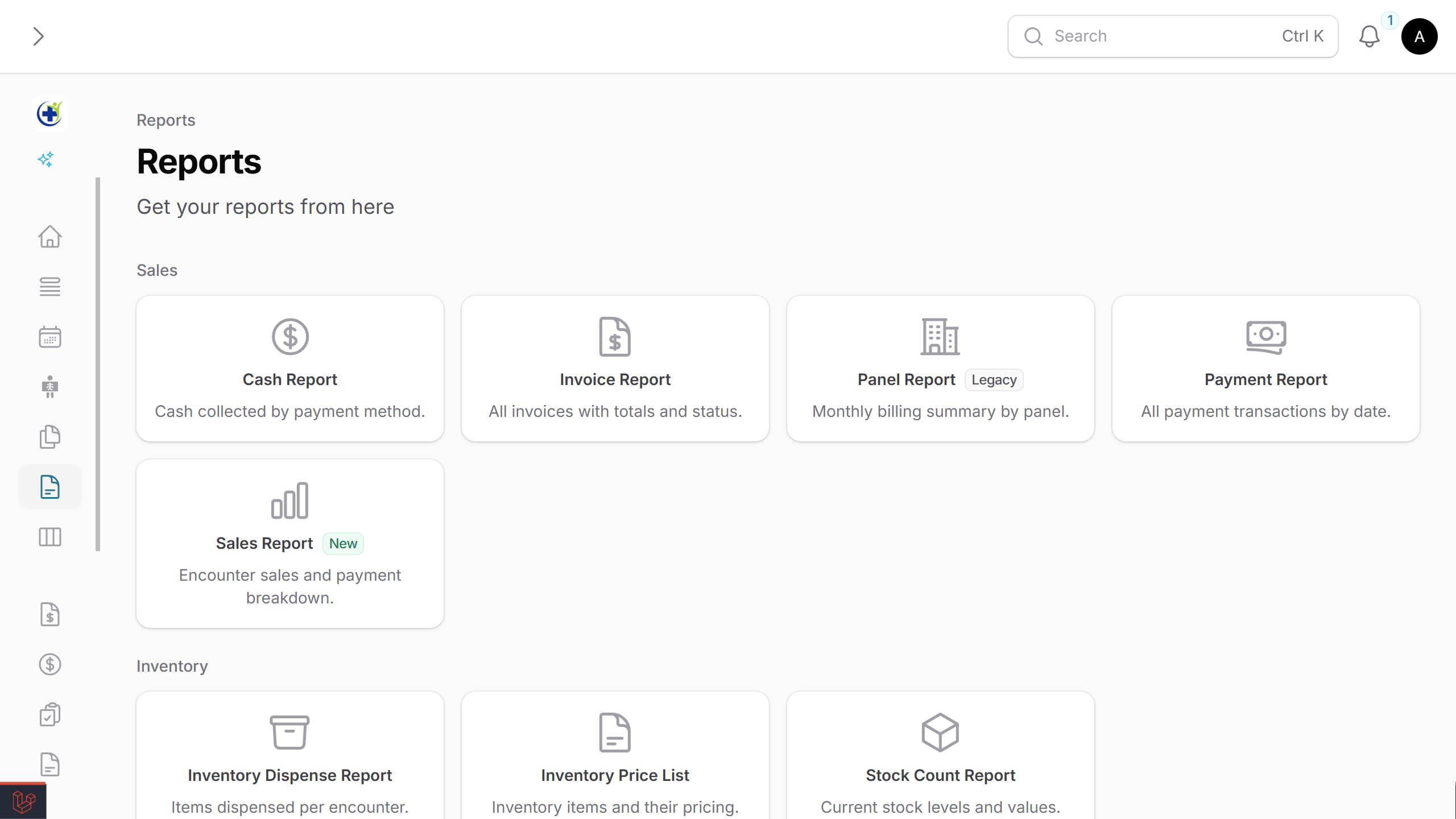
Table of Contents
- Why use this?
- Which approach fits your case?
- Requirements
- Installation
- 60-Second Quick Start
- Use Case A — Cluster Front Page (most common)
- Use Case B — Resource Hub
- Use Case C — Standalone Settings Page
- API Reference —
CardItem - API Reference —
CardGroup - API Reference —
CardsPageConfiguration - API Reference — Page/Resource Hooks (for auto-discovery)
- Advanced — Dynamic Registration
- Advanced — Custom Discovery Filtering
- Full Example
- Optional — Plugin Registration
- Translations
- License
Why use this?
| Feature | What it gives you |
|---|---|
| Auto-discovery | Reads pages/resources in a Cluster (or Resource) and creates cards automatically — no manual list to maintain. |
| Filament-native API | label, description, schema, visible, hidden, columnSpan — same patterns you already use. |
| Authorization-aware | Calls canAccess() on each component before rendering. |
| Grouping & layout | CardGroup, columns, spans, compact mode, collapsible sections. |
| Flexible visibility | Per-card or per-page hooks; central exclude lists; closure-based conditions. |
| Manual + discovered | Mix auto-discovered cards with hand-crafted ones (e.g., external links). |
| Dynamic registration | Add cards from service providers — useful for modular apps and packages. |
| Client-side search | Optional live search that filters by label, description, badge, and custom keywords. |
Which approach fits your case?
| Your situation | Use this |
|---|---|
| You have a Cluster with several pages and want a landing page | Cluster Front Page |
| You have a Resource with many custom pages | Resource Hub |
| You just want a generic settings/control panel with manual cards | Standalone Page |
| You want to add cards from a package or module | Dynamic Registration |
Requirements
- PHP 8.2+
- Laravel 11+
- Filament v4 or v5
Installation
Install the package via Composer:
composer require harvirsidhu/filament-cards
Theme setup (required for styling)
The plugin uses Tailwind classes, so add its views to your Filament theme so Tailwind picks them up.
In your theme.css, add:
@source '../../../../vendor/harvirsidhu/filament-cards/resources/views';
Then rebuild assets:
npm run build
60-Second Quick Start
The smallest possible cards page:
namespace App\Filament\Pages;

use Harvirsidhu\FilamentCards\CardItem;
use Harvirsidhu\FilamentCards\Filament\Pages\CardsPage;

class ControlPanel extends CardsPage
{
    protected static ?string $navigationIcon = 'heroicon-o-squares-2x2';

    protected static function getCards(): array
    {
        return [
            CardItem::make(CompanySettings::class),
            CardItem::make(BillingSettings::class),
        ];
    }
}
That's it — Filament will pick up your new page, and clicking each card navigates to the linked page.
Use Case A — Cluster Front Page (most common)
The most powerful pattern: a CardsPage that automatically lists every page and resource in its Cluster.
Step 1 — Define the Cluster
namespace App\Filament\Clusters;

use Filament\Clusters\Cluster;

class Settings extends Cluster
{
    protected static ?string $navigationIcon = 'heroicon-o-cog-8-tooth';
}
Step 2 — Create the front-page CardsPage
namespace App\Filament\Clusters\Settings\Pages;

use App\Filament\Clusters\Settings;
use Harvirsidhu\FilamentCards\Filament\Pages\CardsPage;

class SettingsHub extends CardsPage
{
    protected static ?string $cluster = Settings::class;
    protected static ?int $navigationSort = -1; // Show first in the cluster

    protected static function getCards(): array
    {
        return static::discoverClusterCards();
    }
}
Step 3 — Your other Cluster pages need no changes
Your existing pages just work. To add a description on the card, add a single property:
class CompanySettings extends Page
{
    protected static ?string $cluster = Settings::class;
    protected static ?string $navigationIcon = 'heroicon-o-building-office';

    public static ?string $navigationDescription = 'Manage company name, address, and branding.';
}
Breadcrumbs (Dashboard > Settings > Company Settings) work automatically.
What discoverClusterCards() does
In order, for every component registered to the Cluster:
- Skips the CardsPage itself.
- Calls
canAccess()(respects authorization). - Checks
showInFilamentCards()/$showInFilamentCards— falls back toshouldRegisterNavigation(). - Reads
$navigationLabel,$navigationIcon, and the resolved URL. - Reads
getNavigationBadge()/getNavigationBadgeColor()if defined. - Reads
$navigationDescription(orgetNavigationDescription()) if defined. - Groups by
getFilamentCardsGroup()/$filamentCardsGroup— falls back to$navigationGroup. - Sorts each group by
$navigationSort.
Hiding a card from auto-discovery
Option 1 — on the Page/Resource (recommended):
class InternalToolsPage extends Page
{
    public static function showInFilamentCards(): bool
    {
        return false;
    }
}

// or as a property
class AuditLogsResource extends Resource
{
    public static bool $showInFilamentCards = false;
}
To force-show a page that's hidden from the sidebar:
class HiddenFromSidebarPage extends Page
{
    public static function shouldRegisterNavigation(): bool
    {
        return false;
    }

    public static function showInFilamentCards(): bool
    {
        return true;
    }
}
Option 2 — central exclude list on the CardsPage:
class SettingsHub extends CardsPage
{
    protected static array $excludedClusterComponents = [
        AuditLogsResource::class,
        InternalToolsPage::class,
    ];
}
Custom group name (different from the sidebar)
class CompanySettings extends Page
{
    public static function getFilamentCardsGroup(): ?string
    {
        return 'Business Settings';
    }
}

// or property form
class BillingResource extends Resource
{
    public static ?string $filamentCardsGroup = 'Finance';
}
Mixing discovered cards with manual ones
protected static function getCards(): array
{
    return [
        ...static::discoverClusterCards(),

        CardGroup::make('External Links')
            ->schema([
                CardItem::make('https://docs.example.com')
                    ->label('Documentation')
                    ->icon('heroicon-o-book-open')
                    ->openUrlInNewTab(),
            ]),
    ];
}
Use Case B — Resource Hub
When a Resource has many custom pages, use discoverResourceCards() to auto-create a card for each:
namespace App\Filament\Resources\UserResource\Pages;

use App\Filament\Resources\UserResource;
use Harvirsidhu\FilamentCards\Filament\Pages\CardsPage;

class UserSettingsHub extends CardsPage
{
    protected static string $resource = UserResource::class;

    protected static function getCards(): array
    {
        return static::discoverResourceCards();
    }
}
$resource is what tells the page which resource to read; discoverResourceCards() returns nothing without it.
Same hooks (showInFilamentCards, $navigationDescription, etc.) work here. To exclude specific pages:
protected static array $excludedResourcePages = [
    UserResource\Pages\DangerZone::class,
];
Use Case C — Standalone Settings Page
No Cluster, no Resource — just a manually-curated cards page:
use Harvirsidhu\FilamentCards\CardGroup;
use Harvirsidhu\FilamentCards\CardItem;
use Harvirsidhu\FilamentCards\Filament\Pages\CardsPage;

class ControlPanel extends CardsPage
{
    protected static ?string $navigationIcon = 'heroicon-o-squares-2x2';

    protected static function getCards(): array
    {
        return [
            CardGroup::make('General')
                ->icon('heroicon-o-cog')
                ->description('Core settings')
                ->schema([
                    CardItem::make(CompanySettings::class)->color('primary'),
                    CardItem::make(BillingSettings::class)->color('success'),
                ]),

            CardItem::make('/external/docs')
                ->label('Documentation')
                ->icon('heroicon-o-document-text')
                ->openUrlInNewTab(),
        ];
    }
}
API Reference — CardItem
CardItem represents a single clickable card. Pass a Filament Page class, Resource class, or a URL string:
CardItem::make(CompanySettings::class)  // Filament Page
CardItem::make(UserResource::class)     // Filament Resource
CardItem::make('/custom/path')          // Internal URL
CardItem::make('https://example.com')   // External URL
When given a Page/Resource class, the card auto-resolves label, icon, description, badge, badgeColor, and url from the class's navigation properties — lazily, so a badge that runs a count query only runs it if the card is actually shown.
Such a card is also hidden automatically when the user cannot access the target, so the grid never offers a link that lands on a 403. See checkAccess() to opt out.
Method overview
| Method | Purpose |
|---|---|
label() |
Override the card title |
description() |
Subtitle below the title |
badge() |
Right-aligned badge |
badgeColor() |
Badge color |
icon() |
Override the card icon |
url() / openUrlInNewTab() |
Override target URL |
alignment() |
Text alignment inside the card |
color() |
Color accent on the card |
visible() / hidden() |
Conditional rendering |
disabled() |
Render but make non-clickable |
sort() |
Order within a group |
columnSpan() / columnSpanFull() |
Grid span |
searchKeywords() |
Extra terms for the search bar |
actions() |
Filament actions rendered on the card |
checkAccess() |
Opt out of the automatic canAccess() check |
extraAttributes() |
Custom HTML attributes |
label()
Override the card title. Accepts a string or Closure:
CardItem::make(CompanySettings::class)
    ->label('Company')

CardItem::make(CompanySettings::class)
    ->label(fn () => __('settings.company'))
description()
Add a subtitle below the title:
CardItem::make(CompanySettings::class)
    ->description('Manage company name, address, and branding')
Auto-discovery shortcut: add
public static ?string $navigationDescriptionto the page/resource anddiscoverClusterCards()/discoverResourceCards()will pick it up automatically.
badge() / badgeColor()
CardItem::make(CompanySettings::class)
    ->badge('Beta')
    ->badgeColor('primary')
Auto-discovery: read from
getNavigationBadge()/getNavigationBadgeColor()when present on the discovered Page/Resource.
icon()
CardItem::make('/path')
    ->icon('heroicon-o-building-office')
url() / openUrlInNewTab()
CardItem::make(CompanySettings::class)
    ->url('https://custom-url.com')
    ->openUrlInNewTab()
alignment()
Text alignment inside the card. Options: Start, Center, End, Justify.
use Filament\Support\Enums\Alignment;

CardItem::make(CompanySettings::class)
    ->alignment(Alignment::Center)
color()
Color accent on the card. Available: primary, success, danger, warning, info, gray.
CardItem::make(BillingSettings::class)->color('success')
CardItem::make(DangerZone::class)->color('danger')
visible() / hidden()
Boolean or Closure:
CardItem::make(BillingSettings::class)
    ->visible(fn () => auth()->user()->can('manage-billing'))

CardItem::make(DangerZone::class)
    ->hidden(fn () => ! auth()->user()->isAdmin())
disabled()
Render the card but make it non-clickable with reduced opacity:
CardItem::make(DangerZone::class)
    ->disabled(fn () => ! auth()->user()->isAdmin())
sort()
Order cards within a group:
CardItem::make(CompanySettings::class)->sort(1)
CardItem::make(BillingSettings::class)->sort(2)
columnSpan() / columnSpanFull()
CardItem::make(CompanySettings::class)->columnSpan(2)
CardItem::make(NotificationPrefs::class)->columnSpanFull()

// Responsive
CardItem::make(CompanySettings::class)->columnSpan([
    'default' => 1,
    'md' => 2,
    'lg' => 3,
])
searchKeywords()
Extra terms used by the page's search bar (when $searchable = true on the CardsPage). Useful for aliases and jargon — the keywords are not displayed.
CardItem::make(BillingSettings::class)
    ->searchKeywords(['invoices', 'payments', 'subscriptions', 'finance'])

CardItem::make(CompanySettings::class)
    ->searchKeywords('organisation') // single string ok

CardItem::make(LegacyTools::class)
    ->searchKeywords(fn () => $this->resolveLegacyAliases())
Auto-discovery: declare on the page/resource directly:
public static array $filamentCardsSearchKeywords = ['organisation', 'org'];

// …or as a method
public static function getFilamentCardsSearchKeywords(): array
{
    return ['organisation', 'org'];
}
actions()
Render Filament actions on a card. Action names must be unique across the page — the same constraint Filament puts on a page's header actions.
use Filament\Actions\Action;

CardItem::make(CacheSettings::class)
    ->actions([
        Action::make('clearCache')
            ->label('Clear now')
            ->requiresConfirmation()
            ->action(fn () => Artisan::call('cache:clear')),
    ])
A card with actions keeps its whole surface clickable via a stretched overlay link, because a <button> nested inside an <a> is invalid HTML and unreachable by keyboard.
checkAccess()
Cards built from a Page or Resource class are hidden when canAccess() returns false. Turn that off for a card whose target is guarded by something Filament cannot see:
CardItem::make(LegacyReportPage::class)->checkAccess(false)
extraAttributes()
Custom HTML attributes on the card element:
CardItem::make(CompanySettings::class)
    ->extraAttributes([
        'data-analytics' => 'company-settings',
        'id' => 'company-card',
    ])
API Reference — CardGroup
Groups organize cards under a (collapsible) header — like Filament's Section.
Method overview
| Method | Purpose |
|---|---|
schema() |
Cards inside the group |
label() / description() / icon() |
Header customization |
columns() |
Override grid columns for this group |
collapsible() / collapsed() |
Collapse behavior |
compact() |
Tighter padding/gaps |
persistCollapsed() |
Remember collapse state across page loads |
contained() |
Render the group inside a Filament section |
id() |
Stable identifier for persisted collapse state |
visible() / hidden() |
Hide the whole group |
schema()
CardGroup::make('General')
    ->schema([
        CardItem::make(CompanySettings::class),
        CardItem::make(BillingSettings::class),
    ])
label() / description() / icon() (group)
CardGroup::make('General')
    ->label('General Settings')
    ->description('Core application configuration')
    ->icon('heroicon-o-cog')
    ->schema([...])
columns()
Integer or responsive array (Filament widget style):
CardGroup::make('Wide Cards')
    ->columns(2)
    ->schema([...])

CardGroup::make('Wide Cards')
    ->columns([
        'md' => 2,
        'xl' => 4,
    ])
    ->schema([...])
collapsible() / collapsed()
CardGroup::make('Advanced')->collapsible()->schema([...])

// Starts collapsed (implicitly collapsible)
CardGroup::make('Advanced')->collapsed()->schema([...])

CardGroup::make('Advanced')
    ->collapsed(fn () => ! auth()->user()->isAdmin())
    ->schema([...])
persistCollapsed()
Remembers whether the user collapsed a group, using the same Alpine $persist mechanism as Filament's own sections, so it does not spring open on every navigation.
CardGroup::make('Advanced')->collapsed()->persistCollapsed()->schema([...])
Turn it on for every group in the panel with FilamentCardsPlugin::make()->persistCollapsed().
contained()
Renders the group inside a Filament Section instead of under a plain heading, so it matches the rest of the panel's chrome:
CardGroup::make('Billing')->contained()->collapsible()->schema([...])
id()
Groups derive a slug from their label to key persisted collapse state. Set one explicitly when the label is dynamic:
CardGroup::make(fn () => $this->tenantName)->id('tenant')->persistCollapsed()->schema([...])
compact()
CardGroup::make('Quick Links')
    ->compact()
    ->schema([...])
Group-level visible() / hidden()
CardGroup::make('Admin Only')
    ->hidden(fn () => ! auth()->user()->isAdmin())
    ->schema([...])
API Reference — CardsPage Configuration
Configure the whole page with static properties.
Each setting resolves in this order:
page static property → plugin default → package default
so a page that declares a property always wins, and pages that declare nothing follow the panel. Every setting also has an overridable getter (getCardsColumns(), isCardsSearchable(), getCardsItemsAlignment(), getCardsIconSize(), getCardsIconPosition(), hasInlinedCardIcons(), getCardsSearchPlaceholder()) for values you need to compute at runtime:
public static function getCardsColumns(): int|string|array
{
    return auth()->user()->prefersDenseLayout() ? 4 : 3;
}
| Property | Type | Default | Purpose |
|---|---|---|---|
$columns |
int|string|array |
3 |
Grid columns (responsive supported) |
$itemsAlignment |
Alignment |
Center |
Alignment of card content |
$iconSize |
IconSize |
Medium |
Card icon size |
$iconInlined |
bool |
false |
Inline icon with title (vs stacked) |
$iconPosition |
IconPosition |
Before |
Icon before or after the label |
$searchable |
bool |
false |
Show a client-side search bar |
$searchPlaceholder |
?string |
null ('Search…') |
Placeholder text for the search input |
$excludedClusterComponents |
array |
[] |
Skip these classes in discoverClusterCards() |
$excludedResourcePages |
array |
[] |
Skip these classes in discoverResourceCards() |
$columns
Declare the full int|string|array type — PHP requires a redeclared static property to match the parent's type exactly, so protected static int $columns is a fatal error.
protected static string|int|array $columns = 4;

// Responsive
protected static string|int|array $columns = [
    'md' => 2,
    'xl' => 4,
];
$itemsAlignment
use Filament\Support\Enums\Alignment;

protected static Alignment $itemsAlignment = Alignment::Center;
$iconSize
use Filament\Support\Enums\IconSize;

protected static IconSize $iconSize = IconSize::Small;
$iconInlined
protected static bool $iconInlined = true;
$iconPosition
use Filament\Support\Enums\IconPosition;

protected static IconPosition $iconPosition = IconPosition::After;
$searchable
Renders a search bar at the top right. Filters cards live by label, description, badge, and any searchKeywords(). Empty groups are auto-hidden. Filtering happens client-side via Alpine.js — no server round-trips.
protected static bool $searchable = true;
$searchPlaceholder
protected static bool $searchable = true;
protected static ?string $searchPlaceholder = 'Find a tool...';
$excludedClusterComponents
protected static array $excludedClusterComponents = [
    AuditLogsResource::class,
    InternalToolsPage::class,
];
$excludedResourcePages
protected static array $excludedResourcePages = [
    UserResource\Pages\DangerZone::class,
];
API Reference — Page/Resource Hooks (for auto-discovery)
These are read off your existing Pages and Resources by discoverClusterCards() / discoverResourceCards(). You add them only to pages you want discovered.
| Hook | Form | Purpose |
|---|---|---|
$navigationDescription |
public static ?string |
Subtitle text on the card |
getNavigationDescription() |
public static function (): ?string |
Same as above (method form) |
$showInFilamentCards |
public static bool |
Whether to include in cards |
showInFilamentCards() |
public static function (): bool |
Same (method form) |
$filamentCardsGroup |
public static ?string |
Override group name (otherwise $navigationGroup) |
getFilamentCardsGroup() |
public static function (): ?string |
Same (method form) |
$filamentCardsSearchKeywords |
public static array |
Extra search terms |
getFilamentCardsSearchKeywords() |
public static function (): array |
Same (method form) |
getNavigationBadge() |
Filament built-in | Read by discovery for the card badge |
getNavigationBadgeColor() |
Filament built-in | Read by discovery for the badge color |
$navigationLabel / $navigationIcon / $navigationSort / $navigationGroup |
Filament built-in | Used as defaults for label/icon/order/group |
Advanced — Dynamic Registration
Add cards from outside the class — useful for modular apps and packages. Call from a service provider's boot():
use App\Filament\Pages\ControlPanel;
use Harvirsidhu\FilamentCards\CardItem;

ControlPanel::addCards([
    CardItem::make(UserManagement::class)
        ->label('User Accounts')
        ->icon('heroicon-o-users')
        ->description('Manage roles, permissions, and user accounts'),
]);
Advanced — Custom Discovery Filtering
Override shouldIncludeDiscoveredCard() for centralized inclusion logic that goes beyond exclude lists:
protected static function shouldIncludeDiscoveredCard(string $component): bool
{
    if (! parent::shouldIncludeDiscoveredCard($component)) {
        return false;
    }

    return $component !== BetaFeaturePage::class;
}
Full Example
Everything together — auto-discovery, manual cards, groups, conditional visibility, and an external link:
use Filament\Support\Enums\Alignment;
use Filament\Support\Enums\IconPosition;
use Filament\Support\Enums\IconSize;
use Harvirsidhu\FilamentCards\CardGroup;
use Harvirsidhu\FilamentCards\CardItem;
use Harvirsidhu\FilamentCards\Filament\Pages\CardsPage;

class SettingsHub extends CardsPage
{
    protected static ?string $navigationIcon = 'heroicon-o-cog-8-tooth';
    protected static int|string|array $columns = 3;
    protected static Alignment $itemsAlignment = Alignment::Center;
    protected static IconSize $iconSize = IconSize::Medium;
    protected static IconPosition $iconPosition = IconPosition::Before;

    protected static function getCards(): array
    {
        return [
            CardGroup::make('General')
                ->icon('heroicon-o-cog')
                ->description('Core application settings')
                ->collapsible()
                ->schema([
                    CardItem::make(CompanySettings::class)
                        ->color('primary'),

                    CardItem::make(BillingSettings::class)
                        ->visible(fn () => auth()->user()->can('manage-billing'))
                        ->color('success')
                        ->sort(2),

                    CardItem::make(NotificationPrefs::class)
                        ->description('Email, SMS & push notification preferences')
                        ->columnSpanFull(),
                ]),

            CardGroup::make('Danger Zone')
                ->icon('heroicon-o-exclamation-triangle')
                ->collapsed()
                ->columns(2)
                ->schema([
                    CardItem::make(DangerZone::class)
                        ->color('danger')
                        ->disabled(fn () => ! auth()->user()->isAdmin()),
                ]),

            CardItem::make('https://docs.example.com')
                ->label('Documentation')
                ->icon('heroicon-o-book-open')
                ->openUrlInNewTab()
                ->extraAttributes(['data-track' => 'docs']),
        ];
    }
}
Optional — Plugin Registration
Not required, but registering the plugin lets you set defaults once for every cards page in the panel, instead of redeclaring the same statics on each:
use Filament\Support\Enums\Alignment;
use Harvirsidhu\FilamentCards\FilamentCardsPlugin;

public function panel(Panel $panel): Panel
{
    return $panel
        ->plugins([
            FilamentCardsPlugin::make()
                ->columns(4)
                ->itemsAlignment(Alignment::Start)
                ->searchable()
                ->persistCollapsed(),
        ]);
}
| Method | Sets the default for |
|---|---|
columns() |
$columns |
itemsAlignment() |
$itemsAlignment |
iconSize() |
$iconSize |
iconPosition() |
$iconPosition |
iconInlined() |
$iconInlined |
searchable() |
$searchable |
searchPlaceholder() |
$searchPlaceholder |
persistCollapsed() |
Whether collapsible groups remember their state |
A page that declares the corresponding static property still wins — see the resolution order.
Translations
Every user-facing string (the search placeholder, the screen-reader labels, the empty states) lives in the package's language files. Publish them to customise:
php artisan vendor:publish --tag=filament-cards-translations
License
MIT — see License File.
Related Packages
Compose any Filament action list into primary actions plus an overflow dropdown,...
A smart, type-ahead time picker field for Filament. Type freely (3p, 330, 3:30 P...
Filament plugin to generate XML sitemaps with splitting, news, images, and searc...
This Filament package provides a simple and elegant way to implement cookie cons...
A log viewer for Filament: read and clear Laravel log files from your panel
Version History
| Version | Released | PHP | License |
|---|---|---|---|
| v1.1.0 | ^8.2 | MIT | |
| v1.0.9 | ^8.2 | MIT | |
| v1.0.8 | ^8.2 | MIT | |
| v1.0.7 | ^8.2 | MIT | |
| v1.0.6 | ^8.2 | MIT | |
| v1.0.5 | ^8.2 | MIT | |
| v1.0.4 | ^8.2 | MIT | |
| v1.0.3 | ^8.2 | MIT | |
| v1.0.2 | ^8.2 | MIT | |
| v1.0.1 | ^8.2 | MIT | |
| v1.0.0 | ^8.2 | MIT |