idez/nova-date-range-filter
| Install | |
|---|---|
composer require idez/nova-date-range-filter |
|
| Latest Version: | 2.2.0 |
| PHP: | ^8.1 |
| Laravel: | 9 · 10 · 11 |
| Older releases: | 5 – 8 |
| License: | MIT |
| Last Updated: | Apr 15, 2024 |
| Links: | GitHub · Packagist |
Laravel Nova Date Range Filter
About
This is a configurable and ready to use filter for Laravel Nova 4 based on Nova's own date filter that displays a date range picker.
Installation
To install the filter run the following command in your Laravel Nova project:
composer require idez/nova-date-range-filter
Usage
Simply add this filter to the filters method in your Nova resource.
use Illuminate\Http\Request;
use Idez\DateRangeFilter\DateRangeFilter;

class CustomResource extends Resource
{
    public function filters(Request $request): array
    {
        return [
            new DateRangeFilter(),
        ];
    }
}
By default, this will create a filter named "Created at" which applies the selected date range to the created_at
database column.
Customization
The filter takes up to three arguments to customize it to your needs.
| Parameter | Type | Description | Default |
| Name | String | The name of the filter how it should appear in the filter dropdown list. | "Created at" |
| Column | String | The name of the database column on which the selected date range should be applied to. | Illuminate\Database\Eloquent\Model::CREATED_AT |
| Settings | Array | An array of settings to customize the filter. See the configuration section below for details. | [] |
Configuration
All available settings are provided by the included Config enum. See the full example below how to use it.
| Setting | Type | Description | Default |
| ALLOW_INPUT | Boolean | Allows the user to enter a date directly into the input field. | false |
| DATE_FORMAT | String | A string of characters which are used to define how the date will be displayed in the input box. The supported characters are defined in this table. | "Y-m-d" |
| DEFAULT_DATE | Array |
Sets the initial selected dates. Supply an array of date strings which follow the format Y-m-d.
|
null |
| DISABLED | Boolean | Entirely disables the filter. | false |
| ENABLE_TIME | Boolean | Enables the time picker. | false |
| ENABLE_SECONDS | Boolean | Enables seconds in the time picker. | false |
| FIRST_DAY_OF_WEEK | Integer | Sets the first day of the week (0 = Sunday, 1 = Monday etc.). If a custom locale is used, this setting has no effect. | 0 |
| LOCALE | String | Localizes the filter. Available locales can be found here. | "default" |
| MAX_DATE | String | The maximum date that a user can pick to (inclusive). | null |
| MIN_DATE | String | The minimum date that a user can start picking from (inclusive). | null |
| PLACEHOLDER | String | The text that is shown in the empty input box. | __('Choose date range') |
| SHORTHAND_CURRENT_MONTH | Boolean | Shows the month using the shorthand version (e.g. Sep instead of September). | false |
| SHOW_MONTHS | Integer | The number of months that should be showed. | 1 |
| TIME24HR | Boolean | Displays the time picker in 24 hour mode without AM/PM selection when enabled. | false |
| WEEK_NUMBERS | Boolean | Enables the display of week numbers in the calendar. | false |
Full Example
use Illuminate\Http\Request;
use Idez\DateRangeFilter\DateRangeFilter;
use Idez\DateRangeFilter\Enums\Config;

class CustomResource extends Resource
{
    public function filters(Request $request): array
    {
        return [
            new DateRangeFilter('Created at', 'created_at', [
                Config::ALLOW_INPUT => false,
                Config::DATE_FORMAT => 'Y-m-d',
                Config::DEFAULT_DATE => ['2019-06-01', '2019-06-30'],
                Config::DISABLED => false,
                Config::ENABLE_TIME => false,
                Config::ENABLE_SECONDS => false,
                Config::FIRST_DAY_OF_WEEK => 0,
                Config::LOCALE => 'default',
                Config::MAX_DATE => '2019-12-31',
                Config::MIN_DATE => '2019-01-01',
                Config::PLACEHOLDER => __('Choose date range'),
                Config::SHORTHAND_CURRENT_MONTH => false,
                Config::SHOW_MONTHS => 1,
                Config::TIME24HR => false,
                Config::WEEK_NUMBERS => false,
            ]),
        ];
    }
}
Screenshots
| Default configuration | Showing 2 months |
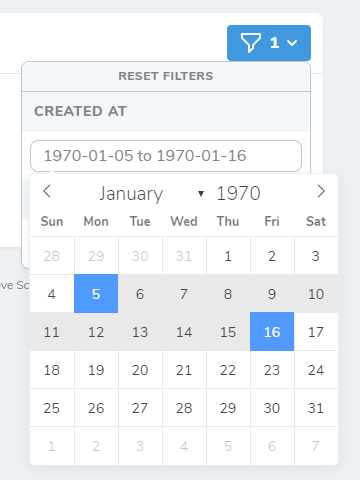 |
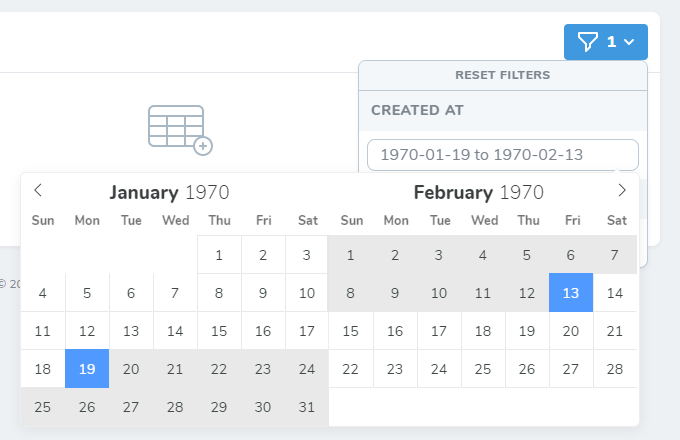 |
Contributing
Contributions are welcome, explain the issue/feature that you want to solve/add and back your code up with tests. Happy coding!
License
This package was originally developed by https://github.com/pos-lifestyle/laravel-nova-date-range-filter however they have abandoned the package. The MIT License (MIT). Please see License File for more information.
Related Packages
Searchable Nova filter for belongsTo relationships.
Havingable macro for Laravel Nova fields, allowing filtering of aggregated value...
Version History
| Version | Released | PHP | Laravel | License |
|---|---|---|---|---|
| 2.2.0 | ^8.1 | ^9.0 || | MIT | |
| 2.1.0 | ^8.1 | ^9.0 || | MIT | |
| 2.0.0 | ^8.0 | ^8.0 || | MIT | |
| 1.3.3 | >=7.1 | ^5.8 || | MIT | |
| 1.3.2 | >=7.1 | ^5.8 || | MIT | |
| 1.3.1 | ^7.1 | ^5.8 || | MIT | |
| 1.3.0 | ^7.1 | ^5.8 || | MIT | |
| 1.2.0 | ^7.1 | ^5.8 || | MIT | |
| 1.1.2 | ^7.1 | ^5.8 || | MIT | |
| 1.1.1 | ^7.1 | ^5.8 || | MIT | |
| 1.1.0 | ^7.1 | ^5.8 || | MIT | |
| 1.0.2 | ^7.1 | ^5.8 || | MIT | |
| 1.0.1 | ^7.1 | ^5.8 || | MIT | |
| 1.0.0 | >=7.1.0 | ^5.8| | MIT |