make-dev/orca
| Install | |
|---|---|
composer require make-dev/orca |
|
| Latest Version: | 0.4.4 |
| PHP: | ^8.4 |
| License: | MIT |
| Last Updated: | Mar 16, 2026 |
| Links: | GitHub · Packagist |




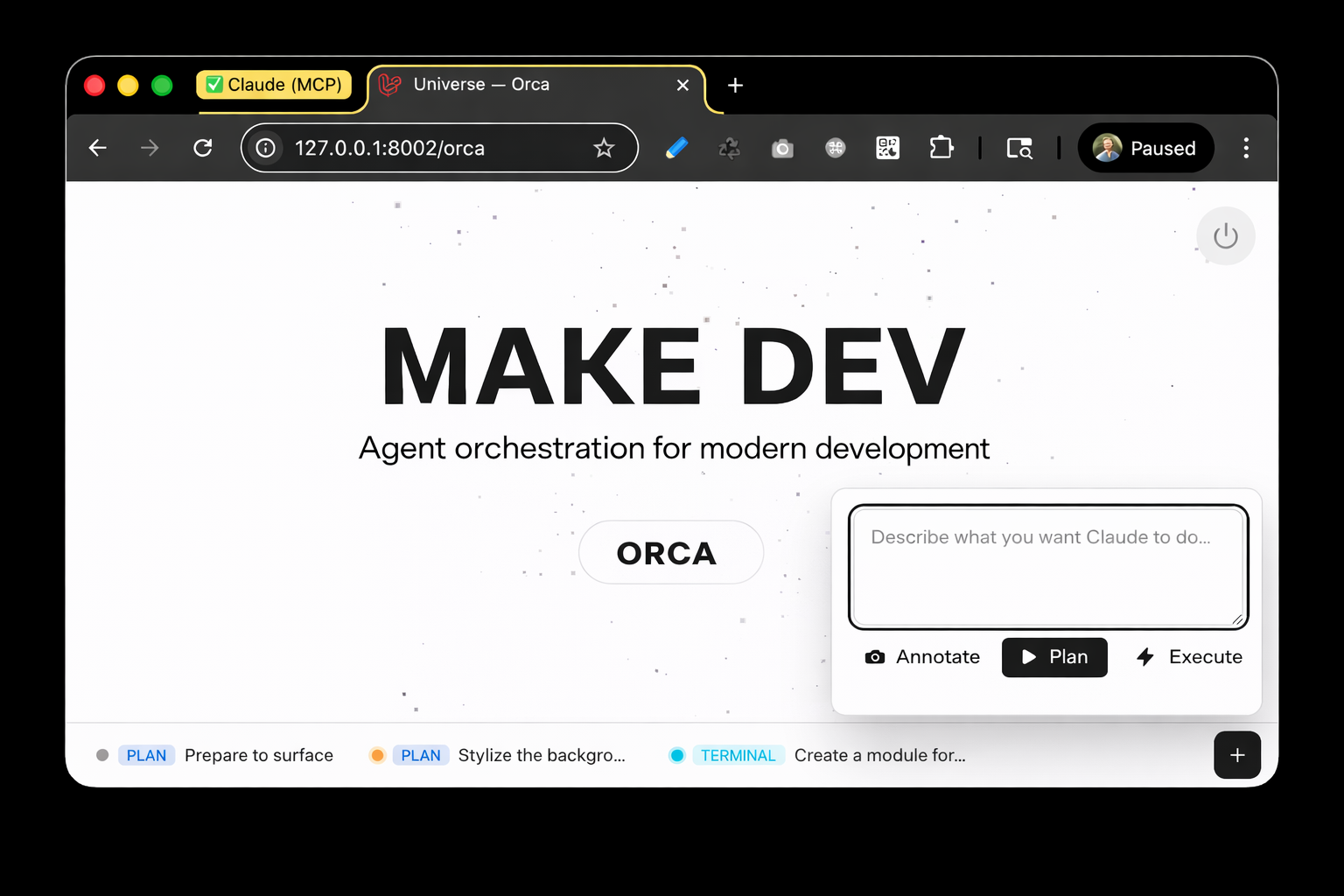
What is Orca? 🐋
Orca is a dev-friendly front-end widget that injects into every page of your app, letting you launch Claude Code sessions directly from the browser. It automatically captures context about the page you're looking at — the URL, route, controller or Livewire component, and authenticated user — and feeds it all to Claude.
No JavaScript framework required. Pure PHP and Livewire with real-time streaming output, bidirectional communication via Claude's stream-json protocol, and full permission control — all without leaving your app.
Quick Start
composer require make-dev/orca
php artisan migrate

# Run the websocket server for WebTerm sessions (optional, but required for in-browser terminals)
php artisan orca:webterm
The orca:webterm command starts the WebSocket server that powers the in-browser terminal. This needs to be running alongside your queue worker for WebTerm sessions to connect. If you're using Laravel Herd, this is the easiest way to keep it running — just add it to your site's services.
Orca auto-injects into every page in local environments — CSS and JS are served automatically.
Features
-
In-Browser Claude Code — Real-time streaming output. Watch Claude think, plan, and code live.
-
Plan / Execute Workflow — Launch in Plan mode (read-only, safe by default) then upgrade to Execute mode with full permissions when the plan looks right.
-
Screenshot & Annotate — Capture the current page, highlight elements, and attach screenshots to your prompts so Claude can see what you see.
-
In-Browser WebTerminal — Full terminal emulation in the browser via WebSocket. Launch multiple concurrent sessions, drag panels around, minimize to the taskbar — no separate terminal app needed.
-
Pop Out to Terminal — Seamlessly hand off any session to native macOS Terminal for full interactive use. When you're done, Orca auto-resumes the session back in the browser.
-
Page-Aware Context — Every session automatically captures the source URL, resolved route/controller/Livewire component, route name, and authenticated user.
-
Auto-Login URLs — Generates Claude-friendly signed URLs so Claude can browse your app as the current user, with configurable expiry.
-
Session Management — Taskbar UI with session pills, live status indicators, message history, parent/child session chaining, and bulk cleanup.
How It Works
Orca bridges your browser to your agent using Laravel queues, Livewire, optionally Redis, and a custom event parser — all running locally on your machine.
graph LR
    A[Browser] -->|Livewire poll / push| B[Launcher Component]
    B -->|Dispatch job| C[RunClaudeSession Queue Job]
    C -->|proc_open + bidirectional stream-json| D[Claude Code CLI]
    C -->|Parse NDJSON stdout → events| E[(Database: OrcaSession & Messages)]
    B <-->|Poll & render live messages| E
    A -->|User input / approvals / screenshots| B
    B -->|Push NDJSON events to FIFO| F[(Redis: SessionChannel stdin queue)]
    C -->|Pop from Redis → write to stdin pipe| D
- The Launcher Livewire component dispatches a
RunClaudeSessionqueue job with the user's prompt - The job spawns Claude CLI via
proc_openusing--output-format stream-jsonand--input-format stream-json - Claude's NDJSON stdout is parsed by
ClaudeEventParserand stored asOrcaSessionMessagerecords - The Livewire component polls the database and renders messages in real time
- User responses (text, permissions, screenshots) are pushed to a Redis FIFO queue (
SessionChannel) and delivered to Claude's stdin pipe by the job loop
Installation
composer require make-dev/orca
php artisan migrate
That's it. Orca auto-injects into every page in local environments — CSS and JS are served automatically. No asset publishing or Tailwind configuration required.
Publish Configuration (optional)
php artisan vendor:publish --tag=orca-config
Publish Views (optional)
php artisan vendor:publish --tag=orca-views
Running
# Start a queue worker (required for session processing)
# --timeout=0 is critical — Claude sessions can run for minutes
php artisan queue:work --timeout=0

# Start the WebTerm WebSocket server (required for in-browser terminals)
php artisan orca:webterm

# Ensure Claude Code CLI is installed
claude --version
The WebSocket server needs to be running for in-browser terminal sessions to work. Laravel Herd is the easiest way to manage this — it can run the server automatically alongside your site.
Orca automatically injects itself into every HTML response via middleware — no Blade changes needed. It only activates in the local environment (app()->isLocal()), so it will never appear in production.
Configuration
Configuration can be published to config/orca.php and overridden via environment variables:
General
| Variable | Default | Description |
|---|---|---|
ORCA_ENABLED |
true |
Enable/disable the Orca widget entirely |
ORCA_TIMEOUT |
300 |
Default session timeout (seconds) |
ORCA_QUEUE |
default |
Queue name for Orca jobs |
Claude CLI
| Variable | Default | Description |
|---|---|---|
CLAUDE_BINARY |
claude |
Path to the Claude Code CLI binary |
CLAUDE_PERMISSION_MODE |
plan |
Default permission mode (plan, acceptEdits, bypassPermissions) |
CLAUDE_MAX_TURNS |
50 |
Maximum agentic turns per session |
CLAUDE_TIMEOUT |
3600 |
Claude process timeout (seconds) |
Pop Out to Terminal
| Variable | Default | Description |
|---|---|---|
ORCA_POPOUT_ENABLED |
true |
Enable the Pop Out to Terminal feature (macOS only) |
Screen Recording permission required for live preview: The pop-out terminal feature shows a live screenshot preview of the Terminal window in the Orca widget. This requires Terminal.app to have Screen Recording permission. Grant it in System Settings → Privacy & Security → Screen & System Audio Recording → Terminal. Without this permission, screenshots will be blank and the widget will show a fallback "Running in Terminal" indicator instead.
WebTerminal
| Variable | Default | Description |
|---|---|---|
ORCA_WEBTERM_ENABLED |
true |
Enable the in-browser WebTerminal feature |
ORCA_WEBTERM_HOST |
127.0.0.1 |
WebSocket server bind address |
ORCA_WEBTERM_PORT |
8085 |
WebSocket server port |
Auto-Login
| Variable | Default | Description |
|---|---|---|
ORCA_AUTO_LOGIN_ENABLED |
true |
Enable signed auto-login URLs for Claude |
ORCA_AUTO_LOGIN_EXPIRY |
30 |
Auto-login URL expiry (minutes) |
Screenshots
| Variable | Default | Description |
|---|---|---|
ORCA_SCREENSHOT_DISK |
local |
Filesystem disk for screenshot storage |
Redis
| Variable | Default | Description |
|---|---|---|
ORCA_REDIS_CONNECTION |
default |
Redis connection for the stdin channel |
ORCA_REDIS_TTL |
7200 |
TTL for Redis stdin keys (seconds) |
Usage
Three Launch Modes
Plan (default) — Claude can read and explore your codebase but cannot write files or execute commands without permission. When Claude has a plan ready, click Execute to resume with full permissions.
Execute — Full permissions from the start. Use when you know exactly what you want and trust Claude to make changes immediately. Runs with --dangerously-skip-permissions.
Terminal — Opens Claude in native macOS Terminal for full interactive use. When the terminal session ends, Orca automatically resumes the session back in the browser so you can continue the conversation.
Responding to Claude
When Claude asks a question or requests permission to use a tool, the session status changes to Awaiting Input. You can:
- Type a response in the input field and send it
- Approve or Deny tool permission requests with dedicated buttons
- Attach a screenshot to your response so Claude can see what you're referring to
Screenshot Annotation
Click the screenshot button to capture the current page. The capture uses html2canvas to render the page, and the resulting image is attached to your prompt. Claude can read the screenshot file directly to understand the visual context of your request.
Security
- Local only — The
InjectLaunchermiddleware checksapp()->isLocal()and refuses to inject in any other environment. - Signed URLs — Auto-login uses Laravel's
URL::temporarySignedRoute()with configurable expiry (default 30 minutes). - Permission modes — Plan mode prevents unintended writes. Execute mode requires explicit user action.
- Local execution — Claude CLI runs locally on your machine. No data leaves the machine beyond what Claude Code itself sends to the API.
Contributing
PRs and issues are welcome. Please follow Laravel conventions and include tests with any changes.
License
MIT + Commons Clause
Free to use, modify, and distribute — but you may not sell Orca itself as a competing commercial product. See LICENSE for details.
Related Packages
AI agent skills for Laravel package authors. Adds Laravel-flavored skills + .mcp...
Claude Code agents for the TALL stack, powered by Laravel Boost
One command sets up Claude Code (and any AI coding agent) on a Laravel project:...
A powerful Laravel scaffolding package — generate Models, Controllers, Repositor...
Anthropic PHP for Laravel is a supercharged PHP API client that allows you to in...
Version History
| Version | Released | PHP | Laravel | License |
|---|---|---|---|---|
| 0.4.4 | ^8.4 | ^12.0 | MIT | |
| 0.4.1 | ^8.4 | ^12.0 | MIT | |
| 0.3.0 | ^8.4 | ^12.0 | MIT |