mdaushi/kinetics
Kinetics
Zero-Friction Tables for Inertia.js



Kinetics follows a simple philosophy: Server-Side First, Zero-Boilerplate React. All sorting, searching, filtering, and pagination logic runs natively through Laravel's Eloquent. The frontend is a pure renderer seamlessly integrated with Tailwind CSS and shadcn/ui.
Demo · Documentation · Quick Start · Roadmap · Contributing
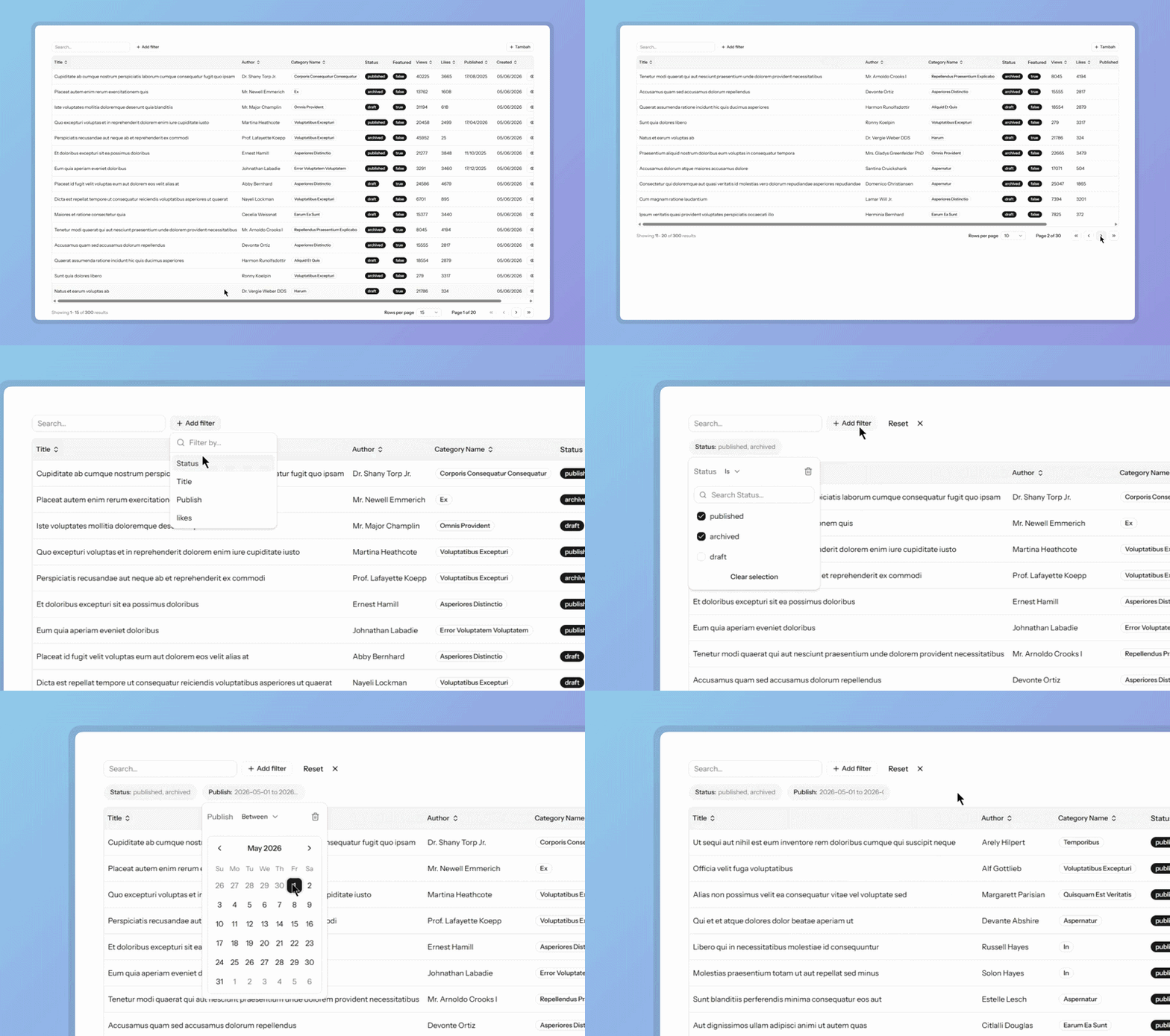
Why Kinetics?
Most datatable libraries make you duplicate logic — sorting on the client, filtering on the server, pagination somewhere in between. Kinetics has one rule: all data logic belongs to Laravel. The frontend receives a result and renders it. Nothing more.
Request → [SortPipe → SearchPipe → FilterPipe → PaginatePipe] → TableResult → JSON → <Table />
Features
- Server-side everything — sort, search, filter, and paginate via Eloquent; no client-side data processing
- Zero-boilerplate frontend — one
<Table />component renders the full UI out of the box - Composable pipeline — add, remove, or replace query pipes to fit any use case
- Action columns — per-row buttons and dropdown groups with visibility and disabled conditions
- TanStack Table — full access to the underlying table instance for custom layouts
- shadcn/ui components — polished, accessible UI included; no separate installation needed
- TypeScript-first — fully typed props, hooks, and column definitions
Installation
1. Laravel package
composer require mdaushi/kinetics
2. React package
npm install @mdaushi/kinetics-react
3. Configure Tailwind CSS
Kinetics ships Tailwind classes in its dist. Tell Tailwind to scan the package so those classes aren't purged.
Add @source to resources/css/app.css:
@import "tailwindcss";

@source "../../node_modules/@mdaushi/kinetics-react/dist";
Add the path to tailwind.config.js:
export default {
  content: [
    // ... existing paths
    "./node_modules/@mdaushi/kinetics-react/dist/**/*.js",
  ],
};
Quick Start
1. Define your table
use Kinetics\Table;
use Kinetics\Columns\TextColumn;

$posts = Table::model(Post::class)
  ->columns([
    TextColumn::make('title')
      ->sortable()
      ->searchable(),
    TextColumn::make('user.name')
      ->label('Author')
      ->sortable()
      ->searchable(),
    TextColumn::make('status')
      ->badge(),
  ])
  ->make();

  return Inertia::render('posts', ['posts' => $posts]);
2. Render on the frontend
import { Table } from "@mdaushi/kinetics-react";

export default function Post() {
  return (
    <div className="container mx-auto mt-20">
      <Head title="Posts — Table Test" />
      <Table table="posts" />
    </div>
  );
}
Documentation
Kinetics features a comprehensive documentation site. It covers everything from basic installation to advanced backend APIs (Columns, Filters, Actions) and pipeline customizations.
📚 Read the Official Documentation
(Note: To view the documentation locally, navigate to the docs/ directory and run pnpm install followed by pnpm dev)
Roadmap
- Export (CSV / XLSX) — respects active filters, skips pagination
- Bulk actions — checkbox selection + batch operations
- Column visibility toggle — persist per-user
- Saved filter presets
- Vue adapter (
@kinetics/vue)
Contributing
Contributions are welcome — bug fixes, new features, or documentation improvements.
Local Setup
# 1. Clone
git clone https://github.com/mdaushi/kinetics
cd kinetics

# 2. Install dependencies
composer install
pnpm install

# 3. Build packages (core first, then react)
pnpm --filter @mdaushi/kinetics-core run build
pnpm --filter @mdaushi/kinetics-react run build

# 4. Run tests
composer test

# 5. Lint
composer lint        # Check
composer lint:fix    # Fix
Project Structure
kinetics/
├── src/                     # Laravel package
│   ├── Table.php            # Main entry point
│   ├── Columns/             # Column, ActionColumn
│   ├── Actions/             # Action, ActionGroup
│   ├── Pipes/               # Query pipeline stages
│   ├── Resources/           # TableResult (response formatter)
│   └── Support/             # TableConfig, TableContext
├── packages/
│   ├── core/                # @mdaushi/kinetics-core
│   └── react/               # @mdaushi/kinetics-react
│       └── src/
│           ├── components/  # <Table>, ActionCell, Toolbar, Pagination
│           └── hooks/       # useTable
├── tests/                   # PHPUnit test suite
└── docs/                    # Documentation
Guidelines
- PHP — PSR-12 style. Add PHPUnit tests for any new feature or fix under
tests/. - React/TS — keep components headless-friendly; UI logic belongs in
hooks/, not in components. - New pipe — implement
PipeInterface, add tosrc/Pipes/, document indocs/laravel-backend.md. - Commits — use Conventional Commits (
feat:,fix:,docs:,chore:).
Open an issue for bugs or feature requests.
Reporting Issues
Please open an issue with a clear description and, where possible, a minimal reproduction.
Related Packages
Production-ready, keyboard-navigable, server-driven Data Table package for Larav...
A reusable, server-side DataTable system for Laravel + Inertia.js + React (TanSt...
Laravel Breeze & React хослолд зориулсан Shadcn/ui + Laravel paginated response-...
Modern Inertia.js integration for Symfony 8 - Build single-page applications wit...
Starter Kit Laravel 12 + React + Inertia + Tailwind + ShadCN UI + Spatie Permiss...
Version History
| Version | Released | PHP | Laravel | License |
|---|---|---|---|---|
| v0.3.0 | ^8.2 | ^12.0| | MIT | |
| v0.2.0 | ^8.2 | ^12.0| | MIT | |
| v0.1.1 | ^8.2 | ^12.0| | MIT | |
| v0.1.0 | ^8.2 | ^12.0| | MIT |
Pre-releases (1)
| Version | Released | PHP | Laravel | License |
|---|---|---|---|---|
| v0.1.0-a | ^8.2 | ^12.0| | MIT |