mohammadhprp/filament-ip-to-country-flag-column
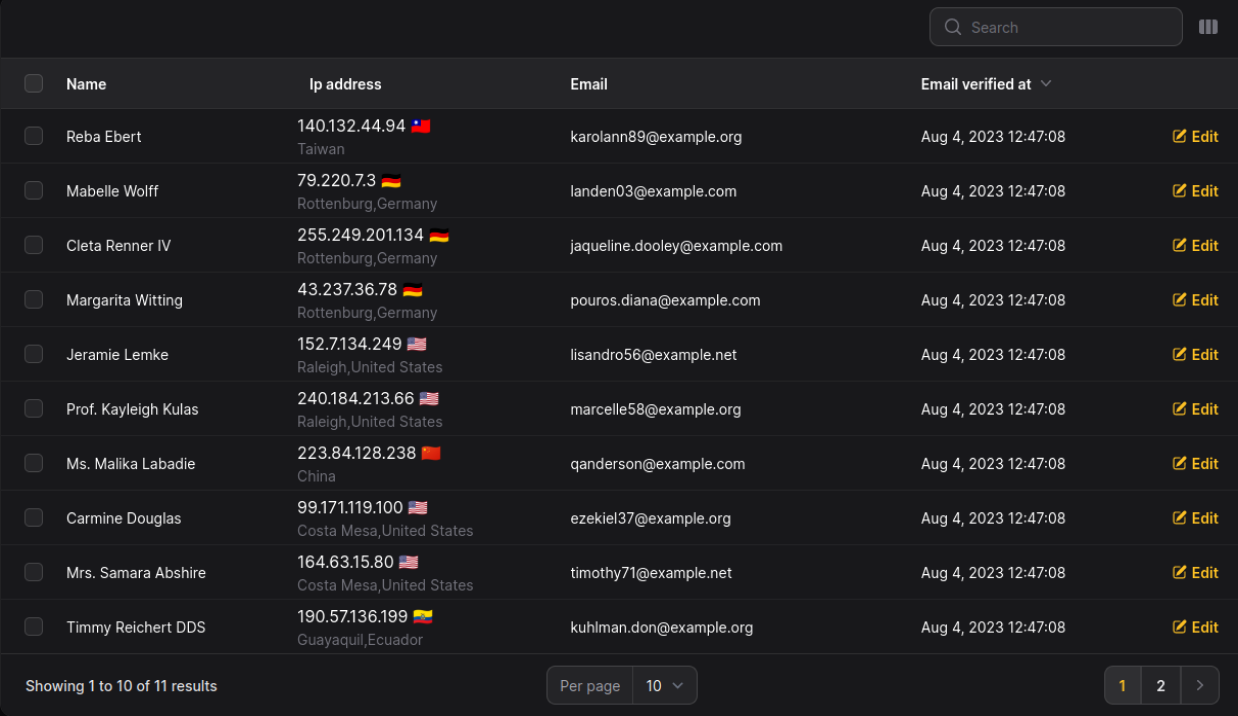
Display Country flag from IP address in your Filament tables
19,844
24
| Install | |
|---|---|
composer require mohammadhprp/filament-ip-to-country-flag-column |
|
| Latest Version: | v2.2.0 |
| PHP: | ^8.2 |
| License: | MIT |
| Last Updated: | Sep 16, 2026 |
| Links: | GitHub · Packagist |
Maintainer: mohammadhprp
IP to country flag Column for Filament 🚩




Installation
Requires Filament 5 and PHP 8.2 or newer.
composer require mohammadhprp/filament-ip-to-country-flag-column
Usage
use Mohammadhprp\IPToCountryFlagColumn\Columns\IPToCountryFlagColumn;

IPToCountryFlagColumn::make('client_ip');
Options
flagPosition('left')- flag position,right(default) orleft.location(position: 'above', separator: '-')- location position,below(default) orabove, and separator (default,).hideIP(),hideFlag(),hideLocation(),hideCountry(),hideCity().locationResolver(fn (string $ip): array => [...])- use another provider, add caching, or point at a self-hosted service. The package never caches lookups itself.whenVisible()- resolve a cell only once it scrolls into view.loadingState('Locating…')anderrorState('Unavailable')- what a cell shows while loading and when a lookup fails (they accept a string, anHtmlable, or a closure). Failed cells are clickable to retry; disable withretryable(false). UseerrorStateUsing(fn (Throwable $exception) => ...)if you need the exception.
Testing
composer test
Example Application
The example/ directory contains a Laravel 12 and Filament 5 application using
this package through a local Composer path repository. See
example/README.md for setup and login instructions.
Changelog
Please see CHANGELOG for more information on what has changed recently.
Contributing
- Fork the repository.
- Create a new branch for your feature.
- Make your changes and commit them with clear commit messages.
- Submit a pull request to the
masterbranch.
Credits
License
This project is licensed under the MIT License - see the License file for details.
Related Packages
relisiuol/filament-relative-time
Filament 4 column powered by @github/relative-time-element.
1,043
3
archilex/filament-stacked-image-column
Display multiple images as a stack in your Filament tables
8,626
43
filafly/filament-identity-column
A column for Filament Tables to which combines an avatar, name and description.
11,537
7
riodwanto/superduper-filament-starter-kit
A comprehensive Laravel Filament 3 💡 starter kit with pre-installed plugins, ad...
8,691
278
Version History
| Version | Released | PHP | License |
|---|---|---|---|
| v2.2.0 | ^8.2 | MIT | |
| v2.1.0 | ^8.2 | MIT | |
| v2.0.0 | ^8.2 | MIT | |
| v1.0.2 | ^8.1 | MIT | |
| v1.0.1 | ^8.1 | MIT | |
| v1.0.0 | ^8.1 | MIT | |
| v0.2.0 | ^8.1 | MIT | |
| v0.1.0 | ^8.1 | MIT |