mwguerra/web-terminal
Web Terminal
A secure web terminal package for Laravel with Filament integration. Execute allowed commands on local systems or SSH servers.
Stream mode is moving to its own plugin
After weighing how differently the two modes evolve, I decided to split them. Stream mode — the full PTY shell over WebSocket with canvas rendering — is being extracted into a dedicated plugin,
mwguerra/web-terminal-stream.What that means in practice:
- Stream mode is frozen here. It still works and remains documented, but it will receive no further updates in this package.
- It will be removed in a future release. Once the standalone plugin launches, Stream mode will be dropped from a future version/tag of
web-terminal. That removal will be announced in the CHANGELOG with a migration path, and it will land on a major version — nothing will disappear from under you mid-2.x.- Classic mode becomes the single focus. From then on, this package does one thing: a secure, whitelisted, auditable command terminal. No mode switching, no dual code paths.
The two modes solve genuinely different problems and carry very different security and maintenance profiles. Separating them lets each get the attention and release cadence it deserves, instead of one holding the other back.
If you use Stream mode today: nothing breaks right now. Stay on your current version and watch for the standalone plugin's release before upgrading past the removal.
Version Compatibility
| Version | Filament | Laravel | Livewire | PHP |
|---|---|---|---|---|
| 2.x | 5.x | 12.x–13.x | 4.x | 8.3+ |
| 1.x | 4.x | 11.x | 3.x | 8.2+ |
Features
- Connection types: Local shell execution or SSH connections to remote servers
- Command whitelisting: Configurable allowlist to restrict which commands can be executed
- Interactive mode: PTY/tmux sessions for artisan tinker, reverb:start, queue:work, and other interactive/long-running commands
- Stream mode (frozen — moving to its own plugin, see note above): Full interactive PTY shell via WebSocket with ghostty-web canvas rendering — supports vim, htop, and other full-screen TUI apps
- Enum-based permissions:
TerminalPermissionenum for clean, declarative permission control - Scripts: Define reusable command sequences with progress tracking and one-click execution
- Comprehensive logging: Audit trail for connections, commands, outputs, and errors
- Multi-tenant support: Built-in tenant isolation for SaaS applications
- Session management: Inactivity timeout, disconnect-on-navigate, and session statistics
- Filament integration: Terminal page and Terminal Logs resource with stats widgets
- Embeddable: Use as Livewire component or Filament Schema component in any page
- Clipboard integration: Copy All button, per-block copy on hover, multi-line paste with confirmation
- Security by design: Credential protection, input sanitization, rate limiting
- Localization: English and Portuguese (BR) translations included
- Dark mode: Full dark mode support via Filament
Requirements
- PHP 8.3+
- Laravel 12.x or 13.x
- Filament 5.x
- Livewire 4.x
For Laravel 11 and Filament 4 support, use version
^1.0.
Warning
This package provides real shell access to real servers. Commands executed through this terminal can modify files, change configurations, and affect running services.
Before using this package:
- Restrict access to technical personnel only — do not expose terminal pages to general users
- Review and limit the allowed commands whitelist for each terminal instance
- Enable logging to maintain an audit trail of all executed commands
- Test configurations in a safe environment before deploying to production
Use at your own risk. The authors are not responsible for any damage, data loss, or security incidents resulting from the use of this package. Always ensure proper access controls and review your security configuration.
Installation
For Filament 5 / Laravel 12–13 (latest)
composer require mwguerra/web-terminal:"^2.0"
For Filament 4 / Laravel 11 (legacy)
composer require mwguerra/web-terminal:"^1.0"
Upgrading from v1.x to v2.x
composer require mwguerra/web-terminal:"^2.0"
Key changes in v2.x:
- Requires Laravel 12.x or 13.x, Filament 5.x, and Livewire 4.x
- If you published Blade views, update any
@entangle('prop')to$wire.entangle('prop')in your custom views
Interactive Setup
Run the install command for guided configuration:
php artisan terminal:install
The installer will:
- Publish configuration file
- Publish database migration (with optional tenant support)
- Optionally publish Blade views for customization
- Optionally run the migration
Install Options
# Standard installation (interactive)
php artisan terminal:install

# Multi-tenant installation (adds tenant_id column)
php artisan terminal:install --with-tenant

# Standard installation (explicitly no tenant)
php artisan terminal:install --no-tenant

# Force overwrite existing files
php artisan terminal:install --force
Non-Interactive Installation
Use --no-interaction (or -n) with specific flags to skip prompts:
# Install only config file
php artisan terminal:install --config -n

# Install only migration
php artisan terminal:install --migration -n

# Install config, migration, and run migrate
php artisan terminal:install --config --migration --migrate -n

# Install page only (requires --panel for multi-panel apps)
php artisan terminal:install --page --panel=admin -n

# Install everything non-interactively
php artisan terminal:install --config --migration --views --page --resource --migrate --panel=admin -n
| Flag | Description |
|---|---|
--config |
Publish the configuration file |
--migration |
Publish the database migration |
--views |
Publish Blade views for customization |
--migrate |
Run migration after publishing |
--page |
Generate a custom Terminal page |
--resource |
Generate a custom TerminalLogs resource |
--panel= |
Specify the Filament panel (required for page/resource in multi-panel apps) |
Note: When using -n without any flags, the installer defaults to --config --migration.
Generate Custom Pages
Generate customizable Terminal page and TerminalLogs resource in your application instead of using the plugin defaults:
# Generate a custom Terminal page
php artisan terminal:install --page

# Generate a custom TerminalLogs resource
php artisan terminal:install --resource

# Generate both page and resource
php artisan terminal:install --page --resource

# Generate for a specific panel (multi-panel apps)
php artisan terminal:install --page --panel=admin
The generated files are placed in directories configured in your panel provider via ->discoverPages() and ->discoverResources(). For example:
| Generated File | Location |
|---|---|
| Terminal page | app/Filament/Pages/Terminal.php |
| TerminalLogResource | app/Filament/Resources/TerminalLogResource.php |
| ListTerminalLogs | app/Filament/Resources/TerminalLogResource/Pages/ListTerminalLogs.php |
| ViewTerminalLog | app/Filament/Resources/TerminalLogResource/Pages/ViewTerminalLog.php |
Important: When using custom generated pages with the plugin, you must disable the corresponding plugin defaults to avoid duplicate pages in your navigation.
// If you generated only the Terminal page
WebTerminalPlugin::make()
    ->withoutTerminalPage()

// If you generated only the TerminalLogs resource
WebTerminalPlugin::make()
    ->withoutTerminalLogs()

// If you generated both, disable both plugin defaults
WebTerminalPlugin::make()
    ->withoutTerminalPage()
    ->withoutTerminalLogs()

// Or use only() to keep plugin services without any default pages
WebTerminalPlugin::make()
    ->only([])
If you don't need the plugin at all (using only custom pages), you can remove WebTerminalPlugin::make() from your panel provider entirely.
Terminal Command Permissions
When generating a custom Terminal page, you can specify command permissions:
# Default - safe readonly commands (ls, pwd, cd, cat, grep, etc.)
php artisan terminal:install --page --allow-secure-commands

# Allow all commands (dangerous - use with caution)
php artisan terminal:install --page --allow-all-commands

# No commands - configure manually in the generated file
php artisan terminal:install --page --allow-no-commands
| Option | Generated Configuration | Description |
|---|---|---|
--allow-secure-commands (default) |
->allowedCommands([...]) |
Safe readonly commands |
--allow-all-commands |
->allowAllCommands() |
All commands allowed (dangerous) |
--allow-no-commands |
->allowedCommands([]) |
No commands (configure manually) |
Create Terminal Page Command
For more control over page generation, use the dedicated terminal:make-page command:
# Interactive mode - prompts for all options
php artisan terminal:make-page

# Create a page with a specific name
php artisan terminal:make-page ServerTerminal

# Specify panel and terminal key
php artisan terminal:make-page ServerTerminal --panel=admin --key=server-term

# Set command permissions
php artisan terminal:make-page AdminTerminal --allow-all-commands
php artisan terminal:make-page ViewerTerminal --allow-no-commands

# Non-interactive with defaults
php artisan terminal:make-page --no-interaction

# Overwrite existing file
php artisan terminal:make-page Terminal --force
| Option | Description |
|---|---|
name |
The page class name (default: Terminal) |
--panel= |
The Filament panel to create the page for |
--key= |
The terminal identifier key for logging |
--allow-secure-commands |
Safe readonly commands (default) |
--allow-all-commands |
All commands allowed (dangerous) |
--allow-no-commands |
No commands (configure manually) |
--force |
Overwrite existing file |
Interactive prompts (when not using --no-interaction):
- Panel selection - if multiple panels exist
- Page class name - defaults to "Terminal"
- Terminal key - auto-generated from name (e.g.,
server-terminal-terminal) - Command permissions - secure/none/all options
Manual Setup
If you prefer manual setup:
# Publish configuration
php artisan vendor:publish --tag=web-terminal-config

# Publish views (optional)
php artisan vendor:publish --tag=web-terminal-views
Quick Start
Get a working terminal in under a minute:
// In your Filament PanelProvider
use MWGuerra\WebTerminal\WebTerminalPlugin;

public function panel(Panel $panel): Panel
{
    return $panel
        ->plugins([
            WebTerminalPlugin::make(),
        ]);
}
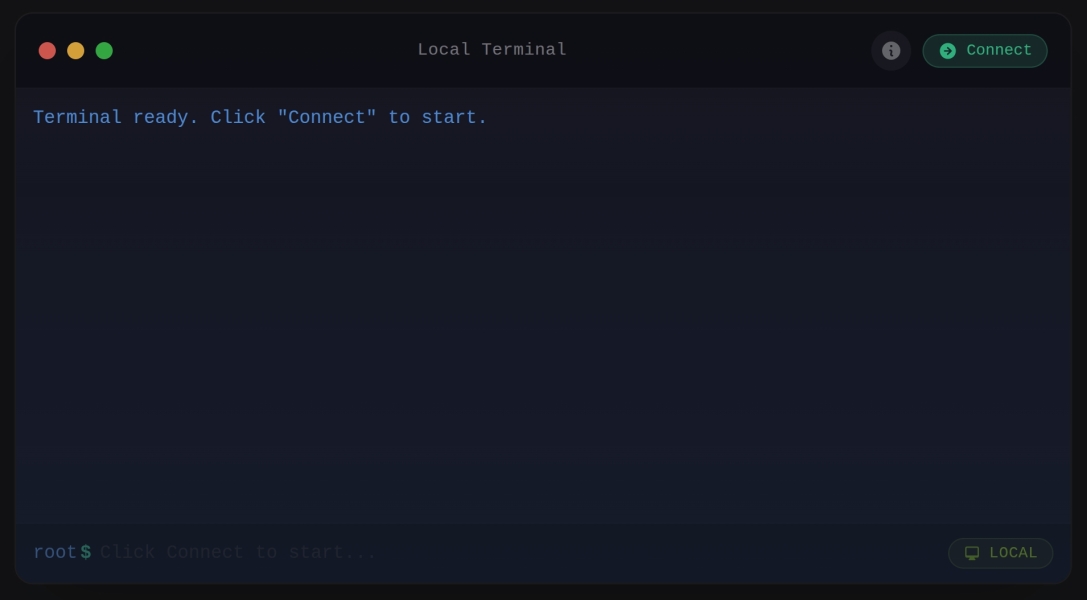
That's it! Visit /admin/terminal to access the terminal.
For a custom terminal with specific commands:
use MWGuerra\WebTerminal\Schemas\Components\WebTerminal;

WebTerminal::make()
    ->local()
    ->allowedCommands(['ls', 'pwd', 'cd', 'cat', 'git *'])
    ->workingDirectory(base_path())
    ->height('400px')
Filament Integration
The package provides a Filament plugin that adds:
- Terminal Page: A demo page with local terminal functionality
- Terminal Logs Resource: Browse and search terminal session logs with stats widgets
Register the Plugin
Add the plugin to your Filament panel provider:
<?php

namespace App\Providers\Filament;

use Filament\Panel;
use Filament\PanelProvider;
use MWGuerra\WebTerminal\WebTerminalPlugin;

class AdminPanelProvider extends PanelProvider
{
    public function panel(Panel $panel): Panel
    {
        return $panel
            ->plugins([
                WebTerminalPlugin::make(),
            ]);
    }
}
Plugin Configuration
Customize Navigation
WebTerminalPlugin::make()
    // Configure Terminal page navigation
    ->terminalNavigation(
        icon: 'heroicon-o-command-line',
        label: 'Terminal',
        sort: 100,
        group: 'Tools',
    )
    // Configure Terminal Logs resource navigation
    ->terminalLogsNavigation(
        icon: 'heroicon-o-clipboard-document-list',
        label: 'Terminal Logs',
        sort: 101,
        group: 'Tools',
    )
Disable Components
// Disable Terminal page (only show logs)
WebTerminalPlugin::make()
    ->withoutTerminalPage()

// Disable Terminal Logs resource (only show terminal)
WebTerminalPlugin::make()
    ->withoutTerminalLogs()

// Register only specific components
WebTerminalPlugin::make()
    ->only([
        \MWGuerra\WebTerminal\Filament\Pages\Terminal::class,
    ])
Access Plugin Configuration
use MWGuerra\WebTerminal\WebTerminalPlugin;

// Get current plugin instance
$plugin = WebTerminalPlugin::get();

// Check if components are enabled
$plugin->isTerminalPageEnabled();
$plugin->isTerminalLogsEnabled();

// Get navigation configuration
$plugin->getTerminalNavigationIcon();
$plugin->getTerminalNavigationLabel();
$plugin->getTerminalNavigationSort();
$plugin->getTerminalNavigationGroup();
Customizing the Plugin's Terminal Page
The plugin provides a ready-to-use Terminal page at /admin/terminal. To customize its terminal configuration (allowed commands, working directory, etc.), create your own page that extends the base:
<?php

namespace App\Filament\Pages;

use Filament\Schemas\Components\Section;
use Filament\Schemas\Schema;
use MWGuerra\WebTerminal\Filament\Pages\Terminal as BaseTerminal;
use MWGuerra\WebTerminal\Schemas\Components\WebTerminal;

class Terminal extends BaseTerminal
{
    public function schema(Schema $schema): Schema
    {
        return $schema
            ->components([
                Section::make('Server Terminal')
                    ->description('Execute commands on the server.')
                    ->icon('heroicon-o-command-line')
                    ->schema([
                        WebTerminal::make()
                            ->key('custom-terminal')
                            ->local()
                            // Customize allowed commands
                            ->allowedCommands([
                                'ls', 'pwd', 'cd', 'cat', 'head', 'tail',
                                'git *',
                                'php artisan *',
                                'composer *',
                                'npm *', 'yarn *',
                            ])
                            // Set working directory
                            ->workingDirectory(base_path())
                            // Enable login shell for full environment
                            ->loginShell()
                            // UI customization
                            ->timeout(60)
                            ->height('500px')
                            ->title('Development Terminal')
                            ->windowControls(true)
                            ->startConnected(false)
                            // Logging
                            ->log(
                                enabled: true,
                                commands: true,
                                identifier: 'dev-terminal',
                            ),
                    ]),
            ]);
    }
}
Then disable the plugin's default page and register your custom one:
// In your PanelProvider
WebTerminalPlugin::make()
    ->withoutTerminalPage()  // Disable default Terminal page
// Register your custom page
public function panel(Panel $panel): Panel
{
    return $panel
        ->pages([
            \App\Filament\Pages\Terminal::class,
        ])
        ->plugins([
            WebTerminalPlugin::make()
                ->withoutTerminalPage(),
        ]);
}
Usage
Option 1: Direct Livewire Component
Embed the terminal directly in any Blade view:
<livewire:web-terminal
    :connection="['type' => 'local']"
    :allowed-commands="['ls', 'pwd', 'cd', 'cat', 'head', 'tail']"
    :timeout="10"
    prompt="$ "
    :history-limit="50"
    height="400px"
/>
Option 2: Filament Schema Component (Recommended)
Use the schema component for Filament pages with fluent configuration:
<?php

namespace App\Filament\Pages;

use Filament\Pages\Page;
use Filament\Schemas\Schema;
use Filament\Schemas\Components\Section;
use Filament\Schemas\Concerns\InteractsWithSchemas;
use Filament\Schemas\Contracts\HasSchemas;
use MWGuerra\WebTerminal\Schemas\Components\WebTerminal;

class Terminal extends Page implements HasSchemas
{
    use InteractsWithSchemas;

    protected string $view = 'filament.pages.terminal';

    public function schema(Schema $schema): Schema
    {
        return $schema
            ->components([
                Section::make('Terminal')
                    ->description('Execute allowed commands.')
                    ->icon('heroicon-o-command-line')
                    ->collapsible()
                    ->schema([
                        WebTerminal::make()
                            ->local()
                            ->allowedCommands(['ls', 'pwd', 'cd'])
                            ->timeout(10)
                            ->prompt('$ ')
                            ->historyLimit(50)
                            ->height('350px'),
                    ]),
            ]);
    }
}
View file (resources/views/filament/pages/terminal.blade.php):
<x-filament-panels::page>
    {{ $this->schema }}
</x-filament-panels::page>
Default Allowed Commands
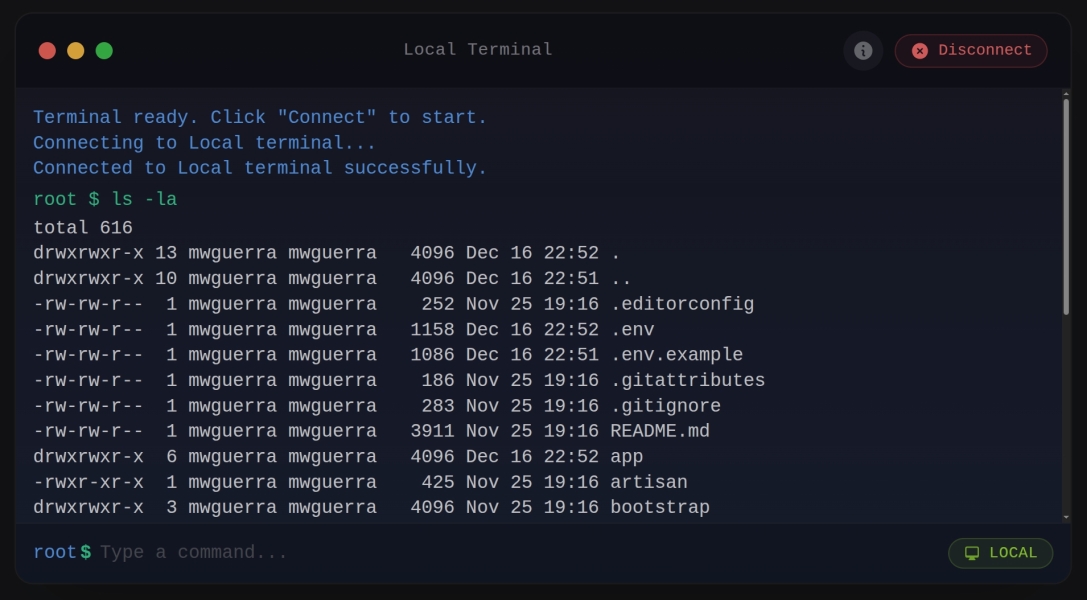
The package uses command whitelisting for security. Only commands in the whitelist can be executed.
Config File Defaults
The config/web-terminal.php file includes these default allowed commands:
'allowed_commands' => [
    'ls', 'ls *',
    'pwd',
    'cd', 'cd *',
    'uname', 'uname *',
    'whoami',
    'date',
    'uptime',
    'df -h',
    'free -m',
    'cat *',
    'head *',
    'tail *',
    'wc *',
    'grep *',
],
Note: The * wildcard allows the command with any arguments (e.g., cd /var/log, uname -a, grep pattern file.txt).
Plugin Terminal Page Defaults
The Filament plugin's Terminal page (/admin/terminal) uses an extended command set suitable for Laravel development:
| Command | Description |
|---|---|
ls, ls * |
List directory contents |
pwd |
Print working directory |
cd, cd * |
Change directory |
uname, uname * |
System information |
whoami |
Display current user |
date |
Show current date/time |
uptime |
System uptime |
cat *, head *, tail * |
View file contents |
wc * |
Word/line count |
grep * |
Search file contents |
php artisan * |
Laravel Artisan commands |
composer * |
Composer package manager |
Note: The * wildcard allows the command with any arguments (e.g., php artisan migrate, composer require package/name).
Customizing Commands
Override the defaults per-terminal using allowedCommands():
WebTerminal::make()
    ->allowedCommands([
        'ls', 'pwd', 'cd',           // Basic navigation
        'git *',                      // All git commands
        'npm *', 'yarn *',           // Package managers
        'php artisan migrate',        // Specific artisan command only
    ])
Or bypass the whitelist entirely (use with caution):
WebTerminal::make()
    ->allowAllCommands()
Configuration Options
Dynamic Configuration with Closures
All configuration methods accept Closures for dynamic resolution at runtime. This is useful for:
- Resolving values based on the authenticated user
- Loading configuration from the database or external sources
- Conditional logic based on current state
WebTerminal::make()
    ->key(fn () => 'terminal-' . auth()->id())
    ->allowedCommands(fn () => auth()->user()->isAdmin()
        ? ['*']
        : ['ls', 'pwd', 'cat'])
    ->ssh(fn () => [
        'host' => auth()->user()->server->host,
        'username' => auth()->user()->server->username,
        'key' => auth()->user()->server->private_key,
    ])
    ->log(fn () => [
        'enabled' => true,
        'commands' => true,
        'identifier' => 'user-' . auth()->id(),
        'metadata' => [
            'user_id' => auth()->id(),
            'user_email' => auth()->user()?->email,
            'tenant_id' => filament()->getTenant()?->id,
        ],
    ])
Connection Types
Local Connection
WebTerminal::make()
    ->local()
    ->allowedCommands(['ls', 'pwd', 'cd'])
SSH Connection with Password
WebTerminal::make()
    ->ssh(
        host: 'server.example.com',
        username: 'deploy',
        password: 'your-password',
        port: 22
    )
SSH Connection with Array Configuration
Use an array to configure SSH connections, useful when loading configuration dynamically:
WebTerminal::make()
    ->ssh([
        'host' => 'server.example.com',
        'username' => 'deploy',
        'password' => 'your-password',
        'port' => 22,
    ])

// With key authentication
WebTerminal::make()
    ->ssh([
        'host' => 'server.example.com',
        'username' => 'deploy',
        'key' => file_get_contents('/path/to/private_key'),
        'passphrase' => 'optional-passphrase',
    ])

// With Closure for dynamic resolution
WebTerminal::make()
    ->ssh(fn () => [
        'host' => auth()->user()->server->host,
        'username' => auth()->user()->server->username,
        'key' => auth()->user()->server->private_key,
    ])
SSH Connection with Key
The key parameter accepts the private key content directly. Load it using your preferred method:
// Key from file
WebTerminal::make()
    ->ssh(
        host: 'localhost',
        username: 'root',
        key: file_get_contents('/path/to/private_key'),
        port: 2222
    )

// Key from environment variable
WebTerminal::make()
    ->ssh(
        host: 'localhost',
        username: 'root',
        key: env('SSH_PRIVATE_KEY'),
        port: 22
    )

// Key from Laravel Storage
use Illuminate\Support\Facades\Storage;

WebTerminal::make()
    ->ssh(
        host: 'localhost',
        username: 'root',
        key: Storage::disk('local')->get('ssh/private_key'),
        port: 2222
    )

// Key with passphrase
WebTerminal::make()
    ->ssh(
        host: 'localhost',
        username: 'root',
        key: file_get_contents('/path/to/encrypted_key'),
        passphrase: 'key-passphrase',
        port: 22
    )
Generic Connection (Advanced)
For complex configurations, use the connection() method with a config array or ConnectionConfig object:
use MWGuerra\WebTerminal\Data\ConnectionConfig;
use MWGuerra\WebTerminal\Enums\ConnectionType;

// Using array
WebTerminal::make()
    ->connection([
        'type' => 'ssh',
        'host' => 'server.example.com',
        'username' => 'deploy',
        'password' => 'secret',
        'port' => 22,
    ])

// Using ConnectionConfig object (constructor)
$config = new ConnectionConfig(
    type: ConnectionType::SSH,
    host: 'server.example.com',
    username: 'deploy',
    password: 'secret',
    port: 22,
);

WebTerminal::make()->connection($config)

// Using static factory methods (cleaner API)
use MWGuerra\WebTerminal\Data\ConnectionConfig;

// Local connection
$config = ConnectionConfig::local(
    timeout: 30,
    workingDirectory: base_path(),
);

// SSH with password
$config = ConnectionConfig::sshWithPassword(
    host: 'server.example.com',
    username: 'deploy',
    password: 'secret',
    port: 22,
);

// SSH with key
$config = ConnectionConfig::sshWithKey(
    host: 'server.example.com',
    username: 'deploy',
    privateKey: file_get_contents('/path/to/key'),
    passphrase: 'optional-passphrase',
);

WebTerminal::make()->connection($config)
Terminal Settings
| Method | Description | Default |
|---|---|---|
key(string) |
Unique identifier for the terminal instance | 'web-terminal' |
allowedCommands(array) |
Commands users can execute | [] |
allowAllCommands() |
Bypass command whitelist (use with caution) | false |
allowInteractiveMode() |
Enable interactive execution (PTY/tmux) for streaming output and stdin | false |
allow(array) |
Set permissions using TerminalPermission enum values |
- |
loginShell() |
Use login shell for full environment (loads .bashrc) | false |
timeout(int) |
Command timeout in seconds | 10 |
prompt(string) |
Terminal prompt symbol | '$ ' |
historyLimit(int) |
Command history size | 50 |
maxOutputLines(int) |
Max output lines to display | 1000 |
height(string) |
Terminal height | '350px' |
workingDirectory(string) |
Initial working directory | null |
environment(array) |
Environment variables for commands | [] |
shell(string) |
Shell to use for execution | '/bin/bash' |
UI Settings
| Method | Description | Default |
|---|---|---|
title(string) |
Title shown in terminal header bar | 'Terminal' |
windowControls(bool) |
Show macOS-style window control dots | true |
startConnected(bool) |
Auto-connect on page load | false |
Stream Mode
Note
Stream mode is frozen and will be removed from this package in a future release, once it ships as the standalone
mwguerra/web-terminal-streamplugin. It still works and is documented below, but it receives no further updates here. See the note at the top of this README for the full rationale and what it means for existing users.
Stream mode provides a full interactive PTY shell via WebSocket, powered by ghostty-web. Unlike the Classic terminal (which executes one command at a time via Livewire), Stream mode gives you a real shell session with canvas-rendered output — supporting full-screen TUI apps like vim, htop, nano, and more.
Enabling Stream Mode
// Stream-only terminal (no Classic mode)
WebTerminal::make()
    ->local()
    ->streamTerminal()
    ->classicTerminal(false)
    ->streamTheme([
        'background' => '#1a1b26',
        'foreground' => '#a9b1d6',
        'fontSize' => 14,
        'fontFamily' => 'JetBrains Mono, monospace',
    ])
    ->height('500px')
    ->title('Stream Terminal')

// Dual-mode terminal (toggle between Classic and Stream)
WebTerminal::make()
    ->local()
    ->allowAllCommands()
    ->streamTerminal()
    ->streamTheme([
        'background' => '#1a1b26',
        'foreground' => '#a9b1d6',
    ])
    ->height('500px')
In dual-mode, a toggle pill in the header bar lets users switch between Classic and Stream modes.
Stream Mode Settings
| Method | Description | Default |
|---|---|---|
streamTerminal(bool) |
Enable Stream terminal mode | false |
classicTerminal(bool) |
Enable Classic terminal mode | true |
streamTheme(array) |
Theme for the Stream terminal canvas | See config |
autoConnect(bool) |
Auto-connect and hide connect/disconnect button | false |
Stream mode always auto-connects when the terminal becomes visible. The connect/disconnect button is never shown in Stream mode.
WebSocket Server
Stream mode requires a WebSocket server to bridge the browser to a PTY shell process. Start it with:
php artisan terminal:serve
Options:
# Custom host and port
php artisan terminal:serve --host=0.0.0.0 --port=8090

# Default: 127.0.0.1:8090
The server uses React PHP for the event loop and Ratchet RFC6455 for WebSocket protocol handling.
SSL/WSS Configuration
When your app is served over HTTPS, the WebSocket connection must use WSS. Configure SSL in your .env:
# Enable stream mode
WEB_TERMINAL_STREAM_ENABLED=true

# WSS URL (use when behind HTTPS)
WEB_TERMINAL_WEBSOCKET_URL=wss://your-domain.test:8090

# SSL certificate and key (for direct WSS, not proxied)
WEB_TERMINAL_SSL_CERT=/path/to/cert.crt
WEB_TERMINAL_SSL_KEY=/path/to/cert.key
Or configure in config/web-terminal.php:
'stream' => [
    'enabled' => env('WEB_TERMINAL_STREAM_ENABLED', false),
    'ratchet_host' => env('WEB_TERMINAL_RATCHET_HOST', '127.0.0.1'),
    'ratchet_port' => env('WEB_TERMINAL_RATCHET_PORT', 8090),
    'websocket_url' => env('WEB_TERMINAL_WEBSOCKET_URL'),
    'ssl_cert' => env('WEB_TERMINAL_SSL_CERT'),
    'ssl_key' => env('WEB_TERMINAL_SSL_KEY'),
    'working_directory' => env('WEB_TERMINAL_STREAM_CWD'),
    // ...
],
When ssl_cert and ssl_key are set, the WebSocket server automatically serves over TLS.
Required Dependencies
Stream mode requires additional packages (suggested, not required by default):
composer require react/socket react/event-loop ratchet/rfc6455
Running in Production
For production, run the WebSocket server as a supervised process:
# Using Supervisor
[program:terminal-serve]
command=php /path/to/artisan terminal:serve --host=0.0.0.0 --port=8090
autostart=true
autorestart=true
user=www-data
redirect_stderr=true
stdout_logfile=/var/log/terminal-serve.log
Or with systemd:
[Unit]
Description=Web Terminal WebSocket Server
After=network.target

[Service]
ExecStart=/usr/bin/php /path/to/artisan terminal:serve --host=0.0.0.0 --port=8090
Restart=always
User=www-data

[Install]
WantedBy=multi-user.target
Session Management
Control how the terminal handles navigation and inactivity:
| Method | Description | Default |
|---|---|---|
disconnectOnNavigate(bool) |
Disconnect when user navigates away or refreshes | true |
keepConnectedOnNavigate() |
Disable auto-disconnect on navigation | - |
inactivityTimeout(int) |
Auto-disconnect after N seconds of inactivity | 3600 (60 min) |
noInactivityTimeout() |
Disable inactivity timeout | - |
// Auto-disconnect after 30 minutes of inactivity
WebTerminal::make()
    ->local()
    ->inactivityTimeout(1800)

// Keep connection when navigating (useful for SPAs)
WebTerminal::make()
    ->local()
    ->keepConnectedOnNavigate()

// Disable inactivity timeout (never auto-disconnect)
WebTerminal::make()
    ->local()
    ->noInactivityTimeout()
Session Configuration in Config File
You can also configure these settings globally in config/web-terminal.php:
'session' => [
    // Automatically disconnect when user navigates away or refreshes
    'disconnect_on_navigate' => env('WEB_TERMINAL_DISCONNECT_ON_NAVIGATE', true),

    // Inactivity timeout in seconds (0 = disabled)
    // Default: 3600 seconds (60 minutes)
    'inactivity_timeout' => env('WEB_TERMINAL_INACTIVITY_TIMEOUT', 3600),
],
The terminal tracks user activity (commands, keystrokes) and automatically disconnects after the configured timeout period. This helps prevent orphaned tmux sessions and releases server resources.
Environment Helpers
| Method | Description |
|---|---|
path(string) |
Set custom PATH environment variable |
inheritPath() |
Inherit PATH from server's environment |
// Example: Make NVM-installed node available
WebTerminal::make()
    ->local()
    ->path('/home/user/.nvm/versions/node/v18.0.0/bin:/usr/local/bin:/usr/bin:/bin')
    ->allowedCommands(['node', 'npm', 'npx'])

// Or inherit the server's PATH
WebTerminal::make()
    ->local()
    ->inheritPath()
    ->loginShell()  // Also loads shell profile for full environment
Preset Configurations
Quick presets that configure allowed commands for common use cases:
| Preset | Allowed Commands | Use Case |
|---|---|---|
readOnly() |
ls, pwd, cat, head, tail, find, grep |
View-only file access |
fileBrowser() |
ls, pwd, cd, cat, head, tail, find |
Navigate and view files |
gitTerminal() |
git, ls, pwd, cd, cat |
Git operations |
dockerTerminal() |
docker, docker-compose, ls, pwd, cd |
Container management |
nodeTerminal() |
npm, npx, node, yarn, ls, pwd, cd, cat |
Node.js development |
artisanTerminal() |
php, composer, ls, pwd, cd, cat |
Laravel development |
// Read-only file browser
WebTerminal::make()->readOnly()

// File browser with navigation
WebTerminal::make()->fileBrowser()

// Git operations
WebTerminal::make()->gitTerminal()

// Docker management
WebTerminal::make()->dockerTerminal()

// Node.js development
WebTerminal::make()->nodeTerminal()

// Laravel Artisan commands
WebTerminal::make()->artisanTerminal()
Note: Presets can be combined with other methods:
WebTerminal::make()
    ->gitTerminal()                    // Use git preset
    ->workingDirectory(base_path())    // Set working directory
    ->loginShell()                     // Enable full shell environment
    ->title('Git Terminal')            // Custom title
    ->height('400px')
Scripts
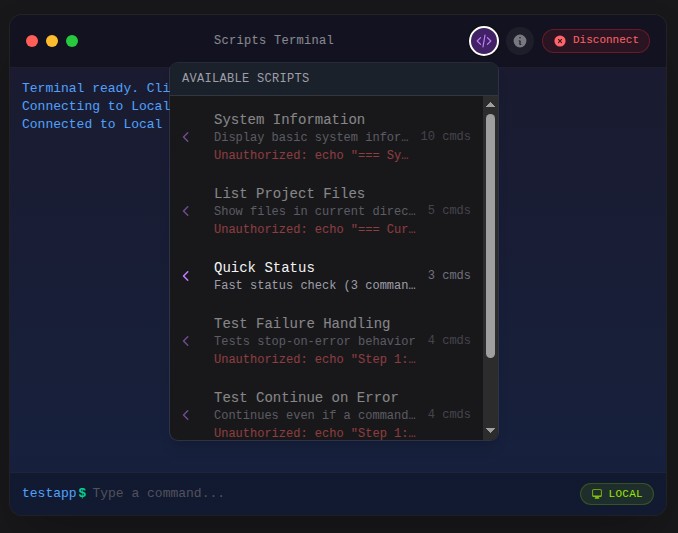
Scripts allow you to define reusable sequences of commands that can be executed with a single click. They appear in a dropdown menu in the terminal header and provide visual feedback during execution.
Defining Scripts
Use the Script class to define scripts with a fluent API:
use MWGuerra\WebTerminal\Data\Script;
use MWGuerra\WebTerminal\Schemas\Components\WebTerminal;

WebTerminal::make()
    ->local()
    ->scripts([
        Script::make('deploy')
            ->label('Deploy Application')
            ->description('Pull latest code and restart services')
            ->icon('heroicon-o-rocket-launch')
            ->commands([
                'git pull origin main',
                'composer install --no-dev',
                'php artisan migrate --force',
                'php artisan cache:clear',
            ])
            ->stopOnError(),

        Script::make('logs')
            ->label('View Recent Logs')
            ->description('Display the last 100 lines of Laravel logs')
            ->commands(['tail -100 storage/logs/laravel.log'])
            ->continueOnError(),
    ])
Script Configuration Options
| Method | Description | Default |
|---|---|---|
make(string $key) |
Create a script with a unique identifier | Required |
label(string) |
Display name in the dropdown menu | Key value |
description(string) |
Human-readable description | null |
icon(string) |
Heroicon name for the dropdown | 'heroicon-o-command-line' |
commands(array) |
List of commands to execute sequentially | [] |
Execution Behavior
| Method | Description | Default |
|---|---|---|
stopOnError() |
Stop execution if any command fails | true |
continueOnError() |
Continue execution even if commands fail | - |
confirmBeforeRun() |
Require user confirmation before running | false |
Elevated Scripts
Scripts can bypass the command whitelist using the elevated() method. Use this for trusted administrative scripts:
Script::make('maintenance')
    ->label('Enable Maintenance Mode')
    ->elevated()  // Bypasses command whitelist
    ->commands([
        'php artisan down --secret=bypass-token',
        'php artisan cache:clear',
        'php artisan config:cache',
    ])
Warning: Elevated scripts bypass all command authorization checks. Only use for trusted scripts that require commands not in your whitelist.
Disconnection Scripts
For scripts that will disconnect the terminal (like server reboots), use the willDisconnect() method:
Script::make('reboot')
    ->label('Reboot Server')
    ->elevated()
    ->willDisconnect()
    ->beforeMessage('Server will reboot in 30 seconds.')
    ->disconnectMessage('Server is rebooting. Please wait and reconnect.')
    ->confirmBeforeRun()
    ->commands(['sudo shutdown -r +1'])
| Method | Description |
|---|---|
willDisconnect() |
Mark script as causing disconnection |
beforeMessage(string) |
Message shown before script starts |
disconnectMessage(string) |
Message shown when disconnection occurs |
Script Authorization
Scripts are only shown in the dropdown if the user is authorized to run them. Authorization is determined by:
- Elevated scripts: Always authorized (bypass whitelist)
- Terminal allows all commands: Always authorized
- Command whitelist: All script commands must be in the
allowedCommandslist
// This script will only appear if 'git *' and 'composer *' are allowed
Script::make('update')
    ->commands(['git pull', 'composer install'])

// This script always appears (elevated bypasses whitelist)
Script::make('admin-task')
    ->elevated()
    ->commands(['any-command-here'])
Script Execution UI
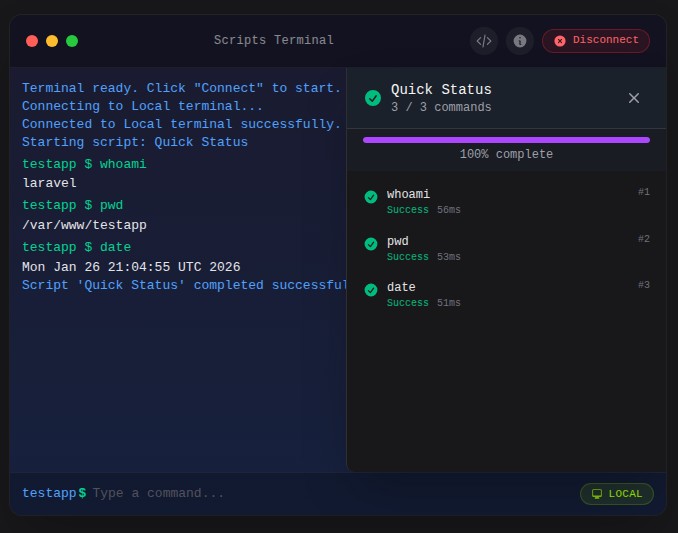
When a script runs, a slide-over panel displays:
- Script name and progress percentage
- Progress bar
- List of all commands with status icons
- Execution time for each command
- Exit codes for completed commands
- Cancel button to stop execution
Note: Terminal input is disabled while a script is running to prevent interference with script execution. The input field is re-enabled once the script completes or is cancelled.
Command statuses:
- Pending: Waiting to execute
- Running: Currently executing
- Success: Completed with exit code 0
- Failed: Completed with non-zero exit code
- Skipped: Not executed (due to
stopOnErroror cancellation)
Script Examples
Deployment Script
Script::make('deploy')
    ->label('Deploy to Production')
    ->description('Full deployment with migrations')
    ->icon('heroicon-o-rocket-launch')
    ->commands([
        'git pull origin main',
        'composer install --no-dev --optimize-autoloader',
        'php artisan migrate --force',
        'php artisan config:cache',
        'php artisan route:cache',
        'php artisan view:cache',
    ])
    ->stopOnError()
    ->confirmBeforeRun()
Log Viewer Script
Script::make('all-logs')
    ->label('View All Logs')
    ->description('Display recent logs from multiple sources')
    ->icon('heroicon-o-document-text')
    ->commands([
        'echo "=== Laravel Logs ==="',
        'tail -50 storage/logs/laravel.log',
        'echo ""',
        'echo "=== Nginx Access Logs ==="',
        'tail -20 /var/log/nginx/access.log',
    ])
    ->continueOnError()  // Continue even if some logs don't exist
Database Backup Script
Script::make('backup-db')
    ->label('Backup Database')
    ->description('Create a timestamped database backup')
    ->icon('heroicon-o-circle-stack')
    ->elevated()
    ->commands([
        'php artisan backup:run --only-db',
    ])
    ->confirmBeforeRun()
Server Maintenance Script
Script::make('server-status')
    ->label('Server Status')
    ->description('Check server health metrics')
    ->icon('heroicon-o-server')
    ->commands([
        'echo "=== Disk Usage ==="',
        'df -h',
        'echo ""',
        'echo "=== Memory Usage ==="',
        'free -m',
        'echo ""',
        'echo "=== System Uptime ==="',
        'uptime',
    ])
    ->continueOnError()
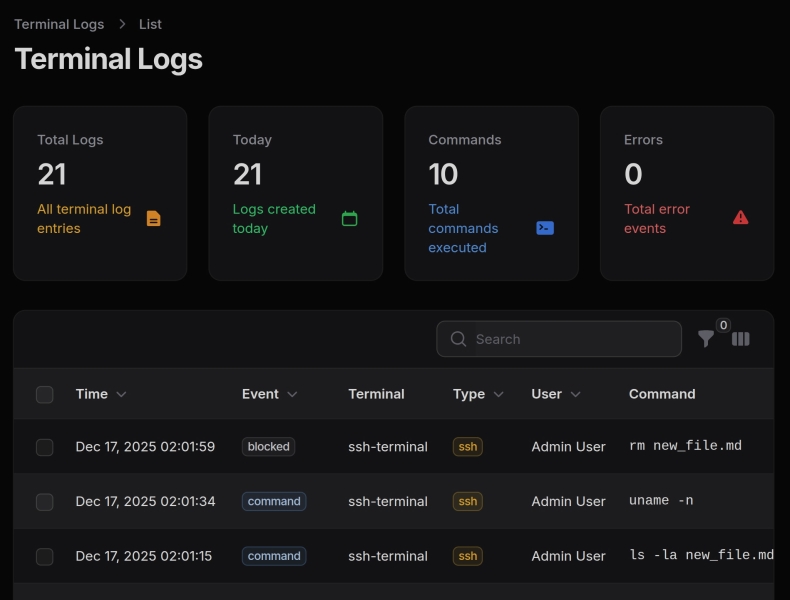
Logging
The package includes comprehensive logging for terminal sessions, connections, and command execution.
Configuration
Logging is configured in config/web-terminal.php:
'logging' => [
    // Global toggle - can be overridden per-terminal
    'enabled' => env('WEB_TERMINAL_LOGGING', true),

    // What to log
    'log_connections' => env('WEB_TERMINAL_LOG_CONNECTIONS', true),
    'log_disconnections' => env('WEB_TERMINAL_LOG_DISCONNECTIONS', true),
    'log_commands' => env('WEB_TERMINAL_LOG_COMMANDS', true),
    'log_output' => env('WEB_TERMINAL_LOG_OUTPUT', false), // Can be verbose
    'log_errors' => env('WEB_TERMINAL_LOG_ERRORS', true),

    // Output handling
    'max_output_length' => env('WEB_TERMINAL_MAX_OUTPUT_LOG', 10000),
    'truncate_output' => true,

    // User configuration
    'user_table' => 'users',
    'user_foreign_key' => 'user_id',

    // Retention (cleanup via manual `terminal:cleanup` command)
    'retention_days' => env('WEB_TERMINAL_LOG_RETENTION', 90),

    // Terminals to log (empty = all)
    'terminals' => [], // ['local-terminal', 'ssh-terminal']

    // Multi-tenant support
    'tenant_column' => null, // 'tenant_id' if using tenancy
    'tenant_resolver' => null, // fn () => auth()->user()?->tenant_id
],
Fluent API
Override logging settings per-terminal using the log() method:
// Enable logging with all defaults from config
WebTerminal::make()
    ->local()
    ->log()

// Enable logging with custom settings (named parameters)
WebTerminal::make()
    ->key('server-terminal')
    ->ssh(host: 'server.com', username: 'admin', password: 'secret')
    ->log(
        enabled: true,                    // Enable logging
        connections: true,                // Log connect/disconnect
        commands: true,                   // Log all commands
        output: false,                    // Don't log output (verbose)
        identifier: 'production-ssh',     // Custom identifier for filtering
    )

// Disable logging for a specific terminal
WebTerminal::make()
    ->key('debug-terminal')
    ->local()
    ->log(enabled: false)

// Full audit logging (including output)
WebTerminal::make()
    ->key('audit-terminal')
    ->local()
    ->log(
        enabled: true,
        output: true,
        identifier: 'full-audit-terminal',
    )
Array and Closure Configuration
The log() method also accepts an array or Closure, which is useful for dynamic configuration and adding custom metadata:
// Array configuration with metadata
WebTerminal::make()
    ->local()
    ->log([
        'enabled' => true,
        'connections' => true,
        'commands' => true,
        'identifier' => 'admin-terminal',
        'metadata' => [
            'context' => 'admin_panel',
            'feature' => 'server_maintenance',
        ],
    ])

// Closure for dynamic resolution (recommended for user-specific data)
WebTerminal::make()
    ->local()
    ->log(fn () => [
        'enabled' => true,
        'commands' => true,
        'identifier' => 'user-terminal',
        'metadata' => [
            'user_id' => auth()->id(),
            'user_email' => auth()->user()?->email,
            'tenant_id' => filament()->getTenant()?->id,
            'session_started_at' => now()->toIso8601String(),
        ],
    ])
Log Configuration Options
| Key | Type | Description |
|---|---|---|
enabled |
bool |
Enable/disable logging |
connections |
bool |
Log connect/disconnect events |
commands |
bool |
Log command executions |
output |
bool |
Log command output (can be verbose) |
identifier |
string |
Custom identifier for filtering logs |
metadata |
array |
Custom metadata stored with each log entry |
Standalone Metadata Method
You can also set metadata separately using the logMetadata() method:
// Set metadata independently from log configuration
WebTerminal::make()
    ->local()
    ->log(enabled: true, commands: true)
    ->logMetadata([
        'user_id' => auth()->id(),
        'tenant_id' => filament()->getTenant()?->id,
        'context' => 'admin_panel',
    ])

// With Closure for dynamic resolution
WebTerminal::make()
    ->local()
    ->log()
    ->logMetadata(fn () => [
        'user_id' => auth()->id(),
        'user_email' => auth()->user()?->email,
        'session_started_at' => now()->toIso8601String(),
    ])
This is useful when you want to keep log settings separate from metadata, or when building configurations dynamically.
Event Types
The logger tracks these event types:
connected- Terminal session starteddisconnected- Terminal session endedcommand- Command executedoutput- Command output (when enabled)error- Error occurredblocked- Command was blocked by whitelist
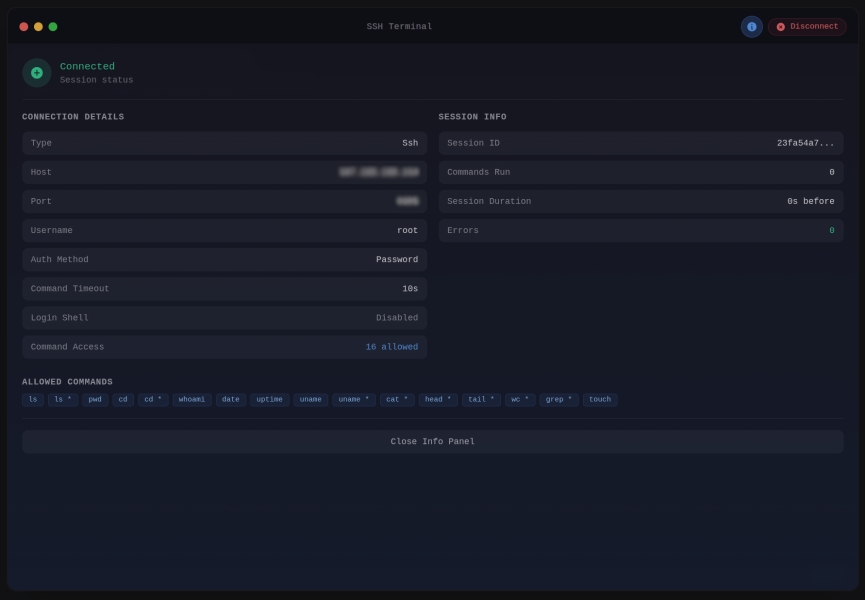
Session Info Panel
When logging is enabled, the terminal info panel displays session statistics:
- Session ID
- Commands Run
- Session Duration
- Error Count
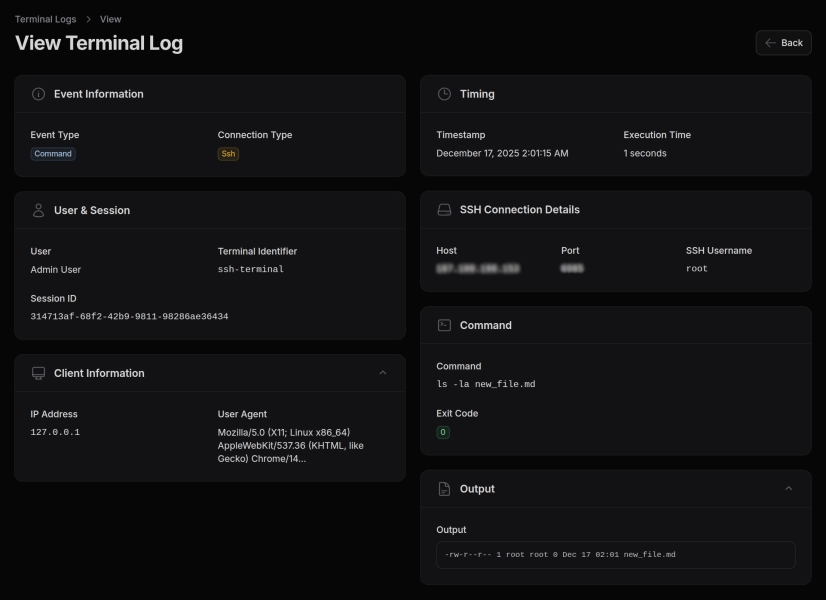
Querying Logs
use MWGuerra\WebTerminal\Models\TerminalLog;

// Get all commands for a user today
TerminalLog::forUser(auth()->id())
    ->commands()
    ->whereDate('created_at', today())
    ->get();

// Get session summary
$logger = app(TerminalLogger::class);
$summary = $logger->getSessionSummary($sessionId);

// Get logs for a specific terminal
TerminalLog::forTerminal('production-ssh')
    ->recent(24) // Last 24 hours
    ->get();

// Get recent errors
TerminalLog::errors()
    ->recent(72)
    ->get();

// Get connection history
TerminalLog::connections()
    ->forUser($userId)
    ->orderBy('created_at', 'desc')
    ->limit(20)
    ->get();
Available Scopes
| Scope | Description |
|---|---|
forSession(string $sessionId) |
Filter by session ID |
forTerminal(string $identifier) |
Filter by terminal identifier |
forUser(int $userId) |
Filter by user ID |
forTenant(mixed $tenantId) |
Filter by tenant ID |
connections() |
Only connection events |
commands() |
Only command events |
errors() |
Only error events |
recent(int $hours) |
Logs from the last N hours |
olderThan(int $days) |
Logs older than N days |
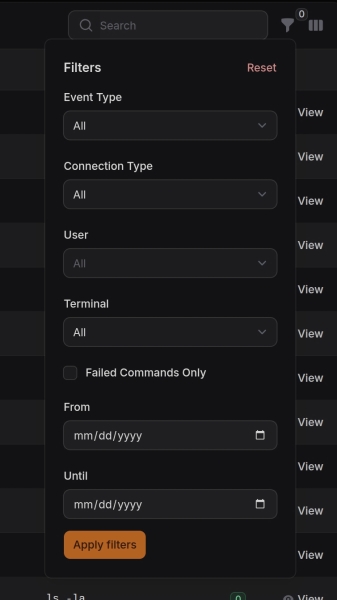
Log Cleanup
Clean up old log entries manually:
# Clean logs older than retention period (default 90 days)
php artisan terminal:cleanup

# Clean logs older than 30 days
php artisan terminal:cleanup --days=30

# Preview what would be deleted (dry run)
php artisan terminal:cleanup --dry-run
Multi-Tenant Support
For multi-tenant applications, configure the tenant resolver:
// In config/web-terminal.php
'logging' => [
    'tenant_column' => 'tenant_id',
    'tenant_resolver' => fn () => auth()->user()?->tenant_id,
],
Or use a class-based resolver:
'tenant_resolver' => App\Services\TenantResolver::class,
The resolver class must implement __invoke():
class TenantResolver
{
    public function __invoke(): ?int
    {
        return session('current_tenant_id');
    }
}
Built-in Commands
The terminal includes these built-in commands:
help- Show available commandsclear- Clear terminal outputhistory- Show command history
Copy & Paste
The terminal includes clipboard integration for copying output and pasting commands.
Copy All Output
Click the clipboard icon in the terminal header bar to copy the entire terminal output as plain text. ANSI escape codes are stripped automatically. A brief checkmark feedback confirms the copy.
Per-Block Copy
Hover over any command block (a command and its output) to reveal a copy button. Click it to copy that block's content to the clipboard.
Multi-Line Paste
When you paste text containing multiple lines into the terminal input:
- A confirmation modal appears listing all commands to be executed
- Comment lines (starting with
#) and empty lines are filtered out - Commands are executed sequentially with visual progress feedback
- You can cancel at any time before or during execution
Single-line pastes are inserted directly into the input field without a modal.
Note: Multi-line paste is disabled during interactive mode (e.g., when a process like top is running) and during script execution.
Programmatic Access
// Get terminal output as plain text (ANSI codes stripped)
$text = $this->getPlainTextOutput();

// Clear all terminal output
$this->clearOutput();
Security by Design
WebTerminal is built with security as a core principle, implementing multiple layers of protection to minimize attack surface and prevent credential exposure.
Credential Protection
Server-Side Only Credentials: SSH passwords, private keys, and passphrases are stored exclusively in protected PHP properties that are never serialized or sent to the browser. This prevents:
- Credential exposure in HTML page source
- Credential leakage in Livewire AJAX requests
- JavaScript access to sensitive authentication data
- Browser DevTools inspection of credentials
The connection details shown in the info panel (host, port, username) are rendered server-side via PHP methods, not exposed as JavaScript-accessible properties.
Command Filtering
Commands are validated server-side against a configurable allowlist before execution. This provides defense-in-depth against:
- Command injection attacks
- Unauthorized system access
- Privilege escalation attempts
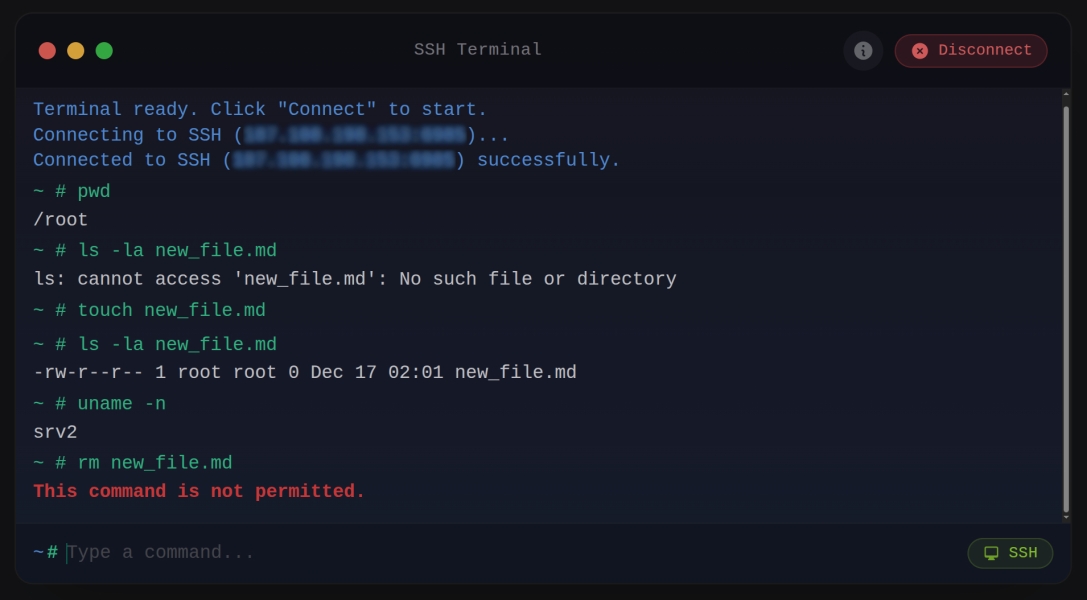
Only whitelisted commands can be executed (unless allowAllCommands() is explicitly used).
Shell Operator Controls
By default, the terminal blocks shell operators (pipes, redirections, chaining, and variable expansion) to prevent command injection. You can selectively enable operator groups based on your security requirements.
Operator Groups
| Method | Operators | Risk Level | Description |
|---|---|---|---|
allowPipes() |
| |
Low | Enables piping output between commands. Pipes pass stdout of one command to stdin of another. Example: ls | grep foo |
allowRedirection() |
> < >> << |
Medium | Enables file I/O redirection. Output redirection (>) can overwrite files. Input redirection (<) reads from files. Append (>>) adds to files. Here-documents (<<) allow multi-line input. |
allowChaining() |
; && || & |
Medium | Enables running multiple commands. Semicolon (;) runs sequentially. AND (&&) runs next only on success. OR (||) runs next only on failure. Background (&) runs asynchronously. |
allowExpansion() |
$ ` $() ${} |
High | Enables variable and command substitution. Dollar sign ($VAR) expands variables. Backticks and $() execute commands and substitute output. ${} enables parameter expansion. Most dangerous group. |
allowAllShellOperators() |
All above | High | Enables all operator groups at once. Only use in trusted environments. |
Usage Examples
// Allow only piping (low risk)
WebTerminal::make()
    ->allowedCommands(['ls', 'grep', 'sort', 'wc'])
    ->allowPipes()

// Allow piping and redirection
WebTerminal::make()
    ->allowedCommands(['ls', 'grep', 'cat', 'echo'])
    ->allowPipes()
    ->allowRedirection()

// Full shell access (high risk - trusted environments only)
WebTerminal::make()
    ->allowAllCommands()
    ->allowAllShellOperators()
Interactive Mode
By default, commands run synchronously — they execute, wait for completion, and return the output. This works for simple commands like ls or pwd, but fails for:
- REPL commands like
php artisan tinker(needs stdin input) - Long-running processes like
php artisan reverb:startorphp artisan queue:work(timeout) - Interactive installers like
composer create-project(needs user input)
Enable interactive mode to use PTY/tmux sessions with streaming output and stdin support:
// Whitelist + interactive mode (secure and functional)
WebTerminal::make()
    ->allowedCommands(['php artisan *', 'composer *', 'npm *'])
    ->allowInteractiveMode()
    ->allowAllShellOperators()

// Or use the TerminalPermission enum
use MWGuerra\WebTerminal\Enums\TerminalPermission;

WebTerminal::make()
    ->allowedCommands(['php artisan *', 'composer *'])
    ->allow([TerminalPermission::InteractiveMode, TerminalPermission::ShellOperators])
When allowInteractiveMode() is enabled:
- Commands still go through the whitelist validation
- Execution uses tmux/PTY sessions instead of synchronous Symfony Process
- Output streams in real-time via polling (500ms intervals)
- Users can send stdin input during execution
- TUI detection still blocks full-screen apps (vim, htop, etc.)
Permissions with TerminalPermission Enum
Instead of chaining multiple allow*() methods, use the allow() method with the TerminalPermission enum:
use MWGuerra\WebTerminal\Enums\TerminalPermission;

// Individual permissions
WebTerminal::make()
    ->allow([TerminalPermission::InteractiveMode, TerminalPermission::Pipes])

// All shell operators
WebTerminal::make()
    ->allow([TerminalPermission::ShellOperators])

// Everything (commands + operators + interactive)
WebTerminal::make()
    ->allow([TerminalPermission::All])
Available permissions:
| Enum Case | Description | Equivalent Method |
|---|---|---|
AllCommands |
Bypass command whitelist | allowAllCommands() |
Pipes |
Allow pipe operator (|) |
allowPipes() |
Redirection |
Allow redirection (> < >>) |
allowRedirection() |
Chaining |
Allow chaining (; && ||) |
allowChaining() |
Expansion |
Allow variable expansion ($() ${}) |
allowExpansion() |
ShellOperators |
All operator groups above | allowAllShellOperators() |
InteractiveMode |
PTY/tmux streaming execution | allowInteractiveMode() |
All |
Everything above combined | - |
Security Invariants
Regardless of which operator groups you enable, the following characters are always blocked to prevent fundamental injection attacks:
- Null bytes (
\x00) - Can truncate strings and bypass security checks - Newlines (
\n) - Can inject additional commands on new lines - Carriage returns (
\r) - Can be used for command injection via line manipulation
Why Operators Are Blocked by Default
Shell operators are a common vector for command injection attacks. Even when commands are whitelisted, operators can be used to chain arbitrary commands, redirect sensitive data to files, or substitute variables to bypass restrictions. By blocking operators by default and requiring explicit opt-in, the terminal follows the principle of least privilege and reduces the attack surface for untrusted input.
Input Sanitization
All user input is properly escaped and sanitized:
- Commands are validated against the whitelist before execution
- Output is escaped before display to prevent XSS
- Environment variables are filtered
Session Security
- Terminal sessions use secure UUIDs
- Sessions can be configured to disconnect on page navigation
- Inactivity timeout support for automatic disconnection
- All session events can be logged for audit purposes
Audit Logging
Optional comprehensive logging captures:
- Connection events (connect/disconnect)
- Command execution with exit codes and timing
- Blocked command attempts (security events)
- User and session identification
Logging can be configured per-terminal and respects output truncation limits.
Security Best Practices
- Use allowedCommands(): Always restrict commands to only what's needed
- Avoid allowAllCommands(): Only use in controlled development environments
- Enable logging: Track terminal usage for security auditing
- Use SSH keys: Prefer key-based authentication over passwords when possible
- Set timeouts: Configure inactivity timeouts to limit exposure
- Restrict access: Use Filament policies or middleware to limit who can access terminal pages
Rate Limiting
Configure rate limiting in the config file:
'rate_limit' => [
    'enabled' => env('WEB_TERMINAL_RATE_LIMIT', true),
    'max_attempts' => env('WEB_TERMINAL_RATE_LIMIT_MAX', 1),   // Commands per decay period
    'decay_seconds' => env('WEB_TERMINAL_RATE_LIMIT_DECAY', 1), // Decay window in seconds
],
The default settings allow 1 command per second per user. Adjust based on your use case:
// More permissive: 10 commands per 10 seconds
'rate_limit' => [
    'enabled' => true,
    'max_attempts' => 10,
    'decay_seconds' => 10,
],
Events
The package dispatches events you can listen to:
MWGuerra\WebTerminal\Events\CommandExecutedEvent- After command executionMWGuerra\WebTerminal\Events\TerminalConnectedEvent- When terminal connectsMWGuerra\WebTerminal\Events\TerminalDisconnectedEvent- When terminal disconnects
Example listener:
use MWGuerra\WebTerminal\Events\CommandExecutedEvent;

class LogDangerousCommands
{
    public function handle(CommandExecutedEvent $event): void
    {
        if (str_contains($event->command, 'rm ')) {
            Log::warning('Dangerous command executed', $event->toArray());
        }
    }
}
Example Use Cases
Server Monitoring Dashboard
WebTerminal::make()
    ->key('server-monitor')
    ->ssh(
        host: config('servers.production.host'),
        username: config('servers.production.user'),
        key: Storage::get('ssh/production.key'),
    )
    ->allowedCommands([
        'htop', 'top', 'df', 'free', 'uptime',
        'ps', 'netstat', 'iostat', 'vmstat',
    ])
    ->timeout(30)
    ->log(identifier: 'production-monitor')
    ->title('Production Server')
    ->height('500px')
Developer Sandbox
WebTerminal::make()
    ->key('dev-sandbox')
    ->local()
    ->workingDirectory(base_path())
    ->loginShell()
    ->allowedCommands([
        'php', 'composer', 'npm', 'node', 'yarn',
        'git', 'artisan', 'pest', 'phpunit',
    ])
    ->environment([
        'PATH' => '/usr/local/bin:/usr/bin:/bin:' . base_path('vendor/bin'),
    ])
    ->log(
        commands: true,
        output: true, // Full audit trail
        identifier: 'developer-sandbox',
    )
    ->title('Development Terminal')
Docker Container Management
WebTerminal::make()
    ->key('docker-terminal')
    ->local()
    ->dockerTerminal() // Preset with docker commands
    ->log(identifier: 'docker-ops')
    ->title('Docker Management')
Database Admin (Read-Only)
WebTerminal::make()
    ->key('db-readonly')
    ->local()
    ->allowedCommands(['mysql', 'psql', 'redis-cli'])
    ->timeout(60)
    ->log(
        commands: true,
        identifier: 'database-readonly',
    )
    ->title('Database Console')
Multi-Tenant SaaS
WebTerminal::make()
    ->key('tenant-terminal-' . auth()->user()->tenant_id)
    ->local()
    ->workingDirectory('/var/www/tenants/' . auth()->user()->tenant_id)
    ->allowedCommands(['ls', 'cat', 'tail', 'grep'])
    ->log(identifier: 'tenant-' . auth()->user()->tenant_id)
    ->title('Tenant Files')
Localization
The package includes translations for English (en) and Brazilian Portuguese (pt_BR). All UI labels, messages, and Filament resource strings are translatable.
Publishing Language Files
To customize translations, publish the language files:
php artisan vendor:publish --tag=web-terminal-lang
This will copy the language files to lang/vendor/web-terminal/.
Using Translations
Translations use the web-terminal::terminal namespace:
// In PHP
__('web-terminal::terminal.navigation.terminal')
__('web-terminal::terminal.resource.label')

// In Blade
{{ __('web-terminal::terminal.terminal.connect') }}
Available Translation Keys
| Group | Keys |
|---|---|
terminal.* |
Terminal UI strings (connect, disconnect, session info, etc.) |
navigation.* |
Navigation labels |
pages.* |
Page titles and descriptions |
resource.* |
Resource labels |
table.* |
Table column labels |
filters.* |
Filter labels |
events.* |
Event type labels |
connection_types.* |
Connection type labels |
infolist.* |
View page section and field labels |
widgets.* |
Stats widget labels |
Adding New Languages
Create a new directory in lang/ with your locale code and copy the structure from en/terminal.php:
mkdir -p lang/es
cp lang/en/terminal.php lang/es/terminal.php
# Edit lang/es/terminal.php with Spanish translations
Issues and Contributing
Found a bug or have a feature request? Please open an issue on GitHub Issues.
We welcome contributions! Please read our Contributing Guide before submitting a pull request.
License
Web Terminal is open-sourced software licensed under the MIT License.
Author
Marcelo W. Guerra
- Website: mwguerra.com
- Github: mwguerra
- Linkedin: marcelowguerra
Related Packages
A Stream-mode web terminal for Filament/Laravel: full interactive PTY over WebSo...
A powerful shell terminal plugin for FilamentPHP with local assets and enhanced...
A powerful Filament panel plugin that provides a browser-based terminal console...
A comprehensive Laravel Filament 3 💡 starter kit with pre-installed plugins, ad...
Version History
| Version | Released | PHP | Laravel | License |
|---|---|---|---|---|
| v2.3.1 | ^8.2 | ^12.0| | MIT | |
| v2.3.0 | ^8.2 | ^12.0| | MIT | |
| v2.2.0 | ^8.2 | ^12.0| | MIT | |
| v2.1.2 | ^8.2 | ^12.0 | MIT | |
| v2.1.1 | ^8.2 | ^12.0 | MIT | |
| v2.1.0 | ^8.2 | ^12.0 | MIT | |
| v2.0.0 | ^8.2 | ^12.0 | MIT | |
| v1.0.0 | ^8.2 | ^11.0| | MIT | |
| v0.1.1 | ^8.2 | ^11.0| | MIT | |
| v0.1.0 | ^8.2 | ^11.0| | MIT |