noerd/modal
noerd/modal
A stacked modal system for Laravel Livewire 4.
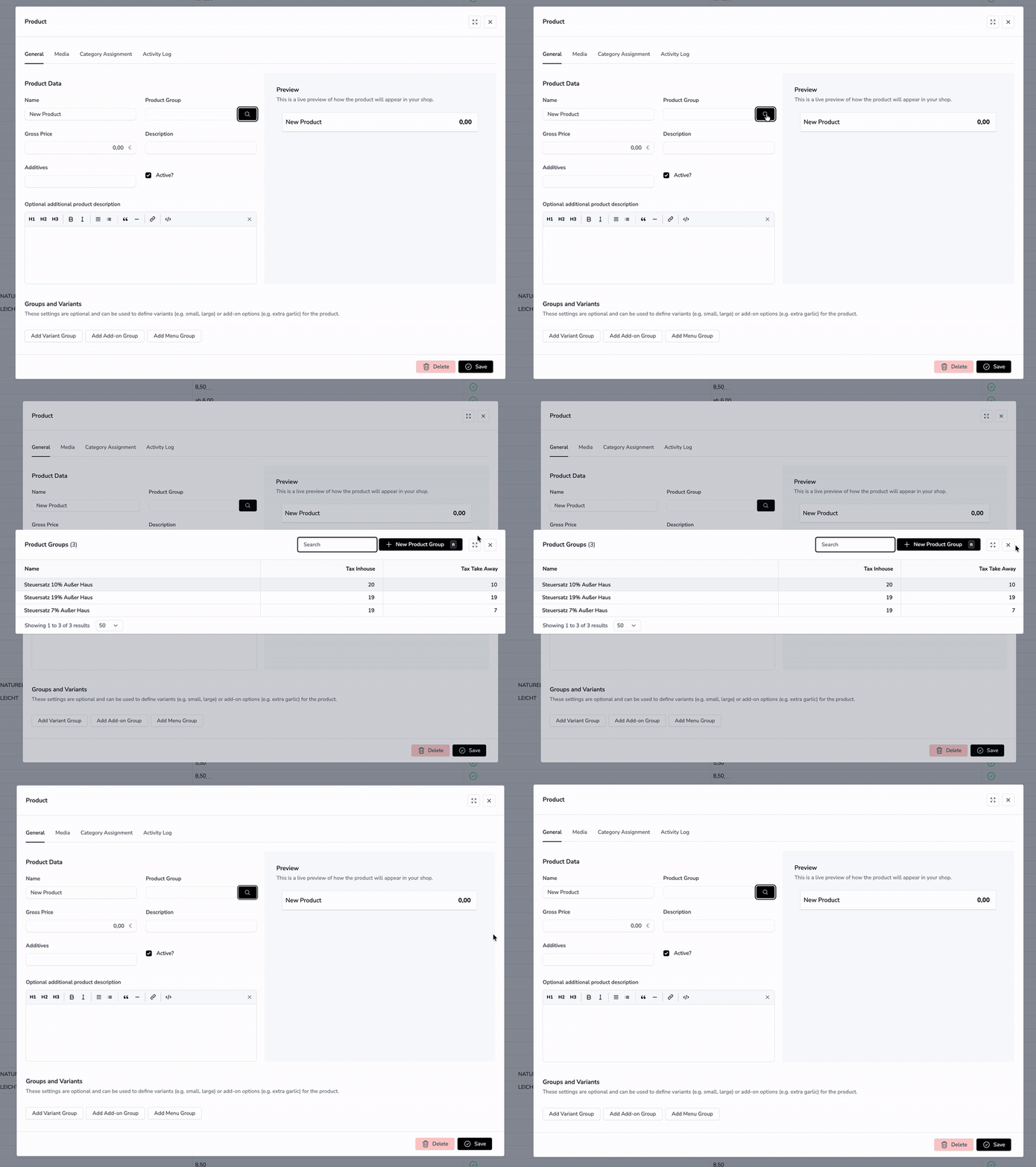
Open any Livewire component in a modal — no traits, no modifications to your livewire component code.
Modals can also be stacked — open another modal from inside an open one with the same $modal() call.
Installation
composer require noerd/modal
That is all — nothing needs to be published. The bundled JavaScript is served by the package itself
through the route /noerd-modal/{file} (like Livewire serves livewire.js), so public/ stays
untouched and the package works from vendor/ as well as from a path repository.
Add source path to your resources/css/app.css file
@source '../../vendor/noerd/modal/resources/views/**/*.blade.php';
Configuration
The config is merged automatically. Publish it only when you want to change the default panel
position (center or right):
php artisan vendor:publish --tag=noerd-modal-config
Add Assets between your head tags.
<head>
...
<x-noerd::noerd-modal-assets/>
...
</head>
Add Modal Component to your layout. Make sure x-data is set on the body tag or any parent element of the modal component, otherwise the modal won't work.
<body x-data>
  <livewire:noerd-modal/>
...
</head>
Example Usage
Opening a Livewire component in a modal via a button
<button type="button"
    @click="$modal('livewire-component-name')">
    Open Modal
</button>
If you want to add parameters to your component which is opened in a modal:
<button type="button"
    @click="$modal('livewire-component-name', { name: 'John Doe' })">
    Open Modal
</button>
<?php

use Livewire\Component;

new class extends Component
{
    public string $name = ''; // will be set to John Doe
};
?>

<div class="p-4">
    {{$name}} {{-- Will display John Doe --}}
</div>
Stacked Modals
$modal(...) works the same way from inside an already-open modal — there is no extra API and no nesting limit. Calling it pushes a new modal onto the stack on top of the current one.
{{-- Inside a Livewire component that is itself open in a modal --}}
<button type="button"
    @click="$modal('another-livewire-component', { count: '{{ $count }}' })">
    Open another modal on top
</button>
Closing follows LIFO order:
- ESC closes only the topmost modal.
- Dispatch
closeTopModalfrom PHP/Livewire to close the top modal programmatically. - Dispatch
closeAllModalsto clear the entire stack at once.
Layering is handled automatically: only the top modal is interactive; modals beneath it are dimmed and slightly scaled down — no styling work required on your end.
Developing the package
Run npm run dev inside the package directory: it writes the Vite hot file to
public/vendor/noerd-modal/hot of the host application (the vite config assumes the package lives
in app-modules/noerd-modal), and <x-noerd::noerd-modal-assets/> then loads the bundle from the
dev server instead of the package route. npm run build writes the bundle to dist/build, which is
committed and shipped with the package.
Publishing the Example
To publish the example components and a demo route, run:
php artisan noerd-modal:publish-example
This will:
- Copy example components to
resources/views/components/example/ - Add a route
/noerd-example-modaltoroutes/web.php
Example Livewire Starter Kit
If you are using the Livewire Starter Kit you can edit the sidebar.blade.php like this example to make noerd modal working
<!DOCTYPE html>
<html lang="{{ str_replace('_', '-', app()->getLocale()) }}" class="dark">
    <head>
        @include('partials.head')
        <x-noerd::noerd-modal-assets/>
    </head>
    <body x-data class="min-h-screen bg-white dark:bg-zinc-800">
        <livewire:noerd-modal/>
Related Packages
Powerful PHP database abstraction layer (DBAL) with many features for database s...
Laravel Serializable Closure provides an easy and secure way to serialize closur...
Cli error handling for console/command-line PHP applications.
Version History
| Version | Released | PHP | Laravel | License |
|---|---|---|---|---|
| v0.3.32 | ^8.3 | ^12.0 || | MIT | |
| v0.3.31 | ^8.3 | ^12.0 || | proprietary | |
| v0.3.30 | ^8.3 | ^12.0 || | proprietary | |
| v0.3.29 | ^8.3 | ^12.0 || | proprietary | |
| v0.3.28 | ^8.3 | ^12.0 || | proprietary | |
| v0.3.27 | ^8.3 | ^12.0 || | proprietary | |
| v0.3.26 | ^8.3 | ^12.0 || | proprietary | |
| v0.3.25 | ^8.3 | ^12.0 || | proprietary | |
| v0.3.24 | ^8.3 | ^12.0 || | proprietary | |
| v0.3.23 | ^8.3 | ^12.0 || | proprietary | |
| v0.3.22 | ^13.0 | proprietary | ||
| v0.3.21 | proprietary | |||
| v0.3.20 | proprietary | |||
| v0.3.19 | proprietary | |||
| v0.3.18 | proprietary | |||
| v0.3.17 | proprietary | |||
| v0.3.15 | proprietary | |||
| v0.3.14 | proprietary | |||
| v0.3.13 | proprietary | |||
| v0.3.12 | proprietary | |||
| v0.3.11 | proprietary | |||
| v0.3.10 | proprietary | |||
| v0.3.9 | proprietary | |||
| v0.3.8 | proprietary | |||
| v0.3.7 | proprietary | |||
| v0.3.6 | proprietary | |||
| v0.3.2 | proprietary | |||
| v0.3.1 | proprietary | |||
| v0.3.0 | proprietary | |||
| v0.2.12 | proprietary |
Showing the latest 30 of 44. See every release on Packagist