nrngajurel/nepali-calendar
| Install | |
|---|---|
composer require nrngajurel/nepali-calendar |
|
| Latest Version: | v1.0.3 |
| PHP: | ^8.1 |
| Laravel: | 9 – 13 |
| License: | MIT |
| Last Updated: | Jul 23, 2026 |
| Links: | GitHub · Packagist |
nrngajurel/nepali-calendar



Bikram Sambat (BS) ⇄ Gregorian (AD) date conversion for PHP, with Laravel Carbon macros that respect a configurable calendar mode. Storage stays AD; only the view layer switches — drop it into any app that needs to show dates in BS, AD, or both.
Contents
- Features
- Datepicker components
- Requirements
- Install
- Carbon macros
- Manager / facade
- Making the mode configurable per tenant / user
- Framework-agnostic converter
- Package layout
- Testing
- Changelog
- Publishing
- Contributing
- Security
- Credits
- License
Features
- Pure PHP converter (
NepaliCalendarConverter) — works outside Laravel too. - Verified against known Nepali New Year dates and round-trip tested across the entire supported range (BS 1970–2100 / AD 1914–2043) with zero drift.
- Calendar mode ('bs' vs 'ad') is resolved through a
CalendarModeResolverinterface — bind your own for tenant- or user-specific behaviour. - Throws typed exceptions (
InvalidNepaliDateException,UnsupportedDateRangeException) instead of silently returningnull. - Scaffolded to match
laravel package(Laravel Installer ≥ v5.31.0) — Pest, Pint, Larastan, and a Testbench workbench sandbox, so it's ready forcomposer test/composer serveout of the box.
Datepicker components
This package ships three Blade components that wrap
nrngajurel/nepali-datepicker-pro
(a zero-dependency JS/CSS package, loaded via CDN by default — nothing to
npm install or composer require) out of the box. Each renders an
<input> using that package's own documented data-nepali-* auto-init
contract, so you get a working BS/AD picker with zero JavaScript of your own:
{{-- Date + time --}}
<x-nepali-calendar::date-picker
    submit-name="appointment_date"
    with-time
    time-format="12h"
/>

{{-- Date range --}}
<x-nepali-calendar::date-range-picker
    submit-name="stay_range"
    :fiscal-start-month="4"
/>

{{-- Month (e.g. payroll/report filter) --}}
<x-nepali-calendar::month-picker
    submit-name="report_month"
/>
Date Picker
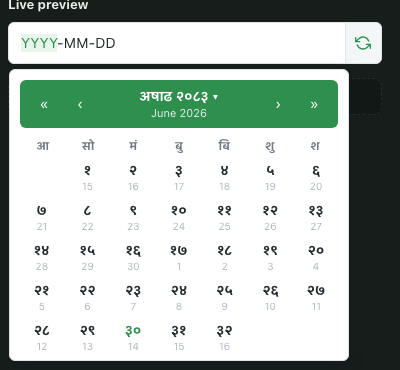
Date Picker |
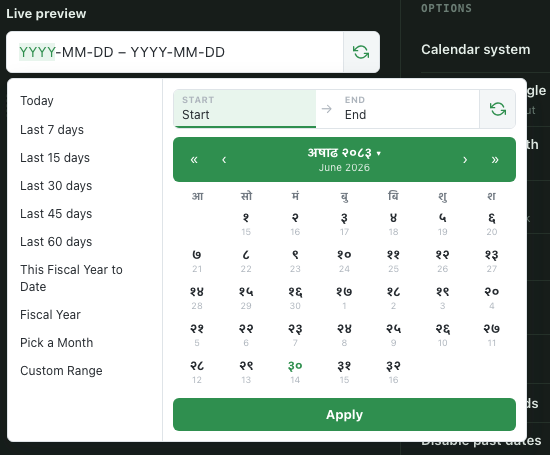
Date Range Picker |
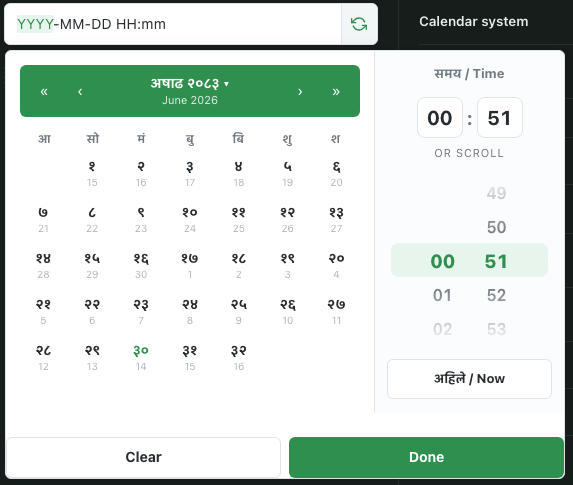
Date Time Picker |
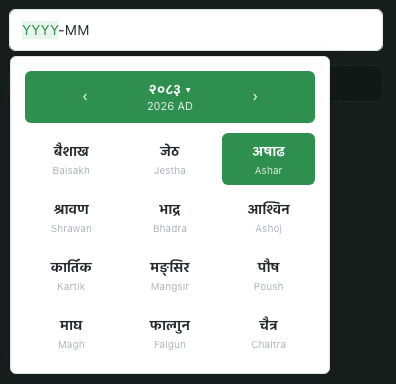
Month Picker |
// Controller
$validated = $request->validate([
    'appointment_date' => 'required|date',
    'stay_range' => 'required|string',   // "2024-04-13,2024-04-20" (AD ISO)
    'report_month' => 'required|string', // "2024-04-13,2024-05-12" (AD ISO)
]);

$appointment->date = Carbon::parse($validated['appointment_date']);
[$rangeStart, $rangeEnd] = explode(',', $validated['stay_range']);
The picker you show the user (BS, Nepali digits, whatever displayFormat
you configure on the JS side) is never assumed to be the value you submit —
submit-name injects a hidden field carrying the AD value, exactly like
nepali-datepicker-pro's own submitName option. See that package's README
for the full JS-side option set (min/max dates, disabled weekdays, presets,
locale, etc.) — anything not exposed as a Blade prop below is still reachable
by adding your own data-* attribute or calling the JS API directly on the
rendered input's id.
| Component | Wraps | Key props |
|---|---|---|
<x-nepali-calendar::date-picker> |
NepaliDateTimePicker |
name, submit-name, alt-field, with-time, time-format (12h/24h), minute-step, value-format (iso/iso-bs/timestamp), value, placeholder, required |
<x-nepali-calendar::date-range-picker> |
NepaliDateRangePicker |
submit-name, alt-field, fiscal-start-month, value-format, value, placeholder, required |
<x-nepali-calendar::month-picker> |
NepaliMonthPicker |
submit-name, alt-field, value-format, value, placeholder, required |
Any attribute not listed (class, extra data-*, x-model, etc.) passes
straight through to the rendered <input>.
Assets (the CDN <link>/<script> tags plus a single NepaliPicker.autoInit()
call) are injected once automatically, no matter how many of the three
components appear on a page. If you already bundle nepali-datepicker-pro
yourself via npm, publish the config and set datepicker.load_assets to
false — the components still render the correct markup, they just skip
the CDN tags:
php artisan vendor:publish --tag=nepali-calendar-config
// config/nepali-calendar.php
'datepicker' => [
    'load_assets' => true,   // false if you bundle nepali-datepicker-pro yourself
    'cdn_version' => null,   // e.g. '0.2.0' to pin a version; null = latest
],
Publish the views if you want to customize the markup:
php artisan vendor:publish --tag=nepali-calendar-views
Requirements
- PHP 8.1+
- Laravel 9, 10, 11, 12, or 13 (via
illuminate/contracts+illuminate/support) nesbot/carbon^2.63 or ^3.0
Install
composer require nrngajurel/nepali-calendar
nepali-datepicker-pro itself is a plain npm/JS package — the 3 components
above pull it in for you via CDN, so there's nothing extra to install unless
you want to bundle it yourself (npm install nepali-datepicker-pro).
Laravel auto-discovers the service provider and the NepaliDate facade.
Publish the config if you want to change defaults:
php artisan vendor:publish --tag=nepali-calendar-config
// config/nepali-calendar.php
return [
    'mode' => env('NEPALI_CALENDAR_MODE', 'ad'),
    'resolver' => \Nrngajurel\NepaliCalendar\Resolvers\ConfigCalendarModeResolver::class,
    'nepali_digits_default' => false,
];
Carbon macros
use Carbon\Carbon;

$date = Carbon::create(2024, 4, 13);

$date->toBsArray();       // ['year' => 2081, 'month' => 1, 'day' => 1, 'weekday' => 7]
$date->toBs();             // "2081-01-01"                  — always BS, ignores mode
$date->toBs('F j, Y');     // "Baishak 1, 2081"
$date->toBs('F j, Y', 'np'); // "बैशाख 1, 2081"
$date->toBs('Y-m-d', 'en', true); // "२०८१-०१-०१"           — Devanagari digits

$date->display();          // BS or AD string depending on the resolved mode
$date->displayHuman();      // "Baishak 1, 2081" or "Apr 13, 2024"
$date->displayWithDay();    // "Saturday, Baishak 1, 2081" or "..., Apr 13, 2024"
$date->displayNepali();     // "१ बैशाख २०८१"
$date->displayDateTime();   // date (per mode) + time

Carbon::parseDisplay($request->input('date')); // parses BS or AD input back to a real AD Carbon
display() and friends only affect presentation. Keep storing and querying
dates in AD — that's what parseDisplay() is for: it takes whatever the user
typed (or whatever nepali-datepicker-pro submitted) in the currently active
calendar and converts it back to AD before you touch the database.
Manager / facade
For services, jobs, and Artisan commands where a Carbon instance isn't already in scope:
use Nrngajurel\NepaliCalendar\Facades\NepaliDate;

NepaliDate::mode();                 // 'bs' | 'ad'
NepaliDate::isBs();
NepaliDate::toBs($carbonDate);      // BsDate value object
NepaliDate::toAd(2081, 1, 1);       // AdDate value object
NepaliDate::display($carbonDate);   // same as $date->display()

// Force a mode for the rest of this request/process (e.g. one export):
NepaliDate::setMode('bs');
// ...
NepaliDate::resetMode();
Or inject Nrngajurel\NepaliCalendar\NepaliCalendarManager directly.
Making the mode configurable per tenant / user
The default resolver reads a single config value, which is fine for a
single-tenant app. For anything more dynamic, bind your own resolver in your
own AppServiceProvider — the package never touches a global helper:
use Nrngajurel\NepaliCalendar\Contracts\CalendarModeResolver;
use Nrngajurel\NepaliCalendar\Resolvers\CallbackCalendarModeResolver;

$this->app->bind(CalendarModeResolver::class, function () {
    return new CallbackCalendarModeResolver(
        fn () => auth()->user()?->calendar_preference ?? tenant()->calendar_type ?? 'ad'
    );
});
Or implement CalendarModeResolver yourself for anything more involved
(caching, request-scoped state, etc.):
final class TenantCalendarModeResolver implements CalendarModeResolver
{
    public function __construct(private TenantRepository $tenants) {}

    public function mode(): string
    {
        return $this->tenants->current()->calendar_type; // 'bs' | 'ad'
    }
}
Framework-agnostic converter
No Laravel required:
use Nrngajurel\NepaliCalendar\Converter\NepaliCalendarConverter;

$converter = new NepaliCalendarConverter();

$bs = $converter->adToBs(2024, 4, 13); // BsDate { year: 2081, month: 1, day: 1, weekday: 7 }
$ad = $converter->bsToAd(2081, 1, 1);  // AdDate { year: 2024, month: 4, day: 13, weekday: 7 }
Weekday is 1 (Sunday) .. 7 (Saturday).
Supported range
- AD input: 1914–2043
- BS input: 1970–2100
Dates outside these ranges throw UnsupportedDateRangeException. Structurally
invalid dates (e.g. 13/32, Feb 30) throw InvalidNepaliDateException.
Package layout
Scaffolded to match the output of laravel package nrngajurel/nepali-calendar --config --facade --views (Laravel Installer ≥ v5.31.0, using
laravel/package-skeleton) — no routes/migrations/translations, since this
package doesn't need them:
config/nepali-calendar.php     — publishable config (incl. datepicker asset settings)
resources/views/components/    — the 3 Blade components + shared asset partial
src/View/Components/           — their backing component classes
src/                            — package source (converter, manager, facade, macros)
tests/Pest.php                  — binds Tests\TestCase to every test
tests/TestCase.php              — Testbench TestCase, registers the provider
tests/ArchTest.php              — arch/lint-level rules (strict_types, no dd()/env())
tests/Unit/                     — framework-agnostic: converter, data table, formatter
tests/Feature/                  — Laravel-integrated: macros, resolver, facade, components
workbench/                      — sandbox Laravel app for `composer serve`
testbench.yaml                  — Testbench workbench configuration
pint.json, phpstan.neon.dist    — Pint / Larastan config
If you'd rather generate a fresh scaffold yourself and diff it against this
repo (e.g. after a future laravel/package-skeleton update), run:
laravel package nrngajurel/nepali-calendar --config --facade --views \
    --author-name="Narayan Gajurel" \
    --author-email="nrngajurel@gmail.com" \
    --vendor-namespace="Nrngajurel" \
    --class-name="NepaliCalendar"
Testing
composer install
composer test        # analyse (Larastan) + lint:check (Pint) + test:unit (Pest)
Or individually:
vendor/bin/pest --parallel     # test suite only
vendor/bin/pint --test         # style check only
vendor/bin/phpstan analyse     # static analysis only
composer serve                 # boot the workbench sandbox app
The test suite includes:
- Round-trip conversion (
AD → BS → AD) across the full supported range. - Regression tests against two independently verified Nepali New Year dates (BS 2081-01-01 = 13 Apr 2024, BS 2083-01-01 = 14 Apr 2026).
- Feature tests for the Carbon macros, the resolver contract (including binding a custom resolver), and the facade.
- Feature tests for all 3 datepicker components: correct
data-nepali-*markup, asset dedup across multiple components on one page, and theload_assetsconfig toggle. - An arch test enforcing
strict_typesand banningdd()/env()/exit()in package source.
Changelog
See CHANGELOG.md for release history.
Publishing
- Push this repository to GitHub as
nrngajurel/nepali-calendar. - Tag a release matching
CHANGELOG.md:git tag v1.0.0 && git push --tags. - On packagist.org, "Submit" the GitHub repo URL.
- Enable the Packagist GitHub App (or add the webhook it gives you) so future tags auto-publish without a manual "Update" click.
composer require nrngajurel/nepali-calendarthen works anywhere.
Contributing
- Fork and clone the repo.
composer install- Make your change, with a Pest test covering it.
composer test— must pass (Larastan, Pint, Pest) before opening a PR.- Open a PR against
main. CI (.github/workflows/tests.yml) runs the same matrix across PHP 8.1–8.4 and Testbench ^9–^11.
Security
If you discover a security vulnerability, please email nrngajurel@gmail.com instead of opening a public issue.
Credits
- Narayan Gajurel
- Datepicker UI powered by nrngajurel/nepali-datepicker-pro
License
MIT © Narayan Gajurel nrngajurel@gmail.com. See LICENSE.md.
Related Packages
A manager to work business date that can use the database to add extra dates
Version History
| Version | Released | PHP | Laravel | License |
|---|---|---|---|---|
| v1.0.3 | ^8.1 | ^9.0|| | MIT | |
| v1.0.1 | ^8.1 | ^9.0|| | MIT |