oybek-daniyarov/laravel-trpc
| Install | |
|---|---|
composer require oybek-daniyarov/laravel-trpc:v0.2.0-beta |
|
| Latest Version: | v0.2.0-beta |
| PHP: | ^8.3 |
| Laravel: | 11 · 12 · 13 |
| License: | MIT |
| Last Updated: | Apr 10, 2026 |
| Links: | GitHub · Packagist |
Laravel tRPC



Generate a fully typed TypeScript client from your Laravel routes — with request types, response types, and optional React Query/Inertia helpers.
Quick Example
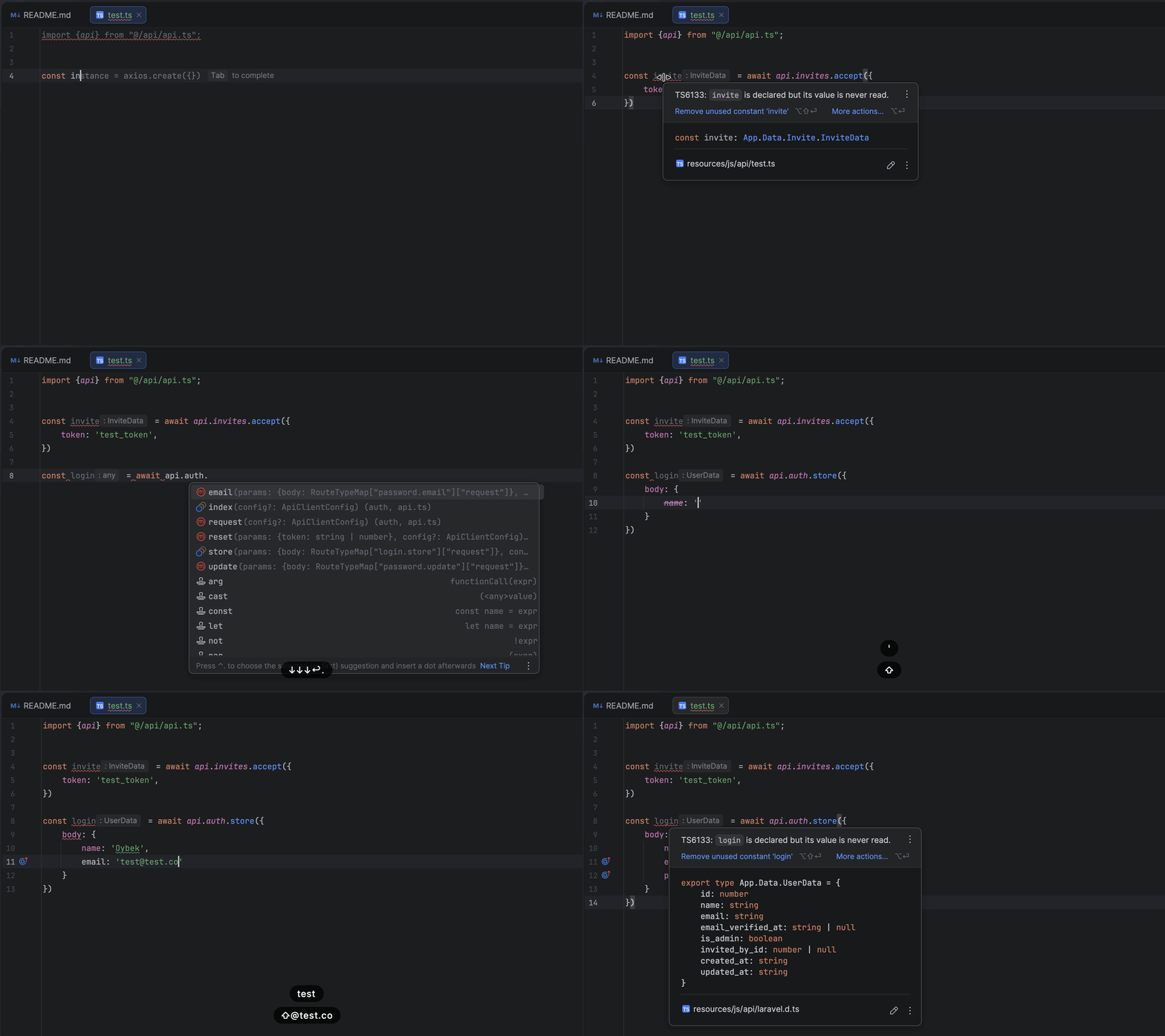
import { createApi } from '@/api';

const api = createApi({
    baseUrl: process.env.NEXT_PUBLIC_API_URL!,
});

// Full autocomplete and type safety
const users = await api.users.index();
const user = await api.users.show({ user: 1 });
const newUser = await api.users.store({
    body: { name: 'John', email: 'john@example.com', password: 'secret' }
});
What This Is (and Isn't)
What it is: A Laravel-first generator that inspects your routes and produces a TypeScript client with fully typed inputs and outputs.
What it isn't: This is not a server-side implementation of the tRPC protocol. It doesn't require a Node.js tRPC router. It generates a typed HTTP client for your existing Laravel routes.
Runtime model: Generation happens at build time via php artisan trpc:generate. The output is a small TypeScript client that calls your HTTP endpoints — no runtime reflection on the PHP side.
Status
Beta (0.x). The public API and generated output structure may change between minor versions. For production use:
- Pin to exact versions in
composer.json - Review generated output diffs on upgrade
- Follow the CHANGELOG for breaking changes
Features
- Full Type Safety: Request bodies, responses, URL parameters, and query strings are all typed
- Zero Runtime Overhead: Types are generated at build time, no runtime reflection
- Framework Integrations: Built-in support for React Query and Inertia.js
- Grouped API Client: Object-based API (
api.users.show()) with full autocomplete - Postman Export: Generate Postman collections from your routes
Example Project
See it in action — a Laravel API with Inertia.js frontend, fully typed end-to-end:
🔗 github.com/oybek-daniyarov/empty-space
Table of Contents
- Example Project
- Requirements
- Installation
- Quick Start
- TypedRoute Attribute
- Generate & Use
- Generated Files
- Output Contract
- Configuration
- Middleware & Authentication
- Error Handling
- Type Helpers
- React Query Integration
- Inertia.js Integration
- API Client Configuration
- Command Options
- Customizing Stubs
- Known Limitations
- Troubleshooting
- Versioning
- Backstory
Requirements
- PHP 8.3+
- Laravel 11.x or 12.x
- spatie/laravel-data
- spatie/laravel-typescript-transformer
Installation
composer require spatie/laravel-data spatie/laravel-typescript-transformer
composer require oybek-daniyarov/laravel-trpc
Publish the config file:
php artisan vendor:publish --tag=trpc-config
Quick Start
1. Define Data Classes
use Spatie\LaravelData\Data;
use Spatie\TypeScriptTransformer\Attributes\TypeScript;

#[TypeScript]
class UserData extends Data
{
    public function __construct(
        public int $id,
        public string $name,
        public string $email,
    ) {}
}

#[TypeScript]
class CreateUserData extends Data
{
    public function __construct(
        public string $name,
        public string $email,
        public string $password,
    ) {}
}
2. Add TypedRoute Attribute to Controllers
use OybekDaniyarov\LaravelTrpc\Attributes\TypedRoute;

class UserController extends Controller
{
    #[TypedRoute(response: UserData::class, isPaginated: true)]
    public function index()
    {
        return UserData::collect(User::paginate());
    }

    #[TypedRoute(response: UserData::class)]
    public function show(User $user)
    {
        return UserData::from($user);
    }

    #[TypedRoute(request: CreateUserData::class, response: UserData::class)]
    public function store(CreateUserData $data)
    {
        return UserData::from(User::create($data->toArray()));
    }

    #[TypedRoute(request: UpdateUserData::class, response: UserData::class)]
    public function update(User $user, UpdateUserData $data)
    {
        $user->update($data->toArray());
        return UserData::from($user);
    }

    #[TypedRoute]
    public function destroy(User $user)
    {
        $user->delete();
        return response()->noContent();
    }
}
TypedRoute Attribute
The #[TypedRoute] attribute explicitly declares request and response types for your API endpoints. When applied, it takes priority over static analysis for type detection.
Parameters
| Parameter | Type | Description |
|---|---|---|
request |
class-string|null |
Request body Data class (for POST/PUT/PATCH) |
query |
class-string|null |
Query parameters Data class (for GET requests) |
response |
class-string|null |
Response Data class |
errorResponse |
class-string|null |
Error response Data class (defaults to ValidationError) |
isCollection |
bool |
Response is an array of items (Array<T>) |
isPaginated |
bool |
Response is paginated (PaginatedResponse<T>) |
Examples
Basic response type:
#[TypedRoute(response: UserData::class)]
public function show(User $user)
{
    return UserData::from($user);
}
Request and response types:
#[TypedRoute(request: CreateUserData::class, response: UserData::class)]
public function store(CreateUserData $data)
{
    return UserData::from(User::create($data->toArray()));
}
Query parameters (for GET with filters/search):
#[TypedRoute(query: UserFilterData::class, response: UserData::class, isPaginated: true)]
public function index(UserFilterData $filters)
{
    return UserData::collect(
        User::filter($filters)->paginate()
    );
}
Paginated response:
#[TypedRoute(response: UserData::class, isPaginated: true)]
public function index()
{
    return UserData::collect(User::paginate());
}
// TypeScript: PaginatedResponse<UserData>
Collection response (non-paginated array):
#[TypedRoute(response: UserData::class, isCollection: true)]
public function all()
{
    return UserData::collect(User::all());
}
// TypeScript: Array<UserData>
No response body (204 No Content):
#[TypedRoute]
public function destroy(User $user)
{
    $user->delete();
    return response()->noContent();
}
// TypeScript: void
Custom error response:
#[TypedRoute(
    request: CreateUserData::class,
    response: UserData::class,
    errorResponse: CreateUserErrorData::class
)]
public function store(CreateUserData $data)
{
    // ...
}
Query vs Request
- Use
requestfor body data (POST, PUT, PATCH requests) - Use
queryfor URL query parameters (GET requests with filters, search, pagination)
// GET /api/users?status=active&sort=name
#[TypedRoute(query: UserFilterData::class, response: UserData::class, isPaginated: true)]
public function index(UserFilterData $filters) { }

// POST /api/users (body: { name: "John", email: "john@example.com" })
#[TypedRoute(request: CreateUserData::class, response: UserData::class)]
public function store(CreateUserData $data) { }
Generate & Use
Generate TypeScript Client
php artisan trpc:generate
4. Use in TypeScript
import { api } from '@/lib/api';

// Full autocomplete and type safety
const users = await api.users.index();
const user = await api.users.show({ user: 1 });
const newUser = await api.users.store({
    body: { name: 'John', email: 'john@example.com', password: 'secret' }
});
await api.users.update({ user: 1, body: { name: 'Jane' } });
await api.users.destroy({ user: 1 });
Generated Files
The generator produces a tree-shakeable folder structure:
resources/js/api/
├── core/                 # Core infrastructure
│   ├── types.ts          # HttpMethod, ApiError, PaginatedResponse, ValidationError
│   ├── fetch.ts          # Low-level fetch wrapper with full type safety
│   ├── helpers.ts        # Type helpers (RequestOf, ResponseOf, ParamsOf, QueryOf)
│   └── index.ts          # Core barrel exports
├── {group}/              # Per-resource folders (users/, posts/, etc.)
│   ├── routes.ts         # Group-specific route definitions
│   ├── api.ts            # createUsersApi() factory
│   ├── queries.ts        # createUsersQueries() factory (optional)
│   ├── mutations.ts      # createUsersMutations() factory (optional)
│   └── index.ts          # Group barrel exports
├── routes.ts             # Aggregated route definitions
├── api.ts                # createApi() factory combining all groups
├── queries.ts            # createQueries() factory (optional)
├── mutations.ts          # createMutations() factory (optional)
├── url-builder.ts        # Type-safe URL builder
├── client.ts             # Method-specific client (client.get(), etc.)
├── inertia.ts            # Inertia.js helpers (optional)
├── react-query.ts        # React Query utilities (optional)
├── index.ts              # Main barrel exports
└── README.md             # Generated documentation
Tree-Shaking
Import only what you need for optimal bundle size:
// Per-resource import (tree-shakeable) - only imports users code
import { createUsersApi } from '@/api/users';

// Or combined API - imports all resources
import { createApi } from '@/api';
Output Contract
The generator produces a stable folder structure:
resources/js/api/
├── core/             # Core infrastructure (always generated)
│   ├── types.ts      # ApiError, PaginatedResponse, ValidationError
│   ├── fetch.ts      # Low-level fetch wrapper
│   ├── helpers.ts    # Type helpers (RequestOf, ResponseOf, etc.)
│   └── index.ts      # Core exports
├── {group}/          # Per-resource folders (e.g., users/, posts/)
│   ├── routes.ts     # Route definitions for this group
│   ├── api.ts        # createUsersApi() factory
│   ├── queries.ts    # createUsersQueries() (if react-query enabled)
│   └── index.ts      # Group exports
├── routes.ts         # Aggregated routes from all groups
├── api.ts            # createApi() factory
├── queries.ts        # createQueries() factory (optional)
├── url-builder.ts    # Type-safe URL builder
├── client.ts         # Method-specific client
├── inertia.ts        # Inertia.js helpers (optional)
├── react-query.ts    # React Query utilities (optional)
├── index.ts          # Barrel exports
└── README.md         # Generated documentation
Naming Conventions
- Route names map directly to TypeScript keys:
users.index→api.users.index() - Groups are derived from the first segment of the route name
- Parameters use Laravel's route parameter names:
{user}→{ user: number }
Configuration
// config/trpc.php
return [
    // Output directory for generated files
    'output_path' => resource_path('js/api'),

    // API route prefix filter
    'api_prefix' => 'api',

    // Route collection mode: 'api', 'web', 'all', 'named', 'attributed'
    'route_mode' => 'api',

    // Exclude patterns
    'exclude_patterns' => [
        'debugbar.*',
        'horizon.*',
        'telescope.*',
    ],

    // Output files to generate
    'outputs' => [
        'routes' => true,
        'types' => true,
        'helpers' => true,
        'url-builder' => true,
        'fetch' => true,
        'client' => true,
        'index' => true,
        'readme' => true,
        'grouped-api' => true,
        'inertia' => true,
        'react-query' => false,
        'queries' => false,
        'mutations' => false,
    ],
];
Configuration Reference
| Option | Type | Default | Description |
|---|---|---|---|
output_path |
string | resource_path('js/api') |
Directory for generated TypeScript files |
api_prefix |
string | 'api' |
API route prefix for filtering |
version |
string | 'v1' |
API version identifier |
route_mode |
string | 'api' |
Route collection mode (see below) |
include_patterns |
array | [] |
Route patterns to include |
exclude_patterns |
array | [...] |
Route patterns to exclude |
exclude_methods |
array | ['options', 'head'] |
HTTP methods to skip |
preset |
string|null | null |
Framework preset: 'inertia', 'api', 'spa' |
outputs |
array | [...] |
Files to generate |
auto_typescript_transform |
bool | true |
Auto-run typescript:transform |
laravel_types_path |
string|null | null |
Path to laravel.d.ts |
Route Modes
| Mode | Description |
|---|---|
'api' |
Only routes starting with api_prefix (default) |
'web' |
Only routes NOT starting with api_prefix |
'all' |
All routes (use with include/exclude patterns) |
'named' |
Only routes with names |
'attributed' |
Only routes with #[TypedRoute] attribute |
Presets
Use presets to quickly enable common output configurations:
// config/trpc.php
return [
    'preset' => 'spa', // 'inertia', 'api', or 'spa'
];
| Preset | Enables | Use Case |
|---|---|---|
'inertia' |
Core files + Inertia helpers | Laravel + Inertia.js apps |
'api' |
Core files + React Query + Mutations | API-first / SPA with React Query |
'spa' |
Core files + Inertia + React Query + Mutations | Full-featured SPA |
null |
Custom (configure outputs manually) |
Fine-grained control |
Presets override the outputs array. To customize individual outputs, set preset to null and configure outputs directly.
Postman Configuration
'postman' => [
    'output_path' => storage_path('app/postman'),
    'collection_name' => env('APP_NAME', 'API').' Collection',
    'base_url' => '{{base_url}}',
    'auth_type' => 'bearer', // 'bearer', 'apikey', or null
    'default_headers' => [],
],
Middleware Configuration
Control how middleware appears in the generated TypeScript output:
'middleware' => [
    // Exclude middleware from generated output (supports wildcards)
    'exclude' => [
        'Stancl\Tenancy\*',
        'App\Http\Middleware\TrustProxies',
    ],

    // Transform FQCNs to short class names (default: true)
    'short_names' => true,
],
Before (with short_names: false and no exclusions):
middleware: ['api', 'Stancl\\Tenancy\\Middleware\\InitializeTenancyByDomain', 'auth:sanctum'] as const,
After (with short_names: true and Tenancy excluded):
middleware: ['api', 'auth:sanctum'] as const,
| Middleware Input | Short Name Output |
|---|---|
Stancl\Tenancy\Middleware\InitializeTenancyByDomain |
InitializeTenancyByDomain |
App\Http\Middleware\RateLimiter:api |
RateLimiter:api |
auth:sanctum |
auth:sanctum (unchanged) |
web |
web (unchanged) |
Middleware & Authentication
The generated routes include middleware information, allowing you to build auth-aware UIs.
Generated Route Data
Each route includes middleware and authentication info:
// In routes.ts
export const routes = {
    'users.index': {
        path: 'api/users',
        method: 'get',
        params: [],
        middleware: ['auth:sanctum', 'verified'] as const,
        authenticated: true,
    },
    'auth.login': {
        path: 'api/auth/login',
        method: 'post',
        params: [],
        middleware: [] as const,
        authenticated: false,
    },
} as const;
Type Helpers for Auth Routes
Filter routes by authentication requirement:
import type { AuthenticatedRoutes, PublicRoutes } from '@/api';

// Only routes that require authentication
type ProtectedRoutes = AuthenticatedRoutes;
// 'users.index' | 'users.store' | 'users.update' | ...

// Only routes that don't require authentication
type OpenRoutes = PublicRoutes;
// 'auth.login' | 'auth.register' | ...
Checking Auth Before API Calls
import { routes, type RouteName } from '@/api';

function isAuthRequired(name: RouteName): boolean {
    return routes[name].authenticated;
}

// Use in components
function ApiButton({ route, children }: { route: RouteName; children: React.ReactNode }) {
    const { isAuthenticated } = useAuth();

    if (routes[route].authenticated && !isAuthenticated) {
        return <LoginPrompt />;
    }

    return <button onClick={() => callApi(route)}>{children}</button>;
}
Accessing Middleware Array
import { routes } from '@/api';

// Get middleware for a route
const middleware = routes['users.index'].middleware;
// ['auth:sanctum', 'verified']

// Check for specific middleware
const requiresVerification = middleware.includes('verified');
Error Handling
Built-in Error Types
The generated types.ts includes standard Laravel error types:
// Base API error (thrown by fetch wrapper)
interface ApiError {
    readonly message: string;
    readonly status: number;        // HTTP status code
    readonly statusText?: string;   // HTTP status text
    readonly errors?: Record<string, string[]>;  // Validation errors
}

// Specific error types
interface ValidationError { message: string; errors: Record<string, string[]>; }
interface NotFoundError { message: string; }
interface UnauthorizedError { message: string; }
interface ForbiddenError { message: string; }
interface ServerError { message: string; exception?: string; trace?: [...]; }
Custom Error Types with errorResponse
Define custom error Data classes for specific routes:
// Define a custom error type
#[TypeScript]
class CreateUserErrorData extends Data
{
    public function __construct(
        public string $message,
        public ?string $email_suggestion,  // Custom field
        public ?array $password_requirements,
    ) {}
}

// Use in controller
#[TypedRoute(
    request: CreateUserData::class,
    response: UserData::class,
    errorResponse: CreateUserErrorData::class  // Custom error type
)]
public function store(CreateUserData $data)
{
    // If validation fails, return custom error structure
    if (User::where('email', $data->email)->exists()) {
        return response()->json([
            'message' => 'Email already taken',
            'email_suggestion' => $data->email . '.new',
        ], 422);
    }

    return UserData::from(User::create($data->toArray()));
}
Using Error Types in TypeScript
import type { ErrorOf, ApiError } from '@/api';
import { api } from '@/lib/api';

// Get the error type for a specific route
type CreateUserError = ErrorOf<'users.store'>;
// CreateUserErrorData (custom) or ValidationError (default)

// Handle errors with proper typing
async function createUser(data: CreateUserData) {
    try {
        return await api.users.store({ body: data });
    } catch (e) {
        const error = e as ApiError;

        console.log(error.status);     // 422
        console.log(error.message);    // "Email already taken"
        console.log(error.errors);     // { email: ["Email already taken"] }

        // For custom error fields, cast to specific type
        if (error.status === 422) {
            const customError = error as unknown as CreateUserError;
            console.log(customError.email_suggestion);
        }
    }
}
Error Handling with React Query
import { useMutation } from '@tanstack/react-query';
import type { ErrorOf, ApiError } from '@/api';

function CreateUserForm() {
    const mutation = useMutation({
        mutationFn: (data: CreateUserData) => api.users.store({ body: data }),
        onError: (error: ApiError) => {
            if (error.status === 422 && error.errors) {
                // Show field-specific errors
                Object.entries(error.errors).forEach(([field, messages]) => {
                    setFieldError(field, messages[0]);
                });
            } else if (error.status === 401) {
                redirectToLogin();
            }
        },
    });

    // ...
}
Type Helpers
Extract types from route names for use in your components:
import type { RequestOf, ResponseOf, ParamsOf, QueryOf, ErrorOf } from '@/api';

// Request body type
type CreateUserPayload = RequestOf<'users.store'>;

// Response type
type UserResponse = ResponseOf<'users.show'>;

// URL parameters type
type UserParams = ParamsOf<'users.show'>; // { user: number }

// Query parameters type
type UserQuery = QueryOf<'users.index'>; // { page?: number, per_page?: number }

// Error type (custom or ValidationError)
type StoreUserError = ErrorOf<'users.store'>;
React Query Integration
Enable in config:
'outputs' => [
    'react-query' => true,  // Core utilities (queryKey, createQueryOptions)
    'queries' => true,      // Resource-based query hooks (usersQueries, etc.)
    'mutations' => true,    // Resource-based mutation hooks (usersMutations, etc.)
],
Generated Files
| File | Description |
|---|---|
react-query.ts |
Low-level utilities: queryKey, createQueryOptions, createInfiniteQueryOptions |
queries.ts |
Resource-based query factories organized by API resource (e.g., usersQueries, postsQueries) |
mutations.ts |
Resource-based mutation factories organized by API resource (e.g., usersMutations, postsMutations) |
Setup
Before using queries and mutations, create configured instances in a setup file:
// lib/api.ts
import { createApi, createQueries, createMutations } from '@/api';

const api = createApi({
    baseUrl: process.env.NEXT_PUBLIC_API_URL ?? '',
    headers: { 'X-App-Version': '1.0.0' },
});

export const queries = createQueries(api);
export const mutations = createMutations(api);
export { api };
Then import from your setup file in components:
import { api, queries, mutations } from '@/lib/api';
Resource-Based Queries (queries.ts)
The queries.ts file generates query factories for each API resource, providing:
- Pre-configured
queryOptions()andinfiniteQueryOptions()for each GET endpoint - Type-safe query keys with
keysobject for cache management - Automatic infinite query support for paginated endpoints
import { useQuery, useInfiniteQuery, useQueryClient } from '@tanstack/react-query';
import { queries } from '@/lib/api';

// Simple query
const { data: user } = useQuery(queries.users.show({ user: 1 }));

// Paginated endpoints automatically use infinite queries
const { data, fetchNextPage, hasNextPage } = useInfiniteQuery(
    queries.users.index({ query: { per_page: 20 } })
);

// Query keys for cache invalidation
const queryClient = useQueryClient();
queryClient.invalidateQueries({ queryKey: queries.users.keys.all });        // ['users']
queryClient.invalidateQueries({ queryKey: queries.users.keys.show({ user: 1 }) }); // ['users', 'show', { user: 1 }]
Low-Level Utilities (react-query.ts)
For more control, use the low-level utilities:
import { useQuery } from '@tanstack/react-query';
import { queryKey, createQueryOptions } from '@/api';

// Create query options manually
const { data } = useQuery(
    createQueryOptions('users.show', {
        path: { user: 1 },
        staleTime: 5000,
    })
);

// Query keys for cache management
const key = queryKey('users.show', { path: { user: 1 } });
// ['users.show', { user: 1 }]
Full Example
import { useQuery, useMutation, useQueryClient } from '@tanstack/react-query';
import { queries, api } from '@/lib/api';

function UserProfile({ userId }: { userId: number }) {
    const { data, isLoading } = useQuery(queries.users.show({ user: userId }));
    const queryClient = useQueryClient();

    const updateUser = useMutation({
        mutationFn: (data: { name: string }) =>
            api.users.update({ user: userId, body: data }),
        onSuccess: () => {
            queryClient.invalidateQueries({
                queryKey: queries.users.keys.show({ user: userId })
            });
        },
    });

    if (isLoading) return <div>Loading...</div>;

    return (
        <div>
            <h1>{data?.name}</h1>
            <button onClick={() => updateUser.mutate({ name: 'New Name' })}>
                Update
            </button>
        </div>
    );
}
Infinite Queries for Pagination
Paginated endpoints automatically generate infiniteQueryOptions:
import { useInfiniteQuery } from '@tanstack/react-query';
import { queries } from '@/lib/api';

function UserList() {
    const { data, fetchNextPage, hasNextPage, isFetchingNextPage } = useInfiniteQuery(
        queries.users.index({ query: { per_page: 20 } })
    );

    return (
        <div>
            {data?.pages.flatMap(page => page.data).map(user => (
                <div key={user.id}>{user.name}</div>
            ))}
            {hasNextPage && (
                <button
                    onClick={() => fetchNextPage()}
                    disabled={isFetchingNextPage}
                >
                    {isFetchingNextPage ? 'Loading...' : 'Load More'}
                </button>
            )}
        </div>
    );
}
Resource-Based Mutations (mutations.ts)
The mutations.ts file generates type-safe mutation factories for POST, PUT, PATCH, and DELETE endpoints:
import { useMutation, useQueryClient } from '@tanstack/react-query';
import { createApi, createMutations, createQueries } from '@/api';

const api = createApi({ baseUrl: process.env.NEXT_PUBLIC_API_URL ?? '' });
const mutations = createMutations(api);
const queries = createQueries(api);

function CreateUserButton() {
    const queryClient = useQueryClient();

    const createUser = useMutation({
        ...mutations.users.store(),
        onSuccess: () => {
            queryClient.invalidateQueries({ queryKey: queries.users.keys.all });
        },
    });

    // TypeScript enforces body is REQUIRED for store route
    return (
        <button
            onClick={() => createUser.mutate({
                body: { name: 'John', email: 'john@example.com' }
            })}
            disabled={createUser.isPending}
        >
            Create User
        </button>
    );
}

function DeleteUserButton({ userId }: { userId: number }) {
    const queryClient = useQueryClient();

    const deleteUser = useMutation({
        ...mutations.users.destroy(),
        onSuccess: () => {
            queryClient.invalidateQueries({ queryKey: queries.users.keys.all });
        },
    });

    // TypeScript allows NO body for destroy route (only path params)
    return (
        <button onClick={() => deleteUser.mutate({ user: userId })}>
            Delete
        </button>
    );
}
Mutation keys for cache management:
mutations.users.keys.all      // ['users', 'mutation']
mutations.users.keys.store()  // ['users.store']
mutations.users.keys.update() // ['users.update']
mutations.users.keys.destroy() // ['users.destroy']
Inertia.js Integration
import { router } from '@inertiajs/react';
import { route, visit, formAction } from '@/api/inertia';

// Generate type-safe URLs
const url = route('users.show', { user: 123 });

// Navigate with type safety
visit('users.show', { user: 123 });
visit('users.index', null, { query: { page: 2 } });

// Form actions
function CreateUserForm() {
    return (
        <form {...formAction('users.store')}>
            <input name="name" />
            <input name="email" type="email" />
            <button type="submit">Create</button>
        </form>
    );
}
API Client Configuration
Basic Setup
Create a configured API instance and export it for use throughout your app:
// lib/api.ts
import { createApi } from '@/api';

export const api = createApi({
    baseUrl: process.env.NEXT_PUBLIC_API_URL ?? '',
    headers: { 'X-App-Version': '1.0.0' },
});
Usage
import { api } from '@/lib/api';

// Simple usage
const users = await api.users.index();

// With custom headers (per-request)
const users = await api.users.index({
    headers: { 'X-Custom': 'value' },
});

// With path params
const user = await api.users.show({ user: 1 });

// With path params and per-request options
const user = await api.users.show({ user: 1 }, {
    headers: { 'X-Request-Id': 'abc123' },
});

// With body (POST/PUT/PATCH)
const newUser = await api.users.store({ body: { name: 'John', email: 'john@example.com' } });
Per-Request Options
All API methods accept an optional RequestOptions object as the last parameter:
interface RequestOptions {
    headers?: Record<string, string>;  // Custom headers for this request
    next?: NextCacheOptions;           // Next.js cache configuration
    mobile?: MobileOptions;            // Mobile/React Native options
    signal?: AbortSignal;              // Abort signal
}
Next.js App Router
Server Components
// lib/api.server.ts
import { createApi } from '@/api';
import { cookies } from 'next/headers';
import { cache } from 'react';

// Cache per request (React cache for deduplication)
export const getServerApi = cache(async () => {
    const cookieStore = await cookies();
    const token = cookieStore.get('token')?.value;

    return createApi({
        baseUrl: process.env.API_URL!,
        headers: token ? { Authorization: `Bearer ${token}` } : {},
    });
});
// app/users/page.tsx
import { getServerApi } from '@/lib/api.server';

export default async function UsersPage() {
    const api = await getServerApi();

    // With Next.js cache tags for revalidation
    const users = await api.users.index({
        next: { tags: ['users'], revalidate: 60 }
    });

    return <UserList users={users.data} />;
}
Server Actions
// app/actions/users.ts
'use server';

import { getServerApi } from '@/lib/api.server';
import { revalidateTag } from 'next/cache';

export async function createUser(data: CreateUserData) {
    const api = await getServerApi();
    const user = await api.users.store({ body: data });

    revalidateTag('users');
    return user;
}

export async function deleteUser(userId: number) {
    const api = await getServerApi();
    await api.users.destroy({ user: userId });

    revalidateTag('users');
    revalidateTag(`user-${userId}`);
}
Route Handlers
// app/api/users/route.ts
import { createApi } from '@/api';
import { NextRequest, NextResponse } from 'next/server';

export async function GET(request: NextRequest) {
    const api = createApi({
        baseUrl: process.env.API_URL!,
        headers: {
            Authorization: request.headers.get('Authorization') ?? '',
        },
    });

    const users = await api.users.index();
    return NextResponse.json(users);
}
React Query Integration
With Configured API (Recommended)
Use createQueries to bind queries to a configured API instance:
// lib/api.ts
import { createApi, createQueries, createMutations } from '@/api';

const api = createApi({
    baseUrl: process.env.NEXT_PUBLIC_API_URL ?? '',
    headers: { 'X-App-Version': '1.0.0' },
});

export const queries = createQueries(api);
export const mutations = createMutations(api);
export { api };
// components/UserProfile.tsx
'use client';

import { useQuery, useMutation, useQueryClient } from '@tanstack/react-query';
import { queries, api } from '@/lib/api';

export function UserProfile({ userId }: { userId: number }) {
    const queryClient = useQueryClient();

    const { data: user, isLoading } = useQuery(
        queries.users.show({ user: userId })
    );

    const updateMutation = useMutation({
        mutationFn: (data: UpdateUserData) =>
            api.users.update({ user: userId, body: data }),
        onSuccess: () => {
            queryClient.invalidateQueries({
                queryKey: queries.users.keys.show({ user: userId })
            });
        },
    });

    if (isLoading) return <div>Loading...</div>;

    return (
        <div>
            <h1>{user?.name}</h1>
            <button onClick={() => updateMutation.mutate({ name: 'New Name' })}>
                Update
            </button>
        </div>
    );
}
Command Options
# Generate TypeScript definitions (default)
php artisan trpc:generate

# Generate Postman collection only
php artisan trpc:generate --postman

# Generate both TypeScript and Postman collection
php artisan trpc:generate --format=all

# Custom output directory (overrides config)
php artisan trpc:generate --output=resources/js/generated

# Override API prefix for route filtering
php artisan trpc:generate --api-prefix=api/v2

# Skip running typescript:transform automatically
php artisan trpc:generate --skip-typescript-transform

# Generate Postman collection with environment file
php artisan trpc:generate --postman --postman-env

# Overwrite files without confirmation
php artisan trpc:generate --force

# Custom base URL for generated client
php artisan trpc:generate --base-url=https://api.example.com
Command Options Reference
| Option | Description |
|---|---|
--output=PATH |
Override the output directory from config |
--api-prefix=PREFIX |
Override the API route prefix filter |
--skip-typescript-transform |
Skip auto-running typescript:transform |
--postman |
Generate Postman collection only (shorthand for --format=postman) |
--postman-env |
Also generate Postman environment file |
--format=FORMAT |
Output format: typescript (default), postman, or all |
--force |
Overwrite existing files without confirmation |
--base-url=URL |
Set default base URL for the generated TypeScript client |
Customizing Stubs
Publish the stub templates:
php artisan vendor:publish --tag=trpc-stubs
Templates will be copied to resources/views/vendor/trpc/.
Known Limitations
- Route model binding: Parameters are typed as
number | stringby default. Custom types require explicit#[TypedRoute]configuration. - Union/polymorphic responses: Not automatically detected. Use a single response Data class or document via
#[TypedRoute(response: ...)]. - Middleware inference: Auth detection relies on common middleware names (
auth,auth:*). Custom auth middleware may not be detected. - Closure routes: Routes without controller methods cannot have types extracted automatically.
Troubleshooting
"No API routes found"
- Ensure your routes use the configured
api_prefix(default:api) - Check that routes are registered before running the command
- Try
php artisan route:listto verify routes exist
Generated types are unknown
- Add
#[TypeScript]attribute to your Data classes - Run
php artisan typescript:transformfirst - Check that
laravel.d.tsexists in your output directory
TypeScript errors after regeneration
- Clear your TypeScript cache:
rm -rf node_modules/.cache - Ensure your
tsconfig.jsonincludes the output directory - Check for circular dependencies in your Data classes
Route names are duplicated
- The generator appends
_1,_2suffixes for duplicate names - Use unique route names or configure
route_name_mappingsin config
Versioning
This package follows Semantic Versioning:
- Patch (0.1.x): Bug fixes, no changes to generated output shape
- Minor (0.x.0): New features, may add fields to generated output
- Major (x.0.0): Breaking changes to generated output structure or API
During the 0.x beta period, minor versions may include breaking changes. These will be clearly documented in the CHANGELOG.
Backstory
I built this to solve a real problem: getting a strongly typed TypeScript client from Laravel routes without manual type duplication.
I used AI tooling (Claude Code) to accelerate development — it helped with boilerplate, iteration, and exploration. The architecture and direction were mine; the implementation was collaborative.
The package has 250+ passing tests, PHPStan level 8 analysis, and is used in production projects. I'm sharing it because it works and saves time.
Found a bug? Open an issue. I'll fix it.
License
MIT License. See LICENSE for details.
Credits
- Oybek Daniyarov
- Claude by Anthropic — the AI that wrote the code
- Spatie for laravel-data and typescript-transformer
- Laravel team for Wayfinder, which inspired some of the thinking here
Related Packages
Generate TypeScript types from Eloquent models, Enums & FormRequests.
Automatically generate Postman v2.1 collections from your Laravel application ro...
Automatic End-to-End Type Safety between Laravel (FormRequests/JsonResources) an...
Automatically generate TypeScript types and validation schemas from Laravel Mode...
Version History
Pre-releases (12)
| Version | Released | PHP | Laravel | License |
|---|---|---|---|---|
| v0.2.0-beta | ^8.3 | ^11.0| | MIT | |
| v0.1.10-beta | ^8.3 | ^11.0| | MIT | |
| v0.1.9-beta | ^8.3 | ^11.0| | MIT | |
| v0.1.8-beta | ^8.3 | ^11.0| | MIT | |
| v0.1.7-beta | ^8.3 | ^11.0| | MIT | |
| v0.1.6-beta | ^8.3 | ^11.0| | MIT | |
| v0.1.5-beta | ^8.3 | ^11.0| | MIT | |
| v0.1.4-beta | ^8.3 | ^11.0| | MIT | |
| v0.1.3-beta | ^8.2 | ^11.0| | MIT | |
| v0.1.2-beta | ^8.2 | ^11.0| | MIT | |
| v0.1.1-beta | ^8.2 | ^11.0| | MIT | |
| v0.1.0-beta | ^8.2 | ^11.0| | MIT |