packstub/filament-form-builder
| Install | |
|---|---|
composer require packstub/filament-form-builder |
|
| Latest Version: | v1.4.0 |
| PHP: | ^8.3 |
| Laravel: | 12 · 13 |
| License: | MIT |
| Last Updated: | Oct 2, 2026 |
| Links: | GitHub · Packagist |
Filament Form Builder
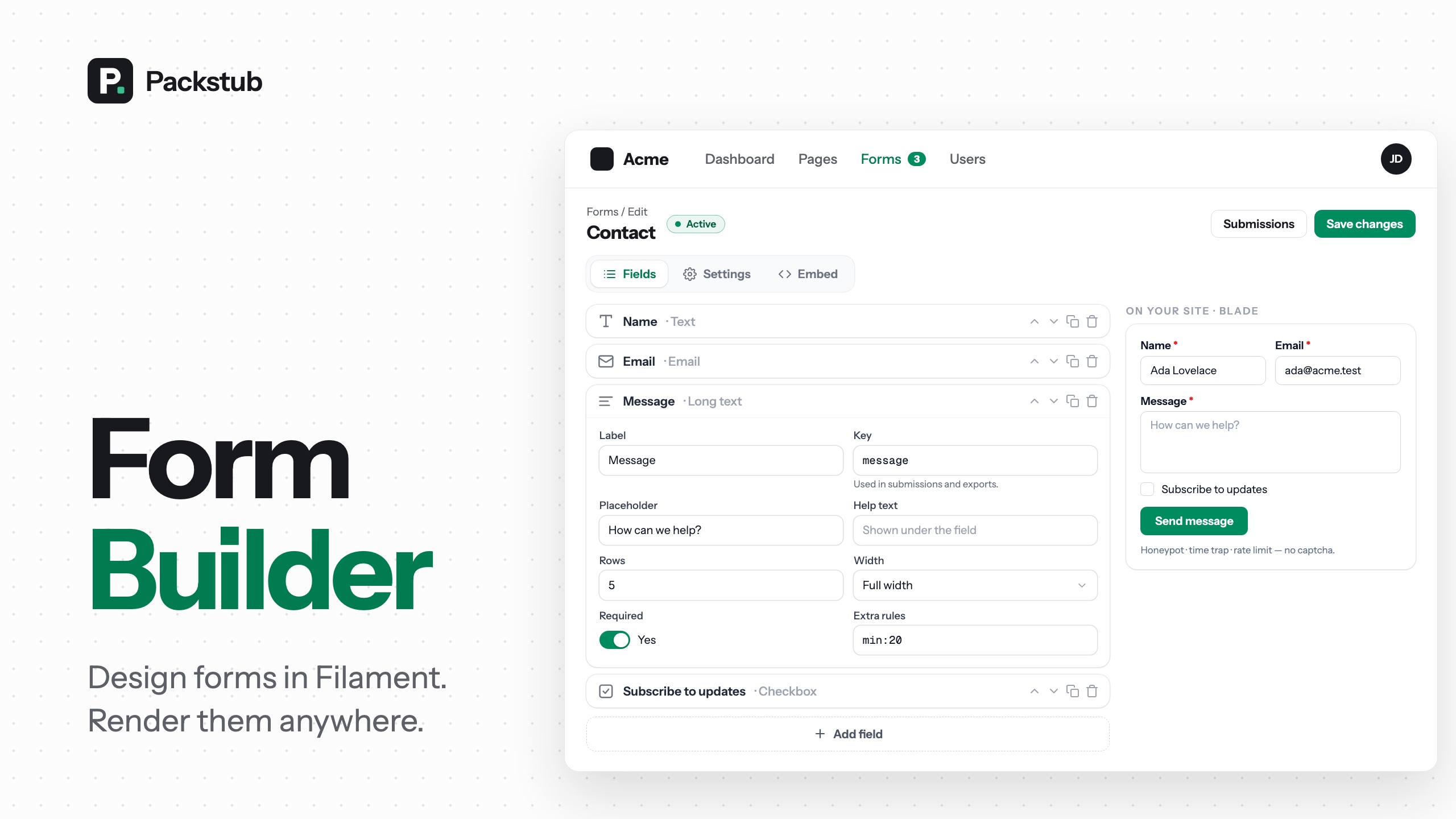





Build forms in your Filament panel, put them on your site with one Blade tag, a Livewire component or a JSON call, and read the submissions where you already work.
Features
- Builder in the panel: 29 field types, a live preview, twenty templates, JSON import and export.
- Conditions and steps: show, hide or require fields based on other answers, and split long forms into steps.
- Render it anywhere: Blade, Livewire, a JSON API, an iframe or a script embed, all through the same validation.
- Submissions in the panel: a column and a filter per field, read / unread state, CSV and Excel export, a daily chart.
- Notifications: emails to you and the visitor, panel notifications, Slack, Discord, Teams and signed webhooks.
- Spam protection without a captcha: honeypot, time trap, rate limit and blocklists, with Turnstile, hCaptcha or reCAPTCHA when you want one.
- Access and limits: opening dates, passwords, login, private share links, submission caps.
- Extensible: your own field types, models and sinks, tenant scoping, testing helpers.
- Themeable and translatable: CSS variables and a language file for every string.
Compatibility
| Plugin | Filament | Laravel | PHP |
|---|---|---|---|
| 1.x | 4.x, 5.x | 12.x, 13.x | 8.3+ |
Installation
composer require packstub/filament-form-builder
php artisan packstub-form-builder:install
Register the plugin on your panel:
use Packstub\FormBuilder\FormBuilderPlugin;

$panel->plugin(FormBuilderPlugin::make());
A Forms resource appears in the navigation.
Building a form
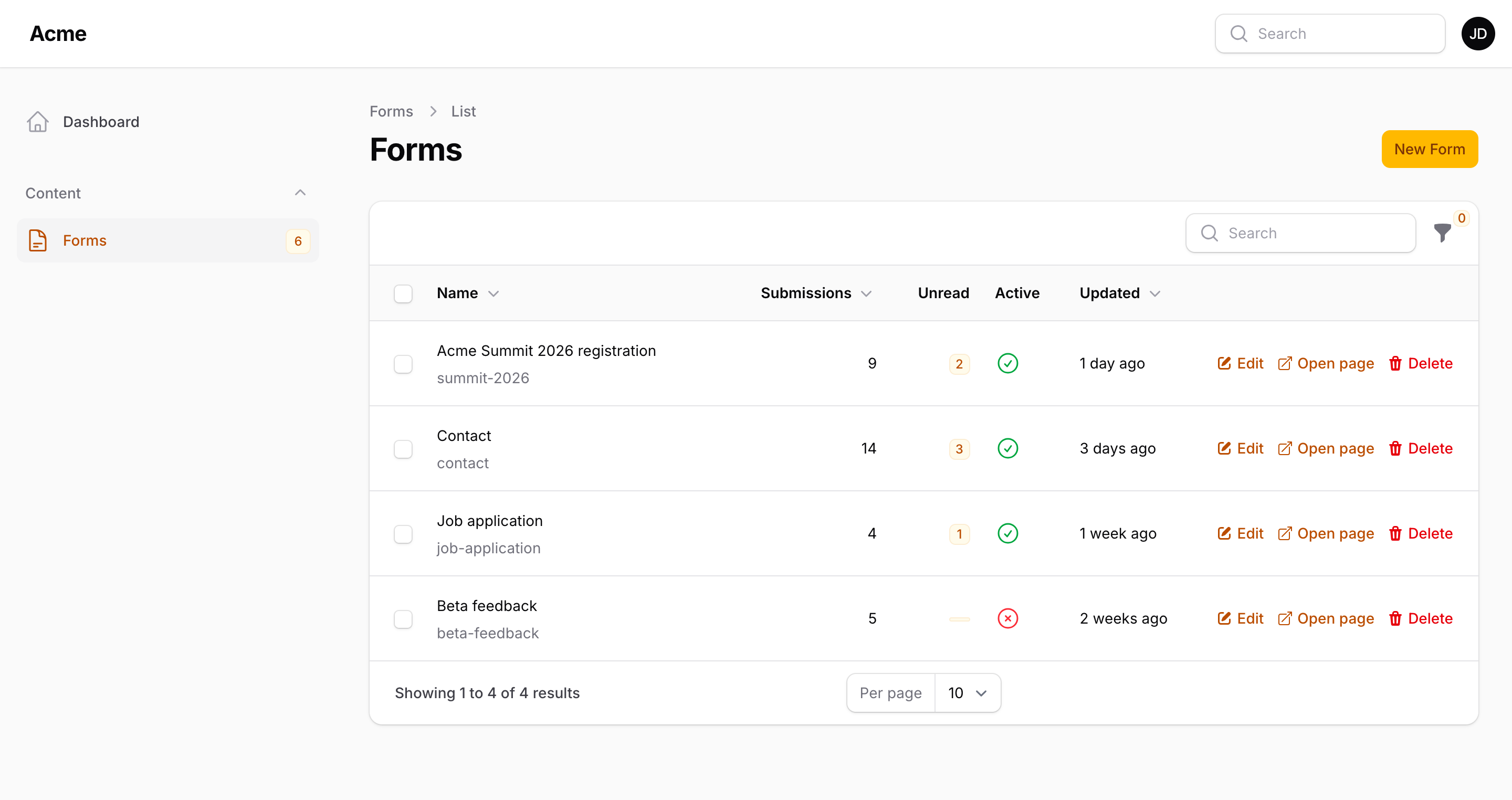
Forms lists every form with its submission count, the unread ones and whether it is open.
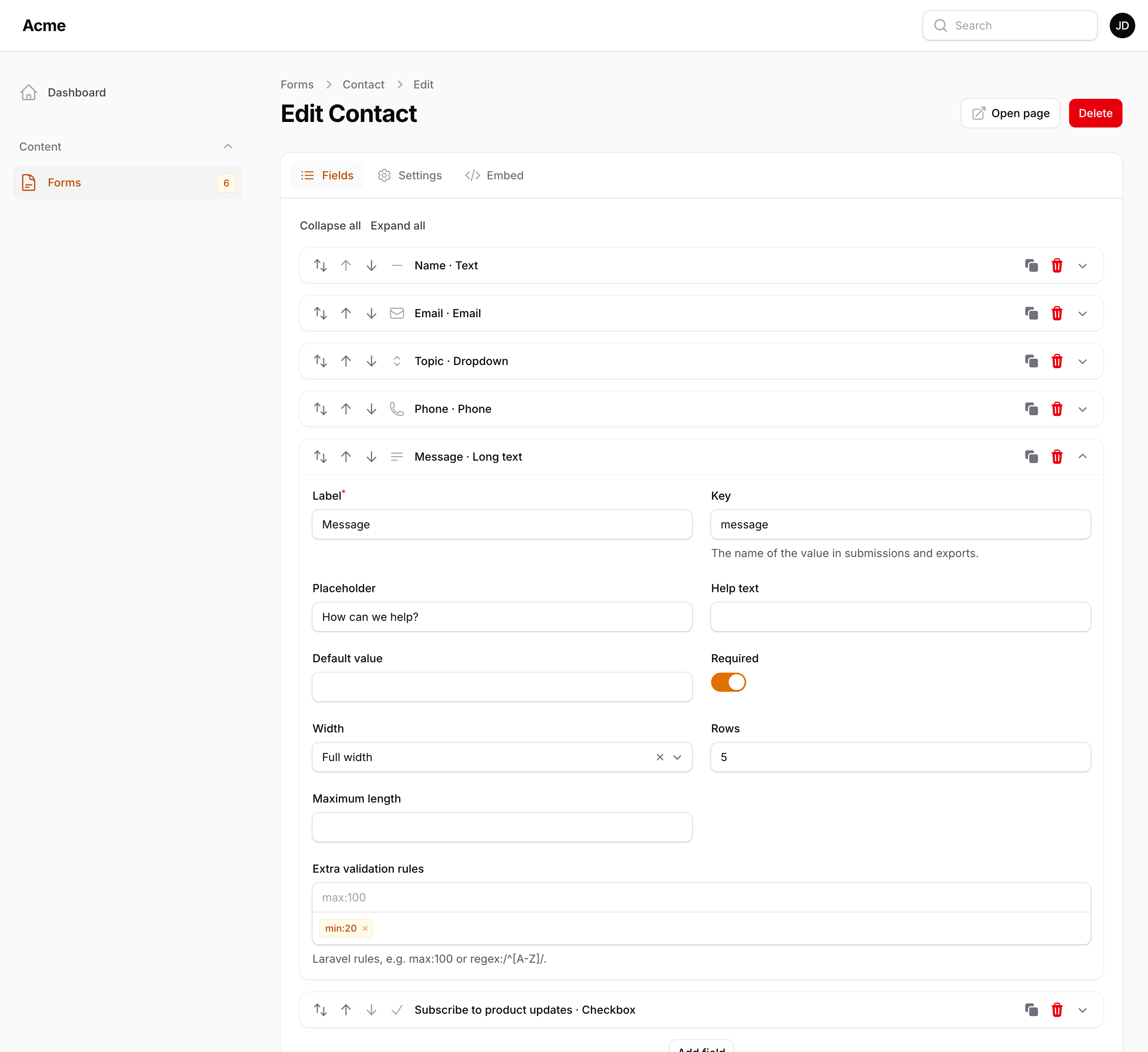
Create a form, give it a name, and add fields from the block picker, or start from one of the twenty templates. Each block carries the settings of its type: choices for a dropdown or a checkbox list, a range for numbers and dates, rows for long text, accepted types and a size for uploads, the level of a heading. Keys are derived from labels and kept unique, so values in submissions and exports keep a stable name. Preview shows the form from the unsaved state.
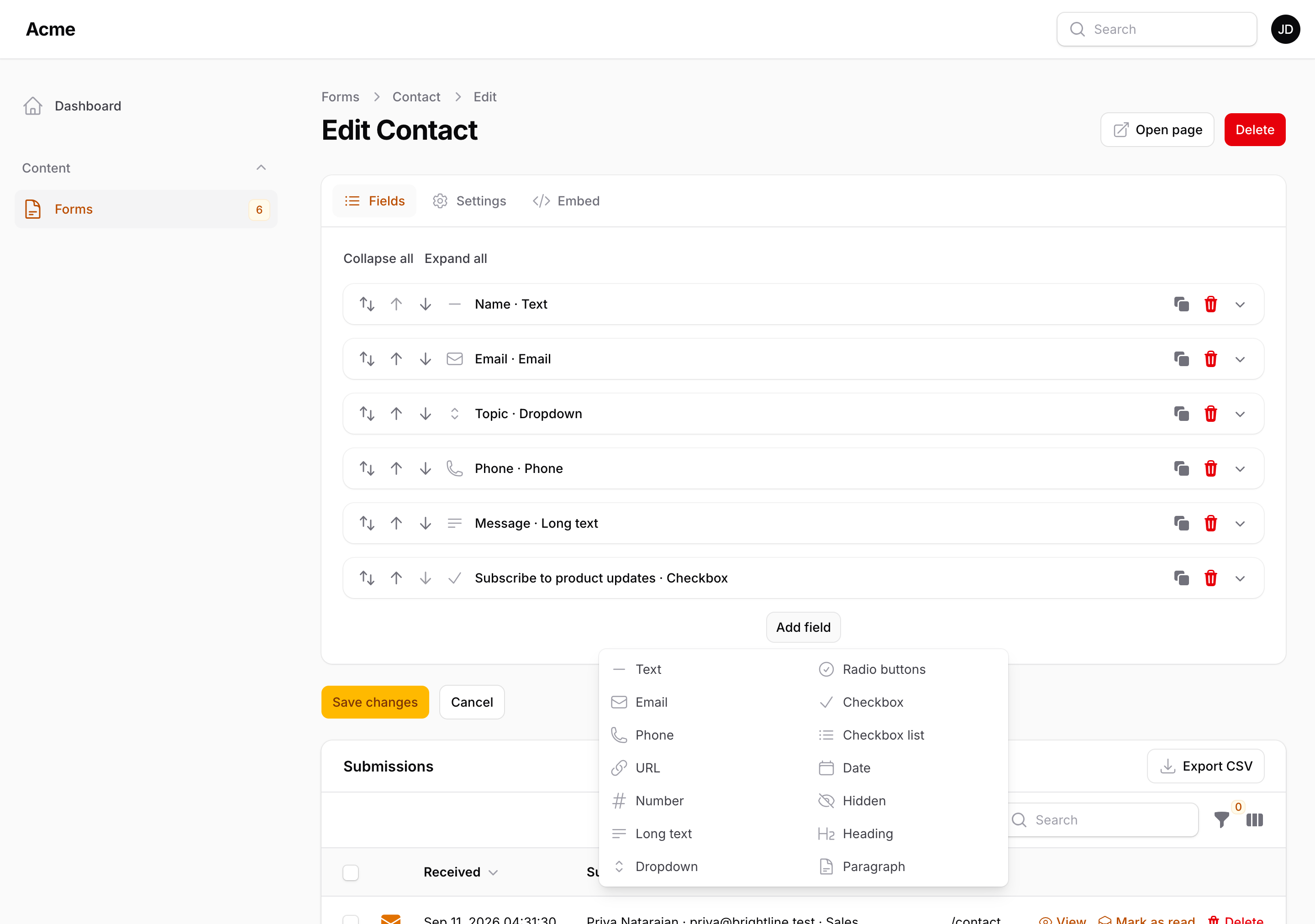
| Kind | Field types |
|---|---|
| Text | Text, email, phone, URL, long text, rich text, hidden |
| Numbers | Number, amount, rating |
| Choices | Dropdown, multi-select, radio buttons, toggle buttons, checkbox list, tags, country |
| Yes / no | Checkbox, toggle, consent |
| Dates | Date, date and time, time |
| Other | File upload, colour, address |
| Layout | Heading, paragraph, divider |
Choice fields take a typed list or options from your own data (FormBuilder::choices()). Every field has a label, key, placeholder, help text, default, required flag, a width on a twelve-column grid, rules picked from a list, a custom error message and extra Laravel rules. What each type stores and its own settings: Building forms. With packstub/filament-rating installed, the rating field shows stars in the panel and the Livewire renderer, and its submissions column gets an average, a distribution and a filter.
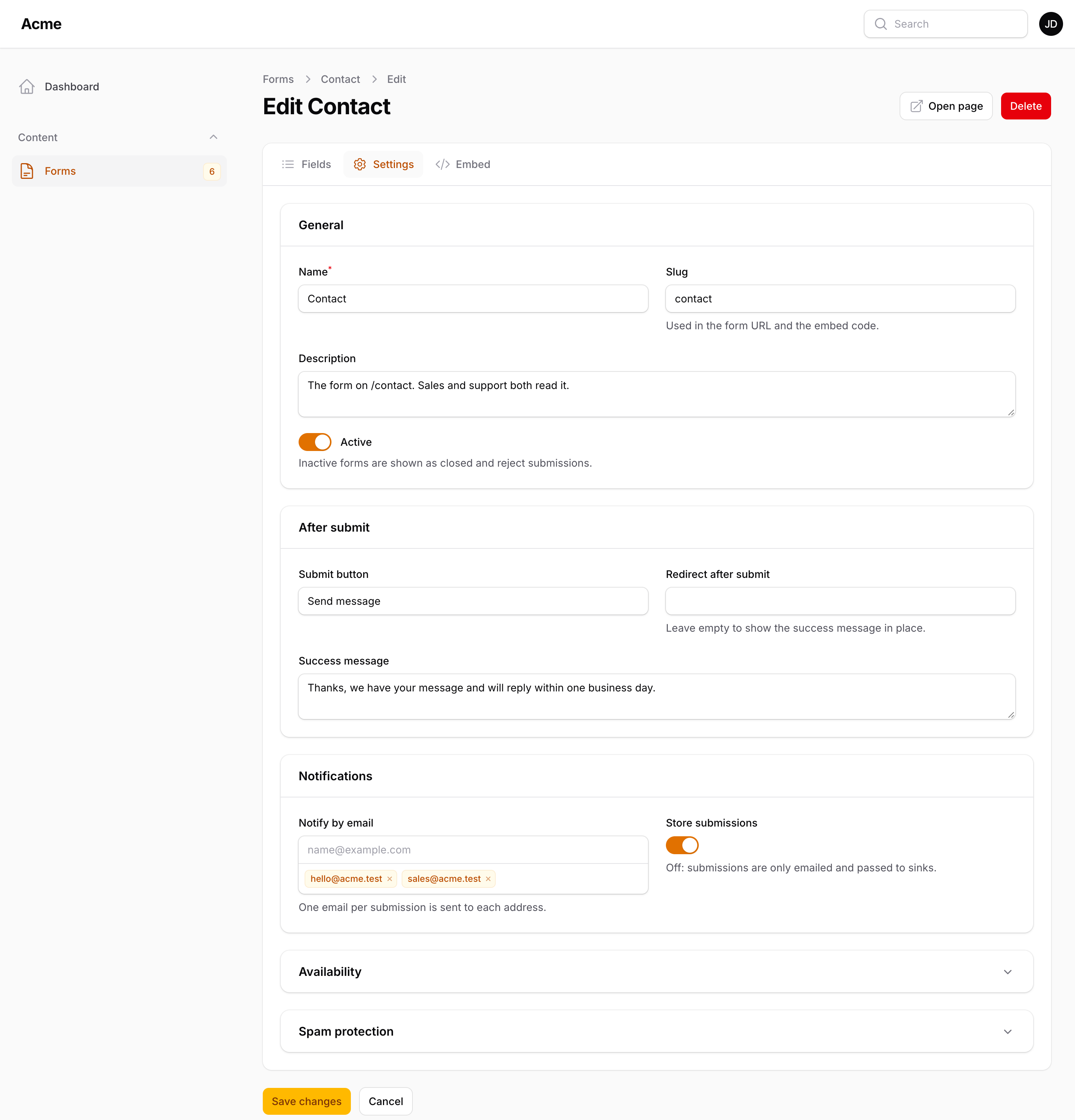
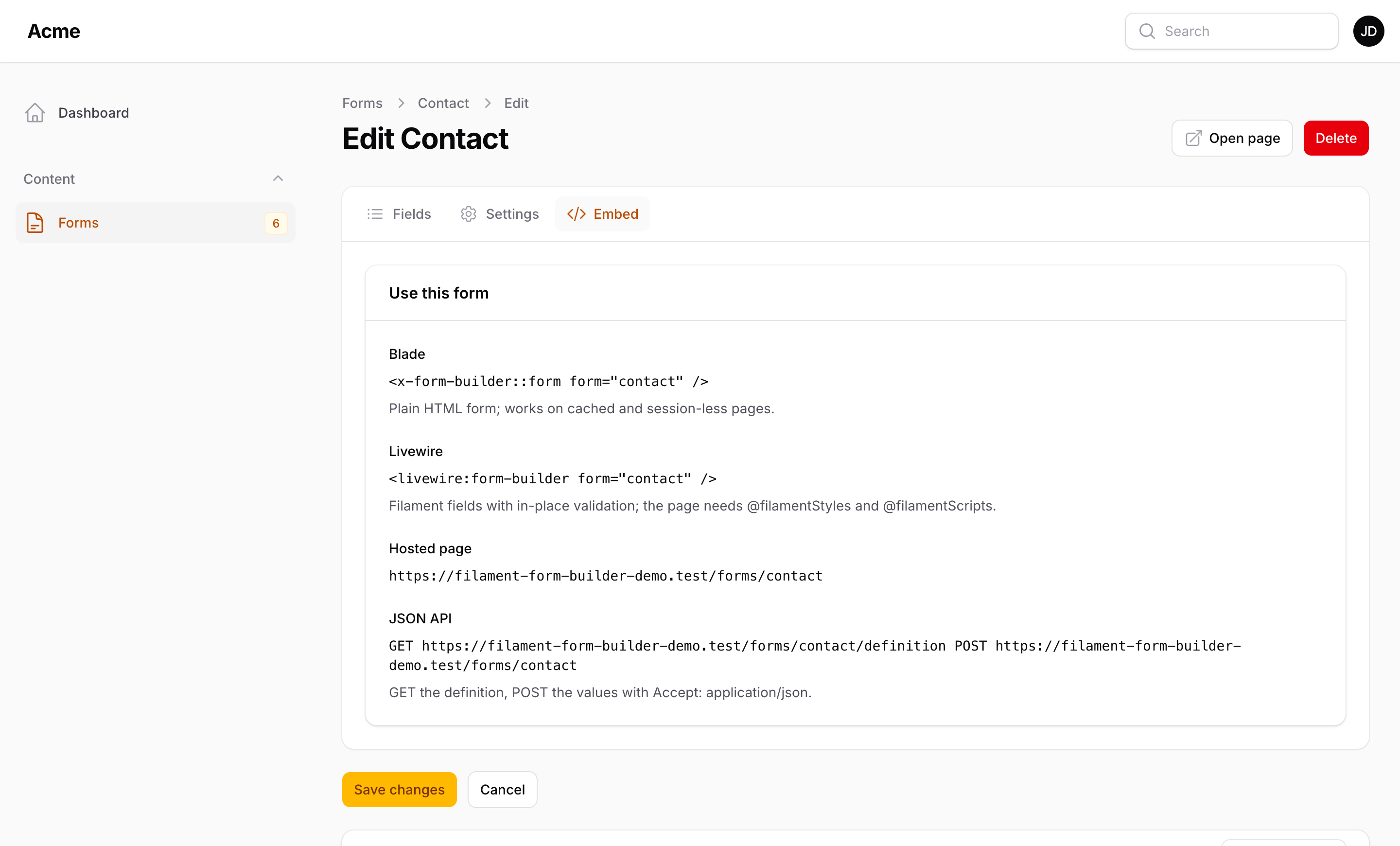
The Settings tab holds the submit button label, the success message or a redirect URL, whether submissions are stored, the availability window, the visibility, password, login and per-person limits and the spam settings. Notifications holds the emails, the panel notifications and the webhook; Design the display mode, the steps, the hosted page and the styling; Embed the snippets for the form you are editing.
Conditions and steps
Every field and section can be shown or hidden when other answers match, and a required field can be required only in some cases:
Show T-shirt size when Attendance is equal to In person. Require Company only when Attendance is equal to Virtual.
Eight operators (equal, not equal, containing, not containing, greater, less, empty, not empty), matched all or any. The conditions run live in the browser (both renderers), on the server when the form is submitted (a hidden field is not validated and is stored as null), and are exposed in the JSON definition for headless clients.
A Section block groups fields under a title: a card on a single-page form, and with Display: multi-step on the Design tab, one step each, with a progress bar, Next and Back buttons and per-step validation. Without JavaScript the plain renderer shows everything on one page and still works.
Read more: Logic and steps.
Read more: Building forms.
Rendering a form
Blade
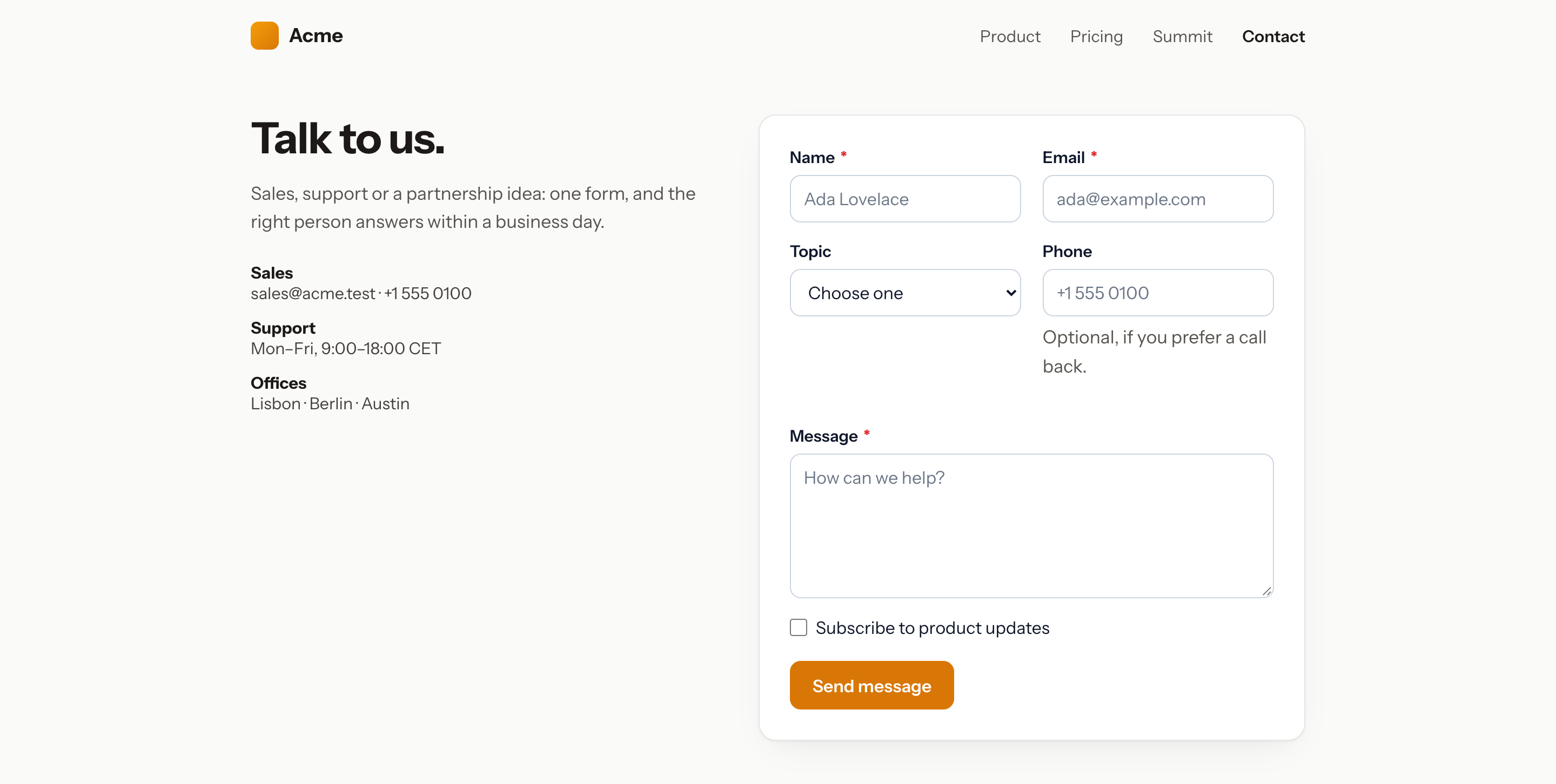
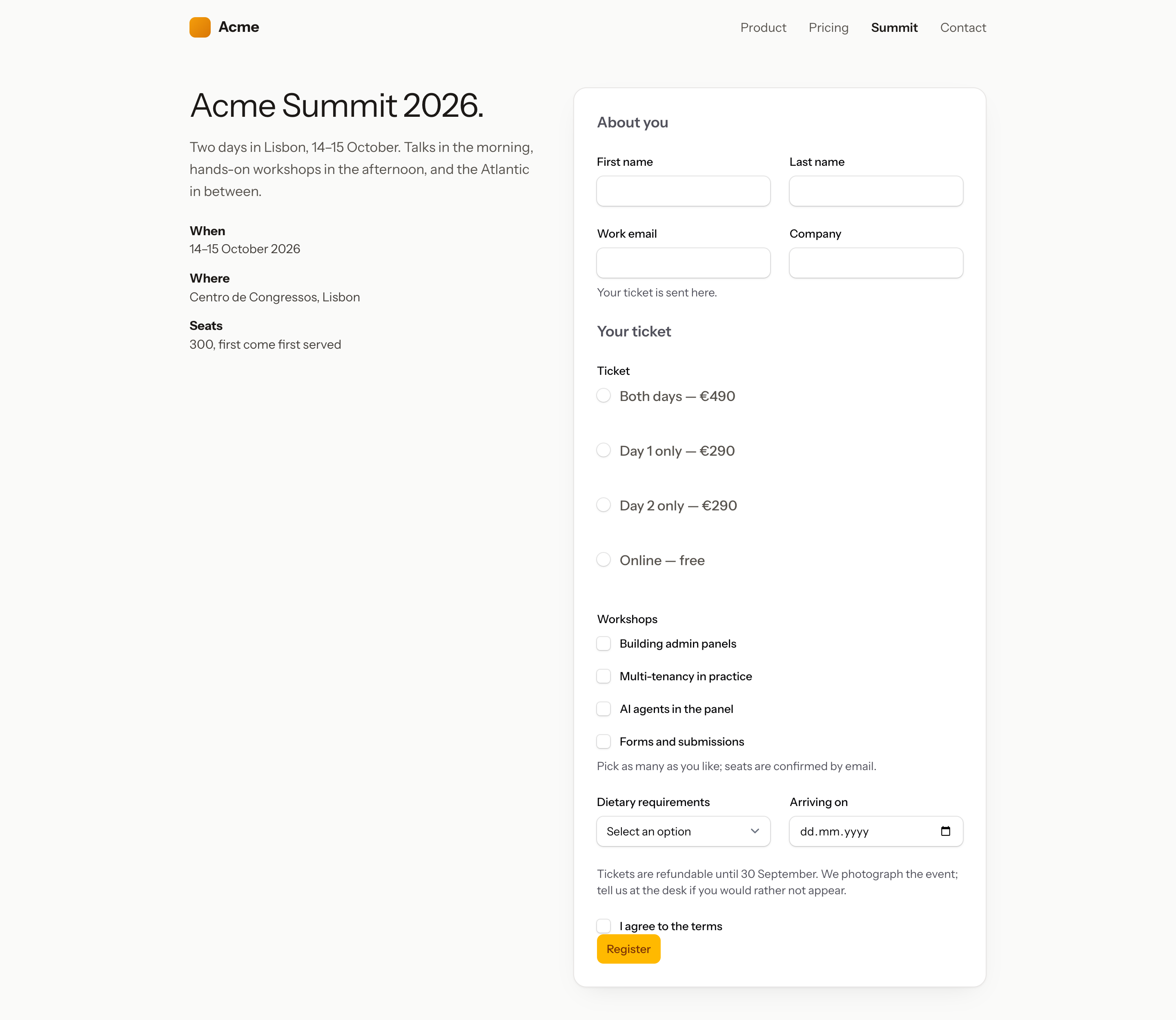
<x-form-builder::form form="contact" />
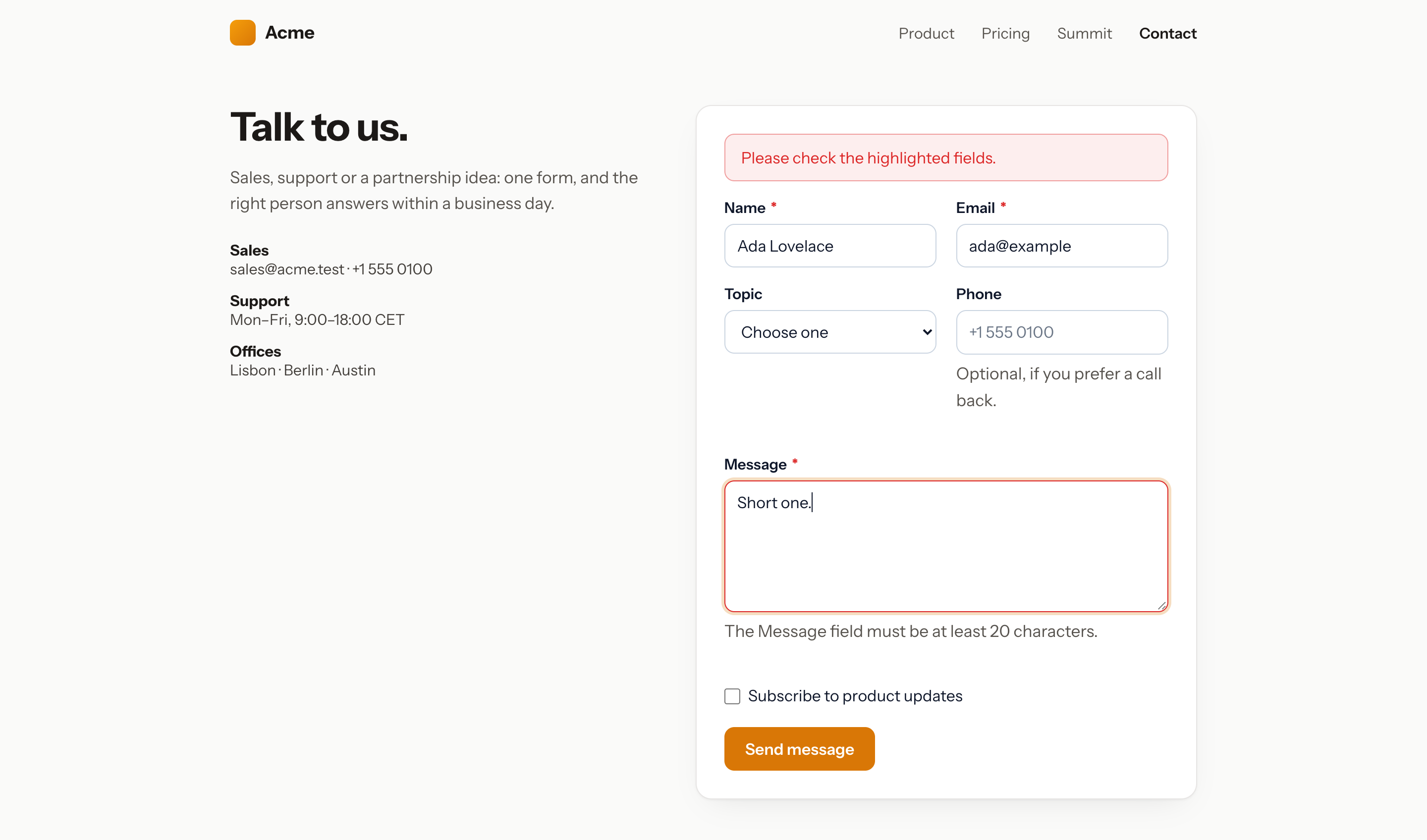
A plain HTML form posting to /forms/contact. Without JavaScript the browser posts and comes back to the page with the success message or the errors and the old input. With the small script the component inlines (frontend.enhance), the form submits with fetch and shows the result in place, without reloading.
The component works on pages without a session: errors and old input travel in an encrypted query parameter instead of the session. The submit route runs the web middleware by default; on a session-less site set routes.middleware to [] and rely on the honeypot, the time trap and the rate limit.
Options: :enhance="false" for a plain POST only, :styles="false" when your site ships its own CSS, :values="[...]" to prefill, action and return to override the endpoint and the page to come back to. The page URL's query parameters prefill fields of the same key (?email=…).
Livewire
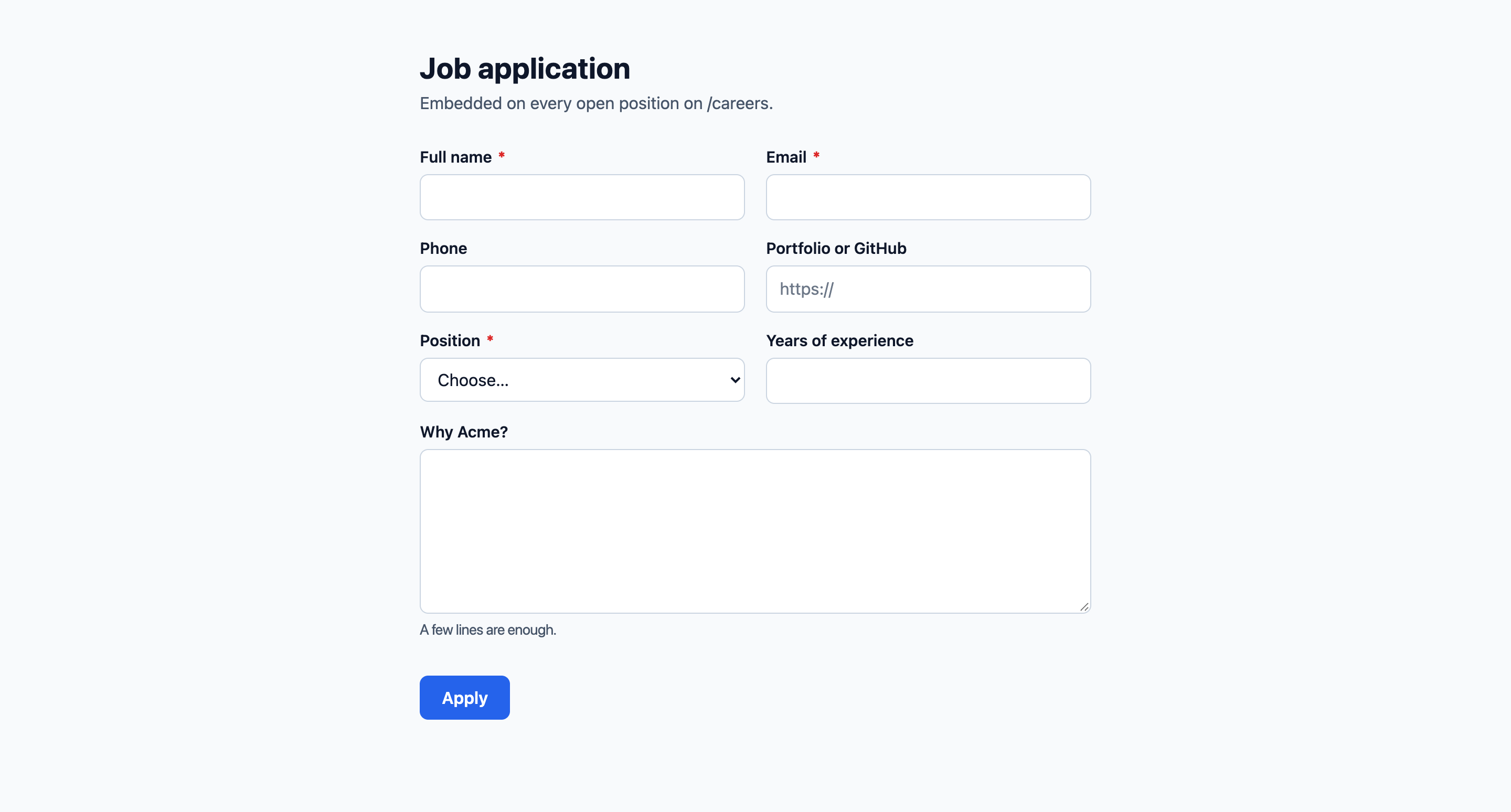
<livewire:form-builder form="contact" />
The fields as Filament components, validated in place. Nothing else to add to the page: the component brings Filament's frontend with it, the way Livewire brings its own script. Its stylesheet is a compiled pick of the Filament components the built-in field types use (24 KB gzipped, against 63 KB for the panel theme), published by php artisan filament:assets next to the other Filament assets. It carries no reset, so the host page keeps its own styles. A layout that already prints @filamentStyles and @filamentScripts is left alone.
Custom field types that render other Filament components (a repeater, a slider) need their CSS: point frontend.livewire_theme at the panel theme filament:assets publishes (css/filament/filament/app.css) or at a theme of your own, and every component is covered.
Read more: Rendering.
JSON
GET  /forms/contact/definition
POST /forms/contact            Accept: application/json
The definition lists the sections and the fields with their type, choices, conditions and requirement, the display mode, plus a fresh protection token, the captcha and the names of the anti-spam fields to send back. The POST answers { "ok": true, "message": "...", "redirect": null, "id": 12 } or 422 with errors keyed by field; POST /forms/contact/validate checks one step.
Iframe and script
For any other site, the Embed tab gives an iframe of the hosted page (?embed=1, bare and auto-sized) and a script that renders the form into a <div data-form-builder="contact"> through the JSON API, with the stylesheet, the in-place submit, the conditions and the steps:
<div data-form-builder="contact"></div>
<script src="https://example.com/forms/contact/embed.js" async></script>
Hosted page
Every form is also served on its own at /forms/{slug} with its page title, meta description, social image and logo (switch off with routes.page, change the layout with routes.page_layout). Share in the panel gives the link, the availability window and, for a private form, a signed share link valid until a date of your choice.
Submissions
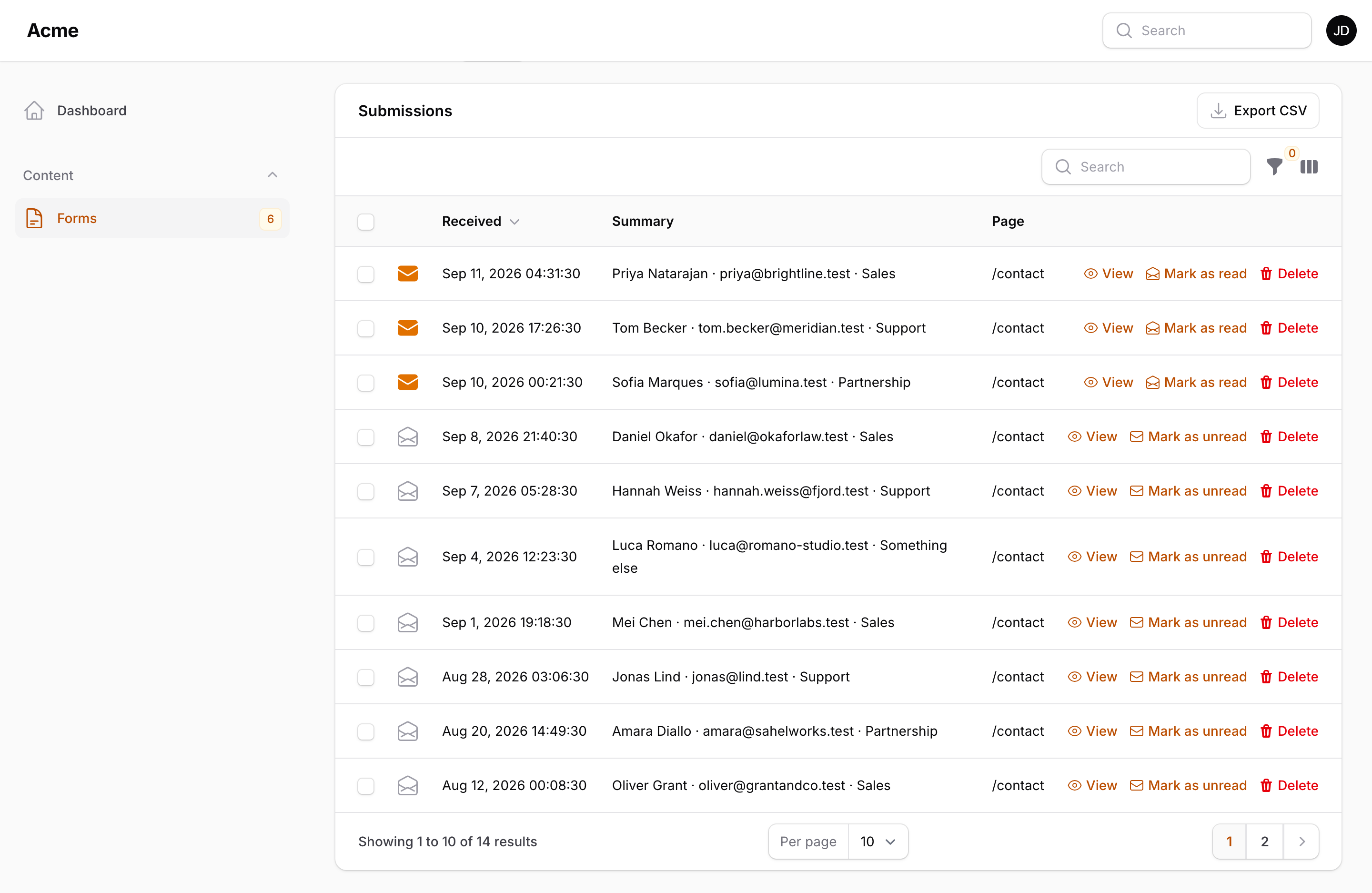
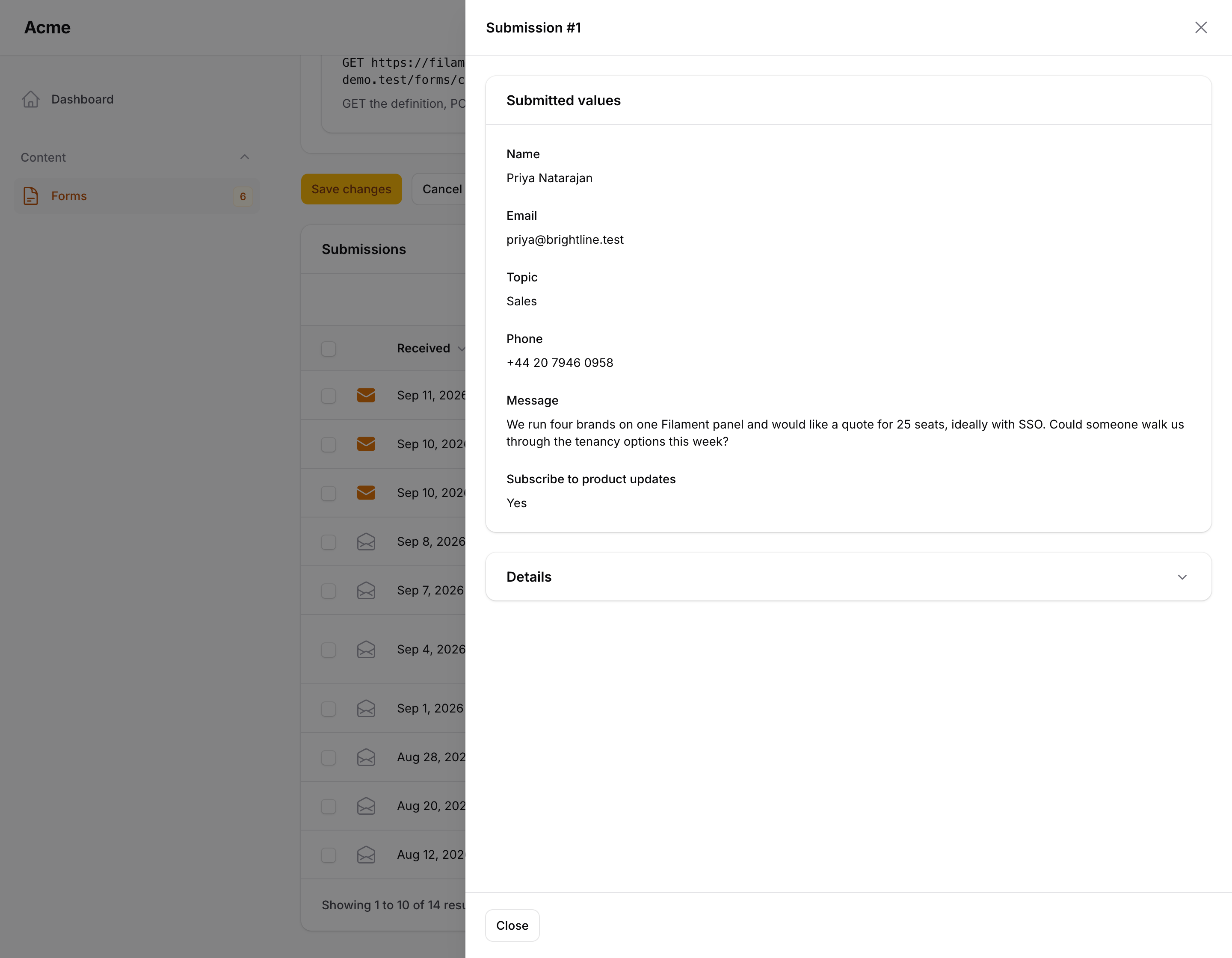
Submissions live under the form as a relation manager: the number, the date, a summary, one column per field (searchable, sortable, toggleable), the page they came from and the channel (web, json, livewire, code), with a filter per choice, boolean or date field. Opening one shows every value and the details, with uploaded files as signed download links, and marks it read; Edit changes the values. Bulk actions mark as read, export or delete. The CSV and Excel exports list the form's fields, then any key an older submission still carries. form-builder:prune applies the retention settings.
use Packstub\FormBuilder\Models\FormSubmission;

FormSubmission::query()->unread()->count();
$submission->value('email');
$submission->formatted(); // ['email' => ['label' => 'Email', 'value' => 'ada@example.com'], ...]
Read more: Submissions.
Notifications and webhooks
Add addresses to Notify by email and each submission is emailed (queued when a queue is configured), with a subject like [{form_name}] #{submission_number} from {name}, reply-to set to the visitor, CC, BCC and the uploaded files attached when you ask. Send a confirmation to the visitor emails the respondent a Markdown message with the same merge tags. Notify in the panel sends a Filament database notification to the users you pick. A Webhook URL gets every submission as JSON, signed with Standard Webhooks headers, with a delivery log and retries under the form. For anything else, write a sink:
use Packstub\FormBuilder\Contracts\SubmissionSink;
use Packstub\FormBuilder\Models\FormSubmission;

class PushToCrm implements SubmissionSink
{
    public function handle(FormSubmission $submission): void
    {
        Crm::createLead($submission->form->slug, $submission->data);
    }
}
Register it in config/packstub-form-builder.php under sinks, or at runtime with FormBuilder::sink(PushToCrm::class). The SubmissionReceived and SpamDetected events are dispatched as well.
Spam protection
- Honeypot — a hidden input a person never sees; a filled one drops the submission.
- Time trap — the form carries an encrypted, single-use token with the time it was rendered; a submission posted faster than
spam.min_seconds(default 2), or with a token that already posted, is dropped. Headless clients get the token from the definition endpoint. - Rate limit —
submissions.throttle(default10,1) per IP on the submit endpoint. - Blocklists and origins — words, email domains and IPs to drop, and the hosts a form may be posted from.
- Captcha — Cloudflare Turnstile, hCaptcha or Google reCAPTCHA v3, verified on the server, per form, once the keys are in the config.
The honeypot, the time trap and the captcha can be tuned per form in its Settings tab. Dropped submissions look like a success to the sender and fire SpamDetected.
Settings
| Setting | What it does |
|---|---|
| Published | Off: the form renders as closed and rejects submissions |
| Submit button, success message | Shown by every renderer |
| Redirect after submit | Sends the visitor to a URL instead of showing the message |
| Store submissions | Off: the submission is only emailed, posted and passed to sinks |
| Opens at, closes at, closed message | An availability window |
| Visibility, password, login | Private forms open only by share link; a password prompt; a login requirement |
| One per person, maximum submissions | Limits, each with its own message |
| Prefill from the page URL | ?key=value fills a field |
| Keep submissions for | Days before pruning |
| Honeypot, minimum seconds, captcha | Per-form spam settings |
| Display, labels, steps, page, styling | The Design tab: single page or multi-step, page meta, brand colour, custom CSS and JavaScript |
Extending
A field type is a class: its id, an icon, the settings it shows in the builder, its validation rules, how it normalises a value, a Blade view and a Filament component.
use Filament\Forms\Components\TextInput;
use Packstub\FormBuilder\Fields\Field;
use Packstub\FormBuilder\Fields\Types\NumberField;

class ScoreField extends NumberField
{
    public static function id(): string
    {
        return 'score';
    }

    public function rules(Field $field): array
    {
        return ['integer', 'between:1,100'];
    }
}
Register it in the config under field_types, on the plugin with FormBuilderPlugin::make()->fieldTypes([ScoreField::class]), or with FormBuilder::registerFieldTypes([...]). Hide built-ins with ->withoutFieldTypes([...]). Name the label in your language file under packstub-form-builder::form-builder.types.score. Scope forms to a tenant with tenancy.enabled; render a form that lives in code with Form::fromArray([...]); offer your own templates with Templates::add($directory).
Submit from code:
use Packstub\FormBuilder\Facades\FormBuilder;

FormBuilder::submit('contact', ['name' => 'Ada', 'email' => 'ada@example.com', 'message' => 'Hi']);
Theming
The Blade renderer scopes everything under .fb-form and reads these variables, each with a fallback:
:root {
    --fb-color-text: #0f172a;
    --fb-color-muted: #475569;
    --fb-color-border: #cbd5e1;
    --fb-color-surface: #fff;
    --fb-color-primary: #2563eb;
    --fb-color-primary-contrast: #fff;
    --fb-color-danger: #dc2626;
    --fb-color-success: #15803d;
    --fb-radius: .5rem;
    --fb-font: inherit;
}
Publish the stylesheet and script with php artisan vendor:publish --tag=packstub-form-builder-assets and set frontend.styles / frontend.enhance to false to ship them your own way. Views publish with --tag=packstub-form-builder-views, the language file with --tag=packstub-form-builder-translations.
Configuration
php artisan vendor:publish --tag=packstub-form-builder-config
| Key | Default | What it does |
|---|---|---|
tables.*, models.* |
form_builder_* |
Table names and model classes |
field_types |
the built-ins | Field types offered in the builder |
routes.prefix |
forms |
URL prefix of the routes |
routes.middleware |
['web'] |
Middleware of the submit, validate, unlock and definition routes |
routes.page, page_middleware, page_layout, embed |
on, ['web'], package layout, on |
The hosted page and the embed script |
submissions.throttle |
10,1 |
Rate limit per IP; null to disable |
submissions.store_ip, store_user_agent |
true |
What the submission row records |
submissions.queue_notifications |
true |
Queue the emails |
submissions.retention_days, anonymize_after_days |
0 |
What form-builder:prune deletes and anonymises |
uploads.disk, directory, max_kb, attach_max_kb |
local, form-builder, 10240, 10240 |
File uploads |
spam.honeypot, honeypot_field, min_seconds, token_field, token_ttl |
on, _fb_website, 2, _fb_token, 120 |
Spam defaults (per form in the panel) |
spam.allowed_origins, spam.blocklist.* |
[] |
Origins and blocklists |
captcha.* |
env | Turnstile, hCaptcha, reCAPTCHA keys and the default provider |
notifications.from_email, from_name |
env | Email defaults |
webhooks.* |
queued, 3 attempts, 15 s, 30 days | Webhook delivery |
formats.* |
Y-m-d, Y-m-d H:i, H:i |
Display formats |
sinks |
[] |
SubmissionSink classes |
frontend.styles, frontend.enhance, frontend.prefill |
true |
Inline the stylesheet and the script; prefill from the URL |
tenancy.* |
off | Scope forms to a tenant |
navigation.*, gate |
— | Navigation group, icon, sort, unread badge; an ability to check |
Plugin methods: fieldTypes(), withoutFieldTypes(), resource(), withoutResource(), navigationGroup(), navigationIcon(), navigationSort(), navigationBadge(), authorize().
Documentation
Installation · Building forms · Logic and steps · Rendering · Submissions · Notifications and webhooks · Sharing and templates · Spam protection · Extending · Configuration
Testing
composer test
Changelog
See CHANGELOG.
Security
Report vulnerabilities to support@packstub.dev rather than the issue tracker.
Credits
License
The MIT License (MIT). See LICENSE.
Related Packages
Visual workflow automations for Filament panels: triggers, conditions and action...
Star ratings for Filament v4 and v5: a form field, table column, infolist entry...
Filament v5 form fields plugin for Laravel — 79 components, virtualized Select w...
Switch between accounts in Filament: impersonate users, linked sub-accounts with...
Version History
| Version | Released | PHP | Laravel | License |
|---|---|---|---|---|
| v1.4.0 | ^8.3 | ^12.0 | | MIT | |
| v1.3.0 | ^8.3 | ^12.0 | | MIT | |
| v1.2.0 | ^8.3 | ^12.0 | | MIT | |
| v1.1.1 | ^8.3 | ^12.0 | | MIT | |
| v1.1.0 | ^8.3 | ^12.0 | | MIT | |
| v1.0.0 | ^8.3 | ^12.0 | | MIT |