rtcamp/nginx-helper
| Install | |
|---|---|
composer require rtcamp/nginx-helper |
|
| Latest Version: | 2.4.1 |
| PHP: | >=5.3.2 |
| License: | GPL-2.0-or-later |
| Last Updated: | Oct 8, 2026 |
| Links: | GitHub · Packagist |
EasyEngine Cache Helper for Nginx & Cloudflare (formerly Nginx Helper)

Contributors: rtcamp, rahul286, saurabhshukla, manishsongirkar36, faishal, desaiuditd, darren-slatten, jk3us, daankortenbach, telofy, pjv, llonchj, jinnko, weskoop, bcole808, gungeekatx, rohanveer, chandrapatel, gagan0123, ravanh, michaelbeil, samedwards, niwreg, entr, nuvoPoint, iam404, rittesh.patel, vishalkakadiya, BhargavBhandari90, bryant1410, 1gor, matt-h, dotsam, nathanielks, rigagoogoo, dslatten, jinschoi, kelin1003, vaishuagola27, rahulsprajapati, utkarshpatel, gsayed786, shashwatmittal, sudhiryadav, thrijith, stayallive, jaredwsmith, abhijitrakas, umeshnevase, sid177, souptik, arafatkn, subscriptiongroup, akrocks, vedantgandhi28, GridPane, stefanfisk, SGr33n, agvs, diepbui4157, pratiklondhe, webdados, ghost, tjalexander70, mrrobot47, alexliii, joelmcdwebworks, bozzmedia, millionleave, kubajosef, alexsina, tomeryatir, minzak, peterdowney01, rayeason, gnif, thisismyurl, DAnn2012, sarthak8858, im3dabasia1, gutobenn, tores54, mcsr, sarthaknagoshe2002, Titan21, smartyp
Tags: nginx, cache-purge, fastcgi, cloudflare, redis-cache
Requires at least: 5.6
Tested up to: 7.1
Requires PHP: 7.4
Stable tag: 3.0.0
License: GPLv2 or later (of-course)
License URI: http://www.gnu.org/licenses/gpl-2.0.html
Donate Link: http://rt.cx/eedonate
Purge Nginx and Redis page cache, plus Cloudflare edge cache with cache tags, when WordPress content changes.
Description
EasyEngine Cache Helper (formerly Nginx Helper) helps keep cached WordPress content fresh across Nginx FastCGI or Redis page caching and Cloudflare's edge cache.
- Purge configured Nginx FastCGI or Redis page cache when posts and related content change.
- Purge Cloudflare edge content using cache tags for related pages, with manual URL and full-zone purge controls.
- Manage Nginx and Cloudflare settings in separate tabs. The Cloudflare integration can be configured independently of Nginx page-cache purging.
- Use WP-CLI for cache administration. Cloudflare commands are new in 3.0.0.
The plugin coordinates purging; it does not install or configure Nginx, Redis, or Cloudflare for you. For Nginx setup, see the configuration tutorials. For Cloudflare, proxy the site through Cloudflare, provide a scoped API token and Zone ID, and set up the cache rule in the Cloudflare tab.
Existing Nginx features, including permalink handling and multisite map support, remain available.
Tutorials
You will need to follow one or more tutorials below to get desired functionality:
- Nginx Map + WordPress-Multisite + Static Files Handling
- Nginx + WordPress + fastcgi_purge_cache
- Nginx + WordPress-Multisite (Subdirectories) + fastcgi_purge_cache
- Nginx + WordPress-Multisite (Subdomains/domain-mapping) + fastcgi_purge_cache
- Other WordPress-Nginx Tutorials
Credits
The Cloudflare cache purge feature is adapted from the Pantheon Advanced Page Cache plugin, Copyright Pantheon Systems, licensed under GPLv2 or later. https://github.com/pantheon-systems/pantheon-advanced-page-cache
The derived code has been modified to emit Cloudflare Cache-Tag headers instead of Surrogate-Key headers.
Installation
Automatic Installation
- Log in to your WordPress admin panel, navigate to the Plugins menu and click Add New.
- In the search field type “Nginx Helper” and click Search Plugins. From the search results, pick Nginx Helper and click Install Now. Wordpress will ask you to confirm to complete the installation.
Manual Installation
- Extract the zip file.
- Upload them to
/wp-content/plugins/directory on your WordPress installation. - Then activate the Plugin from Plugins page.
For proper configuration, check out our tutorial list in the Description tab.
Frequently Asked Questions
Will it work immediately after activation?
The plugin needs a working cache configuration. Nginx or Redis purging requires matching server settings. Cloudflare purging requires a proxied site, a Cloudflare Zone ID, an API token, and an appropriate cache rule. See the Installation section.
Can I use Cloudflare purging without Nginx page-cache purging?
Yes. Configure the Cloudflare tab even if Nginx page-cache purging is disabled. The two settings areas are separate.
How do I enable Cloudflare edge caching?
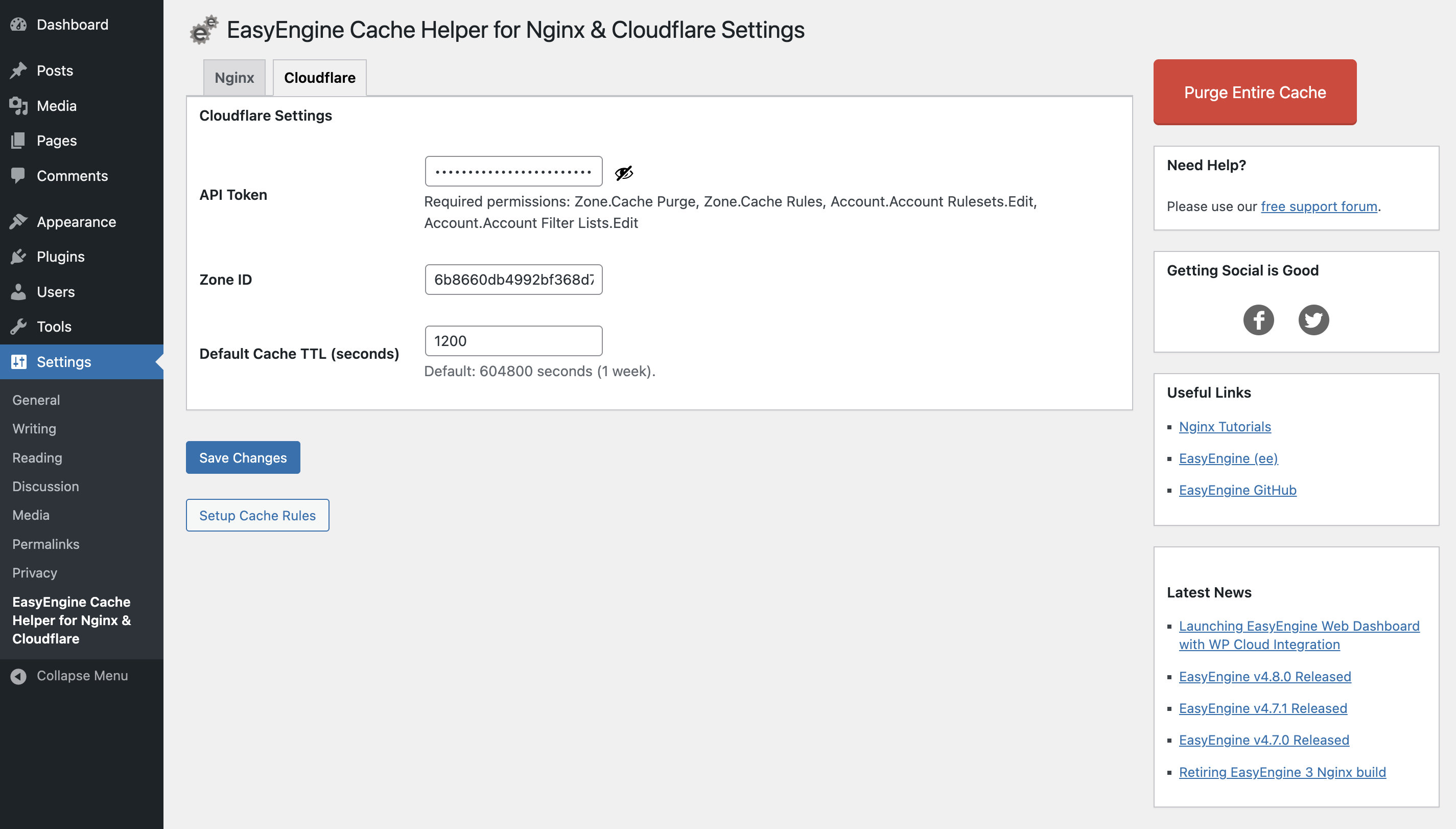
In the Cloudflare tab, save the Zone ID and an API token with the permissions shown in the settings screen. Then select Setup Cache Rules. The rule enables edge caching for matching requests; check its effect alongside any Cloudflare rules you already use.
What happens if I already have Cloudflare cache rules?
The setup action adds the plugin's rule to the existing cache ruleset if a matching plugin rule is not already present. Review the rule order and the combined behavior in Cloudflare after setup.
How is Cloudflare cache purged when content changes?
The plugin adds cache tags to cacheable responses and requests tag purges when relevant WordPress posts, terms, comments, or other supported content changes. Cloudflare must cache the response with those tags for this to work.
Can I purge one page manually?
Yes. An administrator can visit the page while logged in and use Clear Cloudflare Edge Cache in the toolbar to purge that URL from Cloudflare. When Nginx purging is enabled, Purge Current Page handles the configured Nginx or Redis cache.
What does Purge Entire Cache clear?
It requests a full purge of the configured Nginx or Redis cache and, when Cloudflare is configured, the entire Cloudflare zone cache. A full-zone purge also affects other cached content in that zone. Use it when a narrower purge is insufficient.
Does the plugin purge after WordPress, plugin, or theme updates?
Nginx page-cache purging on those updates is off by default. To enable it, add add_filter( 'rt_wp_nginx_helper_enable_auto_purge_on_any_update', '__return_true' ); in site code. Otherwise the plugin shows an admin reminder to purge manually.
Can I set the Cloudflare token in wp-config.php?
Yes. Define EASYENGINE_CACHE_MANAGER_CLOUDFLARE_API_TOKEN in wp-config.php, then save the Zone ID in the Cloudflare tab. The token field is disabled when the constant is present.
Are there Cloudflare WP-CLI commands?
Version 3.0.0 adds wp cloudflare cache purge-tag <tag>, wp cloudflare cache purge-path <url>, and wp cloudflare cache purge-all. The full purge prompts for confirmation unless --yes is passed.
Where can I get help?
Use the WordPress.org support forum for plugin support, or GitHub issues for reproducible bugs.
FAQ - Installation/Comptability
Q. Will this work out of the box?
No. You need to make some changes at the Nginx end. Please check our tutorial list.
FAQ - Nginx Fastcgi Cache Purge
Q. There's a 'purge all' button? Does it purge the whole site?
Yes, it does. It physically empties the cache directory. It is set by default to /var/run/nginx-cache/.
If your cache directory is different, you can override this in your wp-config.php by adding
define('RT_WP_NGINX_HELPER_CACHE_PATH','/var/run/nginx-cache/');
Replace the path with your own.
Q. Does it work for custom posts and taxonomies?
Yes. It handles all post-types the same way.
Q. How can I purge cache automatically after WordPress/plugin/theme updates?
By default, Nginx Helper does not purge cache on WordPress core, plugin, or theme updates. If you want this behavior, you can enable it using a filter:
add_filter( 'rt_wp_nginx_helper_enable_auto_purge_on_any_update', '__return_true' );
Once enabled, cache will be purged automatically whenever WordPress core, plugins, or themes are updated. If left disabled (default), Nginx Helper will instead show an admin notice after updates, reminding you to purge cache manually.
Q. How do I know my Nginx config is correct for fastcgi purging?
Manually purging any page from the cache, by following instructions in the previous answer.
Version 1.3.4 onwards, Nginx Helper adds a comment at the end of the HTML source ('view source' in your favourite browser):
<!--Cached using Nginx-Helper on 2012-10-08 07:01:45. It took 42 queries executed in 0.280 seconds.-->. This shows the time when the page was last cached. This date/time will be reset whenever this page is purged and refreshed in the cache. Just check this comment before and after a manual purge.
As long as you don't purge the page (or make changes that purge it from the cache), the timestamp will remain as is, even if you keep refreshing the page. This means the page was served from the cache and it's working!
The rest shows you the database queries and time saved on loading this page. (This would have been the additional resource load, if you weren't using fast-cgi-cache.)
Q. I need to flush a cached page immediately! How do I do that?
Nginx helper plugin handles usual scenarios, when a page in the cache will need purging. For example, when a post is edited or a comment is approved on a post.
To purge a page immediately, follow these instructions:
- Let's say we have a page at the following domain: http://yoursite.com/about.
- Between the domain name and the rest of the URL, insert '/purge/'.
- So, in the above example, the purge URL will be http://yoursite.com/purge/about.
- Just open this in a browser and the page will be purged instantly.
- Needless to say, this won't work, if you have a page or taxonomy called 'purge'.
Q. Does it need any kind of URL structure?
Yes. When setting the URL structure in Nginx configuration file a trailing slash should always be added.
Q. How can I automatically purge cache when WooCommerce product stock reduces after purchase?
Nginx Helper now includes optional WooCommerce integration. If enabled, cache for purchased products or products updated via REST API will be purged automatically.
To use it:
- Go to Nginx Helper → Settings → WooCommerce Options.
- Tick “Purge product cache on updates”.
This ensures customers always see up-to-date stock status and product information without stale cache.
Note: This option will only be visible if WooCommerce is active.
Q. What are the two different options for ngx_cache_purge module?
We have added support for two versions of the ngx_cache_purge module. The module developed by FRiCKLE is the original implementation that we have supported for a long time. We have now added support for a fork of the module developed by torden, which introduces Nginx module-level wildcard-based purging to help improve performance up to a certain level. You can purge it directly using the following format: https://example.com/* with the PURGE method, which will purge the cache of all descendants.
FAQ - Nginx Redis Cache
Q. Can I override the redis hostname, port and prefix?
Yes, you can force override the redis hostname, port or prefix by defining constant in wp-config.php. For example:
define( 'RT_WP_NGINX_HELPER_REDIS_HOSTNAME', '10.0.0.1' );

define( 'RT_WP_NGINX_HELPER_REDIS_PORT', '6000' );

define( 'RT_WP_NGINX_HELPER_REDIS_PREFIX', 'page-cache:' );
Q. Can I override the redis socket path, username, password?
Yes, you can force override the redis socket path, username, password by defining constant in wp-config.php. For example:
define( 'RT_WP_NGINX_HELPER_REDIS_UNIX_SOCKET', '/var/run/redis/redis.sock' );

define( 'RT_WP_NGINX_HELPER_REDIS_USERNAME', 'admin' );

define( 'RT_WP_NGINX_HELPER_REDIS_PASSWORD', 'admin' );
FAQ - Nginx Map
Q. My multisite already uses WPMU_ACCEL_REDIRECT. Do I still need Nginx Map?
Definitely. WPMU_ACCEL_REDIRECT reduces the load on PHP, but it still ask WordPress i.e. PHP/MySQL to do some work for static files e.g. images in your post. Nginx map lets nginx handle files on its own bypassing wordpress which gives you much better performance without using a CDN.
Q. I am using X plugin. Will it work on Nginx?
Most likely yes. A wordpress plugin, if not using explicitly any Apache-only mod, should work on Nginx. Some plugin may need some extra work.
FAQ - WP-CLI
Q. How can I update the options using WP-CLI?
wp option patch update rt_wp_nginx_helper_options <option_name> <option_value>
FAQ - Cloudflare Edge Cache
Q. Why is the setup cache rule button not visible?
You need to enter the Zone ID and a API key to allow setting up the Cache Rule.
Q. Why is my cache rule setup failing?
Always ensure that the API key has the permissions listed in the description under the API Key field. If any of the permission is missing, we will not be able to set up the cache rule.
Q. What happens if I already have rulesets for Cloudflare Edge Cache?
The plugin will update those rules to add the required configuration.
Q. How can I purge the entire cache when Cloudflare Edge Cache is activated?
You can use the default Purge Entire Cache button on the settings page to purge the cache. It will purge the Nginx cache if it is activated as well as Cloudflare Edge Cache.
Q. How can I purge the cache of a single page only for Cloudflare Edge Cache?
If you are logged in as a user with purge permissions, you can purge a page by visiting it (for example, https://mydomain.com/my-page) and clicking the Clear Cloudflare Edge Cache button in the admin toolbar.
Still need help!
Please post your problem in our free support forum.
Screenshots
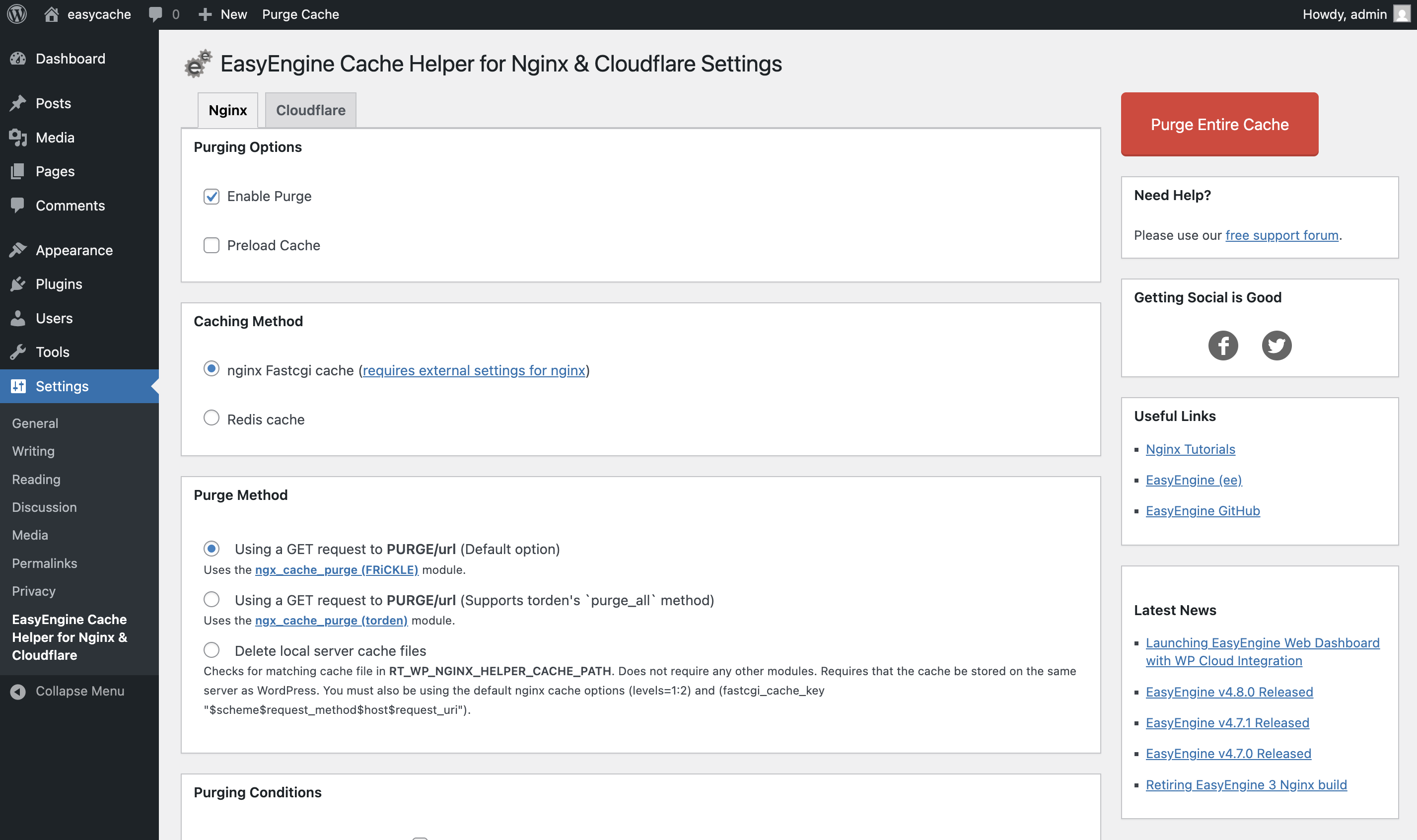
1. Nginx caching and purge settings.
2. Cloudflare API token, Zone ID, cache TTL, and cache rule setup
Changelog
3.0.0
- Added Cloudflare edge-cache management and cache-tag-based purging adapted from pantheon-systems/pantheon-advanced-page-cache. mrrobot47, vedantgandhi28
- Added Cloudflare cache-rule setup, per-URL and full-zone purge controls, and WP-CLI commands. mrrobot47, vedantgandhi28
- Reorganized settings into Nginx and Cloudflare tabs and updated the plugin name to EasyEngine Cache Helper. mrrobot47, vedantgandhi28
2.4.1
- Call to undefined function is_plugin_active() #Issue - by Titan21, smartyp, vedantgandhi28
2.4.0
- Update plugin compatibility to upto WordPress 7.1 - by vedantgandhi28
- Load Plugin TextDomain on init hook - by thisismyurl
- Fix escaped HTML when fetching feed - by DAnn2012
- Posts that are deleted using wp_delete_post($postId, force_delete: true) are not purged. #Issue - by stefanfisk, sarthak8858
- Add support for the torden branch of ngx_cache_purge. - by gnif, gridpane
- Extend WooCommerce Purging Functionality For REST API. - by im3dabasia1
- Add filters to exclude post types - by gutobenn
- Clearing the cache when changing the product status #Issue - by tores54, im3dabasia1
- Enable purge cache option in admin bar for user role #Issue - by Marco Feicht, sarthaknagoshe2002
2.3.5
- Purge not working. #Issue - by tjalexander70, mrrobot47
2.3.4
- Cannot uncheck Purge Homephae options. #Issue - by diepbui4157
- fastcgi cache purge fails if not using trailing slashes in URI structure. #Issue - by agvs, Vedant-Gandhi
- What's _purge_personal_urls() for?. #Issue - by Rolf Allard van Hagen, pratik-londhe4
- Broken link in the useful links section. #358 - by diepbui4157, pratik-londhe4
- Small issues with translatable strings. #348 - by webdados
- New filter for RT_WP_NGINX_HELPER_CACHE_PATH default constant value. #298 - by SGr33n Vedant-Gandhi
- PURGUE FOR EDITOR. #243 - by ghost, pratik-londhe4
2.3.3
- Fix AMP Purge for method unlink. #396 - by Stefan Fisk
2.3.2
- Update the contributors list for the plugin. #343 - by Vedant Gandhi
2.3.1
- Update the contributors list and tags for the plugin. #378 - by Vedant Gandhi
2.3.0
- Disable the purge functionality when importing data. #52 - by Vedant Gandhi
- Added option to preload cache for all Post and Pages. #47 - by Vedant Gandhi
- Added the capability to purge Amp URL's. #135 - by Vedant Gandhi
- Add support for adding Username, Password support for Redis. It also includes the support for Unix Socket Path for Redis along with Database selection. #343,#350 - by Vedant Gandhi
- Add capability to allow modifying options using WP-CLI. #307 - by Vedant Gandhi
- Fix the plugin crash issue due to internationalization after upgrading to WordPress Version 6.7. #364 - by Vedant Gandhi
2.2.5
- Add the capability to enable/disable purging of feeds. #281 - by Amaan Khan
- Fix undefined port error when Redis port is set to empty string. #333 - by Amaan Khan
2.2.4
- Introduces the capability to specify the
NGINX_HELPER_LOGconstant, allowing users to activate the logging feature. #318 - by Vishal Kakadiya - Existing users employing the nginx-helper plugin with logging enabled will experience no disruptions. However, if logging is disabled, users must define the
NGINX_HELPER_LOGconstant to re-enable the logging feature.
2.2.3
- Add the URL being purged as parameter in
rt_nginx_helper_purge_cached_filehook. #271 - by Arafat Islam - Fix performance issue when saving nav menus. #112, #272 - by Arafat Islam
- Fix purging date archives for custom post types. #40, #268 - by Arafat Islam
- Fix pages and CPT URLs not being purged on moving to trash. #191, #267 - by Arafat Islam
- Fix notice - Undefined index: path #190, #251, #262 - by George Lagonikas
- PHP 8.1 compatibility #291, #302 - by Siddharth Tikekar
- Tested with WordPress 6.1 #285
2.2.2
- Add action
rt_nginx_helper_after_purge_allto fire after the entire cache has been purged whatever caching type is used. #232 - by Julien-prrs - Fix issue where settings not saved because the button's value localized (for any language). #236 - by umeshnevase
- Fix issue where "Custom Purge URL" option displays previous value. #240, #241 - by KirillGritcenko
- Tested with WordPress 5.4
2.2.1
- Fix timeout issue on FastCGI cache purge. #229 - by chandrapatel, thrijith
2.2.0
- Add filter
rt_nginx_helper_fastcgi_purge_suffixto change purge suffix for FastCGI cache. #141 - by stayallive - Add filter
rt_nginx_helper_fastcgi_purge_url_baseto change purge URL base for FastCGI cache. #141 - by stayallive - Update our code to be in line with WordPress Coding standards in various places. #209, #225 - by abhijitrakas, chandrapatel
- Check and verify purging is enabled before purging cache. #168 - by jaredwsmith
- Hide Purge Cache button in admin bar when purge is disabled. #218, #219 - by mbautista, chandrapatel
- Don't add Nginx Timestamp on WordPress login page. #204, #220 - by peixotorms, chandrapatel
2.1.0
- Add wildcard cache key deletion for device type cache purge. #203 - by pradeep910
- Add filter
rt_nginx_helper_purge_urlto filter the URL to be purged. #182 - by todeveni - Add filter
rt_nginx_helper_purge_cached_fileto filter the cached file name. #182 - by todeveni - Add filter
rt_nginx_helper_remote_purge_urlto filter remote URL to be purged. #182 - by todeveni - Add action
rt_nginx_helper_after_fastcgi_purge_allto fire after the FastCGI cache has been purged. #182 - by todeveni - Add action
rt_nginx_helper_after_redis_purge_allto fire after the Redis cache has been purged. #182 - by todeveni - Add action
rt_nginx_helper_purged_fileto fire an action after deleting file from cache. #182 - by todeveni - Add action
rt_nginx_helper_before_remote_purge_urlto fire an action before purging remote URL. #182 - by todeveni - Add action
rt_nginx_helper_after_remote_purge_urlto fire an action after remote purge request. #182 - by todeveni - Fix issue with post purge on new comments. #175 - by jinschoi
- Fix Nginx Timestamp being added to invalid content type. #200 - by thrijith
- Handle filesize exception while truncating nginx.log file. #206 - by peterjanes
2.0.3
- Update article link for fastcgi cache purge. #187 - by gagan0123
- Fix map generation issue on
SUBDOMAIN_INSTALL. #189 - by ChrisHardie - Add GitHub Action for plugin release. #194 - by sudhir-yadav
2.0.2
- Fix undefined error when we install the plugin for the first time and if Redis is not available. #162 - by Joel-James
- Remove extra spacing for nginx map section. #169 - by ShashwatMittal
- Purge Cache menu in front-end admibar now purge current page. #173 - by imranhsayed
- Fix issue where cache is not cleared when page is swiched from publish to draft. #174 - by imranhsayed
- Fix an issue where custom purge url option does not show newlines when using multiple urls. #184 - by mist-webit
2.0.1
- Fix settings url for multisite: use network_admin_url to get network correct settings url. #163 - by Joel-James
- Fix php error with arbitrary statement in empty - Prior to PHP 5.5. #165 - by PatelUtkarsh
2.0.0
- Fix typo causing failure to purge on trashed comment. #159 - by jinschoi
- Refactor Plugin structure and remove unused code. Initial code by chandrapatel, #153 - by kelin1003,
- Run phpcs and fix warning. #158 by vaishaliagola27
- Make compatible with EasyEngine v4.
1.9.12
- Allow override Redis host/port/prefix by defining constant in wp-config.php #152 - by vincent-lu
1.9.11
- Fixed issue where permalinks without trailing slash does not purging #124 - by Patrick
- Check whether role exist or not before removing capability. #134 - by 1gor
1.9.10
- Fixed issue where Nginx cache folders deleted on purge. #123 - by johan-chassaing
- Fixed Redis purge all feature for installation where WordPress lives in a separate folder. #130 - by pySilver
1.9.9
1.9.8
- Fixed homepage cache cleared when WPML plugin used #116 - by Niwreg
- Fixed Purge Cache clears the whole Redis cache #113 - by HansVanEijsden
- One log file for all site in WPMU.
- Single site Redis cache purge when click on Purge Cache button in WPMU #122 - by Lars Støttrup Nielsen
- Fixed notices and warnings.
1.9.7
- Remove timestamp if cron or wp-cli #114 - by samedwards
- Fixed notices and warnings.
1.9.6
- Fixed cache purging on post publish.
- Error fixed when redis server not installed.
1.9.5
Added custom purge URL option.
1.9.4
- Added redis server connection timeout.
- Added RedisException handling.
1.9.3
- Added PhpRedis API support.
- Added redis-lua script support to purge complete cache very fast.
- Added composer.json support
- Fixed cache purging link in admin bar.
- Updated the initial settings to include the 'purge_method' #99 - by gagan0123
1.9.2
Fix purging for Redis cache and FastCGI cache
1.9.1
Fix purging for custom post types
1.9
Added Redis cache purge support.
1.8.13
Fixed PHP notice for an undefined index when "Enable Logging" is not set.
1.8.12
Updated readme and changelog
1.8.11
Fix url escaping #82 - by javisperez
1.8.10
- Security bug fix
1.8.9
- Default setting fix and wp-cli example correction - by bcole808
1.8.8
- Added option to purge cache without nginx purge module - by bcole808
1.8.7
- Added action
rt_nginx_helper_purge_allto purge cache from other plugins - by gungeekatx
1.8.6
- Removed wercker.yml from plugin zip/svn.
- Updated readme
1.8.5
- Added WP_CLI support - by Udit Desai
1.8.4
- Fix undefined index issue and correct "purge_archive_on_del" key
1.8.3
- Tested with WordPress 4.0
- Fix issue #69
1.8.1
- Tested with wordpress 3.9.1
- Fix confilct with Mailchimp's Social plugin
1.8
- New admin UI
- Fix missing wp_sanitize_redirect function call
1.7.6
- Update Backend UI
- Added Language Support
1.7.5
- Fixed option name mismatch issue to purge homepage on delete.
1.7.4
- Disable purge and stamp by default.
1.7.3
- Suppressed
unlinkrelated error-messages which can be safely ignored. - Fixed a bug in purge-all option.
1.7.2
- pjv fixed bug in logging file.
1.7.1
- Fixes bug in true purge and admin screen.
1.7
- True full cache purge added.
- Map file location changed to uploads' directory to fix http://rtcamp.com/support/topic/plugin-update-removes-map-file/
- Log file location also changed to uploads' directory.
1.6.13
- pjv changed the way home URL is accessed. Instead of site option, the plugin now uses home_URL() function.
1.6.12
- telofy added purging of atom and RDF feeds.
1.6.11
- Removed comments from Admin screens since, it was interfering with media uploads in 3.5 up.
1.6.10
- Cleaned up code.
- Added credits for code.
- Improved attachment purging.
1.6.9
- Added Faux to Purge all buttons, to avoid misleading users.
1.6.8
- daankortenbach added Purge Cache link to wp-admin bar
1.6.7
- jk3us added better content-type detection for cache verification comments
1.6.6
- darren-slatten added Manual 'Purge all URLs' functionality
1.6.5
- Fixed typo that interfered with archive purge settings. Thanks to Daan Kortenbach for pointing this out.
1.6.4
- Improved code for map generation to better conventions since the nesting confused some servers.
- Added map update process to admin_init for frequent refreshes.
1.6.3
- Fixed duplicate entries.
1.6.2
- Another bug fix in the revised code for improved multisite and multidomain mapping.
1.6.1
- Fixed bug in the revised code for improved multisite and multidomain mapping.
1.6
- Revised code for improved multisite and multidomain mapping.
1.5
- Timestamp now only gets added to content-type text/html
- Added option to toggle timestamp creation
1.4
- Fixed bug related to nomenclature of comment status that caused purge to fail.
1.3.9
- Removed extraneous headers.
1.3.8
- Fixed bug in single post/page/post-type purging code. Thanks to Greg for pointing this out here: http://rtcamp.com/support/topic/updating-post-nginx-helper-purge-cache-post/.
1.3.7
- Changed the action hook, back to 'shutdown' from 'wp_footer' to add verification comments.
- Added a check to prevent adding comments to ajax requests,
1.3.6
- Changed the action hook, from 'shutdown' to 'wp_footer' to add verification comments. This was interfering with other plugins.
1.3.5
- Improved Readme.
- Improved cache verification comments.
1.3.4
- Fixed duplicate entries generated for maps (Harmless, but doesn't look good!)
- Added timestamp html comments for cache verification, as described here: http://rtcamp.com/wordpress-nginx/tutorials/checklist/
1.3.3
- Fixed map generation for multi domain installs using domain mapping plugin, where blog ids were not displayed.
1.3.2
- Fixed map generation for multi domain installs with domain mapping plugin.
1.3.1
- Minor fixes for directory structure and file names.
1.3
- Improved Readme.
1.2
- Fixed map generation error.
- Fixed purging logic.
- Fixed UI where purge settings were lost on disabling and re-enabling purge.
- Minor Ui rearrangement.
1.1
- Improved readme.txt. Added Screenshots.
1.0
- First release
Credits
The Cloudflare cache purge feature is adapted from the pantheon-systems/pantheon-advanced-page-cache plugin, Copyright Pantheon Systems, licensed under GPLv2 or later.
The derived code has been modified to emit Cloudflare Cache-Tag headers instead of Surrogate-Key headers.
Upgrade Notice
2.2.3
Nginx Helper 2.2.3, Fix performance issue when saving nav menus, purging date archives for CPTs, purge page and post URLs when the post is trashed and passes the URL being purged in "rt_nginx_helper_purge_cached_file" hook as parameter.
Does this interest you?
Related Packages
Cloned from rtcamp/nginx-helper. Cleans nginx's fastcgi/proxy cache or redis-cac...
A Laravel package for advanced caching with tags and namespaces in Redis.
A powerful package that provides an efficient and scalable cache invalidation sy...
Wordpress as a composer dependency in the context of a Laravel appliction. This...
Version History
| Version | Released | PHP | License |
|---|---|---|---|
| 2.4.1 | >=5.3.2 | GPL-2.0+ | |
| 2.4.0 | >=5.3.2 | GPL-2.0+ | |
| 2.3.5 | >=5.3.2 | GPL-2.0+ | |
| 2.3.4 | >=5.3.2 | GPL-2.0+ | |
| 2.3.3 | >=5.3.2 | GPL-2.0+ | |
| 2.3.2 | >=5.3.2 | GPL-2.0+ | |
| 2.3.1 | >=5.3.2 | GPL-2.0+ | |
| 2.3.0 | >=5.3.2 | GPL-2.0+ | |
| 2.2.5 | >=5.3.2 | GPL-2.0+ | |
| 2.2.4 | >=5.3.2 | GPL-2.0+ | |
| 2.2.3 | >=5.3.2 | GPL-2.0+ | |
| 2.2.2 | >=5.3.2 | GPL-2.0+ | |
| 2.2.1 | >=5.3.2 | GPL-2.0+ | |
| 2.2.0 | >=5.3.2 | GPL-2.0+ | |
| 2.1.0 | >=5.3.2 | GPL-2.0+ | |
| 2.0.3 | >=5.3.2 | GPL-2.0+ | |
| 2.0.2 | >=5.3.2 | GPL-2.0+ | |
| 2.0.1 | >=5.3.2 | GPL-2.0+ | |
| 2.0.0 | >=5.3.2 | GPL-2.0+ | |
| 1.9.11 | >=5.3.2 | GPL-2.0+ | |
| 1.9.10 | >=5.3.2 | GPL-2.0+ | |
| 1.9.9 | >=5.3.2 | GPL-2.0+ | |
| 1.9.8 | >=5.3.2 | GPL-2.0+ | |
| 1.9.7 | >=5.3.2 | GPL-2.0+ | |
| 1.9.6 | >=5.3.2 | GPL-2.0+ | |
| 1.9.5 | >=5.3.2 | GPL-2.0+ | |
| 1.9.4 | >=5.3.2 | GPL-2.0+ | |
| 1.9.3 | >=5.3.2 | GPLv2 |