saade/filament-adjacency-list
| Install | |
|---|---|
composer require saade/filament-adjacency-list |
|
| Latest Version: | v4.2.0 |
| PHP: | ^8.2 |
| Laravel: | 13 |
| Older releases: | 10 · 11 · 12 |
| License: | MIT |
| Last Updated: | Oct 22, 2026 |
| Links: | GitHub · Packagist |
Filament Adjacency List



A tree field for Filament. Build and edit nested, hierarchical data, such as menus, categories and page trees, with drag and drop, inside any form.
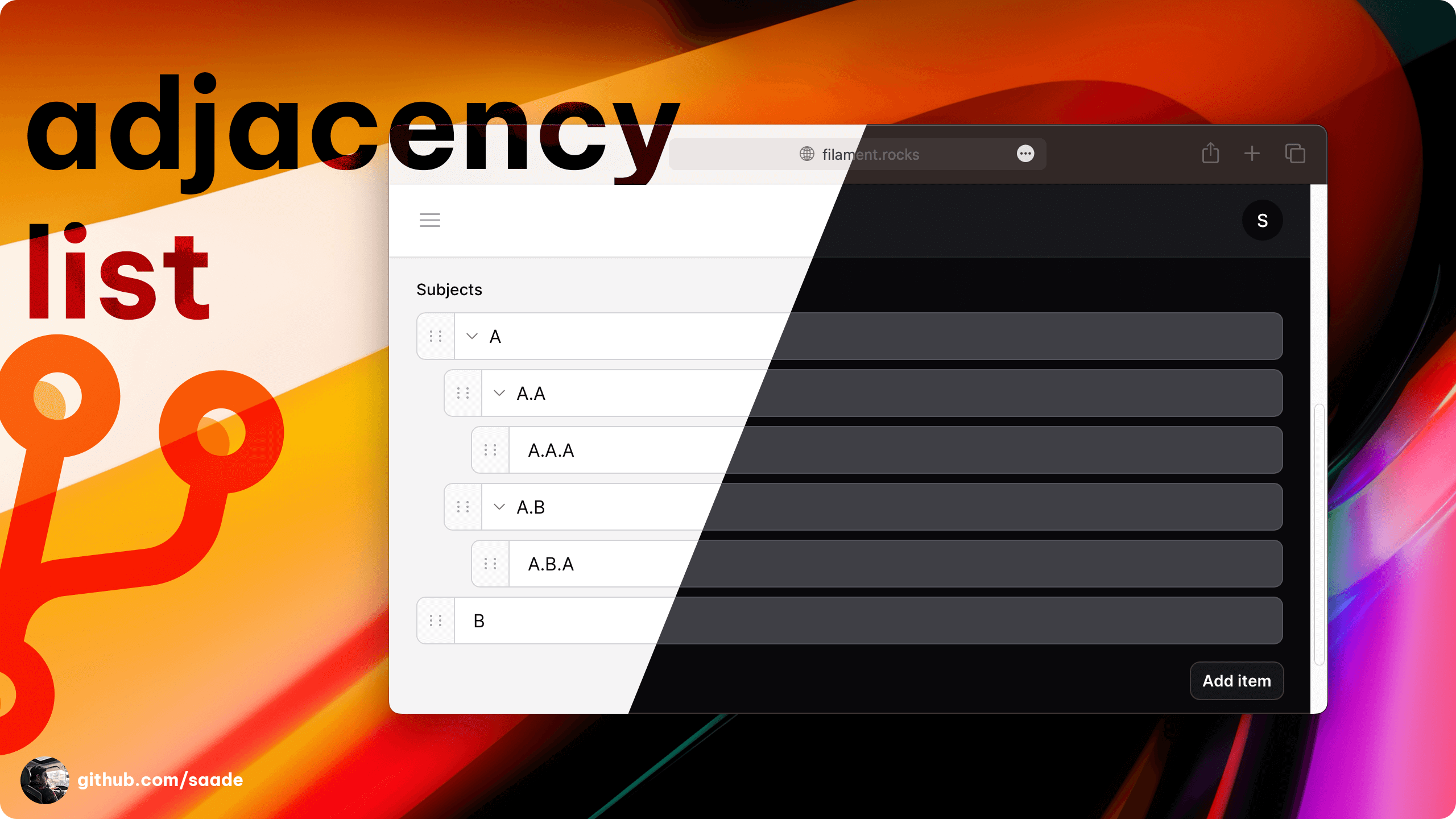
- Stores the tree in a JSON column, or in your database through a relationship.
- Each item has its own form, built with the Filament fields you already use.
- Reorder and nest by dragging, or with the move, indent and outdent buttons.
- Checks your model policies before creating, editing, deleting or reordering.
- No jQuery.
| Plugin | Filament |
|---|---|
| 4.x | 4.x, 5.x |
| 3.x | 3.x |
Upgrading from 3.x? See Upgrading from 3.x.
Installation
Install the package with Composer:
composer require saade/filament-adjacency-list
The plugin is styled with Tailwind CSS classes and ships no stylesheet of its own, so it needs a custom theme. Add its views to your theme's CSS file (or to your application's CSS file, when you use Filament outside a panel):
@source '../../../../vendor/saade/filament-adjacency-list/resources/views/**/*.blade.php';
Then rebuild your assets with npm run build.
Usage
AdjacencyList is a form field. Add it to any form, like a Repeater:
use Filament\Forms\Components\TextInput;
use Saade\FilamentAdjacencyList\Forms\Components\AdjacencyList;

AdjacencyList::make('menu')
    ->schema([
        TextInput::make('label')
            ->required(),
        TextInput::make('url')
            ->url(),
    ])
schema() defines the form shown when an item is added or edited.
There are two ways to store the tree:
- In a JSON column of the record being edited. Nothing else is needed, which makes it a good fit for menus.
- In the database, through a relationship, where every item is a record of its own. Use this for categories and other data you query.
Storing the tree in a JSON column
Cast the column to an array on your model:
class Menu extends Model
{
    protected function casts(): array
    {
        return [
            'items' => 'array',
        ];
    }
}
AdjacencyList::make('items')
    ->schema([
        TextInput::make('label')->required(),
        TextInput::make('url')->url(),
    ])
The tree is saved with the rest of the form. This is what it looks like in the column:
[
    '9c0b1c4e-...' => [
        'label' => 'Products',
        'url' => '/products',
        'children' => [
            '4f7d2a90-...' => [
                'label' => 'Books',
                'url' => '/products/books',
                'children' => [],
            ],
        ],
    ],
]
Each item is keyed by a UUID that the field generates. If you fill the state yourself, every key has to be unique across the whole tree, not only among its siblings, and every item needs its children key, even when it is empty.
Storing the tree with a relationship
Relationships are read through staudenmeir/laravel-adjacency-list, which is installed with this package. The field edits the descendants of the record whose form it is in, so that record's model has to use the HasRecursiveRelationships trait.
Take a category tree. The table needs a nullable parent_id, and a column to keep the order in:
Schema::create('categories', function (Blueprint $table) {
    $table->id();
    $table->foreignId('parent_id')->nullable()->constrained('categories')->cascadeOnDelete();
    $table->string('name');
    $table->unsignedInteger('sort')->default(0);
    $table->timestamps();
});
use Illuminate\Database\Eloquent\Model;
use Staudenmeir\LaravelAdjacencyList\Eloquent\HasRecursiveRelationships;

class Category extends Model
{
    use HasRecursiveRelationships;

    protected $fillable = ['parent_id', 'name', 'sort'];
}
In the form of a category, the field shows everything under that category:
// app/Filament/Resources/Categories/Schemas/CategoryForm.php

AdjacencyList::make('descendants')
    ->relationship('descendants')
    ->labelKey('name')
    ->orderColumn('sort')
    ->schema([
        TextInput::make('name')
            ->required(),
    ])
relationship('descendants') is the relationship the trait gives the model. The field loads the whole subtree in one query and nests it for you.
To manage one whole tree, such as all the items of a menu, make a record for the tree itself and edit its descendants: the "Main menu" record is the root, and its items are everything under it.
A few things to know:
- What is saved when. Adding, editing and deleting an item writes to the database straight away. Reordering, nesting and moving are saved when the form is saved, unless you call
saveOnReorder(). - The children key. Leave
childrenKey()at its default,children. It is also the name of the relationship the items' children are read from. - Creating records. The field needs a saved record to attach items to, so use it on the edit page of a resource. On a create page the tree stays empty, and items cannot be added, until the record is saved.
- Models without the trait. A plain
hasManyrelationship to a model that does not useHasRecursiveRelationshipsis not supported.
Saving moves straight away
AdjacencyList::make('descendants')
    ->relationship('descendants')
    ->saveOnReorder()
A new order or a new parent is then written to the database as soon as an item is dragged or moved with the buttons, without waiting for the form.
Customizing the query
AdjacencyList::make('descendants')
    ->relationship('descendants', fn (Builder $query): Builder => $query->where('is_enabled', true))
Ordering
orderColumn() names the column that keeps the order of the items. It is sort when you call it without a column:
AdjacencyList::make('descendants')
    ->relationship('descendants')
    ->orderColumn('position')
Changing the data of an item
These work like the ones on Filament's Repeater:
AdjacencyList::make('descendants')
    ->relationship('descendants')
    ->mutateRelationshipDataBeforeFillUsing(fn (array $data): array => $data)
    ->mutateRelationshipDataBeforeCreateUsing(fn (array $data): array => [...$data, 'created_by' => auth()->id()])
    ->mutateRelationshipDataBeforeSaveUsing(fn (array $data, Model $record): array => $data)
Authorization
When the items' model has a policy, the field checks it: create before adding, update before editing, delete before deleting, and reorder before moving, nesting or dragging. An action the user is not allowed to run is hidden.
Graphs
A model that uses HasGraphRelationships, where an item can have several parents through a pivot table, works the same way:
use Illuminate\Database\Eloquent\Model;
use Staudenmeir\LaravelAdjacencyList\Eloquent\HasGraphRelationships;

class Node extends Model
{
    use HasGraphRelationships;

    public function getPivotTableName(): string
    {
        return 'edges';
    }
}
AdjacencyList::make('descendants')
    ->relationship('descendants')
    ->labelKey('name')
Moving an item changes the rows of the pivot table, not the items themselves. pivotAttributes() sets extra values to write on those rows. With orderColumn(), the column has to exist on both the model's table and the pivot table, since the order of an item belongs to each of its parents.
Configuration
The label of an item
AdjacencyList::make('items')
    ->labelKey('name') // defaults to 'label'
Or build it yourself:
AdjacencyList::make('items')
    ->itemLabel(fn (array $item): string => "{$item['name']} ({$item['code']})")
The children key
The key each item's children are kept under. It defaults to children:
AdjacencyList::make('items')
    ->childrenKey('items')
Limiting the depth
AdjacencyList::make('items')
    ->maxDepth(2)
There is no limit unless you set one.
Clicking an item
Run one of the item's actions when it is clicked:
AdjacencyList::make('items')
    ->itemAction('edit')
The actions are edit, delete, addChild, moveUp, moveDown, indent and dedent.
Or open a URL:
AdjacencyList::make('descendants')
    ->itemUrl(fn (array $item): string => CategoryResource::getUrl('edit', ['record' => $item['id']]))
    ->openItemUrlInNewTab()
When both are set, the action is used.
Collapsing
AdjacencyList::make('items')
    ->collapsible()

AdjacencyList::make('items')
    ->collapsed() // collapsible, and collapsed when the form loads
Remember which items the user collapsed, in their browser, across page loads:
AdjacencyList::make('items')
    ->collapsible()
    ->persistCollapsed()
Rulers
Draw a guide line for each level of nesting:
AdjacencyList::make('items')
    ->rulers()
Adding items without a modal
AdjacencyList::make('items')
    ->modal(false)
A new item is added straight away, without asking for its fields.
Turning features off
AdjacencyList::make('items')
    ->addable(false)
    ->editable(false)
    ->deletable(false)
    ->reorderable(false) // dragging
    ->moveable(false)    // the move up and move down buttons
    ->indentable(false)  // the indent and outdent buttons
Each takes a closure too.
Customizing actions
use Filament\Actions\Action;

AdjacencyList::make('items')
    ->addAction(fn (Action $action): Action => $action->label('Add link'))
    ->addChildAction(fn (Action $action): Action => $action->icon('heroicon-o-plus'))
    ->editAction(fn (Action $action): Action => $action->slideOver())
    ->deleteAction(fn (Action $action): Action => $action->requiresConfirmation())
    ->reorderAction(fn (Action $action): Action => $action->icon('heroicon-o-bars-3'))
    ->indentAction(fn (Action $action): Action => $action->label('Nest'))
    ->dedentAction(fn (Action $action): Action => $action->label('Unnest'))
    ->moveUpAction(fn (Action $action): Action => $action->label('Up'))
    ->moveDownAction(fn (Action $action): Action => $action->label('Down'))
Widget
AdjacencyListWidget shows the tree of a record outside a form, for example on the view or edit page of a resource. Extend it and configure the field:
use Filament\Forms\Components\TextInput;
use Saade\FilamentAdjacencyList\Forms\Components\AdjacencyList;
use Saade\FilamentAdjacencyList\Widgets\AdjacencyListWidget;

class CategoryTreeWidget extends AdjacencyListWidget
{
    protected function adjacencyList(AdjacencyList $adjacencyList): AdjacencyList
    {
        return $adjacencyList
            ->labelKey('name')
            ->orderColumn('sort')
            ->schema([
                TextInput::make('name')->required(),
            ]);
    }
}
On a resource's view or edit page, Filament gives the widget the page's record. To use another record, override getModel():
protected function getModel(): ?Model
{
    return Category::query()->whereNull('parent_id')->first();
}
The widget uses the descendants relationship. Change it with protected static string $relationshipName.
There is no form to save in the widget, so everything is saved straight away: adding, editing, deleting, reordering and nesting.
Upgrading from 3.x
4.x supports Filament 4 and 5. Two things changed besides that:
- A custom theme is required. The plugin no longer registers a stylesheet. Add the
@sourceline from Installation to your theme. - Clicking an item no longer edits it. Call
->itemAction('edit')to get that back.
Changelog
Please see CHANGELOG for more information on what has changed recently.
Contributing
Please see CONTRIBUTING for details.
Security Vulnerabilities
Please review our security policy on how to report security vulnerabilities.
Credits
- Saade
- Ryan Chandler's Navigation Plugin for his work on the tree UI and complex tree actions.
- Hugh for his help on supporting trees/ graphs relationships.
- All Contributors
License
The MIT License (MIT). Please see License File for more information.

Related Packages
Build nested menus in Filament and render them anywhere in your Laravel app.
Tree view for Filament resources - drop-in replacement for Table with drag-and-d...
Tree view for Filament resources - drop-in replacement for Table with drag-and-d...
Expandable parent/child tree rows for Filament v4.3+ & v5 tables — inline sub-ro...
Version History
| Version | Released | PHP | Laravel | License |
|---|---|---|---|---|
| v4.2.0 | ^8.2 | MIT | ||
| v4.1.2 | ^8.2 | ^11.0| | MIT | |
| v4.1.1 | ^8.2 | ^11.0| | MIT | |
| v4.1.0 | ^8.2 | ^11.0| | MIT | |
| v4.0.3 | ^8.2 | ^11.0| | MIT | |
| v4.0.2 | ^8.2 | ^11.0| | MIT | |
| v4.0.1 | ^8.1 | ^10.0| | MIT | |
| v4.0.0 | ^8.1 | ^10.0| | MIT | |
| v3.3.0 | ^8.1 | ^10.0| | MIT | |
| v3.2.2 | ^8.1 | ^10.0| | MIT | |
| v3.2.1 | ^8.1 | ^10.0| | MIT | |
| v3.2.0 | ^8.1 | ^10.0| | MIT | |
| v3.1.2 | ^8.1 | ^10.0| | MIT | |
| v3.1.1 | ^8.1 | ^10.0 | MIT | |
| v3.1.0 | ^8.1 | ^10.0 | MIT | |
| v3.0.4 | ^8.1 | ^10.0 | MIT | |
| v3.0.3 | ^8.1 | ^10.0 | MIT | |
| v3.0.2 | ^8.1 | ^10.0 | MIT | |
| v3.0.1 | ^8.1 | ^10.0 | MIT | |
| v3.0.0 | ^8.1 | ^10.0 | MIT |
Pre-releases (4)
| Version | Released | PHP | Laravel | License |
|---|---|---|---|---|
| v4.0.0-beta3 | ^8.1 | ^10.0| | MIT | |
| v4.0.0-beta2 | ^8.1 | ^10.0| | MIT | |
| v4.0.0-beta1 | ^8.1 | ^10.0| | MIT | |
| v3.2-beta1 | ^8.1 | ^10.0 | MIT |