safi/filament-atelier
| Install | |
|---|---|
composer require safi/filament-atelier |
|
| Latest Version: | v1.0.0 |
| PHP: | ^8.3 |
| Laravel: | 12 · 13 |
| License: | MIT |
| Last Updated: | Sep 17, 2026 |
| Links: | GitHub · Packagist |
Filament Atelier
A visual page builder for Laravel, built as a Filament plugin.
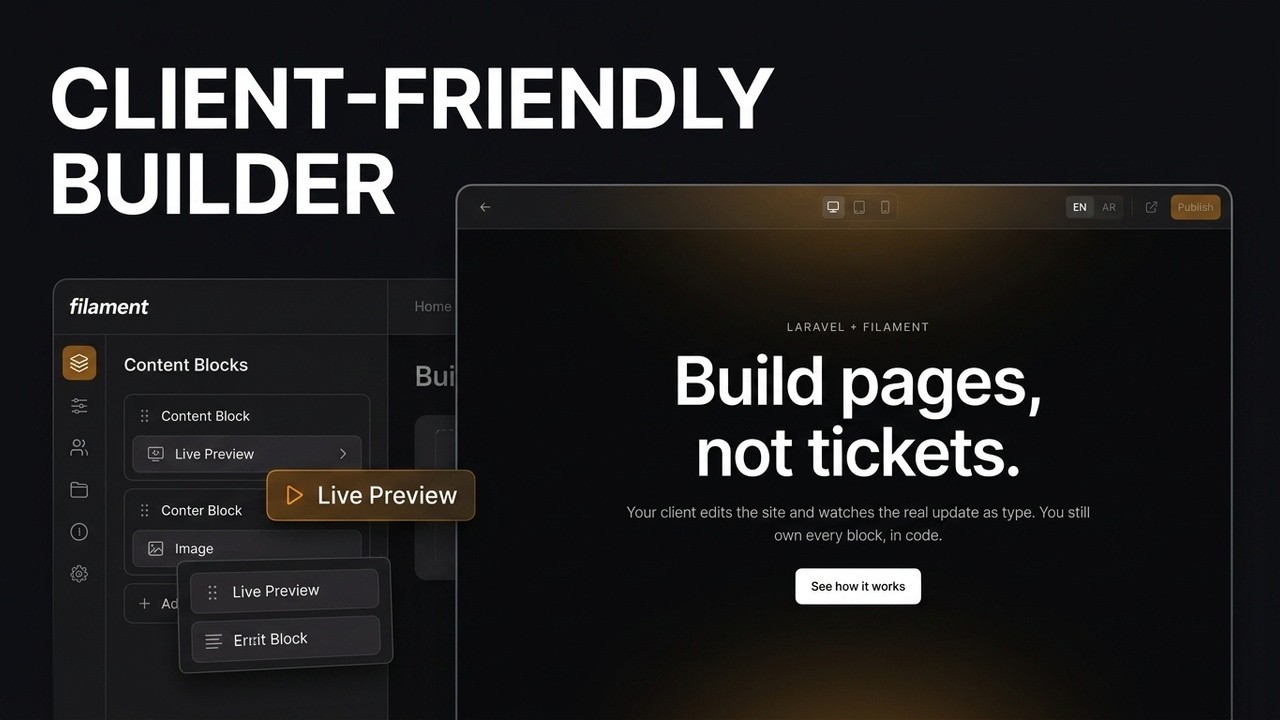
A developer defines the sections in code. The client builds pages from them in a full-screen editor, and sees the real page render as they type. The public site stays server-rendered Blade, multi-language, and fast.
Status
1.0.0. In use on client sites, and the public API is named below: it will not move inside 1.x. Read "Not built yet" before you promise anything to a client.
The package is the repository root. example/ is a Laravel 13 app that installs it for testing, and Docs/ holds the spec. Both are export-ignored, so composer require pulls the package and nothing else.
The idea
A page is stored as a JSON tree of typed blocks and rendered by Blade at request time. That's Gutenberg's data model with Elementor's rendering approach, and it avoids the parts of both that hurt: no HTML stored in the database, no block validation, no deprecation chains.
A block type is one PHP class and one Blade view. The class declares its key, label, icon and category, plus a Filament schema that becomes its settings form. Register it and it shows up in the section picker. Adding a block never means editing a file inside the plugin.
The editor puts the section list on the left and a live iframe beside it. Selecting a section swaps the list for that section's settings. The iframe loads the public layout and the public stylesheet, so what the client sees is what ships. There's a width switcher for desktop, tablet and mobile, because the point of a preview is catching a headline that wraps onto three lines before anyone else does.
Install


composer require safi/filament-atelier
php artisan vendor:publish --tag=filament-atelier-migrations
php artisan migrate && php artisan storage:link
Register AtelierPlugin::make()->blocks(DefaultBlocks::all()) in your panel, and point Tailwind at the package's views. Full steps, including the ones that fail silently if you skip them, are in the Installation guide.
Upgrading
New tables ship as new migration files rather than as edits to one that already ran on your database, so re-publish after every update:
composer update safi/filament-atelier
php artisan vendor:publish --tag=filament-atelier-migrations
php artisan migrate
vendor:publish skips files you already have, so this only ever copies what's new and never overwrites a migration you've edited. Skipping it after an update that adds a table shows up as a "no such table" error the first time that feature runs. CHANGELOG.md says when a release needs it.
What ships today
- Three-pane editor. Add, reorder, duplicate, hide and delete sections, with the live preview beside them. Reordering is up and down buttons, not drag, and new sections land at the end.
- Ten blocks: hero, features, logo wall, testimonials, CTA, FAQ, rich text, image, gallery, collection.
- Page types. Services, products, case studies: one plain class per type gives it its own sidebar entry, its own custom fields, its own starter sections and its own set of usable blocks, all on the same table and the same editor. The collection block lists them, each rendered through the type's own card view.
- Shared section controls. A block declares
supports()and gets background and vertical space in its settings pane, built once rather than per block. - Multiple layouts, picked per page. Register a navbar-and-footer shell, a docs sidebar and anything else; the client chooses one from a dropdown in page settings.
- Design tokens. Colour, font, spacing and width as CSS custom properties, read by the editor preview and the public page from the same layout, so the two cannot drift.
- Any number of languages on every page, LTR or RTL, declared in config. One locale is fine. Each carries
lang,dir, hreflang, its own slug and its own SEO, and the RTL font stack followsdirrather than a locale code. - Draft and published as separate columns, so editing never touches the live page. Every publish leaves a revision snapshot behind, and preview links are signed and expiring.
- Per-locale SEO fields: meta title, description, social share image and canonical, rendered into the head with Open Graph and Twitter tags.
- A sitemap,
robots.txt, per-page noindex, and 301s when a slug changes, so renaming a page doesn't 404 its inbound links. - JSON-LD on every page: the organisation with its opening hours and contact points, the site, the page, breadcrumbs, and a page type picked from nine. FAQ schema either generated from an FAQ block or typed on the settings screen. A blog or services resource that isn't an Atelier page can add its own URLs to the sitemap and share the same graph.
Not built yet
Listed because a page builder is judged on what it does not do:
- Header, footer, contact form and raw HTML blocks. The contact form will be presentational, posting to a route you wire yourself.
example/shows one written in the host app, with the submissions landing in their own panel resource. - A revisions UI. Snapshots are written and
restoreRevision()works, but there is no screen for browsing or comparing them. - Per-block asset loading and a measured performance budget. No page cache, no per-block CSS or JS, no Lighthouse numbers recorded.
- Inserting a section anywhere but the end. Dragging one into place works; a new one still lands at the bottom.
Reviewschema from testimonials. Deliberate: Google ignores reviews a business publishes about itself, and the block has no rating field.
Block types are defined in code, and that is the design rather than a stopgap. Creating block types from the panel is v2 and deliberately parked.
Experimental
-
Menu manager. Named navigation menus, edited from the panel, rendered on the public site with
Menu::treeFor(). Drag and drop, including nesting a top-level item or promoting one back out, per-locale labels and URLs, hide without deleting. Off by default, since it's still being proven out:// config/atelier.php 'experimental' => [ 'menus' => true, ],Or per panel, which overrides config:
AtelierPlugin::make()->experimental(['menus' => true])Leaving it off pulls the page and its route out of the panel entirely, not just the sidebar link. Full details in the Menus guide.
SEO
Server-rendered Blade is the reason the architecture is shaped this way, so this part isn't an afterthought.
Every page emits a title, description, canonical, hreflang between locales, Open Graph and Twitter tags, all editable per locale in page settings. Two toggles per locale control indexing: hiding a page from search engines adds noindex and drops it from the sitemap, decided per locale so a page can be listed in one language while its translation isn't.
/sitemap.xml lists every published, indexable page in every locale with alternates and lastmod, generated per request with no cache to clear. Open it in a browser and a stylesheet renders it as a table. /robots.txt points at it and keeps crawlers out of the panel and the preview route.
Renaming a published page's slug writes a 301 from the old URL, so a client can't silently 404 every inbound link to a page that ranks.
Sitemap URLs from outside Atelier
A client site is rarely only Atelier pages. A blog or services resource with its own model, panel tab and routes hands its URLs over when you register the plugin:
AtelierPlugin::make()
    ->blocks(DefaultBlocks::all())
    ->sitemap([
        fn () => Post::published()->get()->map(fn (Post $post) => [
            'loc' => route('blog.show', $post),
            'lastmod' => $post->updated_at,
        ]),
    ]);
A source is a closure or the name of an invokable class resolved from the container, the same shape as ->blocks(). It returns URL strings, or arrays with lastmod and per-locale alternates. Sources run when the sitemap is requested, so they're free to query. Full details and the reasoning are in the SEO guide.
Structured data
Every page emits one JSON-LD graph, built at render from data you already filled in. Nothing is stored, so there's no second copy to keep in step and no cache to clear.
Three things feed it. Settings → Site details holds the organisation: name, logo, social profiles, address, opening hours, contact points. Structured data on the page settings screen holds what the page is. And blocks describe themselves, so an FAQ block becomes FAQPage with nothing typed twice.
A service page at a nested slug emits its organisation with hours and geo, the site, the page, a BreadcrumbList derived from the slug path, a Service node with its Offer, and an FAQPage from the block on it. All linked by @id rather than repeating the organisation on every node.
Page type is a select of nine: standard, about, contact, listing, article, service, product, event, person, job vacancy. Picking one reveals the few fields it needs, and none of them repeat something the page already has, so the name comes from the meta title and the dates from publishing. Page-shaped types refine the WebPage; thing-shaped types get their own node linked through mainEntity, because a page about a product is not a product.
FAQ and breadcrumbs can be typed rather than derived. On a site whose blocks you wrote yourself, a custom FAQ section has no schema unless somebody remembered to add it, so both are editable per locale under Structured data, and typed entries win over derived ones.
Your own routes, same graph
A blog post lives on your route, in your view, and Atelier never sees it. It shouldn't have to reinvent the organisation:
@include("atelier::partials.schema", [
    "nodes" => [
        [
            "@type" => "Article",
            "@id" => url()->current() . "#article",
            "headline" => $post->title,
            "datePublished" => $post->published_at?->toAtomString(),
            "publisher" => [
                "@id" => \Safi\Atelier\Schema\StructuredData::siteId(
                    "organization"),
            ],
        ],
    ],
])
That emits the Organization and WebSite nodes plus whatever you pass, with the same pruning and safe encoding. The post's publisher is then the same node the rest of the site points at, not a copy that drifts the first time a phone number changes. Full details in the structured data guide.
What 1.x will not break
Semantic versioning, and this is the surface it applies to. Anything not listed is internal and may move in a minor release.
| Surface | What is stable |
|---|---|
Safi\Atelier\Block |
The interface a block implements, and BaseBlock's defaults |
Safi\Atelier\PageType |
The interface a page type implements, and BasePageType's defaults |
Safi\Atelier\AtelierPlugin |
blocks(), pageTypes(), layouts(), menuLocations(), menuSources(), sitemap(), experimental() |
Safi\Atelier\Models\Page |
draft(), published(), publish(), unpublish(), slug(), setSlugs(), url(), data(), children(), seo(), isPublished() |
Safi\Atelier\Media |
upload() and url() |
Safi\Atelier\Url |
safe(), for a client-supplied URL going into an href |
Safi\Atelier\Tokens |
options(), resolve(), all() |
Safi\Atelier\MenuSource |
The interface, and Menu::treeFor(), Menu::label(), Menu::url() |
| Views | atelier::partials.meta, atelier::partials.tokens, and data-atelier-canvas as the layout contract |
| Config | Every key in config/atelier.php |
| Tables | Column names and shapes in atelier_pages, atelier_page_slugs, atelier_page_redirects, atelier_page_revisions, atelier_menus, atelier_settings |
Block and page-type registries, the Filament resources and pages, the renderer and the controllers are internal. They are documented where useful, and extending them is at your own risk.
Built on
Laravel 12/13, Filament 5, Livewire 4, Alpine 3, Tailwind 4.
No page-builder dependency. Atelier owns the page model, slug resolution, routing and rendering, so there's no third-party page abstraction to work around or wait on. The reasoning is in Docs/prd.md under "Why not Fabricator".
Animation belongs to whoever writes the block. A block is your PHP class and your Blade view, so it animates the way you want it to, and Atelier stays out of it.
Documentation
Everything is in the wiki.
Getting started
- Installation: install, register the plugin, the three steps that fail silently, and upgrading
- Usage: the editor, page settings, and the day-to-day flow
Building a site
- Blocks: writing your own section types, shared controls, and the five things that bite
- Page types: services, products and anything else with its own sidebar entry and its own fields
- Layouts: several shells, picked per page
- Menus: named navigation, drag and drop, experimental
- Design tokens: colour, type and spacing read by the editor and the site alike
- Multi-language and RTL: any number of locales in one tree, and mirroring properly
Running it
- Publishing: drafts, publishing, preview links, revisions
- SEO: meta, the sitemap, slug redirects, and adding URLs Atelier doesn't own
- Structured data: the JSON-LD graph, page types, FAQ, and giving your own routes the same graph
- Configuration: every key in
config/atelier.php - Troubleshooting: everything that fails quietly, in the order it catches people
Reference
- How it works: the data model and the reasoning behind it
- Agent quickstart: a copy-pasteable brief for an AI coding agent
Docs/ in this repository is the spec and the design history: the PRD, the task breakdown,
and the research behind the decisions. It's for anyone working on Atelier itself, not for
using it, and it's export-ignored so composer require never pulls it.
If you reach for GSAP
Atelier does not ship GSAP, and animation lives in your own block views. If you use GSAP there: it has been free for commercial use since April 2025, including the plugins that used to be behind Club GreenSock, but it is not MIT and it is not open source. It ships fine in client projects. Don't describe it as open source in a proposal.
Licence
MIT. See LICENSE.md.
The MIT license covers Atelier's own code. It does not extend to dependencies, and anything you pull into your own block views carries its own terms.
Related Packages
A drag-and-drop visual page builder for Filament, storing content as ordered typ...
TallCMS - A modern CMS for Filament admin panels. Works standalone or as a plugi...
The visual layout and widget composition engine for Capell CMS — content-first a...
Tree view for Filament resources - drop-in replacement for Table with drag-and-d...
Email-like inbox messaging plugin for Filament v5 — threads, starring, trash, fo...
Version History
| Version | Released | PHP | Laravel | License |
|---|---|---|---|---|
| v1.0.0 | ^8.3 | ^12.0| | MIT | |
| v0.5.0 | ^8.3 | ^12.0| | MIT | |
| v0.3.6 | ^8.3 | ^12.0| | MIT | |
| v0.3.5 | ^8.3 | ^12.0| | MIT | |
| v0.3.4 | ^8.3 | ^12.0| | MIT | |
| v0.3.3 | ^8.3 | ^12.0| | MIT | |
| v0.3.2 | ^8.3 | ^12.0| | MIT | |
| v0.3.1 | ^8.3 | ^12.0| | MIT | |
| v0.3.0 | ^8.3 | ^12.0| | MIT | |
| v0.2.0 | ^8.3 | ^12.0| | MIT | |
| v0.1.6 | ^8.3 | ^12.0| | MIT | |
| v0.1.5 | ^8.3 | ^12.0| | MIT | |
| v0.1.4 | ^8.3 | ^12.0| | MIT | |
| v0.1.3 | ^8.3 | ^12.0| | MIT | |
| v0.1.2 | ^8.3 | ^12.0| | MIT | |
| v0.1.1 | ^8.3 | ^12.0| | MIT | |
| v0.1.0 | ^8.3 | ^12.0| | MIT |