sarfraznawaz2005/noty
| Install | |
|---|---|
composer require sarfraznawaz2005/noty |
|
| Latest Version: | 1.1.3 |
| Laravel: | 5 – 8 |
| License: | MIT |
| Last Updated: | Sep 11, 2020 |
| Links: | GitHub · Packagist |


Laravel Noty
Laravel package to incorporate beautiful noty notifications into laravel as flash messages.
Tested with version 3.2.0 of noty.
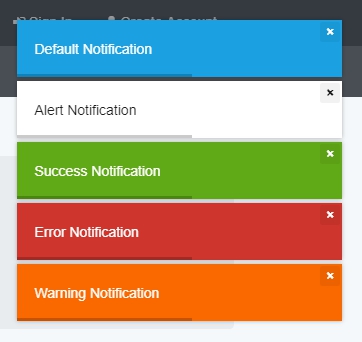
Screenshot
Requirements
- PHP >= 5.6
- Laravel 5
- noty
Installation
Via Composer
$ composer require sarfraznawaz2005/noty
For Laravel < 5.5:
Add Service Provider to config/app.php in providers section
Sarfraznawaz2005\Noty\NotyServiceProvider::class,
Publish package's config file by running below command:
$ php artisan vendor:publish --provider="Sarfraznawaz2005\Noty\NotyServiceProvider"
It should publish config/noty.php config file.
Setup Noty
Before using this package, make sure you include noty library into your project either by using npm/yarn/etc or directly including its css and js files:
<head>
    <link rel="stylesheet" href="/noty.css"/>
    <script type="text/javascript" src="/noty.js"></script>
</head>
and then add this in your view/layout file:
@include('noty::view')
Usage
Syntax:
noty($message, $type = '', array $options = [])
In your controllers, you can now do:
public function store()
{
    noty('Success Message', 'success');

    return redirect()->back();
}
Following are types of notifications you can send:
noty('Your Message'); // default (info)
noty('Your Message', 'success');
noty('Your Message', 'error');
noty('Your Message', 'warning');
noty('Your Message', 'alert');
With $options, you can also override noty config values for individual notifications example:
noty('My Notification', null, ['layout' => 'top', 'timeout' => 5000]);
Credits
License
Please see the license file for more information.
Related Packages
Laravel 5 Flash Notifications with icons and animations and with a timeout
Version History
| Version | Released | Laravel | License |
|---|---|---|---|
| 1.1.3 | ~5| | MIT | |
| 1.1.2 | ~5| | MIT | |
| 1.1.1 | ~5| | MIT | |
| 1.0.0 | ~5 | MIT |