spykapps/filament-passwordless-login
| Install | |
|---|---|
composer require spykapps/filament-passwordless-login |
|
| Latest Version: | v1.0.2 |
| PHP: | ^8.1 |
| License: | MIT |
| Last Updated: | Apr 10, 2026 |
| Links: | GitHub · Packagist |
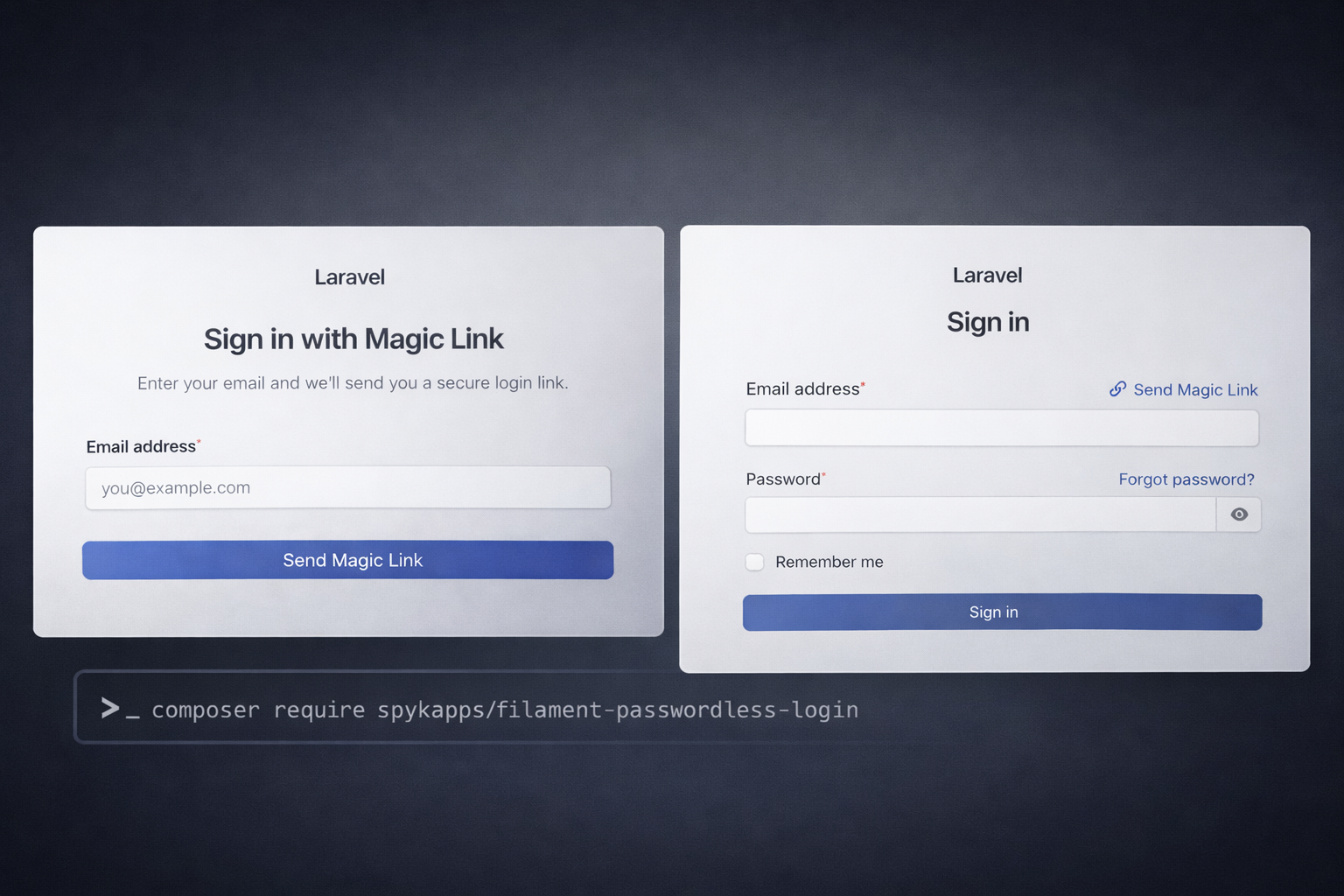
Filament Passwordless Login
A highly customizable Filament 4 & 5 plugin for passwordless (magic link) authentication — built on top of spykapps/passwordless-login.
Features
- 🔐 Magic Link Login Page : Extends Filament's native login — no custom views needed
- ⚡ Reusable Action : Modal/slide-over action to send magic links from anywhere
- 💡 Login Action : Configurable as email field hint or button after login form
- 📊 Resource Widgets : Stats overview, line charts, and top users table on the resource page
- 🗂️ Token Resource : Full Filament resource to manage, generate, and invalidate tokens
- 🌍 Multilingual : 8 languages included (en, es, fr, de, nl, ar, hi, pt)
- 📧 Custom Mailable / Notification : Use your own email templates via fluent API
- ⚙️ Fully Configurable : Everything via plugin fluent API, config file, or language files
Requirements
- PHP 8.1+
- Laravel 10, 11, 12, or 13
- Filament 4.x, 5.x
- spykapps/passwordless-login ^1.0
Installation
1. Install the packages
composer require spykapps/filament-passwordless-login
This will also install spykapps/passwordless-login as a dependency.
2. Set up the base passwordless-login package
If you haven't already set up the base package, publish and run the migrations:
php artisan vendor:publish --tag=passwordless-login-config
php artisan vendor:publish --tag=passwordless-login-migrations
php artisan migrate
Important: The
passwordless_login_tokenstable must exist before using this plugin. If you've already run the migration, skip this step.
3. Add the trait to your User model
use SpykApp\PasswordlessLogin\Traits\HasMagicLogin;

class User extends Authenticatable
{
    use HasMagicLogin;
}
4. Register the plugin
use SpykApp\FilamentPasswordlessLogin\FilamentPasswordlessLoginPlugin;

public function panel(Panel $panel): Panel
{
    return $panel
        ->plugin(
            FilamentPasswordlessLoginPlugin::make()
        );
}
That's it! The plugin will replace the login page, register the token resource with widgets.
Already installed? Run the upgrade command
If you're upgrading from a previous version, the base package includes a command to apply new schema changes (such as the failure_url column) to your existing tokens table without recreating it:
php artisan passwordless-login:upgrade
The command will:
- Ask for your tokens table name (defaults to
passwordless_login_tokens, or the value from your config) - Show a disclaimer listing every column it intends to add
- Ask for confirmation before touching your database
- Add any missing columns — safely skipping ones that already exist
Non-destructive & idempotent — only adds new nullable columns, safe to run multiple times.
5. Publish plugin config (optional)
php artisan vendor:publish --tag=filament-passwordless-login-config
6. Publish language files (optional)
php artisan vendor:publish --tag=filament-passwordless-login-lang
Plugin Configuration (Full Reference)
All options can be set fluently in the plugin registration:
use SpykApp\FilamentPasswordlessLogin\FilamentPasswordlessLoginPlugin;
use SpykApp\FilamentPasswordlessLogin\Enums\FilamentPasswordlessLoginActionPosition;

FilamentPasswordlessLoginPlugin::make()

    // ── Login Page ──────────────────────────────────────
    ->loginPage()                                 // Enable magic link login (default: true)
    ->loginPage(false)                            // Disable — keep default Filament password login
    ->login(MyCustomLoginPage::class)             // Use your own custom login page class
    ->showPasswordLoginLink()                     // Show "Back to password login" link
    ->showPasswordLoginLink(false)                // Hide it

    // ── Redirect URLs ───────────────────────────────────
    ->redirectUrl('/admin/dashboard')             // Where to go after login (default: auto-detects panel URL)
    ->failureUrl('/admin/login')                  // Where to go on expired/invalid link (default: auto-detects panel login URL)

    // ── Login Action ────────────────────────────────────
    ->loginAction()                               // Enable login action (default: false)
    ->loginAction(false)                          // Disable
    ->loginActionPosition(                        // Where to show the action
        FilamentPasswordlessLoginActionPosition::EmailFieldHint      // As hint on email field
        // or
        FilamentPasswordlessLoginActionPosition::LoginFormEndButton  // As button after login form
    )
    ->loginActionIcon('heroicon-m-sparkles')      // Custom icon
    ->loginActionColor('warning')                 // Custom color

    // ── Action Modal ────────────────────────────────────
    ->slideover()                                 // Open action modal as slide-over
    ->slideover(false)                            // Open as centered modal (default)

    // ── Custom Mailable / Notification ──────────────────
    ->mailable(\App\Mail\MyMagicLinkMail::class)              // Custom mailable class
    ->notification(\App\Notifications\MyMagicLinkNotif::class) // Custom notification class

    // ── Resource ────────────────────────────────────────
    ->resource()                                  // Enable token resource (default: true)
    ->resource(false)                             // Disable
    ->canCreateTokens()                           // Allow manual token creation (default: true)
    ->canCreateTokens(false)                      // Disable create
    ->canDeleteTokens()                           // Allow deletion (default: true)
    ->canDeleteTokens(false)                      // Disable delete
    ->resourceSlug('magic-links')                 // Custom URL slug
    ->navigationGroup('Security')                 // Custom nav group (or use lang file)
    ->navigationIcon('heroicon-o-key')            // Custom nav icon
    ->navigationSort(50)                          // Custom sort order

    // ── Widgets (shown on resource page) ────────────────
    ->statsWidget()                               // Enable stats widget (default: true)
    ->statsWidget(false)                          // Disable
    ->chartsWidget()                              // Enable chart widgets (default: true)
    ->chartsWidget(false)                         // Disable
    ->chartDays(60)                               // Custom chart time range in days
Configuration Priority
Settings follow this priority order: Plugin fluent API → Config file → Language file → Hardcoded default
| Setting | Plugin API | Config | Lang | Default |
|---|---|---|---|---|
| Icon | ->loginActionIcon() |
login_action.icon |
— | heroicon-m-link |
| Color | ->loginActionColor() |
login_action.color |
— | primary |
| Slideover | ->slideover() |
login_action.slideover |
— | false |
| Nav Group | ->navigationGroup() |
— | navigation_group |
Authentication |
| Nav Label | — | — | navigation_label |
Magic Links |
| Mailable | ->mailable() |
— | — | Base package default |
| Notification | ->notification() |
— | — | Base package default |
| Redirect URL | ->redirectUrl() |
— | — | filament()->getUrl() → passwordless-login.redirect.on_success |
| Failure URL | ->failureUrl() |
— | — | filament()->getLoginUrl() → passwordless-login.redirect.on_failure |
Login Page
The plugin extends Filament's native Filament\Pages\Auth\Login — no custom views or Blade templates needed.
The form shows only an email field. On submit, a magic link is sent and the page switches to a "Check your email!" confirmation state.
Default Setup (replaces Filament login)
FilamentPasswordlessLoginPlugin::make()
    ->loginPage()
Keep Password Login Available
FilamentPasswordlessLoginPlugin::make()
    ->loginPage()
    ->showPasswordLoginLink()
Disable (keep default Filament login)
FilamentPasswordlessLoginPlugin::make()
    ->loginPage(false)
Redirect URLs
By default, the plugin auto-detects redirect URLs from the current Filament panel — no configuration needed in most cases.
| URL | Default (auto-detected) | Description |
|---|---|---|
| Redirect URL | filament()->getUrl() (e.g. /admin) |
Where the user goes after clicking the magic link |
| Failure URL | filament()->getLoginUrl() (e.g. /admin/login) |
Where the user goes when a link is expired, invalid, or used |
Override via Plugin
FilamentPasswordlessLoginPlugin::make()
    ->redirectUrl('/admin/dashboard')
    ->failureUrl('/admin/login?error=expired')
Priority
- Plugin fluent API —
->redirectUrl()/->failureUrl() - Auto-detected — Current Filament panel URL / login URL
- Base package config —
passwordless-login.redirect.on_success/on_failure
Multi-Panel Setup
Each panel automatically uses its own URLs. No extra configuration needed:
// Admin panel → redirects to /admin after login
class AdminPanelProvider extends PanelProvider
{
    public function panel(Panel $panel): Panel
    {
        return $panel
            ->path('admin')
            ->plugin(FilamentPasswordlessLoginPlugin::make());
    }
}

// App panel → redirects to /app after login
class AppPanelProvider extends PanelProvider
{
    public function panel(Panel $panel): Panel
    {
        return $panel
            ->path('app')
            ->plugin(FilamentPasswordlessLoginPlugin::make());
    }
}
Explicit Per-Panel Redirect
// Admin panel
FilamentPasswordlessLoginPlugin::make()
    ->redirectUrl('/admin/dashboard')
    ->failureUrl('/admin/login')

// App panel
FilamentPasswordlessLoginPlugin::make()
    ->redirectUrl('/app/home')
    ->failureUrl('/app/login')
Custom Login Page
Extend the plugin's login page:
<?php

namespace App\Filament\Pages\Auth;

use SpykApp\FilamentPasswordlessLogin\Pages\MagicLinkLogin;
use Filament\Schemas\Schema;
use Filament\Forms\Components\TextInput;
use Illuminate\Contracts\Support\Htmlable;

class MyMagicLogin extends MagicLinkLogin
{
    public function getHeading(): string|Htmlable
    {
        return 'Welcome! Sign in securely.';
    }

    public function getSubheading(): string|Htmlable|null
    {
        if ($this->magicLinkSent) {
            return 'A secure link has been sent to your inbox.';
        }

        return 'No password needed — we\'ll email you a login link.';
    }
}
Register it:
FilamentPasswordlessLoginPlugin::make()
    ->login(\App\Filament\Pages\Auth\MyMagicLogin::class)
Login Action
The SendMagicLinkAction can be used in two positions on the login page, or standalone anywhere in your panel.
Position: Email Field Hint
Adds a clickable hint icon next to the email field on the default Filament password login page:
FilamentPasswordlessLoginPlugin::make()
    ->loginPage(false)       // Keep the default password login
    ->loginAction()          // Enable the action
    ->loginActionPosition(FilamentPasswordlessLoginActionPosition::EmailFieldHint)
Position: Button After Login Form
Renders a button below the sign-in button on the default Filament password login page:
FilamentPasswordlessLoginPlugin::make()
    ->loginPage(false)       // Keep the default password login
    ->loginAction()          // Enable the action
    ->loginActionPosition(FilamentPasswordlessLoginActionPosition::LoginFormEndButton)
Customizing the Login Action
FilamentPasswordlessLoginPlugin::make()
    ->loginAction()
    ->loginActionIcon('heroicon-m-envelope')
    ->loginActionColor('success')
    ->slideover()            // Open modal as slide-over
Using SendMagicLinkAction Standalone
Use SendMagicLinkAction anywhere in your Filament panel — page headers, table actions, form hint actions:
Page Header Action
use SpykApp\FilamentPasswordlessLogin\Actions\SendMagicLinkAction;

protected function getHeaderActions(): array
{
    return [
        SendMagicLinkAction::make(),
    ];
}
Table Row Action
use SpykApp\FilamentPasswordlessLogin\Actions\SendMagicLinkAction;

public static function table(Table $table): Table
{
    return $table
        ->columns([...])
        ->actions([
            SendMagicLinkAction::make()
                ->fillForm(fn ($record) => ['email' => $record->email]),
        ]);
}
Form Field Hint Action
use SpykApp\FilamentPasswordlessLogin\Actions\SendMagicLinkAction;

TextInput::make('email')
    ->email()
    ->hintAction(SendMagicLinkAction::make())
As a Slide-over
SendMagicLinkAction::make()->asSlideover()
Custom Mailable
Send magic links using your own Mailable class instead of the default:
1. Create your Mailable
<?php

namespace App\Mail;

use Illuminate\Bus\Queueable;
use Illuminate\Mail\Mailable;
use Illuminate\Mail\Mailables\Content;
use Illuminate\Mail\Mailables\Envelope;
use Illuminate\Queue\SerializesModels;

class CustomMagicLinkMail extends Mailable
{
    use Queueable, SerializesModels;

    public function __construct(
        public string $url,
        public int $expiryMinutes,
    ) {}

    public function envelope(): Envelope
    {
        return new Envelope(
            subject: 'Your Secure Login Link',
        );
    }

    public function content(): Content
    {
        return new Content(
            markdown: 'emails.magic-link',
            with: [
                'url' => $this->url,
                'expiryMinutes' => $this->expiryMinutes,
            ],
        );
    }
}
2. Create the Blade template
{{-- resources/views/emails/magic-link.blade.php --}}
<x-mail::message>
# Hello!

You requested a secure login link. Click the button below to sign in:

<x-mail::button :url="$url">
Sign In Now
</x-mail::button>

This link will expire in {{ $expiryMinutes }} minutes.

If you did not request this link, no action is needed.

Thanks,<br>
{{ config('app.name') }}
</x-mail::message>
3. Register it in the plugin
FilamentPasswordlessLoginPlugin::make()
    ->mailable(\App\Mail\CustomMagicLinkMail::class)
Custom Notification
Use your own Laravel Notification class instead of the default:
1. Create your Notification
<?php

namespace App\Notifications;

use Illuminate\Bus\Queueable;
use Illuminate\Notifications\Messages\MailMessage;
use Illuminate\Notifications\Notification;

class CustomMagicLinkNotification extends Notification
{
    use Queueable;

    public function __construct(
        public string $url,
        public int $expiryMinutes,
        public array $metadata = [],
    ) {}

    public function via($notifiable): array
    {
        return ['mail'];
    }

    public function toMail($notifiable): MailMessage
    {
        return (new MailMessage)
            ->subject('Your Login Link — ' . config('app.name'))
            ->greeting('Hello ' . ($notifiable->name ?? '') . '!')
            ->line('Click the button below to sign in securely.')
            ->action('Sign In', $this->url)
            ->line('This link expires in ' . $this->expiryMinutes . ' minutes.')
            ->line('If you did not request this, please ignore this email.');
    }
}
2. Register it in the plugin
FilamentPasswordlessLoginPlugin::make()
    ->notification(\App\Notifications\CustomMagicLinkNotification::class)
Note: Your notification class receives
$url,$expiryMinutes, and$metadatain the constructor — same signature as the base package's default notification.
Token Resource
The plugin registers a full Filament resource for managing magic login tokens at /admin/magic-login-tokens (configurable).
Features
- List View — All tokens with status badges (Active / Expired / Used)
- Filters — By status (active, expired, used) and date range
- Search — By user name or email
- Create — Generate tokens manually with options: user, guard, redirect URL, expiry, max uses, send notification toggle
- Invalidate — Expire individual tokens immediately
- Bulk Delete — Select and delete multiple tokens
- Cleanup — Header action to delete all expired tokens at once
Widgets on Resource Page
The stats and chart widgets are displayed as header widgets on the token list page (not on the dashboard):
- Stats Overview — 4 stat cards: Total Generated (with week-over-week trend), Successfully Used (with success rate), Expired Unused, Active Links. Includes sparkline mini-charts.
- Line Chart — Generated vs Used vs Failed over the configured time range (default 30 days).
Customization
FilamentPasswordlessLoginPlugin::make()
    ->resource()                        // Enable (default)
    ->resourceSlug('magic-links')       // Custom URL: /admin/magic-links
    ->navigationGroup('Security')       // Custom sidebar group
    ->navigationIcon('heroicon-o-key')  // Custom sidebar icon
    ->navigationSort(50)                // Custom sort order
    ->canCreateTokens(false)            // Hide create button
    ->canDeleteTokens(false)            // Hide delete actions
    ->statsWidget()                     // Enable stats (default)
    ->chartsWidget()                    // Enable charts (default)
    ->chartDays(60)                     // Show 60 days of data
Customizing Navigation via Language Files
Navigation group and label are pulled from language files by default. Publish and edit:
php artisan vendor:publish --tag=filament-passwordless-login-lang
Then edit lang/vendor/filament-passwordless-login/en/filament.php:
return [
    'navigation_group' => 'Security',        // Sidebar group name
    'navigation_label' => 'Login Links',     // Sidebar item label
    'resource_label' => 'Login Link',        // Singular label
    'resource_plural_label' => 'Login Links', // Plural label
    // ... all other strings
];
Note: The fluent API (
->navigationGroup('...')) takes priority over language files when both are set.
Multilingual Support
8 languages included out of the box:
| Language | Code | Example Navigation Group |
|---|---|---|
| English | en |
Authentication |
| Spanish | es |
Autenticación |
| French | fr |
Authentification |
| German | de |
Authentifizierung |
| Dutch | nl |
Authenticatie |
| Arabic | ar |
المصادقة |
| Hindi | hi |
प्रमाणीकरण |
| Portuguese | pt |
Autenticação |
All strings are translatable — login page text, action labels, modal headings, resource columns, widget headings, status badges, navigation labels, and filter labels.
Adding a New Language
Create a new file at lang/vendor/filament-passwordless-login/{locale}/filament.php and translate all keys from the English file.
Config File Reference
Published to config/filament-passwordless-login.php:
return [

    // Login page settings
    'login_page' => [
        'enabled' => true,
        'show_password_login_link' => true,
    ],

    // Login action settings
    'login_action' => [
        'enabled' => false,
        'icon' => 'heroicon-m-link',
        'color' => 'primary',
        'slideover' => false,
        'width' => 'md',
    ],

    // Resource settings
    'resource' => [
        'enabled' => true,
        'slug' => 'magic-login-tokens',
        'can_create' => true,
        'can_delete' => true,
    ],

    // Widget settings
    'widgets' => [
        'stats_enabled' => true,
        'charts_enabled' => true,
        'chart_days' => 30,
    ],

];
Base Package Configuration
The Filament plugin uses spykapps/passwordless-login under the hood. Configure the base package in config/passwordless-login.php:
return [
    // User model
    'user_model' => \App\Models\User::class,
    'email_column' => 'email',

    // Token settings
    'token' => [
        'length' => 32,
        'hash_algorithm' => 'sha256',
    ],

    // Link expiry
    'expiry_minutes' => 15,

    // Max uses per link (null = unlimited)
    'max_uses' => 1,

    // Bot detection for email clients (Outlook, Apple Mail, SafeLinks, etc.)
    'bot_detection' => [
        'enabled' => true,
        'strategy' => 'both', // 'confirmation_page', 'javascript', or 'both'
    ],

    // Rate limiting
    'throttle' => [
        'enabled' => true,
        'max_attempts' => 5,
        'decay_minutes' => 10,
    ],

    // Redirect after login
    'redirect' => [
        'on_success' => '/admin',
        'on_failure' => '/admin/login',
    ],

    // Security
    'security' => [
        'invalidate_previous' => true,
        'invalidate_on_login' => true,
        'ip_binding' => false,
        'user_agent_binding' => false,
    ],
];
See the spykapps/passwordless-login README for the full list of configuration options.
Complete Setup Examples
Example 1: Magic Link Only (No Password Login)
FilamentPasswordlessLoginPlugin::make()
    ->loginPage()
    ->showPasswordLoginLink(false)
    ->mailable(\App\Mail\BrandedMagicLink::class)
Example 2: Password Login with Magic Link Hint
FilamentPasswordlessLoginPlugin::make()
    ->loginPage(false)                // Keep default Filament login
    ->loginAction()                   // Enable login action
    ->loginActionPosition(FilamentPasswordlessLoginActionPosition::EmailFieldHint)
    ->loginActionIcon('heroicon-m-envelope')
    ->loginActionColor('success')
Example 3: Password Login with Magic Link Button
FilamentPasswordlessLoginPlugin::make()
    ->loginPage(false)                // Keep default Filament login
    ->loginAction()                   // Enable login action
    ->loginActionPosition(FilamentPasswordlessLoginActionPosition::LoginFormEndButton)
    ->slideover()                     // Open as slide-over
Example 4: Full Featured
FilamentPasswordlessLoginPlugin::make()
    ->loginPage()
    ->showPasswordLoginLink()
    ->redirectUrl('/admin/dashboard')
    ->failureUrl('/admin/login')
    ->loginAction()
    ->loginActionPosition(FilamentPasswordlessLoginActionPosition::EmailFieldHint)
    ->slideover()
    ->mailable(\App\Mail\CustomMagicLink::class)
    ->resource()
    ->navigationGroup('Security')
    ->navigationIcon('heroicon-o-shield-check')
    ->navigationSort(50)
    ->statsWidget()
    ->chartsWidget()
    ->chartDays(90)
Example 5: Minimal (Resource Only, No Login Changes)
FilamentPasswordlessLoginPlugin::make()
    ->loginPage(false)
    ->loginAction(false)
    ->resource()
    ->statsWidget()
    ->chartsWidget(false)
Enum Reference
use SpykApp\FilamentPasswordlessLogin\Enums\FilamentPasswordlessLoginActionPosition;

FilamentPasswordlessLoginActionPosition::EmailFieldHint      // Hint icon on email field
FilamentPasswordlessLoginActionPosition::LoginFormEndButton   // Button after login form
Credits
License
The MIT License (MIT). Please see License File for more information.
Related Packages
A scaffolding package for Magic Link Authentication in Laravel Filament applicat...
A highly customizable, multilingual magic link (passwordless) authentication pac...
Transform Filament's default auth pages into stunning, brand-ready experiences
SPID authentication plugin for Filament based on italia/spid-laravel
Passwordless email magic-link & OTP authentication for Laravel — standalone or w...
Version History
| Version | Released | PHP | License |
|---|---|---|---|
| v1.0.2 | ^8.1 | MIT | |
| v1.0.1 | ^8.1 | MIT | |
| v1.0.0 | ^8.1 | MIT |