theabhishekin/filament-calendar
| Install | |
|---|---|
composer require theabhishekin/filament-calendar |
|
| Latest Version: | 1.0.0 |
| PHP: | ^8.2 |
| License: | MIT |
| Last Updated: | Feb 25, 2026 |
| Links: | GitHub · Packagist |
Filament Calendar
A calendar widget for Filament admin panels, powered by Livewire and Alpine.js. FullCalendar-style month, week, and day views with event display, drag-and-drop, filters, and dark mode support.
Screenshots
Calendar (without filters)
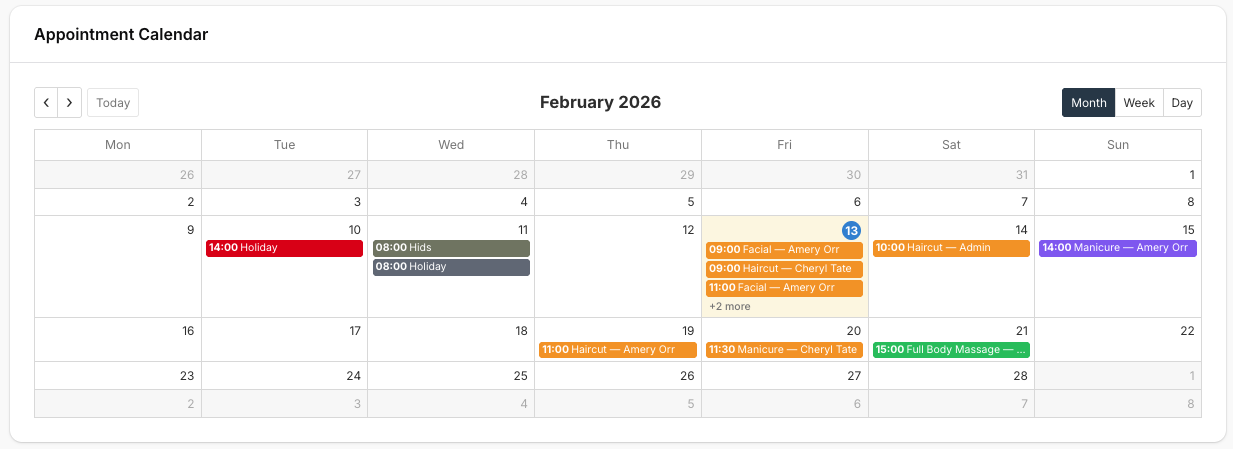
Full calendar grid with month/week/day views. Click any day to open the date modal.
Calendar (with filters)
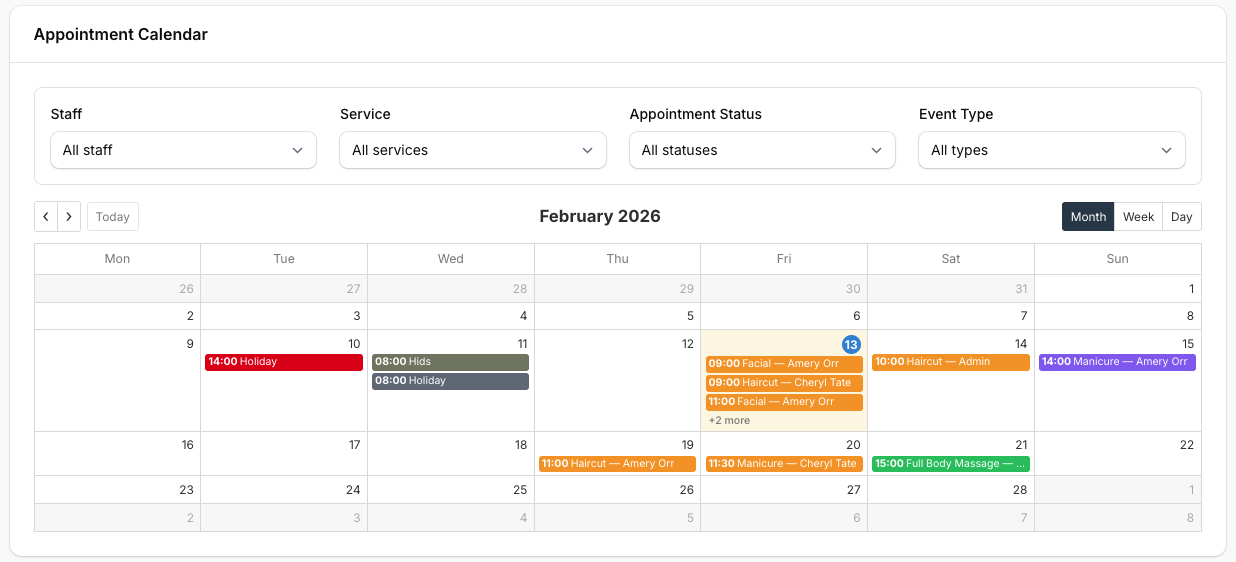
Optional filter bar (staff, service, status, event type) to narrow displayed events. Override filtersForm() to add your own filters.
Create / Edit Event Modal
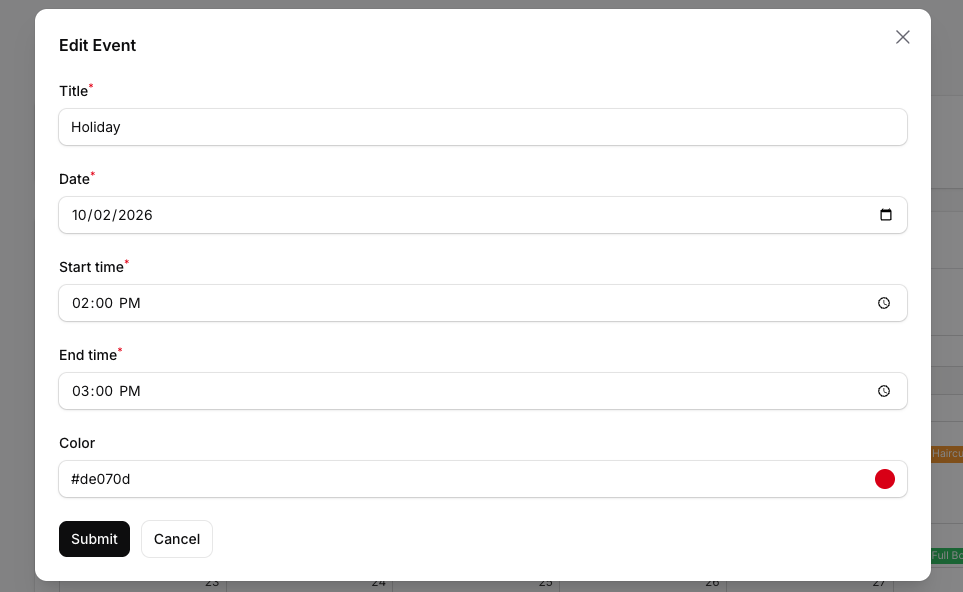
Create events with title, date, time range, and color picker. Click an event to edit (modal for custom events) or redirect (for appointments with URL). Fully customizable via Filament Actions.
Features
- Month / Week / Day views — Toggle between
dayGridMonth,timeGridWeek, andtimeGridDay - View state persistence — Last selected view is stored in the session and restored on the next request
- Date-click modal — Click any day to see scheduled events and run actions (create appointment, create event)
- Event filters — Optional header filters via
filtersForm()(e.g. staff, service, status) - Event colors — Per-event hex colors; supports color picker in create/edit forms
- Drag and drop — Move events to a new date/time; override
onEventDrop()to persist - Click handling — Events with
urlredirect; others triggeronEventClick()(open edit modal, etc.) - Dark mode — Follows Filament theme
- Responsive — Works across screen sizes
Requirements
- PHP ^8.2
- Filament ^5.0
- Livewire ^4.0
Installation
composer require theabhishekin/filament-calendar
The package auto-registers via Laravel's package discovery. No additional setup required.
Usage
Create a widget by extending TheAbhishekIN\FilamentCalendar\Widgets\CalendarWidget and implementing getEvents():
<?php

namespace App\Filament\Widgets;

use TheAbhishekIN\FilamentCalendar\Widgets\CalendarWidget;

class AppointmentCalendarWidget extends CalendarWidget
{
    protected string $defaultView = 'dayGridMonth';

    protected string $dayStartTime = '08:00';

    protected string $dayEndTime = '20:00';

    protected int $firstDayOfWeek = 1;

    public function getHeading(): ?string
    {
        return 'Appointment Calendar';
    }

    protected function getDateClickModalActionNames(): array
    {
        return ['createAppointment', 'createEvent'];
    }

    public function createAppointmentAction(): Action
    {
        return Action::make('createAppointment')
            ->label('Appointment')
            ->url(fn () => AppointmentResource::getUrl('create'))
            ->livewire($this);
    }

    public function createEventAction(): Action
    {
        return Action::make('createEvent')
            ->label('Event')
            ->modalForm([/* title, date, time, color fields */])
            ->action(function (array $data) {
                Event::create($data);
            })
            ->livewire($this);
    }

    protected function getEvents(string $start, string $end): array
    {
        return Appointment::query()
            ->whereBetween('date', [$start, $end])
            ->get()
            ->map(fn (Appointment $apt) => [
                'id' => 'appointment-' . $apt->id,
                'title' => $apt->service->name . ' — ' . $apt->customer->name,
                'start' => $apt->date->format('Y-m-d') . ' ' . substr($apt->start_time, 0, 5),
                'end' => $apt->date->format('Y-m-d') . ' ' . substr($apt->end_time, 0, 5),
                'color' => $this->statusColor($apt->status),
                'url' => AppointmentResource::getUrl('edit', ['record' => $apt]),
                'draggable' => true,
            ])
            ->all();
    }

    protected function onEventClick(string $eventId): void
    {
        if (str_starts_with($eventId, 'appointment-')) {
            $this->redirect(AppointmentResource::getUrl('edit', ['record' => substr($eventId, 12)]));
        }
        if (str_starts_with($eventId, 'event-')) {
            $this->mountAction('editEvent', arguments: ['eventId' => substr($eventId, 6)]);
        }
    }

    protected function onEventDrop(string $eventId, string $newStart, string $newEnd): void
    {
        // Persist the new date/time to your model
    }
}
Register the widget in your Filament panel (or use auto-discovery if widgets live in App\Filament\Widgets).
Adding Filters
Override filtersForm() to add a filter bar above the calendar. Use statePath('filters') and access $this->filters in getEvents():
public function filtersForm(Schema $schema): Schema
{
    return $schema
        ->statePath('filters')
        ->components([
            Select::make('staff_id')
                ->label('Staff')
                ->options(Staff::query()->pluck('name', 'id')->all())
                ->live(),
            Select::make('status')
                ->label('Status')
                ->options(AppointmentStatus::class)
                ->live(),
        ])
        ->columns(4);
}
When filters change, the calendar automatically refetches events.
Event Structure
Each event returned by getEvents() must be an array with:
| Key | Type | Required | Description |
|---|---|---|---|
id |
string|int | Yes | Unique event identifier |
title |
string | Yes | Event label |
start |
string | Yes | Y-m-d or Y-m-d H:i |
end |
string | No | Y-m-d or Y-m-d H:i |
color |
string | No | Hex color (e.g. #6b7280) or named: primary, success, warning, danger, info, gray |
url |
string | No | If set, clicking the event navigates to this URL |
draggable |
bool | No | Whether the event can be dragged to another date/time (default: true) |
Widget Configuration
| Property | Default | Description |
|---|---|---|
$defaultView |
dayGridMonth |
Initial view: dayGridMonth, timeGridWeek, or timeGridDay |
$firstDayOfWeek |
1 |
0 = Sunday, 1 = Monday |
$dayStartTime |
08:00 |
Earliest hour in time-grid views |
$dayEndTime |
20:00 |
Latest hour in time-grid views |
$locale |
en |
Locale for date formatting |
Overridable Methods
| Method | Description |
|---|---|
getHeading() |
Widget heading text above the calendar |
getDateClickModalActionNames() |
Return action names for the date-click modal (e.g. ['createAppointment', 'createEvent']) |
filtersForm(Schema $schema) |
Return a schema with filter form components; use statePath('filters') |
onEventClick(string $eventId) |
Called when an event without url is clicked |
onDateClick(string $date) |
Called when a date cell is clicked (legacy) |
onEventDrop(string $eventId, string $newStart, string $newEnd) |
Called when a draggable event is dropped; override to persist |
getEventsForDate(string $date) |
Events for a single date (modal); defaults to loadEvents($date, $date) |
Custom Theme (Tailwind)
If you use custom Tailwind classes in the calendar modal, add the package views to your Filament theme's @source in resources/css/filament/admin/theme.css:
@source '../../../../vendor/theabhishekin/filament-calendar/resources/views/**/*.blade.php'
Configuration
Publish the config file to customize defaults:
php artisan vendor:publish --tag=filament-calendar-config
This creates config/filament-calendar.php with the following options:
| Key | Default | Description |
|---|---|---|
default_view |
dayGridMonth |
Initial calendar view: dayGridMonth, timeGridWeek, or timeGridDay |
first_day_of_week |
1 |
0 = Sunday, 1 = Monday |
day_start_time |
08:00 |
Earliest hour in time-grid views |
day_end_time |
20:00 |
Latest hour in time-grid views |
locale |
en |
Locale for date formatting |
column_span |
full |
Widget column span (full or 1–12) |
persist_view |
true |
Whether to persist the selected view in the session |
view_storage_key |
filament-calendar-view |
Session key for view state |
colors |
[...] |
Named color hex values for events (primary, success, warning, etc.) |
Widget property overrides (e.g. $defaultView, $dayStartTime) take precedence over config values.
Views
Publish views for customization:
php artisan vendor:publish --tag=filament-calendar-views
Contributing
Contributions are welcome! Please feel free to submit a Pull Request.
Issues
If you discover any bugs or have feature requests, please open an issue on GitHub.
Related Packages
Android-style Chat Heads for Filament panels with real-time messaging, file shar...
Filament v5 Ethiopic Calendar Date Picker with Gregorian conversion support.
Enterprise Laravel Livewire CRUD generator with advanced analytics, calendar man...
Drop-in AI chatbox widget for Laravel with RAG, streaming, Vue 3 frontend, and s...
A comprehensive Laravel Filament 3 💡 starter kit with pre-installed plugins, ad...
Version History
| Version | Released | PHP | License |
|---|---|---|---|
| 1.0.0 | ^8.2 | MIT |