toolbelt/inertia-table
| Install | |
|---|---|
composer require toolbelt/inertia-table |
|
| Latest Version: | v0.2.0 |
| PHP: | ^8.3 |
| License: | MIT |
| Last Updated: | Aug 16, 2026 |
| Links: | GitHub · Packagist |
Musing Inertia Table
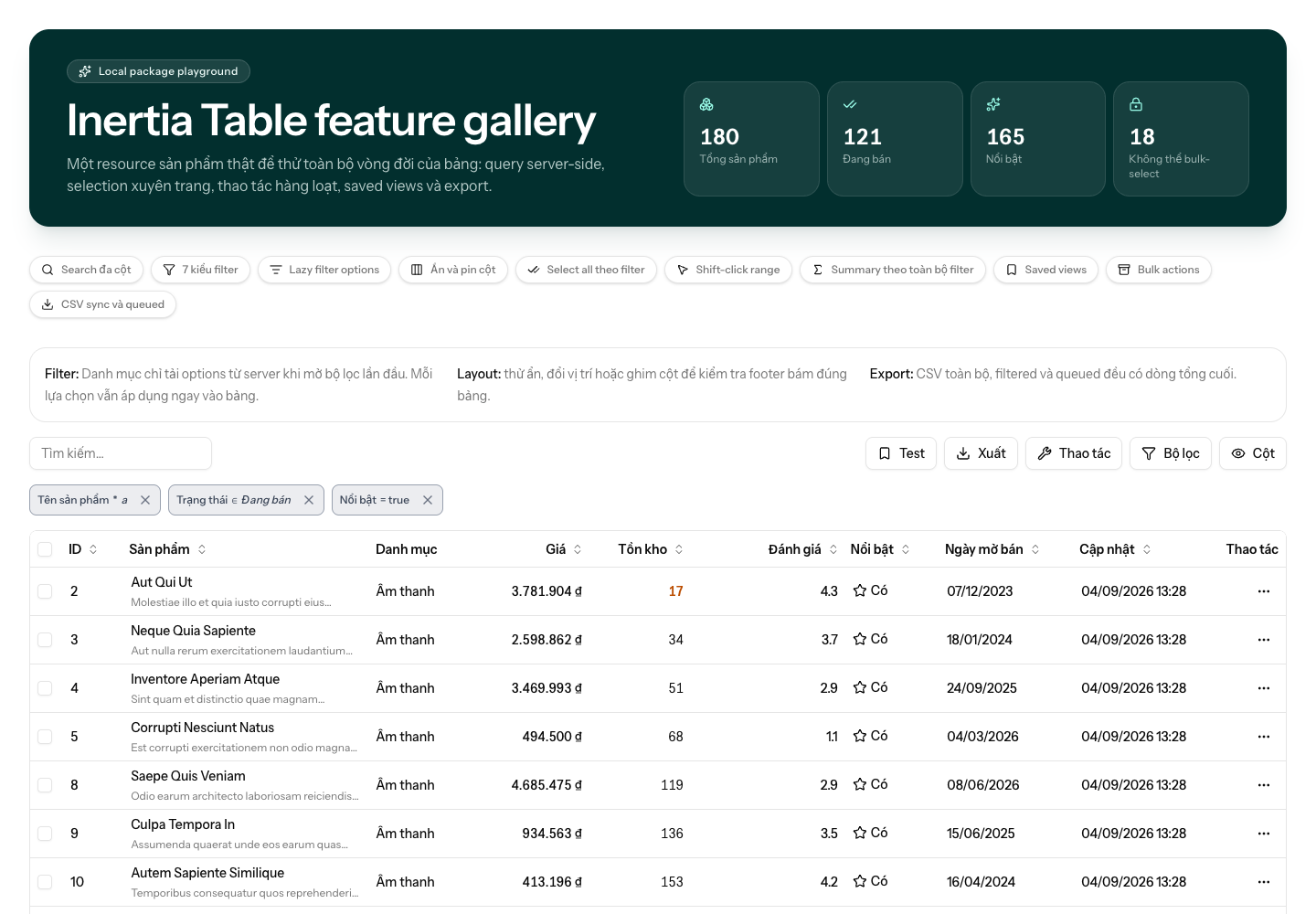
Server-driven data tables for Laravel and Inertia.js. Define the table once in PHP—columns, sorting, search, filters and actions—and render it in Vue with one component.
Toolbelt keeps the server authoritative. The browser can only request capabilities declared by the table, URL state is namespaced per table, and query execution is powered by Spatie Laravel Query Builder.
[!WARNING] The package is actively developed before
v1.0. Please expect API changes between minor releases.
Highlights
- PHP-first definitions for columns, filters, row actions and bulk actions.
- Allowlisted search, sort and filter queries—never raw client input in SQL.
- A ready-to-use Vue
<DataTable>built from shadcn-vue-style source and Reka UI primitives. - Text, numeric, set, boolean and date filters, including single-date and date-range calendars.
- Per-table query-string state, Inertia partial reloads, pagination, column visibility and current-page selection.
- Presentation helpers for badges, dates, images, links, tooltips, alignment and Tailwind classes.
- Slots and headless composables when the default renderer needs an escape hatch.
Requirements
| Layer | Requirement |
|---|---|
| PHP | 8.3+ |
| Laravel | 12 or 13 |
| Inertia | Laravel 2 or 3; Vue 3.4+ |
| Query engine | Spatie Laravel Query Builder 7 |
| Frontend peers | Tailwind CSS 4.1+, Reka UI 2.10+, @lucide/vue 1.30+ |
Installation
Install the Laravel core and Vue renderer:
composer require musing/inertia-table
npm install @musing/inertia-table-vue
Releases
The Laravel package is distributed through Packagist and the Vue renderer through npm. A pushed Git tag in the form vX.Y.Z is the release trigger. The tag must match the version in package.json.
Before the first release, submit https://github.com/thienbd203/inertia-table to Packagist and add an NPM_TOKEN repository secret with permission to publish @musing/inertia-table-vue. The release workflow runs PHP and JavaScript checks, then publishes the Vue package with npm provenance.
npm version 0.1.1 --no-git-tag-version
git add package.json package-lock.json
git commit -m "chore: release v0.1.1"
git tag v0.1.1
git push origin main --follow-tags
Publish configuration only when you want to change pagination or debounce defaults:
php artisan vendor:publish --tag=inertia-table-config
// config/inertia-table.php
return [
'per_page' => 25,
'per_page_options' => [10, 25, 50, 100],
'debounce' => 300,
];
Tailwind CSS v4
The renderer contains Vue source that Tailwind must scan. Add this to the host application's stylesheet:
/* resources/css/app.css */
@source '../../node_modules/@musing/inertia-table-vue/resources/js/**/*.vue';
The package uses your existing shadcn/Tailwind CSS variables. It does not require an application @/components/ui alias.
Quick start
Create a table definition. This is the source of truth for what users can do.
<?php
namespace App\Tables;
use App\Models\Topic;
use Illuminate\Database\Eloquent\Builder;
use Musing\InertiaTable\Actions\Action;
use Musing\InertiaTable\Columns\BadgeColumn;
use Musing\InertiaTable\Columns\NumberColumn;
use Musing\InertiaTable\Columns\TextColumn;
use Musing\InertiaTable\Filters\SetFilter;
use Musing\InertiaTable\Table;
use Musing\InertiaTable\Variant;
final class TopicsTable extends Table
{
protected ?string $defaultSort = 'name';
// Optional: override the global per_page / per_page_options config for this table only.
protected ?int $perPage = 50;
protected ?array $perPageOptions = [25, 50, 100];
public function query(): Builder
{
return Topic::query()->withCount('quotes');
}
public function columns(): array
{
return [
TextColumn::make('name', 'Name')->searchable()->sortable(),
NumberColumn::make('quotes_count', 'Quotes')->sortable(),
BadgeColumn::make('is_featured', 'Featured')
->mapAs(fn (bool $value) => $value ? 'Featured' : 'Normal')
->variant(fn (bool $value) => $value ? Variant::Success : Variant::Default),
];
}
public function filters(): array
{
return [
SetFilter::make('status', 'Status')->options([
'published' => 'Published',
'draft' => 'Draft',
]),
];
}
public function actions(): array
{
return [
Action::make('edit', 'Edit')
->row()
->icon('Pencil')
->hideLabel()
->tooltip('Edit topic')
->endpoint('get', fn (Topic $topic) => route('topics.edit', $topic)),
];
}
}
Pass it directly to the Inertia page:
return inertia('Admin/Topics/Index', [
'topics' => TopicsTable::make()
->reloadProps(['featuredCount']),
]);
Then render it. For most screens this is all the frontend code required.
<script setup lang="ts">
import { DataTable, type TableResource } from "@musing/inertia-table-vue";
type Topic = {
id: number;
name: string;
quotes_count: number;
is_featured: boolean;
};
defineProps<{ topics: TableResource<Topic> }>();
</script>
<template>
<DataTable :resource="topics" />
</template>
Columns
Built-in types: TextColumn, NumberColumn, NumericColumn, BadgeColumn, BooleanColumn, DateColumn, DateTimeColumn, ImageColumn and ActionColumn.
All content columns support common presentation methods such as sortable(), searchable(), toggleable(), visible(), headerClass(), cellClass(), tooltip(), alignment, wrapping and truncation.
TextColumn::make('status')
->sortable()
->mapAs(['pending' => 'Pending', 'approved' => 'Approved'])
->sortUsingMap();
TextColumn::make('description')
->wrap()
->truncate(2)
->cellClass('max-w-md');
DateTimeColumn::make('published_at', 'Published')
->format('d/m/Y H:i')
->centerAligned();
Use a custom sort for expressions, relationships or application-specific ordering:
TextColumn::make('score')->sortable()->sortUsing(
fn (Builder $query, SortDirection $direction) =>
$query->orderBy('score', $direction->value),
);
Badges and images
BadgeColumn::make('status')
->mapAs(['active' => 'Active', 'blocked' => 'Blocked'])
->variant(['active' => Variant::Success, 'blocked' => Variant::Danger])
->icon(['active' => 'CheckCircle', 'blocked' => 'XCircle']);
TextColumn::make('name')->image('avatar_url', fn (Image $image) => $image
->rounded()
->large()
->alt('User avatar'));
Navigation
Cell and row URLs can be a string or a Url object. The object carries Inertia navigation options to the renderer.
TextColumn::make('name')->url(
fn (Topic $topic, Url $url) => $url
->route('topics.edit', $topic)
->openInNewTab(),
);
Tables deliberately do not make rows clickable by default. Handle the optional row-click event when a screen needs it:
<DataTable
:resource="topics"
@row-click="(item, column) => inspect(item, column)"
/>
Search and filters
Mark columns as searchable() for global search. Override the resolved list on the table when necessary:
protected array|string|null $search = ['name', 'email'];
// Explicitly disable global search, even if a column is searchable.
protected array|string|null $search = [];
Available filter classes and their default behaviour:
| Filter | Typical clauses |
|---|---|
TextFilter |
contains, starts with, equals, not equals |
NumericFilter |
comparison, equals and range clauses |
SetFilter |
in, not in, equals, not equals |
BooleanFilter |
true / false |
DateFilter |
before, after, equals, and date ranges |
TextFilter::make('name', 'Name')->clauses([
'contains', 'starts_with', 'equals', 'not_equals',
]);
SetFilter::make('category_id', 'Category')->options(
Category::query()->orderBy('name')->pluck('name', 'id')->all(),
);
DateFilter::make('created_at', 'Created at');
SetFilter presents a multi-select UI for in and not_in. DateFilter presents an inline calendar for a single date and a two-month range calendar for between and not_between.
For application-specific query logic, use applyUsing() and retain the declared option allowlist:
SetFilter::make('status')->options([
'empty' => 'Without quotes',
'featured' => 'Featured',
])->applyUsing(function (Builder $query, string|array $value, string $clause) {
$values = (array) $value;
if ($clause === 'equals' && $values[0] === 'empty') {
$query->doesntHave('quotes');
}
});
SelectFilter is available as a deprecated alias for SetFilter.
Actions
Actions are server-declared and can be row-level, bulk or both. Authorization, visibility, disabled state and action labels may vary per model.
Action::make('delete', 'Delete')
->row()
->destructive()
->icon('Trash2')
->hideLabel()
->tooltip('Delete topic')
->authorized(fn (Topic $topic) => auth()->user()->can('delete', $topic))
->endpoint('delete', fn (Topic $topic) => route('topics.destroy', $topic))
->confirm('Delete topic?', 'This cannot be undone.', 'Delete', 'Cancel');
Action::make('archive', 'Archive')
->row()
->disabled(fn (Topic $topic) => $topic->archived_at !== null)
->disabledTooltip('This topic is already archived')
->buttonClass('text-amber-600 hover:bg-amber-500/10');
Omit endpoint() for a frontend-owned action. The component emits custom-action with (action, keys, onFinish); call onFinish() after the custom work completes.
<DataTable :resource="topics" @custom-action="handleCustomAction" />
Action icons are intentionally library-agnostic. Register your Lucide resolver once:
import { Pencil, Trash2 } from "@lucide/vue";
import { setIconResolver } from "@musing/inertia-table-vue";
setIconResolver((name) => ({ Pencil, Trash2 })[name]);
Slots and headless API
The default renderer is intended to cover normal tables. Use slots only for targeted customisation.
<DataTable :resource="topics">
<template #cell(name)="{ item }">
<strong>{{ item.name }}</strong>
</template>
<template #emptyState>
<p class="py-10 text-center text-muted-foreground">No topics found.</p>
</template>
</DataTable>
Useful slots include topbar, beforeSearch, afterSearch, beforeActions, afterActions, filters, table, thead, tbody, footer, loading, emptyState, confirmation, cell(attribute), header(attribute), filter(attribute), image(attribute) and image-fallback(attribute).
For a fully custom renderer, use the composables instead:
import { useActions, useTable } from "@musing/inertia-table-vue";
const table = useTable(() => props.topics);
const actions = useActions(table);
URL state and multiple tables
Every table gets an isolated query-string namespace. Several table resources may live on one Inertia page without overwriting one another.
?table[topics][search]=laravel
&table[topics][sort]=-created_at
&table[topics][filters][status][enabled]=1
&table[topics][filters][status][clause]=equals
&table[topics][filters][status][value]=featured
&table[topics][columns][created_at]=0
&table[topics][page]=2
&table[topics][perPage]=25
Toolbelt translates this state to Spatie's query contract internally. Invalid columns, sorts, clauses, filter values and page sizes are ignored or replaced by safe defaults before the query executes.
Development
composer install
composer test
composer analyse
composer format
npm install
npm run format:check
npm run types:check
npm test
npm run build
The design and resource contract are described in docs/architecture.md.
License
The MIT License. See LICENSE.md.
Related Packages
A Laravel package to help you quickly build Inertia.js data tables with the help...
Inertia.js table component with sorting, filtering, searching, and multi-table s...
A Laravel package to help you quickly build Inertia.js data tables with the help...