unnathianalytics/laragrid
| Install | |
|---|---|
composer require unnathianalytics/laragrid |
|
| Latest Version: | v1.45.1 |
| PHP: | ^8.1 |
| Laravel: | 10 – 13 |
| License: | MIT |
| Last Updated: | Oct 23, 2026 |
| Links: | GitHub · Packagist |
LaraGrid


Excel-style, keyboard-first datagrid for Laravel + Livewire. Extracted from a production accounting system built for spreadsheet-trained operators, then made app-neutral.
The engine is framework-free vanilla JavaScript that owns every cell it paints: the grid body
lives inside a wire:ignore region, Livewire never morphs a row, and all server traffic runs
over renderless RPCs. The result is spreadsheet-grade speed with Laravel-grade authority —
every edit is validated, authorized, and recomputed server-side.
Everything is configured in your component class with chained methods. No blade wiring,
no JavaScript to write, no npm step — composer require is the entire install.
Try it live → grid.laravel.cloud
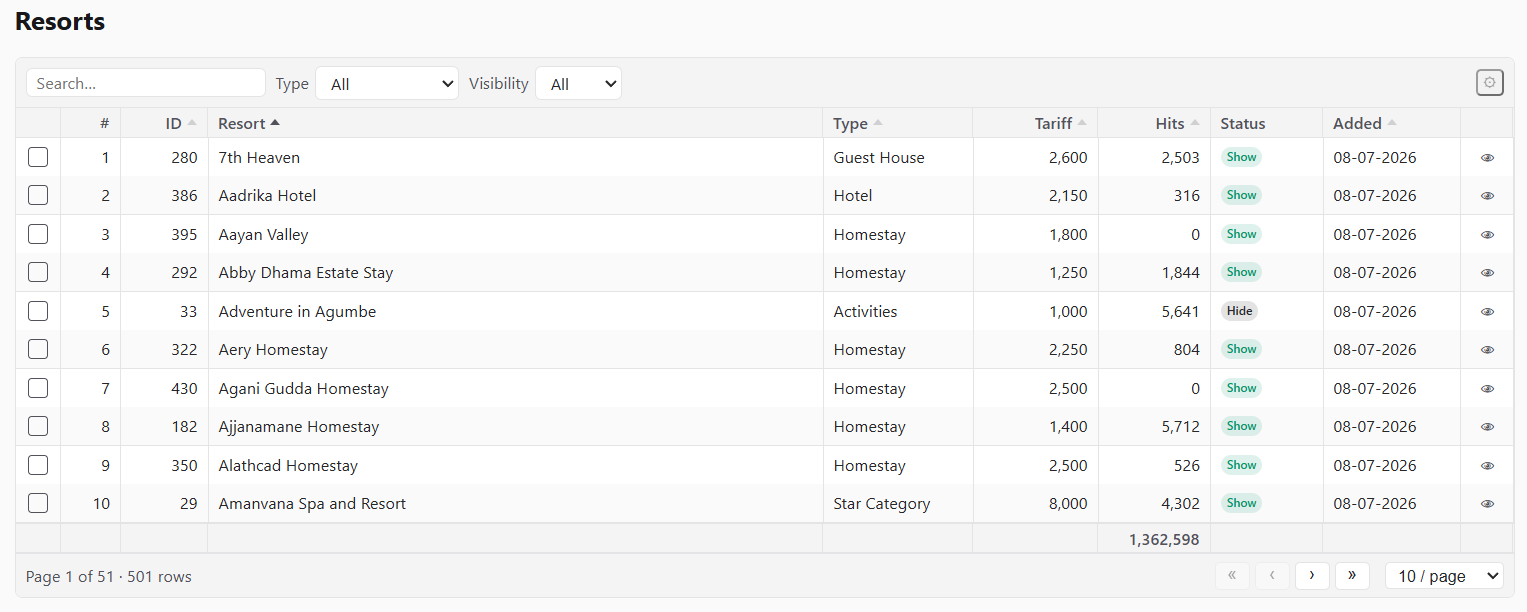
A readonly server-side grid — sorting, global search, filters, pagination, bulk selection and footer totals, all through a whitelisted fail-closed pipeline:
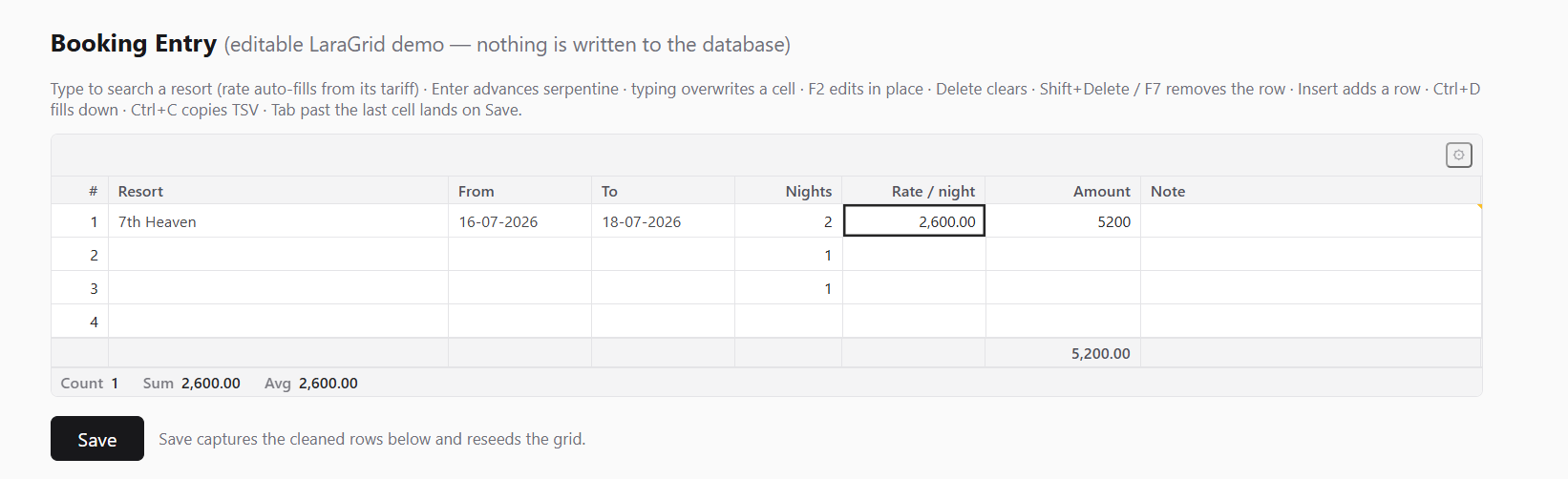
An editable entry grid — typed cell editors, ERP cell focus control (FocusMode) [v1.20.0+], an async picker that enriches the row on select, live formula columns, auto-append and a running footer:
Contents
- The three modes
- Requirements
- Installation
- Quick start — a readonly list
- Quick start — an editable entry grid
- Row lifecycle & blank rows
- Ending entry — the completion flow
- Server hooks — enrichment & row consistency
- Display-only mode
- Column types
- Grid definition reference
- Actions
- Toolbar, search & filters
- Exports (CSV / XLSX / PDF)
- Saved views
- Sticky filters —
persistQuery() - Keyboard
- Undo & redo
- Theming
- Extending
- Host events
- Configuration
- Troubleshooting
- Testing
- License
The three modes
| Mode | Declare with | What you get |
|---|---|---|
| Display | rows passed to the tag | Paints in-memory rows. Works on plain Blade pages without any Livewire component. ->sortable() columns sort client-side (stable, type-aware, empties last; click cycles asc → desc → original order; ->defaultSort() is applied at load) — built for computed report grids (trial balance, ageing) that can never be query()-backed. A Livewire host may opt into trusted downloads with ->exportRows() without changing this display mode. |
| Readonly server-side | ->query(fn () => Model::query()) |
Sort, global search, filters, pagination through a whitelisted fail-closed pipeline. Page 1 ships in the initial payload (zero-round-trip first paint); later pages stream over an RPC with an LRU cache and idle prefetch of the next page. ->singlePageUpTo(N) serves the whole filtered set chrome-free whenever it fits (decided per request — a narrowing search flips into single-page view); a first page above laragrid.max_per_page auto-defers to a post-boot fetch so the mount HTML stays small at any table size. Opt-in CSV/XLSX/PDF downloads of the current view (->exportable()) and named per-user saved views (->savedViews()). |
| Editable | ->editable()->rowsFrom('lines') |
The full spreadsheet: optimistic client, authoritative server, typed op protocol, validation on both sides, formula columns, async pickers with row enrichment, auto-append, undo/redo, live footer totals. |
Both interactive modes share one keyboard model, one selection engine, one theming system. On sortable columns the whole header cell is the sort click target (the caret doubles as the keyboard control); hold Ctrl/Cmd/Shift while clicking to column-select instead.
Requirements
- PHP ^8.1
- Laravel 10 / 11 / 12 / 13
- Livewire ^4.1 — installed automatically as a dependency
Installation
composer require unnathianalytics/laragrid
That's all. The service provider auto-discovers, and the prebuilt script + stylesheet auto-inject into any page that renders a grid. No layout directives, no build step.
Using saved views (->savedViews())? Run the migrations once — the packaged
migration creates the laragrid_views table (name configurable via laragrid.views.table):
php artisan migrate
Grids that never declare ->savedViews() don't need the table; skipping this step changes
nothing for them.
Optional publishes:
php artisan vendor:publish --tag=laragrid-config      # config/laragrid.php (global defaults)
php artisan vendor:publish --tag=laragrid-views       # blade views (mount + badge/edit-link cells)
php artisan vendor:publish --tag=laragrid-assets      # copy dist/ to public/vendor/laragrid
php artisan vendor:publish --tag=laragrid-migrations  # the saved-views table migration (auto-loads otherwise)
Asset delivery is configurable: set laragrid.inject_assets => false to place
@laragridStyles / @laragridScripts yourself, or point laragrid.asset_url at a CDN.
Asset URLs carry a content hash, so upgrades bust browser caches automatically.
For production, publish the assets (--tag=laragrid-assets): once public/vendor/laragrid
holds a copy of the current release the tags point there automatically (no asset_url
needed), so each asset request is a static file instead of a Laravel boot. Re-run the publish
after every upgrade; a copy left behind by an older release (its version.txt is missing or
differs) is ignored, so an upgrade never pairs old JavaScript with new PHP. Without a current
published copy the internal /laragrid/{file} route serves the bundle itself, with the
precompressed brotli/gzip body for browsers that accept it; a published copy relies on your
web server's own compression. Consumers with their own Vite build import
vendor/unnathianalytics/laragrid/resources/js/index.js directly; the undocumented
dist/laragrid.esm.js bundle is no longer built.
Behind a CDN, make sure the query string is part of the cache key (CloudFront's default
policy drops it): the ?v= hash is what tells the edge a new release is out, and without it
the old file would be served for up to a year after an upgrade.
Quick start — a readonly list
use App\Models\Resort;
use LaraGrid\Actions\Action;
use LaraGrid\Aggregate;
use LaraGrid\Columns\{SerialColumn, TextColumn, IntegerColumn, DateColumn, ComputedColumn};
use LaraGrid\Filters\SelectFilter;
use LaraGrid\Grid;
use LaraGrid\Livewire\WithLaraGrid;
use LaraGrid\Support\CellHtml;
use Livewire\Component;

class ResortsIndex extends Component
{
    use WithLaraGrid;   // ← required: provides gridDefinition() and the grid RPCs

    protected function grids(): array
    {
        return ['resorts' => Grid::make('resorts')
            ->query(fn () => Resort::query())
            ->authorize('resort.viewAny')            // mandatory — grids are fail-closed
            ->paginate(25, [10, 25, 50, 100])
            ->defaultSort('name')
            ->searchable(['name', 'shortcode', 'resorts.slug'])   // see note below
            ->filters([
                SelectFilter::make('type')->label('Type')
                    ->options(fn () => Resort::distinct()->orderBy('type')->pluck('type', 'type')),
                SelectFilter::make('visibility')->label('Visibility')
                    ->options(['show' => 'Show', 'hide' => 'Hide']),
            ])
            ->columns([
                SerialColumn::make(),
                TextColumn::make('name')->label('Resort')->sortable()->searchable()->grow(),
                TextColumn::make('type')->sortable()->width(120),
                IntegerColumn::make('hits')->sortable()->width(90),
                ComputedColumn::make('status')->html()->width(90)
                    ->state(fn (array $row) => $row['visibility'] === 'show'
                        ? CellHtml::badge('green', 'Show')
                        : CellHtml::badge('zinc', 'Hide')),
                DateColumn::make('created_at')->label('Added')->sortable()->width(110),
            ])
            ->footer([Aggregate::sum('hits')->format('number')])
            ->exportable(['csv', 'xlsx', 'pdf'])     // toolbar Export control — see Exports
            ->actions([
                Action::make('edit')->icon('✎')->url(fn ($row) => route('resorts.edit', $row['id'])),
                Action::make('delete')->icon('✕')->confirm('Delete this resort?')
                    ->call(fn (array $row) => Resort::whereKey($row['id'])->delete()),
            ])
            ->stickyHeader()->striped()->maxHeight('70vh')];
    }

    public function render()
    {
        return view('livewire.resorts-index');
    }
}
<x-laragrid :grid="$this->gridDefinition('resorts')" />
Search targets: bare names in ->searchable() must be declared columns — a typo fails
loudly at build time instead of silently searching nothing. To search a database column you
don't display, table-qualify it ('resorts.slug'); the dot marks it as an explicit DB column.
Relation columns: a dot-keyed column such as TextColumn::make('itemGroup.name') reads
through the model's relation. The grid eager-loads every such relation the query does not
already load (one query per relation for each page or export chunk, not one per row), so you
don't need ->with() for them. You may still pre-load a relation yourself — for example
Item::query()->with(['itemGroup' => fn ($q) => $q->select('id', 'name')]) to limit its
columns — and the grid keeps your constraint and adds only what is missing. A path that is not
a relation, such as a JSON attribute ('meta.color'), is read from the row and never
eager-loaded.
Quick start — an editable entry grid
use LaraGrid\Columns\{SerialColumn, SearchSelectColumn, IntegerColumn, DecimalColumn, FormulaColumn, TextColumn};
use LaraGrid\Editing\RowContext;

class BookingEntry extends Component
{
    use WithLaraGrid;

    /** @var list<array<string, mixed>> */
    public array $lines = [];

    public function mount(): void
    {
        $this->lines = $this->gridMountRows('lines');   // seeds defaultRows via the factory
    }

    protected function grids(): array
    {
        return ['lines' => Grid::make('lines')
            ->editable()
            ->rowsFrom('lines')                         // binds public array $lines
            ->authorize(fn () => $this->authorize('booking.create'))
            ->defaultRows(3)
            ->newRowUsing(fn () => ['nights' => 1])     // template for seeded AND inserted rows
            ->minRows(1)
            ->autoAppend()                              // Enter past the last cell grows the grid
            ->persistDraft('local', 'booking:new')      // opt-in IndexedDB crash/reload recovery
            ->focusOnMount()
            ->focusOutTo('[data-save]')                 // Tab past the last cell lands on Save
            ->columns([
                SerialColumn::make(),
                SearchSelectColumn::make('resort_id')->label('Resort')
                    ->optionsUsing(fn (string $term) => Resort::query()
                        ->when($term !== '', fn ($q) => $q->where('name', 'like', "%{$term}%"))
                        ->limit(50)->get(['id', 'name'])
                        ->map(fn ($r) => ['value' => (string) $r->id, 'label' => $r->name])
                        ->all())
                    ->onSelect(function (RowContext $row, mixed $value): void {
                        // Enrichment: the pick pre-fills the rate; write-backs reconcile
                        // into the client row automatically.
                        $row->set('rate', Resort::whereKey($value)->value('comparison_tariff'));
                    })
                    ->required()->minChars(0)->debounce(250)->grow(),
                IntegerColumn::make('nights')->rules(['integer', 'min:1'])->required()->width(90),
                DecimalColumn::make('rate')->scale(2)->rules(['numeric', 'min:0'])->width(120),
                FormulaColumn::make('amount')->formula('round(nights * rate, 2)')->width(130),
                TextColumn::make('note')->maxLength(100)->grow(),
            ])
            ->footer([Aggregate::sum('amount')->format('number', ['scale' => 2])])];
    }

    public function save(): void
    {
        $rows = $this->gridRows('lines');       // cleaned AND whole-grid server validated

        Booking::createFromLines($rows);        // your persistence — the grid never owns it

        $this->lines = $this->gridMountRows('lines');
        $this->reseedGrid('lines');             // required after any out-of-band rows change
    }
}
The editable contract in one paragraph: the client applies every keystroke optimistically and
streams typed ops to the server, where each write is authorized, cast, validated, run through
your hooks, and formula columns are recomputed — the response reconciles authoritative values
back into the grid. Rows are addressed by stable keys, never positions. Blank trailing rows
(the auto-append artifact) are invisible to validation, totals, and gridRows().
For a Save button, use the public safe boundary instead of racing a wire:click against an
open editor or queued request:
const grid = window.LaraGrid.find(document.querySelector('[data-lgrid]'))
await grid.commitAndSave('save') // commit editor → flush → await stable queue → $wire.save()
commitAndSave() refuses while validation errors, offline state, or a terminal sync failure
remain. lgrid:statechange bubbles from the root with canSave, pending, modified,
errors, and the current sync status for declarative host buttons. If the host invokes Save
some other way, call await grid.whenSettled() first and await grid.markSaved() only after
the database transaction succeeds.
->persistDraft() is deliberately opt-in because it stores row data in browser IndexedDB.
Scope its key by tenant/operator/document on shared browsers. A reload offers Restore/Discard;
queued ops resume safely, and the draft is retained after acknowledgement until the host save is
confirmed. Every editable grid also installs a dirty-navigation warning.
Validation errors are available from the footer's Review errors control with their row,
column and server message. Entries, previous/next buttons and Ctrl+E focus the affected cell;
cells expose aria-invalid and the message through aria-describedby.
Row lifecycle & blank rows
Understanding what counts as a blank row explains most editable-grid behavior, so here is the full contract.
Where rows come from. An editable grid binds a public array on your component
(->rowsFrom('lines')); every row carries a stable client key _k. You get initial rows from
$this->gridMountRows('lines'), which builds ->defaultRows(n) rows through the
new-row template: every declared column set to null, overlaid with your
->newRowUsing(fn () => [...]) defaults. The same template builds rows grown at runtime —
Enter-past-the-last-cell (auto-append), the Insert key, and paste-created rows — so a seeded
row and a grown row are indistinguishable, server- and client-side.
What "blank" means. A row is blank when every editable cell still equals the new-row
template — factory defaults are not operator data. A booking grid seeded with
['nights' => 1] therefore still treats an untouched row as blank; the moment the operator
types anything real, it isn't. Non-editable carried values (ids, formula results, computed
cells) never make a row non-blank.
What blankness controls. Blank trailing rows (the auto-append artifact at the bottom)
are exempt from validation (a required() column never flags a row nobody touched), excluded
from footer totals, stripped by gridRows() at save, not counted by ->minRows(n), and are
where the end-of-list exit appears (next section).
When the operator deletes its final row, an editable ->autoAppend() grid keeps one blank physical
draft even though it now has zero logical rows. The deleted row is replaced with a fresh keyed row
from the same new-row template and focus stays on the entry surface; ->minRows(0) and
gridRows() === [] remain true. Readonly grids and editable grids with ->autoAppend(false) still
show their normal empty state when they contain no rows.
Row keys are law. Every op addresses rows by _k, never by position — so sorting,
insertion and concurrent edits can never target the wrong row. If your host code ever replaces
the bound rows outside the op protocol (a save reset, importing lines), call
$this->reseedGrid('lines') so the client adopts the new set wholesale; skipping it leaves
the client referencing keys the server no longer has.
Ending entry — the completion flow
Fast keyboard entry needs a deliberate end: with ->autoAppend(), Enter past the last cell
keeps growing the grid forever. LaraGrid ships two "the operator is done" signals, both
funnelled through one channel so your page reacts identically regardless of how entry ended.
->endOfListOption() — the picker exit
SearchSelectColumn::make('item_id')
    ->endOfListOption()                                  // default label: <-- End of List -->
    // ->endOfListOption('— Done adding lines —')        // custom label
    // ->endOfListOption(allowOnEmpty: true)             // offer it even on an empty grid
Declared on a picker column (SelectColumn / SearchSelectColumn — the build fails loud
anywhere else), it injects a synthetic first entry into that column's dropdown, but only where
ending makes sense: on a blank trailing row, and only once the grid holds at least one real
row (pass allowOnEmpty: true for grids whose entries are optional — a charges grid a document
may legitimately have zero of). Choosing it commits no value; it fires the completion
signal. This mirrors classic data-entry systems where the operator ends line entry inside the
same dropdown they've been picking from, instead of tabbing out cell by cell.
->completeWhenBalanced('dr', 'cr') — the balancing guard
For double-entry grids: while Σdr ≠ Σcr the grid keeps auto-appending; the moment the two columns balance (both above zero), Enter past the last cell fires the completion signal instead of growing the grid. With autofill (on by default), landing on an empty amount cell of the deficit side pre-fills the balancing amount through the normal commit pipeline — the operator accepts with Enter or overtypes.
What "complete" does
Completion dispatches a bubbling lgrid:complete DOM event from the grid root
(detail: { grid }). Declare ->onCompleteFocus('[data-save]') and the grid also moves focus
to that selector — with a built-in retry loop, so a Save button that only enables once the grid
is valid still receives focus. The result is the full keyboard circuit: enter lines → end
entry (exit option or balance) → focus lands on Save → Enter posts. For anything fancier,
listen for the event yourself:
document.addEventListener('lgrid:complete', (e) => {
    if (e.detail.grid === 'lines') { /* open a confirm dialog, scroll a summary… */ }
});
->focusOutTo() vs ->onCompleteFocus()
Both take a selector and send focus there, and both resolve it through the same retrying
lookup — so a Save button that is disabled until the very commit that triggered the focus still
receives it (retried every 50ms for ~2s, and a disabled target is treated as not there yet).
That shared tail is where the similarity ends. They answer two different questions:
->focusOutTo(selector) |
->onCompleteFocus(selector) |
|
|---|---|---|
| Question it answers | "Where does Tab go when it leaves the grid?" | "Where does focus go when entry is finished?" |
| Trigger | Forward Tab pressed on the last navigable cell | The completion signal — an ->endOfListOption() pick, or Enter past the last cell once ->completeWhenBalanced() balances |
| Meaning | Positional — the cursor ran out of grid | Semantic — the operator declared they're done |
Fires lgrid:complete? |
No. It's a navigation intercept, nothing else | Yes. The event dispatches first; the focus move is the packaged reaction to it |
| Applies to | Any grid, editable or readonly | Editable grids that declare a completion source |
| While a cell editor is open | Ignored — the editor owns Tab | N/A — completion only fires from a committed flow |
| Rows left behind | Grid keeps whatever rows it has; nothing is signalled | Same — completion commits no value; it only announces |
The practical difference: focusOutTo is a tab-order repair. Without it, Tab off the last
cell falls to whatever the browser thinks is next in the DOM — often nothing useful, since the
grid body is a wire:ignore island. It fires every time the operator tabs off the end, even on
row one of an empty grid, and it says nothing about whether the work is done.
onCompleteFocus is the end of the entry circuit: it only fires when the grid's own
completion guard says the operator finished, and it always comes with the lgrid:complete
event, so host code can react beyond focus.
Declaring both is the normal setup, and they don't conflict — they cover different exits from the same grid:
Grid::make('lines')
    ->editable()->rowsFrom('lines')->autoAppend()
    ->focusOutTo('[data-save]')        // operator tabs off the end → Save
    ->onCompleteFocus('[data-save]')   // operator picks "End of List" → lgrid:complete + Save
Point them at different targets when the two exits mean different things — Tab moves on to the next form field, while completion jumps to Save:
    ->focusOutTo('#remarks')
    ->onCompleteFocus('[data-save]')
If you only want the DOM event and will move focus yourself, declare ->onCompleteFocus() not
at all and listen for lgrid:complete — the event fires with or without it.
Server hooks — enrichment & row consistency
Three server-side hooks let a grid keep its rows internally consistent without any client code.
All of them receive a RowContext — get('col'), set('col', $value),
setLabel('col', $text) for picker display labels — and every set() rides the op response
back into the client row. Crucially, formula columns recompute after the hooks in the same
operation, so a hook that sets nights also refreshes amount = nights × rate in one round
trip.
// 1. Per-pick enrichment (SearchSelectColumn): the pick pre-fills dependent cells.
SearchSelectColumn::make('item_id')
    ->onSelect(function (RowContext $row, mixed $value): void {
        $item = Item::find($value);
        $row->set('rate', $item?->rate);
        $row->set('uom', $item?->uom);
    })

// 2. Grid-wide row consistency: runs after EVERY applied cell change (typing, paste,
//    fill-down). Example — derive nights from a date range:
->afterCellChange(function (RowContext $row, string $column): void {
    if (! in_array($column, ['fromDate', 'toDate'], true)) {
        return;
    }
    if ($row->get('fromDate') && $row->get('toDate')) {
        $nights = Carbon::parse($row->get('fromDate'))
            ->diffInDays(Carbon::parse($row->get('toDate')), false);
        $row->set('nights', $nights >= 1 ? (int) $nights : null);
    }
})

// 3. After a row removal — recompute host-side chrome (an "Allocated" total, a balance badge):
->afterRowRemove(fn () => $this->recomputeTotals())
The hooks are the authoritative half of the optimistic model: the client already painted the keystroke; the server decides the truth and patches back anything the hooks changed.
Row-dependent picker options
The client caches each SearchSelectColumn's server options per typed term. When the
->optionsUsing() closure reads $row (a D/C side, a party, a material centre), declare those
keys with ->optionsDependOn(); the cache is then keyed by the term and those row values, so
one row's list is never reused for another. Keys must be other declared columns of the grid, on a
server-mode picker; the build fails loud otherwise. The server still re-runs the closure with the
row, so filtering and authorization stay server-side.
SearchSelectColumn::make('account_id')
    ->optionsUsing(fn (string $term, array $row): array => $this->searchAccounts($term, side: $row['dc'] ?? null))
    ->optionsDependOn(['dc'])
Display-only mode
<x-laragrid :grid="$grid" :rows="[['name' => 'Alpha'], ['name' => 'Beta']]" />
No ->query(), no ->editable() — the rows are painted as-is with full keyboard navigation,
selection, copy, column chooser, and footer totals. No Livewire component is required.
To refresh a display grid's data later, call $this->reseedGrid('name', $freshRows).
Column types
| Column | Editor | Value | Notes |
|---|---|---|---|
SerialColumn |
— | row number | the # gutter |
TextColumn |
text | string | ->maxLength(), ->upper()/->lower() |
IntegerColumn |
number | int | grouping-tolerant input |
DecimalColumn |
number | fixed-scale string | ->scale(n); precision never rides a float |
DateColumn |
date | ISO Y-m-d |
fuzzy typed input (31/12, 311226); display pattern configurable; financial-year inference opt-in |
SelectColumn |
dropdown | option id | ->options([...]) embedded whitelist |
SearchSelectColumn |
async picker | option id | ->optionsUsing(fn ($term, $row)), ->optionsDependOn([...]), ->onSelect() enrichment, ->minChars(), ->debounce(), ->limit(); an option row may carry 'meta' => … — painted right-aligned and muted (e.g. stock on hand) |
CheckboxColumn |
instant toggle | bool | Space/double-click toggle in place; Enter just advances |
YesNoColumn |
typed Y/N | bool | painted Y/N (blank until answered); typing Y/N commits and advances like Enter — the Tally Yes/No flow; Space still toggles in place |
FormulaColumn |
— | computed | ->formula('qty * rate') — evaluated live client-side, authoritatively server-side |
ComputedColumn |
— | server-baked | ->state(fn ($row)), pair with ->html() for badges/links via CellHtml |
ReadonlyColumn / HiddenColumn |
— | display / carried | writes rejected server-side |
Shared column chains: label, width / minWidth / maxWidth / grow, align, visible,
hiddenByDefault (initially unchecked but available in the column chooser), frozen,
sortable(bool|'db.column'), searchable, filterable(Filter), required /
required(fn), readonly / readonly(fn), focusMode(FocusMode|'always'|'manual'|'never', default: ...) [v1.20.0+] / default(mixed|fn) [v1.20.0+], rules([...]), lockedWhen('col', value),
requiredWhen('col', value), whenFilled(sets: [...], clears: [...]),
endOfListOption() (see Ending entry), opensPanel('name'), html(),
exportable(false) (keep a painted column out of downloads).
To keep an optional column out of the initial layout while still listing it in the column
chooser, use hiddenByDefault():
TextColumn::make('type')->hiddenByDefault()
Use visible(false) only for a definition-level hidden column that operators must never reveal.
Column focus modes & defaults (->focusMode()) [v1.20.0+]
Control how keyboard navigation (Tab / Enter) traverses cells, mirroring ERP and voucher entry field behaviors (e.g. Fixed, Semi-Variable, Variable):
use LaraGrid\Columns\FocusMode;

// Variable (Default): Always receives sequential keyboard focus
TextColumn::make('party_name')
    ->focusMode(FocusMode::Always);

// Semi-Variable: Skipped on keyboard navigation (Tab/Enter), focusable and editable on mouse click
DecimalColumn::make('qty')
    ->focusMode(FocusMode::Manual, default: 1);

// Fixed: Skipped on keyboard navigation, read-only / non-editable, dynamic Closure default
DateColumn::make('vch_date')
    ->focusMode(FocusMode::Never, default: fn () => now()->format('Y-m-d'));
| Mode | Enum / String | Keyboard Focus (Tab/Enter) | Mouse Click / Selection |
|---|---|---|---|
| Variable (Default) | FocusMode::Always / 'always' |
Focused | Editable |
| Semi-Variable | FocusMode::Manual / 'manual' |
Skipped | Editable on Click |
| Fixed | FocusMode::Never / 'never' |
Skipped | Readonly |
- Default value callbacks:
->default($value)accepts static scalar values or dynamic Closure callbacks (fn (array $row = []) => mixed). When fresh rows are created viagridMountRows()or auto-append, column defaults populate automatically.
Grid definition reference
Data — query(fn) · authorize(ability|fn) · paginate(per, [options]) ·
defaultSort(col, dir) · searchable([...]) · filters([...]) · rowKey('id') ·
exportable([formats], fileName:, limit:) (see Exports) ·
savedViews(key?) (see Saved views) ·
rowActivate(fn ($row) => ?url, navigate: true) — Enter/double-click opens a row, permission-gated per row; with navigate: true the grid itself follows the URL (Livewire Navigate when available, full load otherwise — a lgrid:activate listener can cancel via preventDefault()); without it, activation only fires the event and the host decides (modal, drill, custom action).
Editable — editable() · rowsFrom('prop') · defaultRows(n) · newRowUsing(fn) ·
minRows(n) · autoAppend() · padRows(n) · sync(SyncPolicy::PerCell|PerRow|Deferred) ·
persistDraft('local', key) · virtualizeRowsAbove(n) ·
refreshesHost([...]) (re-render host chrome when listed columns change) ·
completeWhenBalanced('dr', 'cr') · afterCellChange(fn) · afterRowRemove(fn).
Behavior — keymap('entry'|'excel') · toolbar(...) / toolbar(false) ·
focusOnMount() · focusOutTo(selector) (Tab off the last cell lands here) ·
onCompleteFocus(selector) (the completion signal lands here — see
the comparison) · emptyState(text) · statusBar(bool) ·
persistWidths() (column layout survives reloads) ·
persistQuery() (search/filters/sort/per-page survive for the session — see
Sticky filters).
Layout — columnGroups([ColumnGroup::make('GST', ['cgst', 'sgst'])]) (two-tier grouped headers) · stickyHeader() · freezeColumns(n) · striped() ·
density(GridDensity::Compact|Normal|Comfortable) · height('420px') · minHeight('300px') ·
maxHeight('60vh') · fillParent() · fitColumns() · themeClass('my-theme') · rowClass(fn) · cellClass(fn).
Use ->fitColumns() when every visible column must stay inside the grid and the horizontal
scrollbar must be suppressed. The grid redistributes space after a container resize or a column
is hidden/revealed. A column's width() (including an operator-resized width) becomes its relative
weight, so wider columns still receive more room, but the grid-level fit guarantee takes precedence
over individual fixed/min/max pixel widths. Dragging a column rebalances the other visible columns.
Actions
->actions([          // per-row buttons in a trailing column
    Action::make('edit')->icon('✎')->url(fn ($row) => route('items.edit', $row['id'])),
    Action::make('archive')->confirm('Archive?')->visible(fn ($row) => ! $row['archived'])
        ->call(fn (array $row) => Item::whereKey($row['id'])->archive()),
])
->bulkActions([      // run over checked rows; a selector gutter + toolbar bulk bar appear
    Action::make('delete')->confirm('Delete selected?')
        ->call(fn (array $keys) => Item::whereKey($keys)->delete()),
])
->toolbarActions([   // grid-scoped buttons in the toolbar
    Action::make('new')->label('New Item')->url(fn () => route('items.create')),
])
Actions are fail-closed end to end: the client only echoes an action name (plus row keys) —
the server re-authorizes the grid gate, the per-action ->authorize(), re-resolves the row
from its authoritative source, and re-checks ->visible() before the closure runs. A hidden
button is an unusable button. url() actions bake their per-row URL server-side; rows where
the resolver returns null get no button. After a call() action, readonly grids refetch
their current page and editable grids receive a reseed payload automatically. Throw a
ValidationException inside a callback to show the operator a refusal message.
Toolbar, search & filters
The toolbar renders itself from the definition: a debounced search box (when the grid declares
->searchable()), one control per grid-level filter, the bulk bar, toolbar action buttons, the
Export control (when the grid declares ->exportable()), and the column chooser. Suppress or
tune it: ->toolbar(false), ->toolbar(search: false). Filter options accept a
{value => label} map (the pluck() idiom), a list of ['value' => , 'label' => ]
rows, or plain scalars. SelectFilter and TernaryFilter (All / Yes / No) ship in core; column
header funnels via ->filterable() run through the same whitelisted pipeline.
Exports (CSV / XLSX / PDF)
Readonly ->query() grids can offer file downloads of the register — opt-in, per grid:
Grid::make('resorts')
    ->query(fn () => Resort::query())
    ->authorize('resort.viewAny')
    ->exportable()                                    // csv + xlsx + pdf (the config default set)
    // ->exportable(['csv', 'xlsx'])                  // or exactly these formats
    // ->exportable(['csv'], fileName: 'resorts', limit: 10000)
An ⤓ Export control appears in the toolbar (a single format downloads directly; several
open a menu). The download is always the operator's current view: the active sort, global
search and filters apply — the whole filtered set, never just the visible page — through the
same whitelisted, fail-closed pipeline as every fetch. The gridExport RPC re-runs the grid's
->authorize() gate and refuses any format the definition doesn't enable.
Readonly in-memory reports
An in-memory report can export without inventing an Eloquent query by declaring a separate,
trusted server row resolver. :rows and exportRows() have intentionally different security
roles: Blade :rows paints the in-memory display dataset; exportRows() rebuilds download rows
on the server after authorization. LaraGrid never exports Blade rows, a Livewire public rows
property, DOM content, or any rows included in the export request.
The host must be a Livewire component using WithLaraGrid, register the definition from
grids(), and declare authorize():
use App\Models\Voucher;
use LaraGrid\Columns\{DateColumn, DecimalColumn, SerialColumn, TextColumn};
use LaraGrid\Grid;
use LaraGrid\Livewire\WithLaraGrid;
use Livewire\Component;

class DayBook extends Component
{
    use WithLaraGrid;

    /** Rows built for the normal in-memory screen. */
    public array $rows = [];

    public string $from = '';
    public string $to = '';

    protected function grids(): array
    {
        return ['dayBook' => $this->dayBookGrid()];
    }

    protected function dayBookGrid(): Grid
    {
        return Grid::make('dayBook')
            ->authorize(fn () => $this->authorize('viewAny', Voucher::class))
            ->exportRows(fn (array $state): iterable => $this->dayBookExportRows($state))
            ->exportable(['csv', 'xlsx', 'pdf'], fileName: 'day-book')
            ->columns([
                SerialColumn::make(),
                DateColumn::make('date')->sortable(),
                TextColumn::make('type')->sortable(),
                TextColumn::make('voucher')->sortable(),
                TextColumn::make('ledger'),
                DecimalColumn::make('debit')->scale(2),
                DecimalColumn::make('credit')->scale(2),
            ]);
    }

    /**
     * $state is exactly {sort, dir, search, filters}; unknown client keys and invalid
     * sort/filter targets have already been removed. Apply the intents your report supports.
     */
    protected function dayBookExportRows(array $state): iterable
    {
        // Component report filters such as $this->from/$this->to are already trusted server
        // state on this rehydrated Livewire component. Re-query and transform independently.
        foreach ($this->reportBuilder($this->from, $this->to)->lazyEntries() as $voucher) {
            foreach ($this->movePartyEntryFirst($voucher) as $row) {
                yield $row; // generators keep the export pipeline bounded-memory
            }
        }
    }

    public function render()
    {
        return view('livewire.day-book');
    }
}
{{-- These rows remain the in-memory display source; downloads never trust them. --}}
<x-laragrid :grid="$this->gridDefinition('dayBook')" :rows="$rows" />
The resolver may return any iterable, including arrays, Laravel Arrayable DTOs, Eloquent
models, collections, and generators. The export row cap is applied lazily. LaraGrid supplies
normalized sort, dir, search, and declared filters, but the resolver is responsible for
applying the relevant state when the custom report supports those grid-level controls. Report
filters held by the component itself can simply be read from the component's server state.
Adding exportRows() does not make isServerSide() true: rendering stays in-memory,
gridFetch remains unavailable, and saved views plus query persistence still require query().
What lands in the file is what the grid paints: picker columns export their labels (not
ids), YesNoColumn exports Y/N (blank while unanswered), CheckboxColumn exports
Yes/No, dates use the configured display pattern, and ->html() cells are stripped back to
plain text. Summable numeric columns stay raw in CSV/XLSX — real number cells a spreadsheet
can total — while the PDF (a visual document) formats them through each column's format tag.
Footer sums append as a totals row that always equals the rows actually in the file, and every
file is capped at laragrid.export.max_rows (default 50,000; override per grid with limit:).
Hidden columns never export; keep a painted column out of the file with ->exportable(false)
on the column.
All three writers are dependency-free — CSV (BOM'd UTF-8), XLSX (native SpreadsheetML,
typed number cells, needs only ext-zip), and PDF (native A4 writer: auto-landscape, repeated
header row, page numbers; base-14 Helvetica, so Latin-1 text — characters outside it
transliterate). Need branded PDFs, full Unicode fonts, or another format? Register your own
writer under any name and grids enable it like a shipped one:
// A service provider:
app(\LaraGrid\Export\ExporterRegistry::class)->register('pdf', new BrandedDompdfExporter);
app(\LaraGrid\Export\ExporterRegistry::class)->register('ods', new OdsExporter);

// A grid:
->exportable(['csv', 'ods'])     // unknown names still fail loudly at build time
Hosts rendering fully custom chrome (->toolbar(false)) trigger downloads over the same
event bridge as search/filters:
el.dispatchEvent(new CustomEvent('lgrid:toolbar', {
    bubbles: true, detail: { grid: 'resorts', kind: 'export', value: 'xlsx' },
}));
Saved views
Readonly ->query() grids can offer named, server-persisted view snapshots — an operator
sets up "Pending GST invoices" once (search + filters + sort + per-page + column widths and
hidden columns) and recalls it from a toolbar ❖ Views menu in any later session, on any
machine:
Grid::make('resorts')
    ->query(fn () => Resort::query())
    ->authorize('resort.viewAny')
    ->savedViews()                    // opt-in; ->savedViews('key') overrides the storage key
Run php artisan migrate once — the packaged migration creates the laragrid_views table
(name configurable via laragrid.views.table). The Views menu then lists the operator's saved
views: picking one applies it (layout instantly, data through the same whitelisted pipeline as
any filter change), + Save current view… captures the current state under a name (saving
an existing name updates it), and ✕ deletes.
Views are per-user and fail-closed: the scope is minted server-side from the authenticated
user (guests are refused), every RPC re-runs the grid's ->authorize() gate, and the saved
state is sanitized against the grid's declared columns, filters and page sizes — unknown keys
are dropped on write, and applying a view still runs through the same whitelisted gridFetch
pipeline as every fetch. One operator can never see, apply or delete another's views. Each
operator may keep up to laragrid.views.max_per_grid (default 50) views per grid.
Storage is swappable: rebind LaraGrid\Views\ViewStore in a service provider to keep views in
Redis, a tenant-scoped table, or an existing preferences service — the three-method interface
(list / save / delete) is the whole contract.
Note ->savedViews() persists views server-side by name, on demand, while
->persistWidths() silently persists the current column layout in localStorage — the two
compose: recalling a view also updates the persisted layout.
Sticky filters — persistQuery()
An operator narrows a register, opens a row to edit it, comes back — and the filters are gone.
->persistQuery() fixes exactly that, and nothing more: the grid remembers the current
search, filters, sort and per-page for the rest of the operator's session.
Grid::make('items')
    ->query(fn () => Item::query())
    ->authorize('item.viewAny')
    ->persistQuery()                  // opt-in; ->persistQuery('session', 'key') overrides the key
    ->persistWidths()                 // composes — different lifetime, different state
No migration, no configuration. State lives in the Laravel session under
laragrid.query.{key}, so it survives a reload, a full-page navigation away and back, and a
second tab — and dies at logout or session expiry, with nothing to clean up.
The page number is deliberately not persisted. Coming back to page 7 of a list you have forgotten you filtered is disorienting; coming back to page 1 of your filtering is not.
No first-paint flash
The state is read on the server, before page 1 is built — not restored on the client after
boot. The first paint is already the narrowed list, and the toolbar controls, header funnels
and sort caret paint the restored state with it. (This is why the lifetime is the session
rather than localStorage: the server has to know before it renders.)
Stale values drop themselves
Every restored filter value is offered back to its own filter's accepts() before it is
replayed. SelectFilter answers against its currently resolved options — which, for a
tenant-scoped ->options() closure, are this company's options. So an item_group_id carried
over from another company (or pointing at a since-deleted record) is dropped rather than
replayed into a WHERE that silently empties the list. Same guard for a column that has left
the definition since: the stored sort falls back to ->defaultSort().
For hard isolation on top of that, scope the storage key:
->persistQuery(key: "items:{$companyId}")
Custom filters extending LaraGrid\Filters\Filter inherit an accepts() that allows
anything — override it when your filter has a knowable legal set.
Clearing
Clearing a control clears the stored state — a query equal to the grid's declared defaults is forgotten, not stored, so an operator who never filters leaves no session entry at all. Hosts can clear it explicitly for events the package cannot see (a tenant switch, a "start clean" workflow):
$this->forgetGridQuery('items'); // no-op on a grid without ->persistQuery()
Which persistence is which
| What it holds | Where | Lifetime | How it's set | |
|---|---|---|---|---|
persistQuery() |
search, filters, sort, per-page | Laravel session | the session | automatic |
persistWidths() |
column widths + hidden columns | localStorage |
until cleared | automatic |
persistDraft() |
editable rows + queued ops + errors + focus | IndexedDB | until host save/discard | Restore/Discard prompt |
savedViews() |
all of the above, by name | laragrid_views table |
permanent | operator saves |
All three compose on one grid. Storage is swappable the same way: rebind
LaraGrid\Query\QueryStore in a service provider (get / put / forget is the whole
contract) to keep live query state in a cache store or a preferences service instead.
'local', 'url' and 'server' are reserved mode names — declaring one throws rather than
silently giving you a lifetime you did not ask for.
Keyboard
The keyboard is not a bolt-on — it is the primary interface, engineered the way Excel,
Tally and Busy trained a generation of operators. One navigation engine drives all three
modes: the grid is a single tab stop with a roving active cell (aria-activedescendant,
no per-cell tabindex), every movement resolves against the same navigability mask, and
what a key does simply deepens with the mode:
| Display | Readonly query() |
Editable | |
|---|---|---|---|
| Navigate · select · copy TSV | ✓ | ✓ | ✓ |
| Sort from the header (whole cell is the click target) | ✓ client-side | ✓ SQL | — row order is domain state |
| F9 row delete / temporary row hide | ✓ hide | ✓ hide | ✓ delete |
Enter / double-click activates a row (->rowActivate()) |
✓ | ✓ | — |
| Edit · row ops · paste · undo | — | — | ✓ |
Two presets, one switch: ->keymap('entry') (default — the serpentine data-entry rhythm
below) or ->keymap('excel') (Enter moves down, Tab moves right, nothing ever blocks).
App-wide default via config('laragrid.keymap').
The magic of Enter Key
Enter Key is the drive shaft of the entry flow — one key, context-aware, and no keystroke is
ever thrown away. On an editable grid under the entry keymap, a single press walks this
decision ladder:
- Voucher done? On a grid whose completion condition holds (
->completeWhenBalanced()satisfied) with the cursor on a fully blank row, Enter doesn't open anything — it fireslgrid:completeand->onCompleteFocus()carries focus straight to your Save button. The operator's final Enter is the handoff. - Empty picker cell — Enter summons the lookup list (the Tally "list pops at you"
feel). An
->endOfListOption()picker shows — End of list — as its first entry, so Enter → Enter finishes entry from an empty row. - Blank required cell on a row that has data — Enter refuses to move (the cell
flashes). But it sails over template-blank trailing rows the operator never touched, so
nobody gets trapped behind
newRowUsing()defaults. - A column tagged
->opensPanel('name')— Enter hands off to YOUR modal (item description, serial capture) instead of advancing; the advance is stashed and resumes the instant the host fireslgrid:panel-done. This fires on the nav-mode Enter too, so re-entering a filled cell and pressing Enter re-opens the panel with its saved values. - Otherwise: advance. Serpentine — rightward through the row's editable, unlocked
cells (readonly,
lockedWhen, and hidden columns are never visited), wrapping to the first editable cell of the next row. Inside an open editor the same Enter first commits: optimistic cast client-side, authoritative cast + validation + hooks + formula recompute server-side, then the advance runs. - Last cell of the last row with
->autoAppend()— the grid grows a fresh row from thenewRowUsing()template and lands in it. Enter literally builds the voucher as fast as the operator can type.
YesNoColumn compresses the loop further — typing Y/N is the Enter (answer +
advance in one keystroke). On readonly and display grids the same key activates a
->rowActivate() row, exactly like double-click; under the excel preset Enter is a
plain move-down and never blocks. Net effect: item → qty → serials (panel) → rate →
balancing entry → Save — an entire voucher keyed without touching the mouse.
Mouse — the same selection engine
Click sets the active cell; dragging extends the range live (the Excel marquee —
native text selection is disabled in head + body, because Ctrl+C copies the cell
selection as TSV, not blue text). Shift+click extends to a far cell in one shot. A
header click sorts — the whole header cell is the target, not just the caret — while
Ctrl/Cmd/Shift+click on a header column-selects instead; a serial-gutter click
selects the row. Column edges drag-resize (double-click autofits) and ->persistWidths()
remembers the layout per grid.
Keyboard shortcuts
These are the complete built-in bindings. Ctrl shortcuts also accept Cmd on macOS.
Grid shortcuts run only while the grid owns focus; inputs in the toolbar, filters, and
popup forms retain their normal browser keyboard behavior.
Navigation
| Shortcut | Action | Available in |
|---|---|---|
Arrow Up / Arrow Down |
Move one row in the same column | All grids |
Arrow Left / Arrow Right |
Move one navigable cell left or right | All grids |
Ctrl+Arrow Up / Ctrl+Arrow Down |
Jump to the first or last row in the same column | All grids |
Ctrl+Arrow Left / Ctrl+Arrow Right |
Jump to the first or last navigable cell in the row | All grids |
Home / End |
Move to the first or last navigable cell in the row | All grids |
Ctrl+Home / Ctrl+End |
Move to the first or last navigable cell in the grid | All grids |
Page Up / Page Down |
Move up or down by one visible page | All grids |
Tab / Shift+Tab |
Move forward or backward, wrapping between rows; at the grid boundary, move focus out | All grids |
Enter |
Move right and wrap to the next row; on an editable cell, use the context-aware entry flow described above | entry keymap |
Shift+Enter |
Move left and wrap to the previous row | entry keymap |
Enter / Shift+Enter |
Move down / up in the same column | excel keymap |
On a non-editable grid with ->rowActivate(), plain Enter activates the focused row
instead of moving. Per-row locked cells are skipped by horizontal and wrapping movement.
Selection and clipboard
| Shortcut | Action | Available in |
|---|---|---|
Shift+Arrow |
Extend the selection in that direction | All grids |
Ctrl+A |
Select all navigable grid cells | All grids |
Ctrl+C |
Copy the selection as TSV for Excel or another grid; after Ctrl+A, the copy starts with the column headers |
All grids |
Ctrl+V |
Paste TSV starting at the active cell; may add rows when ->autoAppend() is enabled. A first row equal to the grid's headers is skipped |
Editable grids |
Escape |
Collapse a range selection to the active cell | All grids |
Cell editing
| Shortcut | Action | Available in |
|---|---|---|
Any printable character except Space |
Open a non-toggle active cell and replace its value with the typed character | Editable grids |
Space |
Toggle a CheckboxColumn or YesNoColumn without advancing |
Editable grids |
Y / N |
Set a YesNoColumn and advance |
Editable grids |
Enter / Shift+Enter |
Commit and advance forward / backward according to the active keymap | While editing |
Tab / Shift+Tab |
Commit and move to the next / previous navigable cell | While editing |
Escape |
Cancel the edit and restore the committed value | While editing |
Delete |
Clear every editable, unlocked cell in the current selection | Editable grids |
Ctrl+E |
Focus a validation error; footer Review/↑/↓ exposes every message | Editable grids |
While editing text, Left/Right/Home/End control the caret and Up/Down commit and move. For number cells, every arrow commits and moves. Date cells use Left/Right for the caret and Up/Down to commit and move.
Picker and popup editing
| Shortcut | Action | Available in |
|---|---|---|
Arrow Up / Arrow Down |
Move the highlighted picker option | Open select/search picker |
Enter |
Choose the highlighted option, commit, and advance using the active keymap | Open select/search picker |
Shift+Enter |
Choose, commit, and advance backward | Open select/search picker |
Tab / Shift+Tab |
Choose, commit, and move to the next / previous cell | Open select/search picker |
Escape |
Cancel the picker/edit | Open select/search picker |
Rows, history, and actions
| Shortcut | Action | Available in |
|---|---|---|
Insert |
Insert a new blank row after the active row | Editable grids |
Ctrl+D |
Fill the active column down through the selected rows, using the selection's first row as the source | Editable grids |
F7 |
Repeat the row immediately above the active row; insert and focus the new copy (no-op on the first row) | Editable grids |
F8 |
Unassigned and available to the host application | All grids |
Shift+Delete |
Delete the active row, subject to ->minRows() |
Editable grids |
F9 |
Delete the active row, subject to ->minRows() |
Editable grids |
F9 |
Temporarily hide the active row; page/reseed/browser refresh resets the view | Non-editable grids |
Shift+F9 |
Restore all rows temporarily hidden with F9 |
Non-editable grids |
Ctrl+Z |
Undo the last change | Editable grids |
Ctrl+Y / Ctrl+Shift+Z |
Redo the last undone change | Editable grids |
Context Menu / Shift+F10 |
Open the active row's declared actions menu | Grids with row actions |
Paste is bulk-aware: a multi-row TSV paste maps onto editable cells, auto-appends rows as needed, and flushes as one batch (with a confirm above 500 cells).
Undo & redo
Editable grids keep a full undo history (100 steps) — Ctrl+Z reverts the last change,
Ctrl+Y / Ctrl+Shift+Z re-applies it. One gesture is one step: a 200-cell paste, a
fill-down, a row delete, or a commit together with its declarative side effects (whenFilled
mirrors, formula recomputes, picker labels) each undo as a single unit. Undoing a row delete
restores the row at its original position with its data and labels intact.
Undo never bypasses the server: each undone step replays through the same op protocol as
typing — the server re-validates, re-runs your onSelect/afterCellChange hooks and
recomputes formulas authoritatively, so an undo can never resurrect a value your rules would
refuse. History is per-mount and clears on any wholesale reseed (reseedGrid, a structural
rollback, save exit paths).
One caveat: non-writable carried values (e.g. a HiddenColumn database id that is not
->writable()) are client-painted on restore but re-created server-side — a host whose save()
diffs lines by id sees a deleted-then-undone row as delete + insert.
Theming
Shipped color schemes
Six presets ship with the package, each with a coordinated light and dark variant:
zinc · blue · emerald · amber · rose · violet.
Grid::make('items')->theme('blue') // per grid (unknown names fail loud at build time)
// config/laragrid.php — app-wide default; any grid's ->theme() overrides it
'theme' => 'emerald',
A scheme tints the accent (active-cell ring, selection, focus), header/footer surfaces,
stripes, and borders as one coordinated family; the dark variant applies automatically under
your .dark class. Internally each preset is just an accent pair — every surface derives from
it via a shared color-mix formula — so all schemes stay tonally consistent, and adding your
own is two custom properties on a class you pass to ->themeClass():
.lgrid--theme-brand { --lgrid-theme-accent: #0f766e; --lgrid-theme-accent-dark: #2dd4bf; }
Custom tokens
Every visual is a --lgrid-* CSS token (row height, paddings, all colors) with self-contained
defaults — the grid looks right on a page with no CSS framework at all. In a Tailwind v4 app it
adopts your --color-* @theme palette automatically. Override tokens globally, under your own
->themeClass(), or under .dark (dark mode is token-flipping, nothing more). All elements
carry stable lgrid-* semantic classes, so any part is restylable and nothing is ever purged
by a build tool. Print collapses to a clean black-on-white table.
Extending
// A custom column type is just a class:
class RatingColumn extends \LaraGrid\Columns\Column
{
    public function painterId(): string { return 'rating'; }
    public function editorId(): ?string { return 'rating'; }
    public function parseSpec(): array { return ['kind' => 'int']; }
}

// App-specific formatters and parse kinds register in a service provider:
app(\LaraGrid\Formatting\FormatRegistry::class)->register('inr', new InrFormatter);
app(\LaraGrid\Casting\CastRegistry::class)->register('paise', new PaiseCast);
// The JS twins and custom UI register through window.LaraGrid — via the ORDER-INDEPENDENT
// `pending` queue, which works from any script position, before or after the grid bundle:
(window.LaraGrid = window.LaraGrid || {}).pending = [
    (LG) => {
        LG.registerPainter('rating', (cellEl, ctx) => { /* draw the cell */ });
        LG.registerEditor('rating', RatingEditor);        // { mount, value, focus, destroy }
        LG.registerFormatter('inr', (value, args) => …);  // twin of the PHP formatter
        LG.registerCast('paise', { parse, editText });    // twin of the PHP cast
    },
];
Why the queue: with auto-injection the grid bundle is appended at the end of <head> —
after your app bundle — and both are deferred, so yours executes first, when
window.LaraGrid doesn't exist yet. The queue closes that gap: seed callbacks from any
script, and the bundle applies them before the first paint (it drains the queue when it
loads, and defers its first scan to DOMContentLoaded so every deferred script has run by
then). After boot the queue stays live — window.LaraGrid.pending.push(fn) applies
immediately — so the idiom above is always correct, everywhere. Calling
LaraGrid.registerFormatter(...) directly is safe only from code that provably runs after
boot (a click handler, a dynamic import); anything that must affect the first paint goes
through the queue.
Custom painters and editors build their DOM with LG.el(tag, className, text) — the same
XSS-safe element factory the built-in renderers use.
Formatting and casting run in both runtimes — the client for instant paint, the server for
authority. Every PHP formatter/cast you register must have a behaviourally identical JS twin
under the same name, pinned by a shared vector in tests/fixtures/grid-vectors/ (the package's
own suite runs 142 vectors through both runtimes on every build).
Host events
Grid → host (bubbling DOM events): lgrid:complete (entry finished), lgrid:activate
(row opened), lgrid:panel (cell hands off to a host modal), lgrid:column-resized,
lgrid:column-visibility. Host → grid: lgrid:reseed (use $this->reseedGrid(...)),
lgrid:panel-done (use $this->gridPanelDone(...)), lgrid:toolbar (drive the grid from
fully custom host chrome), lgrid:refresh (use $this->refreshGrid('name') — a server-side
grid re-fetches its current view cache-busted; the CRUD companion after a modal create/edit,
no remount or wire:key tricks needed).
Configuration
config/laragrid.php holds app-wide defaults only — density, keymap preset, date display
pattern, financial-year start month (off by default), toolbar defaults, export defaults
(format set, row cap, streaming chunk size), saved-views defaults (table name, per-grid cap),
asset injection and asset URL. Any grid overrides any of them through its chained definition.
Troubleshooting
- "Method …::gridMountRows does not exist" — add
use WithLaraGrid;inside the component class (importing the trait at the top of the file is not enough). - "No hint path defined for [layouts]" on a bare Livewire 4 app — pin the layout on your
full-page component:
#[Layout('components.layouts.app')]. - "searchable target [x] is not a declared column" — declare the column, or table-qualify
the target (
'items.slug') to search an undisplayed DB column. - Stale assets after upgrading — none: tags carry a content hash. If a proxy interferes,
hard-refresh once. Behind a CDN, confirm its cache key includes the query string (see
Install); with a published copy, re-run
vendor:publish --tag=laragrid-assets --force.
Testing
Package suite: composer test (Pest via Testbench) and npm test (Node vector runners) —
PHP and JS are asserted against the same committed vectors. Your app tests drive grids through
the public RPCs, exactly as the browser does:
Livewire::test(BookingEntry::class)
    ->call('gridOps', 'lines', ['ops' => [
        ['t' => 'set', 'seq' => 1, 'row' => $key, 'col' => 'nights', 'v' => '3'],
    ]])
    ->call('gridAction', 'resorts', 'delete', [$id]);
License
MIT © Unnathi Analytics
Related Packages
A feature-rich Livewire package designed for projects that require dynamic, inte...
A reusable and customizable generic table component for Livewire 3.
Tables for Laravel, Livewire and Alpine: Blade components that read the same on...
Version History
| Version | Released | PHP | Laravel | License |
|---|---|---|---|---|
| v1.45.1 | ^8.1 | ^10.0| | MIT | |
| v1.45.0 | ^8.1 | ^10.0| | MIT | |
| v1.44.0 | ^8.1 | ^10.0| | MIT | |
| v1.43.0 | ^8.1 | ^10.0| | MIT | |
| v1.42.0 | ^8.1 | ^10.0| | MIT | |
| v1.41.0 | ^8.1 | ^10.0| | MIT | |
| v1.40.0 | ^8.1 | ^10.0| | MIT | |
| v1.30.2 | ^8.1 | ^10.0| | MIT | |
| v1.30.1 | ^8.1 | ^10.0| | MIT | |
| v1.30.0 | ^8.1 | ^10.0| | MIT | |
| v1.23.0 | ^8.1 | ^10.0| | MIT | |
| v1.22.0 | ^8.1 | ^10.0| | MIT | |
| v1.21.0 | ^8.1 | ^10.0| | MIT | |
| v1.20.1 | ^8.1 | ^10.0| | MIT | |
| v1.20.0 | ^8.1 | ^10.0| | MIT | |
| v1.11.0 | ^8.1 | ^10.0| | MIT | |
| v1.10.0 | ^8.1 | ^10.0| | MIT | |
| v1.9.2 | ^8.1 | ^10.0| | MIT | |
| v1.9.1 | ^8.1 | ^10.0| | MIT | |
| v1.9.0 | ^8.1 | ^10.0| | MIT | |
| v1.8.0 | ^8.1 | ^10.0| | MIT | |
| v1.7.0 | ^8.1 | ^10.0| | MIT | |
| v1.6.0 | ^8.1 | ^10.0| | MIT | |
| v1.5.0 | ^8.1 | ^10.0| | MIT | |
| v1.4.0 | ^8.1 | ^10.0| | MIT | |
| v1.3.0 | ^8.1 | ^10.0| | MIT | |
| v1.2.0 | ^8.1 | ^10.0| | MIT | |
| v1.1.0 | ^8.1 | ^10.0| | MIT | |
| v1.0.0 | ^8.1 | ^10.0| | MIT | |
| v0.1.16 | ^8.1 | ^10.0| | MIT |
Showing the latest 30 of 46. See every release on Packagist