visualbuilder/filament-export-scheduler
Custom reports and scheduled exports for Filament




Let your users build their own reports from any Filament exporter, view the results in the panel, download them on demand, and have them emailed on as many schedules as they like.
Version Compatibility
| Package Version | Filament | Laravel | PHP |
|---|---|---|---|
| 6.x | 5.x | 11.x, 12.x | 8.2+ |
| 5.x | 5.x | 11.x, 12.x | 8.2+ |
| 4.x | 4.x | 10.x, 11.x | 8.2+ |
Upgrading from 5.x?
6.0 is a breaking change.
ExportSchedulehas been split intoCustomReportandScheduledReport, and theexport_schedulestable is replaced. Your existing rows are migrated across automatically with no data loss, but app code that touched the old model, resource or table needs updating. Read UPGRADE.md before you upgrade.
Reports and schedules are separate things
A Custom Report is the definition: which exporter (or SQL query), which columns, which filters, and who is allowed to see it. The date range and file format for a delivery are chosen per-schedule.
A Report Schedule is an optional delivery instruction hanging off a report: when to run it, who receives it, who to copy in, what date range and file format to use, and whether to suppress empty results.
Keeping them apart means one report can be
- viewed in the panel and never emailed to anyone,
- downloaded ad hoc whenever somebody wants a copy,
- delivered on several schedules at once — daily to the ops team, monthly to the board.
It sits under a Reports navigation group by default: Custom Reports. Schedules are managed inline from the report itself, through the Schedules relation manager on its edit page.
Any Filament Exporter can be the starting point
- Exporters are discovered in
App\Filament\Exporters, or add more locations in the config. - All column formatting defined in the exporter is respected by the viewer, the ad hoc download and the emailed export alike.
- To keep data secure, only system users can own a report or receive one.
Or write a SQL query report
Set the report type to SQL Query and the exporter picker is replaced by a query field. Useful for reports no exporter covers: cross-table aggregates, window functions, or anything you would rather express in SQL than in Eloquent.
Column headings come from the result set metadata rather than from the rows, so the report is viewable and downloadable even when it matches nothing.
A SQL query is more privilege than most users should have, so creating one is gated by role:
// config/export-scheduler.php
'sql_query_roles' => ['Developer'],   // Spatie hasRole() check; [] allows everyone
Share reports with other users
Every report has a visibility mode:
| Mode | Who can view and download |
|---|---|
| Owner Only (default) | Only the person who built it |
| User Type | Every user of one chosen user class |
| Named Users | Only the users you pick from that class |
Visibility grants viewing and downloading, nothing more. Editing, deleting, running and schedule management stay with the owner whatever the mode — a report shared with you is yours to read, not to change.
Let an admin see and manage everything
Ownership is deliberately strict, which leaves nobody able to tidy up a report whose owner has left.
The BypassesReportVisibility contract is the escape hatch: return true for a user and they are
treated as the owner of every report and every schedule.
namespace App\Support;

use Illuminate\Database\Eloquent\Model;
use Visualbuilder\ExportScheduler\Contracts\BypassesReportVisibility;

class ReportAdmins implements BypassesReportVisibility
{
    public function can(?Model $user): bool
    {
        return $user?->hasRole('Report Admin') ?? false;
    }
}
Point the config at it, or bind the contract directly in a service provider:
// config/export-scheduler.php
'visibility_bypass' => \App\Support\ReportAdmins::class,
A user who passes the check gets, on every report regardless of its visibility mode:
| Without a bypass | With a bypass | |
|---|---|---|
| See it in the reports list | Owner, or shared with them | Always |
| View and download it | Owner, or shared with them | Always |
| Edit and delete it | Owner only | Always |
| See its schedules panel and the schedules list | Owner only | Always |
| Edit, delete and run a schedule | Owner only | Always |
The contract takes a nullable user and is asked about guests too, so an implementation must handle
null. The default, VisibilityBypass, returns false for everyone — nothing changes until you
bind your own.
Filter by available attributes
Exclude attributes with the excludeFilterableAttributes method on the
InteractsWithExportSchedulerFilter trait.
This is useful for excluding attributes not present in the database, or computed attributes/properties.
Date filtering is offered on any attribute via the <> (between) and is_in operators, using
preset ranges: today · yesterday · last 7 days · last week · last 30 days · last month ·
this month · last quarter · this year · last year · next 7 days · next 30 days ·
next 60 days · next 90 days. The date column defaults to created_at and can be changed in the
exporter.
Filter by available relationships
- BelongsTo relations (with
InteractsWithExportSchedulerFilterset on the relation class) are automatically discovered. - MorphTo relations can be filtered using dot notation paths.
- Exclude relations with the
excludeFilterableRelationsmethod on the same trait.
Make columns clickable to their records
A column can link straight through to the record it describes, the same way it already does on that record's own Filament table — an "Order ID" column linking to the order, an "End User" column linking to the user a relation resolves to.
Whoever builds a report only picks columns; there is nothing to configure per report. The exporter's
author decides once, by implementing HasLinkedColumns on the exporter and returning a resolver per
linkable column:
use Illuminate\Database\Eloquent\Model;
use Visualbuilder\ExportScheduler\Contracts\HasLinkedColumns;

class OrderExporter extends Exporter implements HasLinkedColumns
{
    public static function getColumns(): array
    {
        return [
            ExportColumn::make('id')->label('Order ID'),
            ExportColumn::make('user.name')->label('End User'),
        ];
    }

    public static function getColumnLinks(): array
    {
        return [
            'id' => fn (Order $order) => OrderResource::getUrl('view', ['record' => $order]),
            'user.name' => fn (Order $order) => $order->user
                ? UserResource::getUrl('view', ['record' => $order->user])
                : null,
        ];
    }
}
Every report built from OrderExporter gets these links automatically, on whichever of the two
columns it selects. Returning null — no related record, or the resolver chooses not to link an
unauthorized one — just leaves that cell as plain text for that row.
Only exporters implementing HasLinkedColumns get links; everything else, including SQL query
reports, renders exactly as before.
Users choose which columns to include
- Columns must be defined in the exporter, or selected by the SQL query.
- All column formatting options set in the exporter are applied.
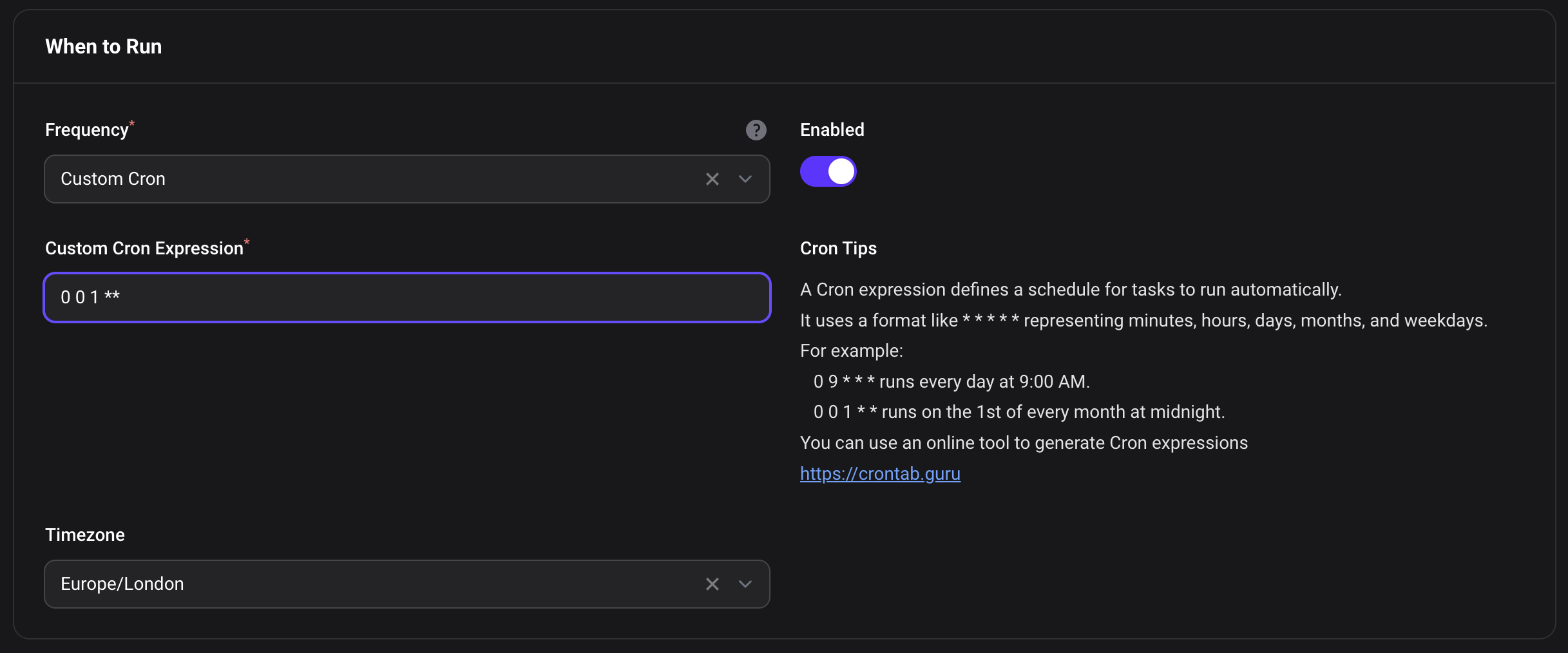
Easy frequency selection
Set on each schedule:
- daily
- weekly
- monthly
- quarterly
- half yearly
- yearly
- or a custom Cron expression for non-standard schedules
Each schedule carries its own timezone too, so one report can reach different regions at a sensible local hour.
An Enabled toggle sits beside the frequency, so a schedule can be built and left switched off until it is wanted, or paused later without deleting it. It can also be flipped straight from the list.
Choose who receives it
- One recipient per schedule, picked from any of your configured user classes.
- Any number of cc recipients from that same class.
- Change the recipient's class and the cc list clears itself, so ids are never reinterpreted against the wrong model.
The file format is chosen per-schedule: CSV or XLSX.
Automatic Recipients
A schedule can instead be fanned out: the report is rerun once per user found in the data, and each of them is sent only their own rows. The fields are hidden from the form by default, since it is a sharp tool and the visibility features now cover most of what it was used for.
'dynamic_recipients' => true, // brings the fields back into the schedule form
Schedules that already have it enabled keep fanning out regardless of this flag — it only governs whether the fields can be reached in the UI.
Control when to send reports
- Choose whether to send when no data is found
- Always send (default) — reports go out even with no rows
- Only send when there are results — sending is skipped if the query returns nothing
- Prevents users from receiving empty reports
- The export files are still created and available in the system
- Ad hoc downloads are never suppressed by this setting: if you asked for the file, you get it
View report results in the admin panel
Opening a saved report shows its live results without running the export or emailing anyone.
- Full width table, 50 rows per page by default
- Click any column header to sort
- One search box matches every field in the results, across all pages
- A Download button runs the report through the normal export pipeline and returns the file to whoever asked for it, in either format
Filtering is not offered in the viewer, because filters are part of the report definition — change them on the report itself.
Searching and sorting are done in PHP rather than in the database, so that they work on columns
that are not database columns: morph relations, relationship aggregates, accessors, and whatever
expressions a SQL query report happens to select. The whole result set is therefore loaded when the
page is opened. On very large reports set viewer_max_rows in the config to cap how many rows the
viewer will load — the export itself is never capped.
File formats
A schedule's format is chosen when you create or edit it: CSV or XLSX. The download action offers the chosen format; CSV is always written first, and XLSX is built from it.
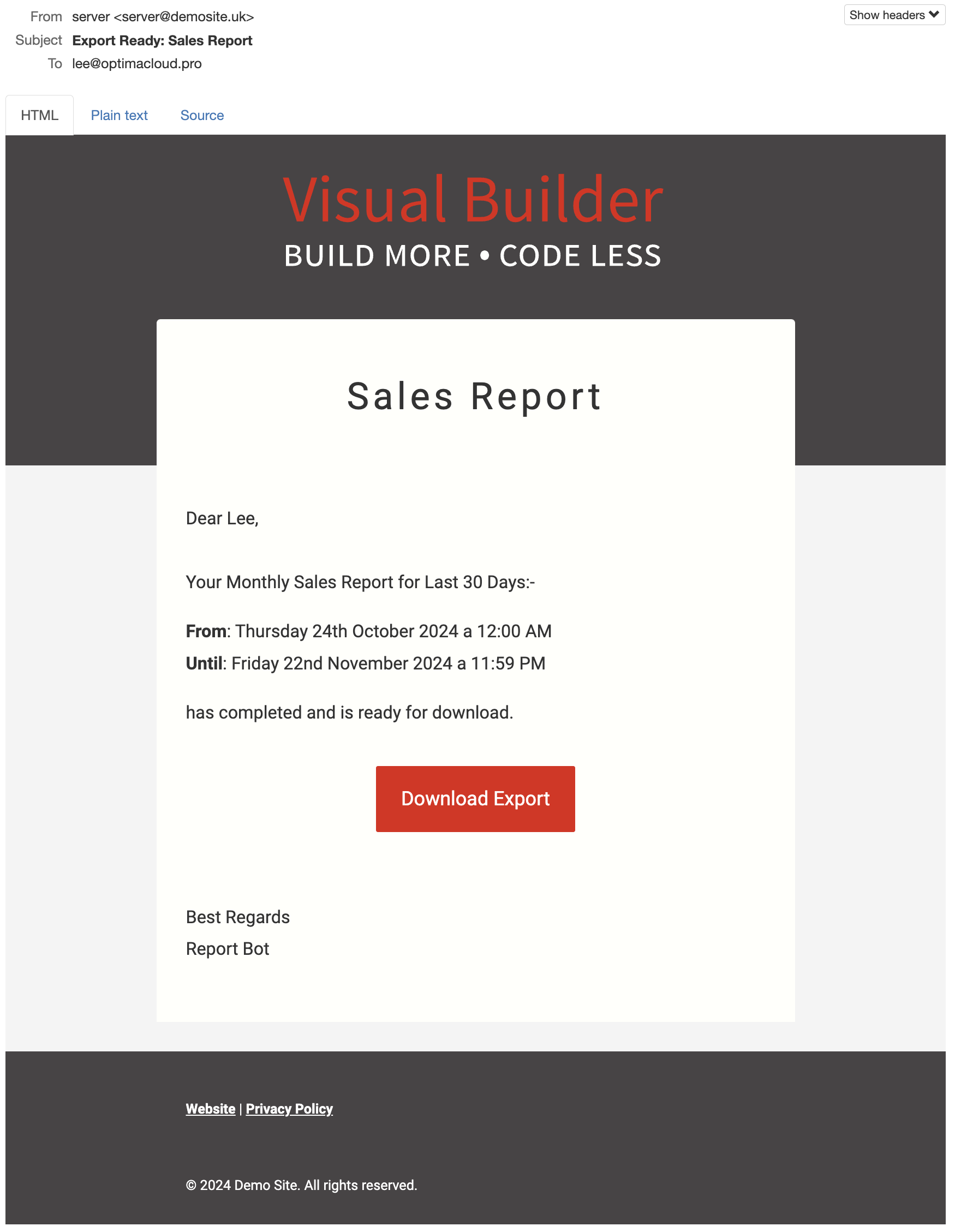
Attractive HTML email templates
- Default HTML email template included
- Or works well with Visual Builder Email Templates — if you want user editable emails
Installation
You can install the package via composer:
# For Filament 5.x
composer require visualbuilder/filament-export-scheduler:^6.0

# For Filament 4.x
composer require visualbuilder/filament-export-scheduler:^4.0
Copy views and migrations, then run the migration:
php artisan export-scheduler:install
This creates the custom_reports and scheduled_reports tables. If you are coming from 5.x, a
third migration copies your export_schedules rows across — see UPGRADE.md.
Optionally seed an example report for the users table. It creates a report of all users, delivered on the 1st of every month:
php artisan vendor:publish --tag=export-scheduler-seeders
php artisan db:seed --class=CustomReportSeeder
Schedule Command in Laravel
To enable automatic sending you must add the console command to your scheduler.
1. Register the Scheduled Command
In routes/console.php (Laravel 11+):
use Illuminate\Support\Facades\Schedule;

Schedule::command('export:run')->everyMinute();
2. Check the server's cron
Ensure your server is set up to run Laravel's scheduler by adding this cron entry:
* * * * * cd /path-to-your-project && php artisan schedule:run >> /dev/null 2>&1
3. Review the config file
Here you can
- override the resource
- customise the navigation menu
- set the disk to be used
- customise which notification and email template is used
- cap how many rows the viewer loads
- restrict who may write SQL query reports
- set which user classes can own reports, receive them, and be given visibility of them
- change how a user's display name and email address are read
- decide who, if anyone, may bypass visibility and administer every report
use Filament\Pages\Enums\SubNavigationPosition;
use Filament\Support\Enums\Width;
use Visualbuilder\ExportScheduler\Filament\Resources\CustomReportResource;
use Visualbuilder\ExportScheduler\Mail\ExportReady;
use Visualbuilder\ExportScheduler\Notifications\ScheduledExportCompleteNotification;
use Visualbuilder\ExportScheduler\Support\ReportUserResolver;
use Visualbuilder\ExportScheduler\Support\VisibilityBypass;

return [

    /**
     * Filament resources to register. Subclass the resource and swap it in here
     * to customise its forms, tables or pages.
     */
    'resources' => [
        CustomReportResource::class,
    ],

    /**
     * The success Notification and Mailable to use
     */
    'notification' => ScheduledExportCompleteNotification::class,
    'mailable' => ExportReady::class,

    /**
     * Allow users to choose from Exporters in these directories
     */
    'exporter_directories' => [
        'App\Filament\Exporters',
    ],

    /**
     * Where the exports should be stored, local or s3
     */
    'file_disk' => 'local',

    /**
     * The report viewer loads the whole result set so it can search and sort
     * across every page, including columns that are not database columns. Set a
     * number here to cap how many rows are loaded on very large reports. Null
     * loads all of them. The export itself is never capped.
     */
    'viewer_max_rows' => null,

    /**
     * Roles allowed to create SQL query reports. Uses Spatie Permission's
     * hasRole(). Set to an empty array to allow all users.
     */
    'sql_query_roles' => ['Developer'],

    /**
     * Admin Panel Navigation
     */
    'navigation' => [
        'enabled' => true,
        'sort' => 100,
        'label' => 'Custom Report',
        'plural_label' => 'Custom Reports',
        'icon' => 'heroicon-o-document-chart-bar',
        'group' => 'Reports',
        'cluster' => false,
        'position' => SubNavigationPosition::Top,

        /**
         * Width of the create, edit and delete modals in the schedules
         * relation manager. The schedule form is wide - frequency,
         * recipient, cc and overrides - so it needs more room than a
         * Filament default.
         */
            'modal_width' => Width::FiveExtraLarge,
        ],
    ],

    /**
     * How the package reads a user's id, display label and email address.
     *
     * Bind your own implementation of ResolvesReportUsers here if the per-model
     * attributes below are not enough.
     */
    'user_resolver' => ReportUserResolver::class,

    /**
     * Which users may see, edit, delete and run every report and schedule,
     * regardless of who owns them.
     *
     * The default grants this to nobody. Bind your own implementation of
     * BypassesReportVisibility to open it up to admins.
     */
    'visibility_bypass' => VisibilityBypass::class,

    /**
     * Automatic Recipients - reruns a report once per user found in the data and
     * sends each of them only their own rows.
     *
     * Hidden from the schedule form by default. Schedules that already have it
     * enabled keep fanning out regardless of this flag; it only governs whether
     * the fields can be reached in the UI.
     */
    'dynamic_recipients' => false,

    /**
     * Which authenticatable models may receive exports, and be given visibility
     * of a report.
     *
     * Only `model` is required. `title_attribute` and `email_attribute` each
     * default to 'email' independently - email_attribute deliberately does not
     * inherit title_attribute, so a model labelled by a name is never mailed at
     * that name. Both are read with data_get(), so 'contact.email' works.
     */
    'user_models' => [
        [
            'model' => \App\Models\User::class,
            'title_attribute' => 'email',
            // 'email_attribute' => 'email',
            // 'model_label' => 'Users',
        ],
    ],
];
4. Ensure you have added the Filament Export migrations
If you don't have an exports table you can add it with:
# Laravel 11 and higher
php artisan make:queue-batches-table
php artisan make:notifications-table

# Laravel 10
php artisan queue:batches-table
php artisan notifications:table

# All apps
php artisan vendor:publish --tag=filament-actions-migrations
Check the docs at: https://filamentphp.com/docs/actions/prebuilt-actions/export
Polymorphism — using different user classes
This package uses this by default, so please ensure your exports migration has this line:
$table->morphs('user');
This will create the columns user_type and user_id to allow any user type to be associated with
an export.
Note: this call is already made in the package service provider, so you don't need to include it.
Export::polymorphicUserRelationship();
5. Add the plugin to your Filament panel provider
use Visualbuilder\ExportScheduler\ExportSchedulerPlugin;

public function panel(Panel $panel): Panel
{
    return $panel
        ->default()
        ->plugins([
            ExportSchedulerPlugin::make(),
        ]);
}
Both navigation items can be gated together, or one at a time:
ExportSchedulerPlugin::make()
    ->enableNavigation(fn () => auth()->user()->can('viewReports'))
Make some export classes with:
php artisan make:filament-exporter
How the package identifies your users
Nothing here assumes your user model has email, id or name columns. Every id, display label
and email address the package reads goes through the ResolvesReportUsers contract, resolved from
the container.
The default resolver tries three things in order:
- The model's own
HasExportReportIdentitymethods, if it implements that contract. - The
title_attributeandemail_attributefrom config, read withdata_get()— so dot notation into relations works. - A fallback label, so a user is never rendered as a blank option.
email_attribute deliberately does not inherit title_attribute. A model labelled by a person's
name is never mailed at that name.
Per-model control
use Visualbuilder\ExportScheduler\Contracts\HasExportReportIdentity;

class Contact extends Model implements HasExportReportIdentity
{
    public function getExportReportLabel(): string
    {
        return "{$this->last_name}, {$this->first_name}";
    }

    public function getExportReportEmail(): ?string
    {
        return $this->work_email ?? $this->personal_email;
    }
}
Or replace the resolver entirely
// In a service provider
$this->app->bind(
    \Visualbuilder\ExportScheduler\Contracts\ResolvesReportUsers::class,
    \App\Services\CustomReportUserResolver::class,
);
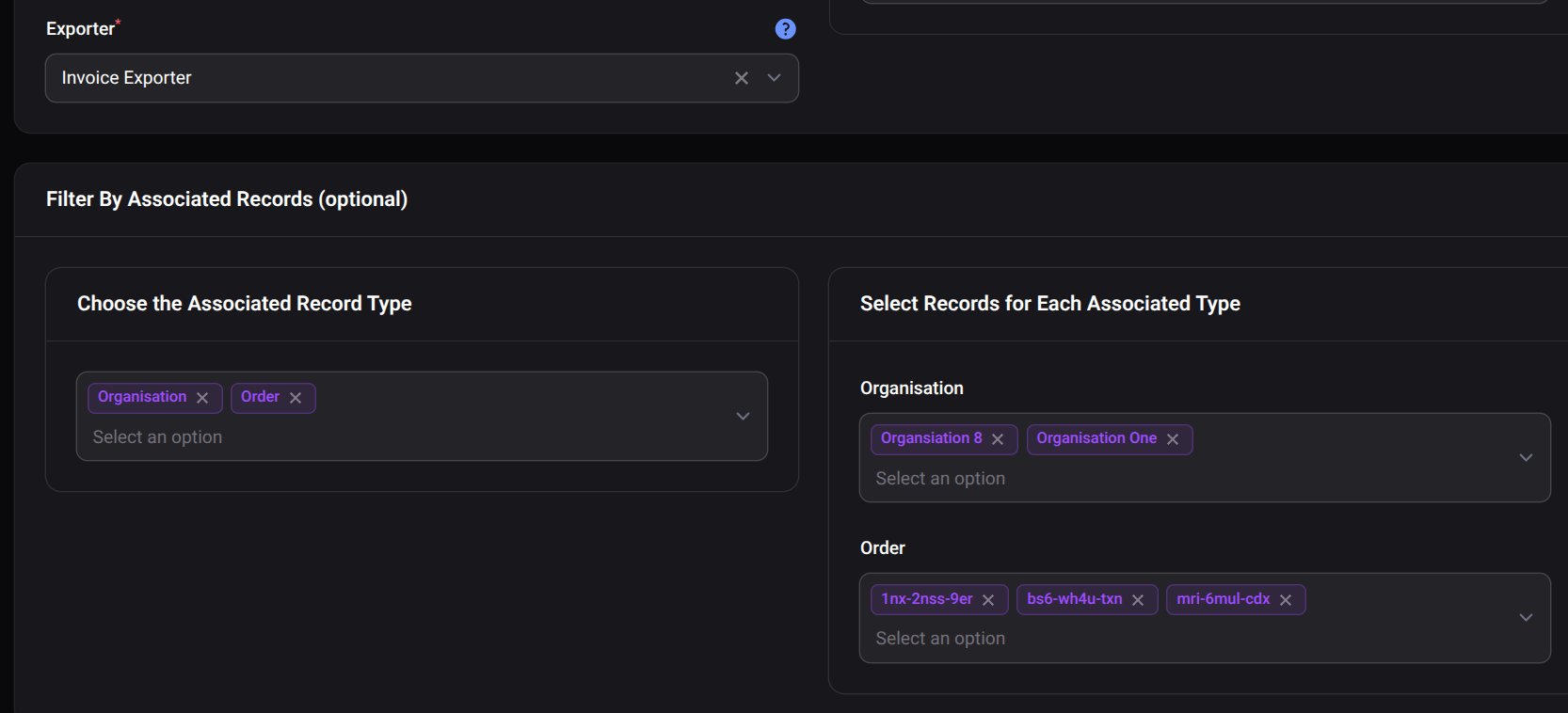
Filtering exports by a related attribute/model
A typical scenario might be exporting all Orders filtered by a specific Organisation. To filter by organisation we need to know the field that should be searchable.
This requires adding the InteractsWithExportSchedulerFilter trait to the models that can be
filtered.
use Visualbuilder\ExportScheduler\Traits\InteractsWithExportSchedulerFilter;

class Organisation extends Model
{
    use InteractsWithExportSchedulerFilter;

    protected $filterOptionLabel = 'name';
}
The trait provides:
$filterOptionLabel— which column is used for the filter label.excludeFilterableAttributes()— exclude attributes, including nested ones, from column selection. Suitable for attributes that do not exist in the database.excludeFilterableRelations()— exclude relations that should not be offered in the filter. By default all BelongsTo relations are included.
MorphTo relations are also supported when filtering nested attributes.
Extending the package
The service, job, notification and mailable all take the report and its schedule as separate arguments. The schedule is always optional — pass none for an ad hoc run.
use Visualbuilder\ExportScheduler\Services\ScheduledExporter;

// Scheduled delivery
(new ScheduledExporter($report, $schedule))->run();

// Ad hoc: no schedule, no recipient list, the result goes to the requester
(new ScheduledExporter($report))->run();
| Class | Signature |
|---|---|
ScheduledExporter |
__construct(CustomReport $report, ?ScheduledReport $schedule = null) |
ScheduledExportCompletion |
__construct(Export $export, CustomReport $report, ?ScheduledReport $schedule = null, bool $isAdHoc = false) |
ScheduledExportCompleteNotification |
__construct(Export $export, CustomReport $report, ?ScheduledReport $schedule = null) |
ExportReady |
__construct(Export $export, CustomReport $report, ?ScheduledReport $schedule = null) |
Testing
composer test
To prove the integrity of the system the test suite creates these schedules and simulates running the tasks every day for 4 years to ensure leap years are handled correctly.
| Test Name | Schedule Frequency | Cron Expression | Expected Report Time | Verification Method (Example) |
|---|---|---|---|---|
| User Export Daily | DAILY | N/A | Every day at 3:00 AM | Check for a new file/email at 3:00 AM each simulated day. |
| User Export Weekly (Monday) | WEEKLY | N/A | Every Monday at 4:00 AM | Check for a new file/email at 4:00 AM every Monday. |
| User Export Monthly (Day 15) | MONTHLY | N/A | The 15th day of every month at 5:00 AM | Check for a new file/email at 5:00 AM on the 15th of each month. |
| User Export Monthly (Last Day) | MONTHLY | N/A | The last day of every month at 6:00 AM | Check for a new file/email at 6:00 AM on the last day of each month. |
| User Export Yearly | YEARLY | N/A | January 1st of every year at 7:00 AM | Check for a new file/email at 7:00 AM on January 1st. |
| User Export Leap Year Test | YEARLY | N/A | February 29th (during leap years) at 10:00 AM | Check for file/email on Feb 29th in leap years; verify handling in non-leap years. |
| User Export Quarterly (Jan 10) | QUARTERLY | N/A | January 10th, April 10th, July 10th, October 10th at 8:00 AM | Check for a new file/email on these dates at 8:00 AM. |
| User Export Half-Yearly (Jul 1) | HALF_YEARLY | N/A | July 1st and January 1st of every year at 9:00 AM | Check for a new file/email on these dates at 9:00 AM. |
| User Export Weekdays 10:30 AM | CRON | 30 10 * * 1-5 |
Every weekday (Monday-Friday) at 10:30 AM | Check for a new file/email at 10:30 AM each weekday. |
| User Export Quarter Ends 2:00 AM | CRON | 0 2 1 3,6,9,12 * |
The 1st day of March, June, September, and December at 2:00 AM | Check for a new file/email on these dates at 2:00 AM. |
Codex Setup
When using this repository in the OpenAI Codex environment, a .codex/setup.sh script will install
PHP, MySQL, and Composer during initialization when network access is available.
Upgrading
Please see UPGRADE.md for the 5.x to 6.0 migration guide.
Changelog
Please see CHANGELOG for more information on what has changed recently.
Contributing
Please see CONTRIBUTING for details.
Security Vulnerabilities
Please review our security policy on how to report security vulnerabilities.
Credits
License
The MIT License (MIT). Please see License File for more information.
Related Packages
A Filament v5 design-system review panel and AI-friendly theme designer.
Effortlessly manage revisions of your Eloquent models in Filament with polymorph...
Lottie animation Schema component and Blade component for Filament panels.
Laravel artisan commands for YouTrack workflow automation — extracted so dev-age...
Version History
| Version | Released | PHP | License |
|---|---|---|---|
| 6.2.2 | ^8.2 | MIT | |
| 6.2.1 | ^8.2 | MIT | |
| 6.2.0 | ^8.2 | MIT | |
| 6.1.0 | ^8.2 | MIT | |
| 6.0.4 | ^8.2 | MIT | |
| 6.0.3 | ^8.2 | MIT | |
| 6.0.2 | ^8.2 | MIT | |
| 6.0.1 | ^8.2 | MIT | |
| 6.0.0 | ^8.2 | MIT | |
| 5.2.0 | ^8.2 | MIT | |
| 5.1.1 | ^8.2 | MIT | |
| 5.1.0 | ^8.2 | MIT | |
| 5.0.7 | ^8.2 | MIT | |
| 5.0.5 | ^8.2 | MIT | |
| 5.0.4 | ^8.2 | MIT | |
| 5.0.3 | ^8.2 | MIT | |
| 5.0.2 | ^8.2 | MIT | |
| 5.0.1 | ^8.2 | MIT | |
| 5.0.0 | ^8.2 | MIT | |
| 4.0.12 | ^8.2 | MIT | |
| 4.0.11 | ^8.2 | MIT | |
| 4.0.10 | ^8.2 | MIT | |
| 4.0.9 | ^8.2 | MIT | |
| 4.0.8 | ^8.2 | MIT | |
| 4.0.7 | ^8.2 | MIT | |
| 4.0.6 | ^8.2 | MIT | |
| v4.0.5 | ^8.2 | MIT | |
| v4.0.4 | ^8.2 | MIT | |
| 4.0.3 | ^8.2 | MIT | |
| 4.0.2 | ^8.2 | MIT |
Showing the latest 30 of 82. See every release on Packagist