wangta69/laravel-editor
🚀 Laravel Editor Hub (wangta69/laravel-editor)
WYSIWYG · Markdown · Block(JSON) 에디터를 하나의 통일된 인터페이스로 제공하는 라라벨 패키지입니다.
기존 프로젝트의 코드 수정 없이 설정(config/pondol-editor.php) 하나로 SunEditor, Summernote, EasyMDE, Cherry Markdown, Vditor, Editor.js, Naver SmartEditor2 등을 자유롭게 교체·혼용할 수 있습니다.
🌟 Real-world Usage
이 패키지는 길라(Gilra) (Online Fortune Service)의 커뮤니티 Q&A, 1:1 상담소, 공지사항을 구축하며 실제 운영 환경에서 검증되었습니다.
특히 다중 에디터 인스턴스 처리, 스크립트 defer 로딩 대응, 이미지 자동 추출/업로드, Light/Dark 테마 전환을 실서비스 요구에 맞게 고도화했습니다.
✨ Key Features
- 10종 에디터 통합 지원: WYSIWYG, Markdown, Block(JSON) 에디터를 동일한 방식으로 호출
- 100% 하위 호환: 기존
@include('editor::default', ...)및<x-editor-components />문법 그대로 지원 - 라이트 / 다크 테마 & 툴바 프리셋:
theme(light|dark) 및preset(minimal|standard|full) 지원 - 레이아웃 / 모달 완벽 대응:
section_mode(section|stack|inline)로 일반 페이지부터 AJAX 모달까지 지원 - 중복 로드 방지 & 다중 에디터 안전성:
@once기반 에셋 로딩 및 요청 단위 인스턴스 관리 (세션 오염 제거) - 통합 이미지 업로드 & 보안 검증: Laravel 10·11·12·13
public디스크 호환, MIME/실제 이미지 바이너리 검증,ImageUploaded이벤트 발행 - 렌더링 헬퍼 내장: Base64 이미지 파일 추출(
extractBase64Image), Markdown → HTML(toHtml), Editor.js JSON → HTML(renderEditorJs)
📚 Documentation
상세한 사용법과 문서는 공식 사이트에서 확인하실 수 있습니다.
🛠 Installation
1. Composer 설치 (PHP 8.1+ / Laravel 10·11·12)
composer require wangta69/laravel-editor
2. 오픈소스 로컬 에셋 다운로드 & 퍼블리싱
# 1) 오픈소스 에디터 정적 파일(JS/CSS) 다운로드 (필요한 것만 받으려면 --only=suneditor,easymde 사용)
php artisan pondol:install-editor assets

# 2) 설정 파일(config/pondol-editor.php), public/plugins/editor 퍼블리싱 및 storage:link 생성
php artisan pondol:install-editor full
참고: 특정 에디터만 퍼블리싱하고 싶다면
--only=suneditor,summernote또는--tag=public-plugins-suneditor를 사용할 수 있습니다.
⚙️ Supported Editors
config/pondol-editor.php의 default-template 또는 뷰의 template 파라미터로 아래 키를 지정할 수 있습니다.
| Key | Category | Editor Name | License | 특징 |
|---|---|---|---|---|
suneditor |
WYSIWYG | SunEditor | MIT | 기본값(추천). 순수 JS(jQuery 불필요), 한국어/표/이미지 리사이즈 최적 |
summernote |
WYSIWYG | Summernote Lite | MIT | 가볍고 익숙한 UI, Bootstrap 비의존 Lite 버전 |
smart-editor |
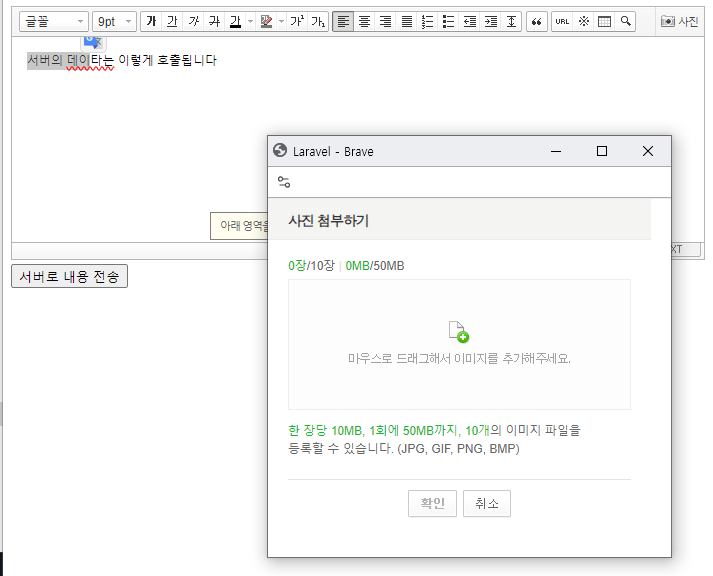
WYSIWYG | Naver SmartEditor2 | LGPL-2.1 | 국내 게시판에 친숙한 네이버 스마트에디터 (HTML5 멀티 업로드 지원) |
easymde |
Markdown | EasyMDE | MIT | 가볍고 <textarea>와 100% 네이티브 호환되는 마크다운 에디터 |
cherry-markdown |
Markdown | Cherry Markdown | Apache-2.0 | 실시간 분할 미리보기, Mermaid/수식, HTML→MD 붙여넣기 지원 |
vditor |
Markdown | Vditor | MIT | WYSIWYG / 실시간 렌더링(IR) / 분할(SV) 3가지 편집 모드 지원 |
editorjs |
Block | Editor.js | Apache-2.0 | 노션 스타일 블록 에디터 (깔끔한 JSON 데이터 출력) |
tinymce |
WYSIWYG | TinyMCE | GPLv2+ / Commercial | 강력한 기능 (※ 오픈소스 사용 시 GPL 라이선스 조건 확인 필요) |
froala |
WYSIWYG | Froala Editor | Commercial | 하위 호환용 (별도 상용 라이선스 필요) |
richtext |
WYSIWYG | RichTextEditor | Commercial | 하위 호환용 (별도 상용 라이선스 필요) |
📖 Quick Start
1. Blade Component 방식 (권장)
{{-- 기본 에디터 (SunEditor, Light 테마) --}}
<x-editor-components name="content" id="content_id" :value="old('content', $article->content ?? '')" />

{{-- 특정 에디터 + 다크 테마 + 심플 툴바 --}}
<x-editor-components
    template="cherry-markdown"
    name="body"
    id="body_id"
    :value="$article->body ?? ''"
    :options="['theme' => 'dark', 'preset' => 'minimal']"
/>
2. Blade Include 방식 (기존 100% 호환)
@include('editor::default', [
    'name' => 'content',
    'id' => 'content-id',
    'value' => old('content', $article->content ?? null),
    'attr' => ['class' => 'form-control input-sm'],
])
다른 에디터를 일회성으로 지정할 때는 'template' => 'easymde'와 'options'를 함께 넘기면 됩니다:
@include('editor::default', [
    'template' => 'easymde',
    'name' => 'markdown_body',
    'id' => 'md-body',
    'value' => $post->markdown_body ?? '',
    'options' => ['theme' => 'dark', 'preset' => 'minimal'],
])
🚀 Advanced Usage
1. 한 페이지에 여러 에디터 동시에 사용하기
동일 에디터든 서로 다른 에디터든 ID만 다르면 자동으로 중복 에셋 로딩을 방지하고 각각 독립적으로 동작합니다.
<x-editor-components template="suneditor" name="summary" id="summary_id" :options="['preset' => 'minimal']" />
<x-editor-components template="easymde" name="detail" id="detail_id" />
2. AJAX 모달 / 레이아웃 없는 뷰에서 사용하기 (inline 모드)
레이아웃에 @yield('styles')나 @yield('scripts')가 없는 모달·부분 뷰에서는 section_mode를 inline으로 지정하세요.
<x-editor-components
    name="reply"
    id="modal_reply"
    :options="['section_mode' => 'inline']"
/>
3. 본문 렌더링 & 이미지 추출 헬퍼 (Editor Facade)
use Pondol\Editor\Facades\Editor;

// 1) Base64 인라인 이미지를 실제 파일로 추출 후 URL 치환 (SVG 등 XSS 위험 포맷 자동 차단)
$html = Editor::extractBase64Image(
    $request->input('content'),
    public_path('uploads/editor'),
    '/uploads/editor/'
);

// 2) Markdown -> 안전한 HTML 변환
$markdownHtml = Editor::toHtml($article->markdown_body);

// 3) Editor.js JSON -> 안전한 HTML 변환
$blockHtml = Editor::renderEditorJs($article->blocks_json);
4. 이미지 업로드 이벤트 훅 (ImageUploaded)
통합 업로더(/editor/upload) 또는 SmartEditor 업로드가 성공할 때마다 Pondol\Editor\Events\ImageUploaded 이벤트가 발행됩니다. 워터마크, 리사이징, S3 백업 등을 리스너로 연결할 수 있습니다.
use Pondol\Editor\Events\ImageUploaded;

Event::listen(ImageUploaded::class, function (ImageUploaded $event) {
    // $event->disk, $event->path, $event->url, $event->userId 등 활용
});
5. 기존 SmartEditor Trait 직접 사용 (하위 호환)
use Pondol\Editor\Traits\SmartEditor;

class PostController extends Controller
{
    use SmartEditor;

    public function uploadImage(Request $request)
    {
        $result = $this->_uploadStore($request, 'uploads/posts');
        if (! empty($result['error'])) {
            return response()->json(['success' => false]);
        }

        return $result['url'];
    }
}
6. 임시 업로드 이미지 정리 스케줄러
storage/app/public/tmp/editor에 남은 오래된 임시 파일을 정리합니다.
php artisan pondol:clean-editor-tmp --days=1
routes/console.php (Laravel 11+)에 등록 예시:
Schedule::command('pondol:clean-editor-tmp --days=1')->daily();
🧪 Tests & Sample Preview
브라우저 샘플 확인
패키지 설치 후 아래 URL에서 10종 에디터를 즉시 테스트할 수 있습니다. (기본 미들웨어: ['web', 'auth'])
GET /editor/sample/suneditorGET /editor/sample/summernoteGET /editor/sample/easymdeGET /editor/sample/cherry-markdownGET /editor/sample/vditorGET /editor/sample/editorjsGET /editor/sample/smart-editor
패키지 단위 테스트 실행
composer install
composer test
🖼 Screenshots
🤝 Contribution & Support
- Issues: GitHub Issues
- Docs & Support: onstory.fun
- Real-world Case: 길라(Gilra) 운세 서비스
Copyright © wangta69. Licensed under the MIT License.
Related Packages
A powerful Livewire rich text editor (WYSIWYG) component built top of Jodit Edit...
A powerful Livewire rich text editor (WYSIWYG) component built top of Jodit Edit...
Version History
| Version | Released | PHP | Laravel | License |
|---|---|---|---|---|
| 8.13.0 | ^8.1 | ^10.0| | MIT | |
| 8.12.1 | >=7.0.0 | MIT | ||
| 8.12.0 | >=7.0.0 | MIT | ||
| 8.5.2 | >=7.0.0 | MIT | ||
| 8.5.1 | >=7.0.0 | MIT | ||
| 8.5.0 | >=7.0.0 | MIT | ||
| 8.4.2 | >=7.0.0 | MIT | ||
| 8.4.1 | >=7.0.0 | MIT | ||
| 8.4.0 | >=7.0.0 | MIT | ||
| 8.3.3 | >=7.0.0 | MIT | ||
| 8.3.2 | >=7.0.0 | MIT | ||
| 8.3.1 | >=7.0.0 | MIT | ||
| 8.3.0 | >=7.0.0 | MIT | ||
| 8.2.0 | >=7.0.0 | MIT | ||
| 8.1.4 | >=7.0.0 | MIT | ||
| 8.1.3 | >=7.0.0 | MIT | ||
| 8.1.2 | >=7.0.0 | MIT | ||
| 8.1.1 | >=7.0.0 | MIT | ||
| 8.1.0 | >=7.0.0 | MIT | ||
| 8.0.7 | >=7.0.0 | MIT | ||
| 8.0.6 | >=7.0.0 | MIT | ||
| 8.0.5 | >=7.0.0 | MIT | ||
| 8.0.4 | >=7.0.0 | MIT | ||
| 8.0.3 | >=7.0.0 | MIT | ||
| 8.0.2 | >=7.0.0 | MIT | ||
| 8.0.1 | >=7.0.0 | MIT | ||
| 8.0.0 | >=6.0.0 | MIT | ||
| 0.0.9 | >=6.0.0 | MIT | ||
| 0.0.8 | >=6.0.0 | MIT | ||
| 0.0.7 | >=6.0.0 | MIT |
Showing the latest 30 of 36. See every release on Packagist