wotz/filament-admin-bar
| Install | |
|---|---|
composer require wotz/filament-admin-bar |
|
| Latest Version: | v2.2.0 |
| PHP: | ^8.3 |
| License: | MIT |
| Last Updated: | Sep 15, 2026 |
| Links: | GitHub · Packagist |
Admin bar for filament
This package will add an admin bar to the frontend, only visible for logged in Filament users.
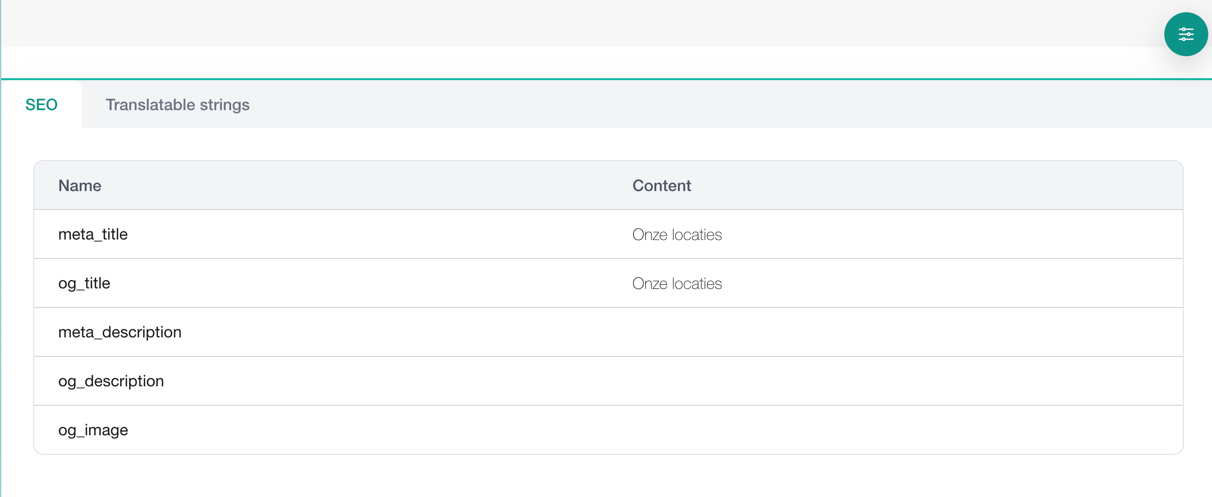
Tabs
Five tabs ship with the package, and each decides for itself whether it has anything to show:
| Tab | Shows |
|---|---|
| SEO | What the page reports to search engines |
| Translatable strings | The copy on this page, editable in place |
| Media | The images on this page, and which of them have no alt text |
| Records | The CMS records behind this page, linked to their edit screens |
| Redirect | Only on a 404: create a redirect from the URL that just failed |
Only the active tab is rendered. Listing a tab therefore costs what it costs when somebody opens it, not on every frontend request an admin makes.
Telling the bar which record a page is
Detail pages need no wiring: anything bound to the route is picked up, so the "Edit page in CMS" action and the Records tab work on them out of the box.
Index and home pages resolve their record some other way, so they say so — usually from the one place an application already funnels them through:
admin_bar_record($staticPage);          // this page contains it
admin_bar_record($vacancy, primary: true); // this page *is* it
The header action opens the primary record. Everything else is a click away in the Records tab.
Sharing the corner
The closed trigger sits against the bottom edge, and so does everything else that wants to be permanent — a dev toolbar, a cookie strip. It steps along the edge to clear anything small parked in its corner, and takes itself out of the way entirely while something spans that edge, coming back when it closes. Laravel Debugbar does all three: a corner button, a full-width strip, and an open panel.
inset_inline sets where it rests when the corner is free.
Telling the bar which images a page draws
The Media tab lists the images the page loaded and flags the ones with no alt text. A page draws them from a great many templates and from one model, so the model is where to say it:
Attachment::retrieved(fn (Attachment $attachment) => admin_bar_media($attachment));
Nothing is collected outside a page view, so a queued job that walks the whole library costs nothing.
The redirect tab
It only appears on a 404, which is the one moment the old URL is in front of you. Your error view has to say so before the layout renders the bar:
@php
    \Wotz\FilamentAdminBar\Tabs\RedirectsTab::markNotFound();
@endphp
Editable strings
The package ships a Translator that records which keys a page resolved, so
the Translatable strings tab knows what to offer. TranslationLoader swaps it
in for Laravel's own — register it in bootstrap/providers.php, before
anything that resolves a translation:
return [
    // …
    Wotz\FilamentAdminBar\TranslationLoader::class,
];
Keys are collected for the whole page view, including the lazy Livewire components and deferred islands it renders afterwards, and the list starts empty on the next page. Nothing is recorded for a visitor who is not signed in to the panel.
Installation
You can install the package via composer:
composer require wotz/filament-admin-bar
DO NOT forget to publish the CSS files, or the bar will not be visible:
php artisan vendor:publish --force --tag=filament-admin-bar-assets
You can publish the config file with:
php artisan vendor:publish --tag="filament-admin-bar-config"
This is the contents of the published config file:
return [
    'tabs' => [
        Wotz\FilamentAdminBar\Tabs\SeoTab::class,
        Wotz\FilamentAdminBar\Tabs\TranslatableStringsTab::class,
    ],
    'translatable-strings-tab' => [
        'excluded' => [
            'filament-admin-bar::*',
            'routes.*',
        ],
    ],
];
Optionally, you can publish the views using
php artisan vendor:publish --tag="filament-admin-bar-views"
Usage
<livewire:admin-bar />
Documentation
For the full documentation, check here.
Testing
vendor/bin/pest
Changelog
Please see CHANGELOG for more information on what has changed recently.
Upgrading
Please see UPGRADING for more information on how to upgrade to a new version.
Contributing
Please see CONTRIBUTING for details.
Security Vulnerabilities
If you discover any security-related issues, please email info@whoownsthezebra.be instead of using the issue tracker.
License
The MIT License (MIT). Please see License File for more information.
Related Packages
A field for Filament that allows you to add content to another field
Version History
| Version | Released | PHP | Laravel | License |
|---|---|---|---|---|
| v2.2.0 | ^8.3 | ^12.0| | MIT | |
| v2.1.2 | ^8.3 | ^12.0| | MIT | |
| v2.1.1 | ^8.3 | ^12.0| | MIT | |
| v2.1.0 | ^8.3 | ^12.0| | MIT | |
| v2.0.1 | ^8.2 | ^10.0| | MIT | |
| v2.0.0 | ^8.2 | ^10.0| | MIT | |
| v1.4.2 | ^8.2 | ^10.0| | MIT | |
| v1.4.1 | ^8.2 | ^10.0| | MIT | |
| v1.4.0 | ^8.2 | ^10.0| | MIT | |
| v1.3.0 | ^8.2 | ^10.0 | | MIT | |
| v1.2.2 | ^8.2 | ^10.0 | MIT | |
| v1.2.1 | ^8.2 | ^10.0 | MIT | |
| v1.2.0 | ^8.2 | ^10.0 | MIT | |
| v1.1.1 | ^8.2 | ^10.0 | MIT | |
| v1.1.0 | ^8.2 | ^10.0 | MIT | |
| v1.0.0 | ^8.2 | ^10.0 | MIT | |
| v0.1.2 | ^8.2 | ^10.0 | MIT | |
| v0.1.1 | ^8.2 | ^10.0 | MIT | |
| v0.1.0 | ^8.2 | ^10.0 | MIT |