yusufgenc/filament-api-forge
| Install | |
|---|---|
composer require yusufgenc/filament-api-forge |
|
| Latest Version: | 1.2.0 |
| PHP: | ^8.2 |
| License: | MIT |
| Last Updated: | Jun 3, 2026 |
| Links: | GitHub · Packagist |
Filament API Forge
Automatically expose your Filament Resources as fully-featured REST APIs — with hash-based authentication, interactive OpenAPI documentation, per-resource access control, rate limiting, and IP restrictions. No Sanctum required.
Screenshots
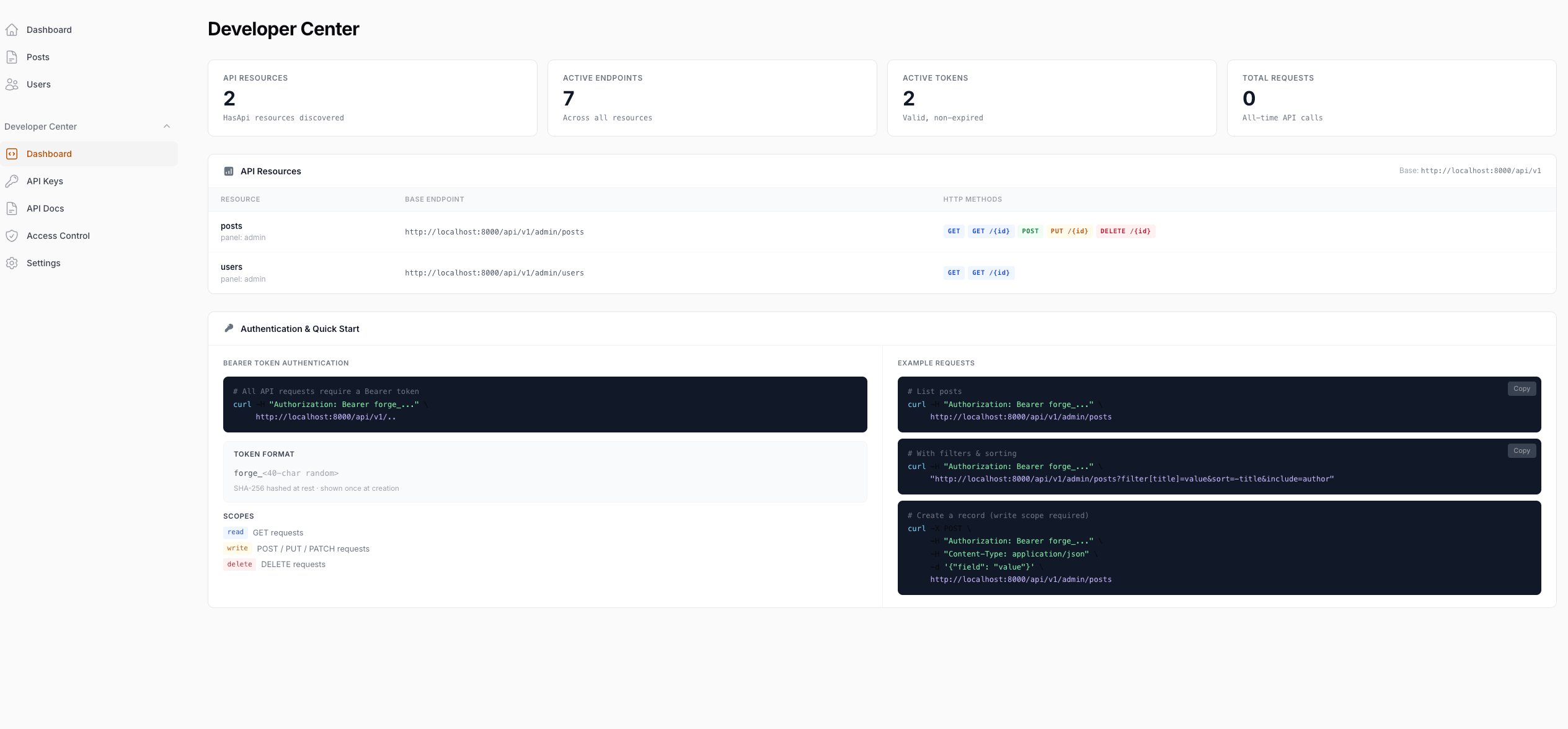
Developer Center

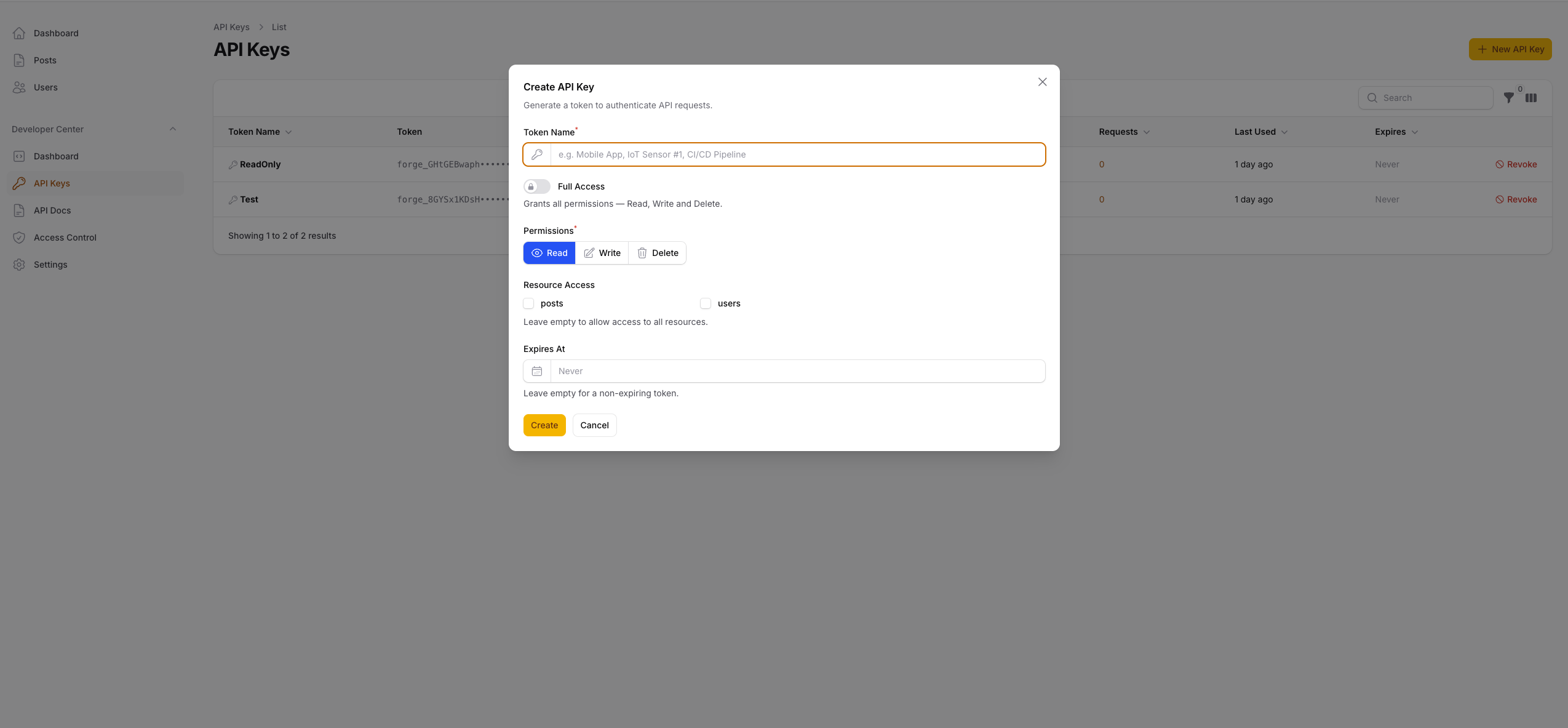
API Keys

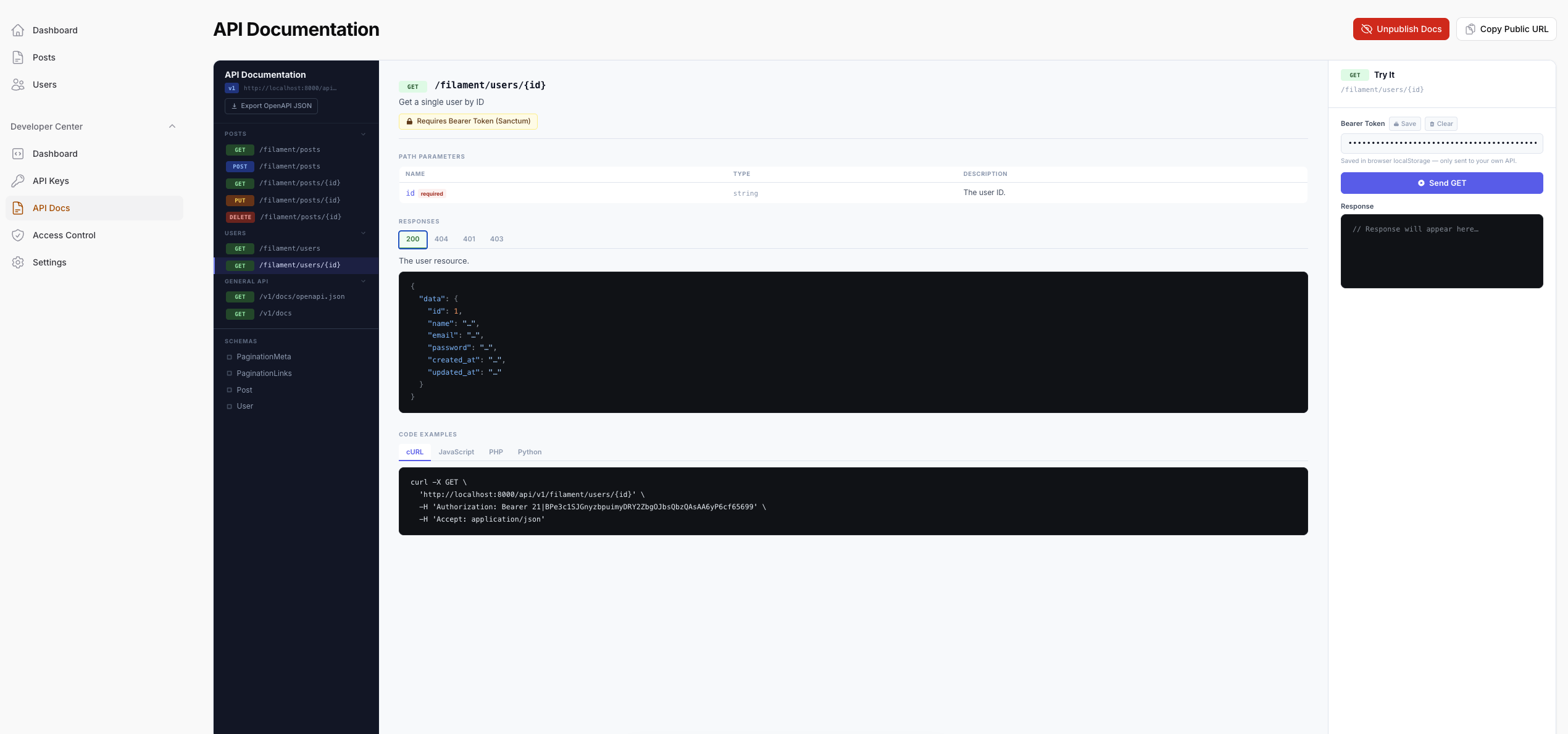
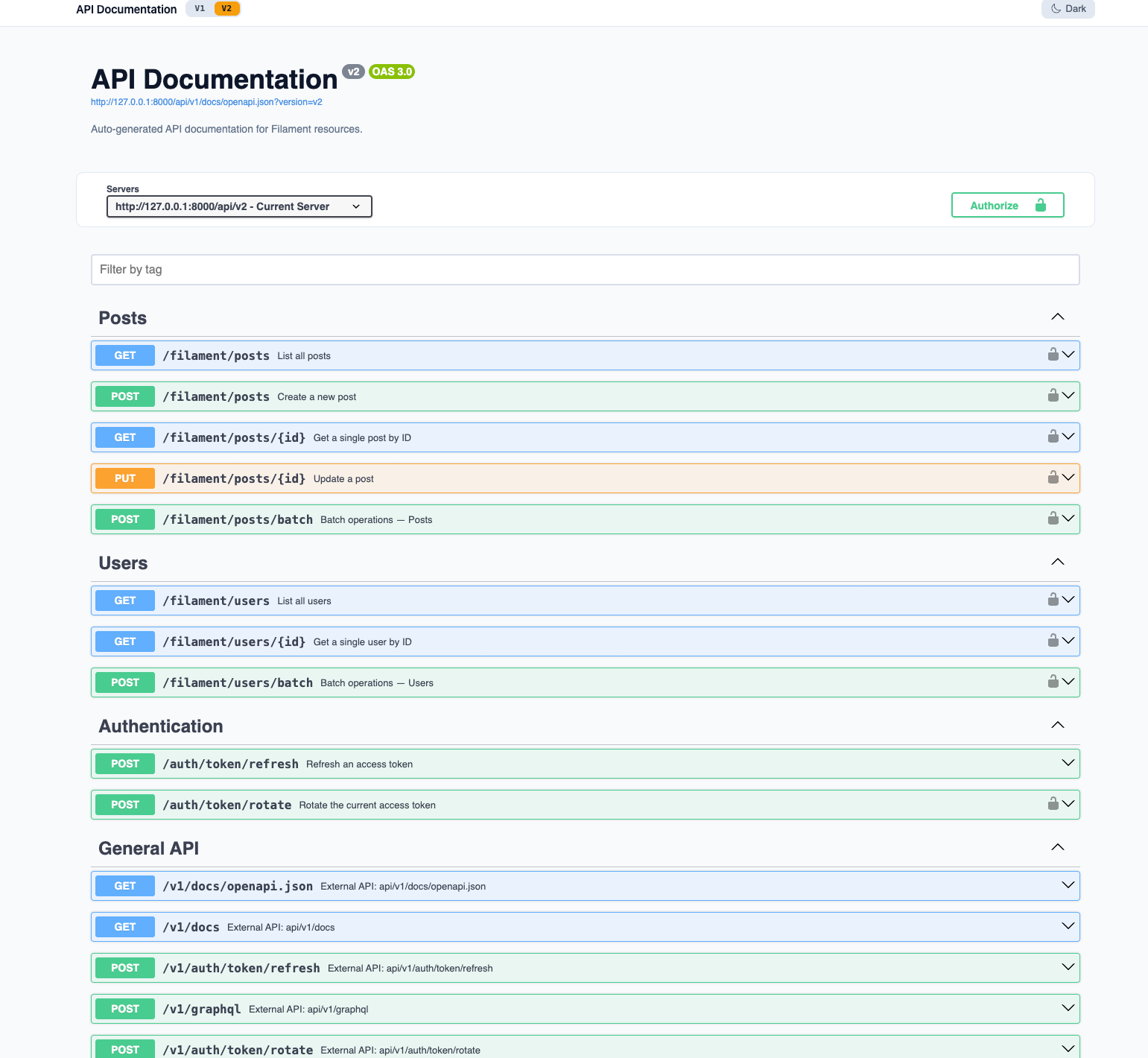
API Docs

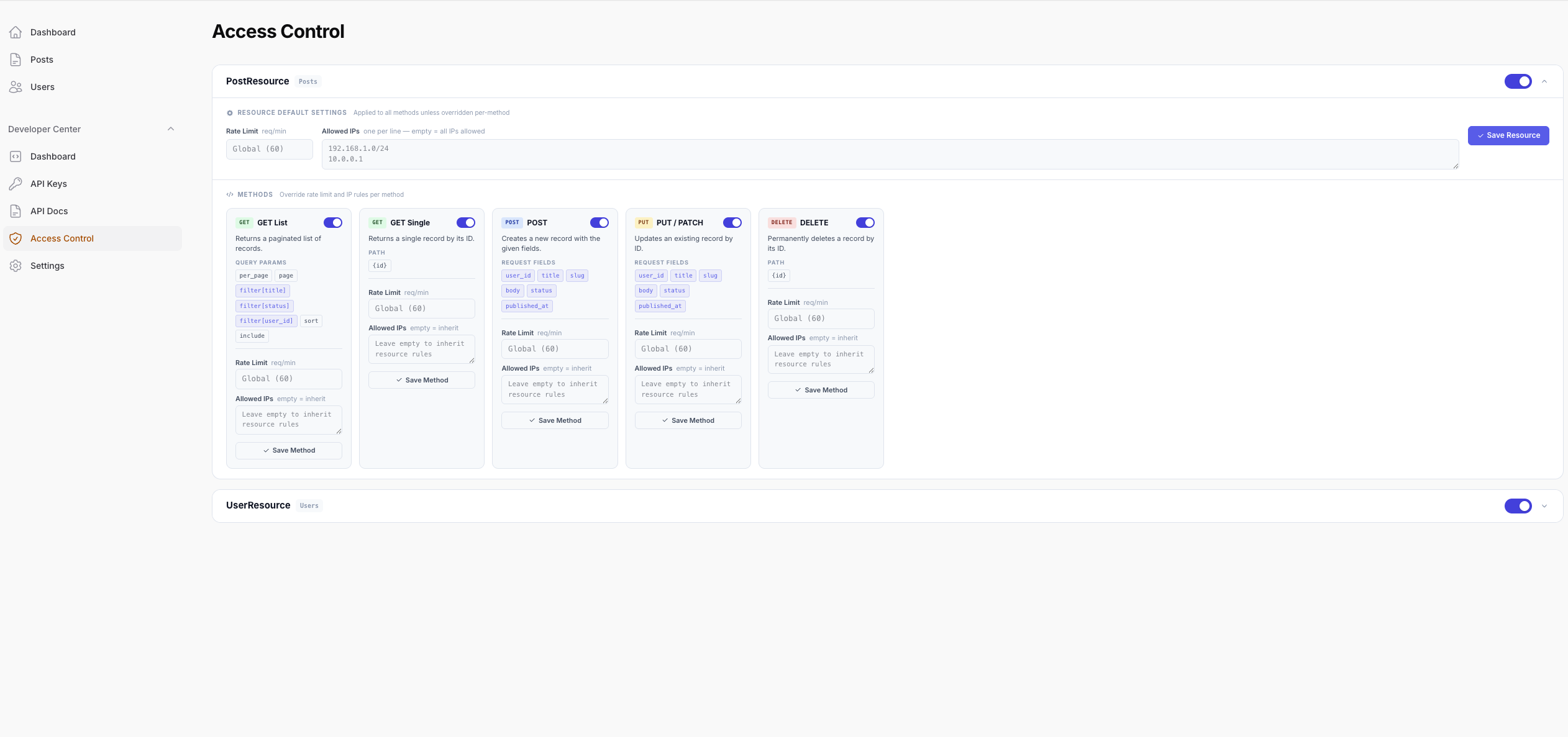
Access Control

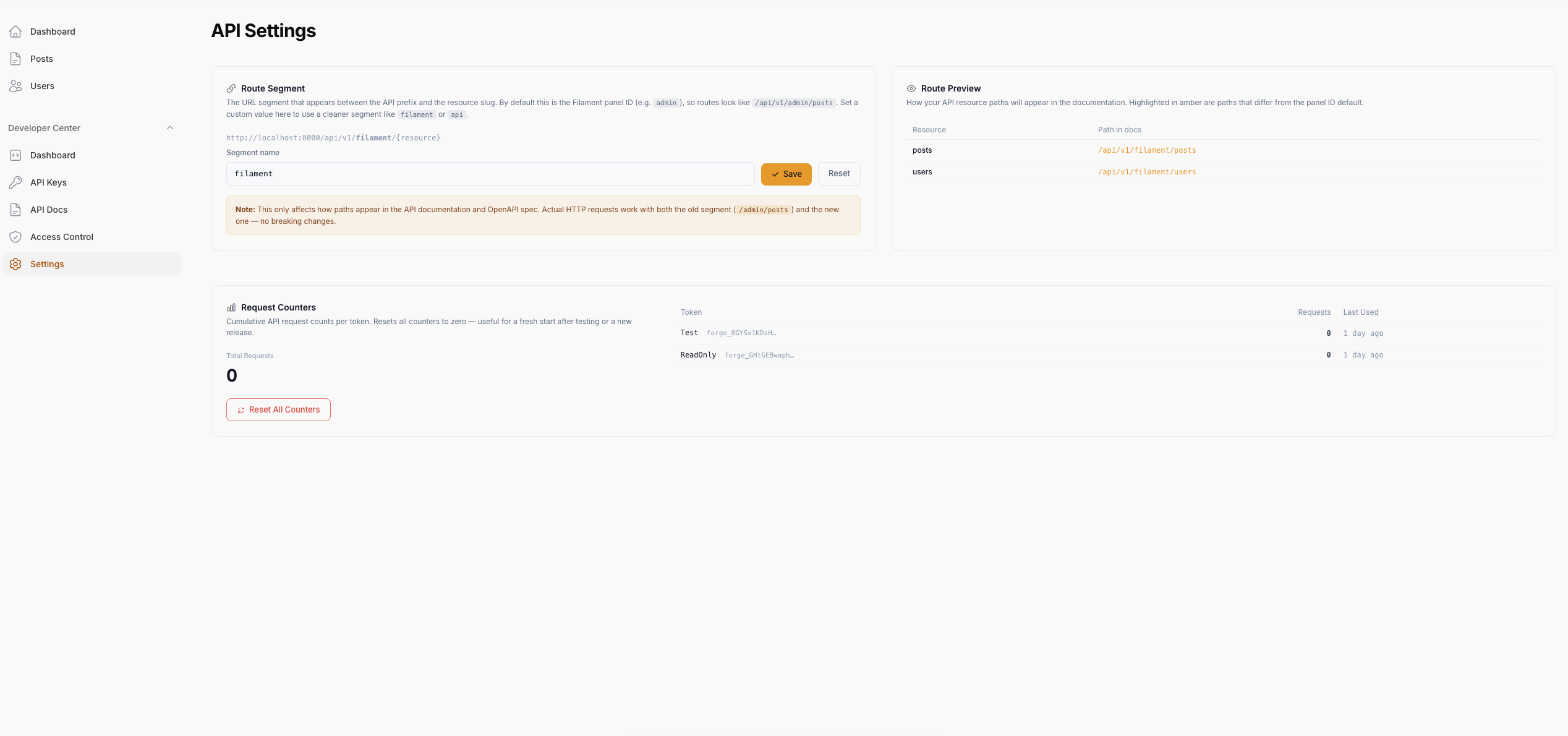
Settings

Public Docs — Light Mode

Public Docs — Dark Mode

Features
| Feature | Description |
|---|---|
| Auto-Discovery | Detects any Resource implementing HasApi — zero manual route registration |
| Hash-Based Auth | forge_ prefix tokens (SHA-256 hashed at rest), Stripe/OpenAI style |
| CRUD Endpoints | index, show, store, update, destroy — enable only what you need |
| Spatie Query Builder | Filtering, sorting, field selection, eager loading, full-text search out of the box |
| Scope Enforcement | Per-token read / write / delete scopes, plus * for full access |
| Access Control | Dedicated panel page — enable/disable methods or entire resources, set rate limits and IP rules |
| Rate Limiting | Global, per-resource, and per-method limits — method overrides resource, resource overrides global |
| IP Restrictions | Whitelist IPs per resource or per method (CIDR, wildcard, exact) |
| Lifecycle Hooks & Events | beforeCreate/afterUpdate-style hooks on your Resource, plus dispatched Laravel events for every write operation |
| File Uploads | multipart/form-data uploads on store/update — Spatie Media Library integration with Laravel Filesystem fallback |
| Custom Actions | Expose domain actions (publish, archive, …) as endpoints with a single #[ApiAction] attribute |
| Nested Resources | Full CRUD on child relations (/posts/1/comments) with scoped binding and per-relation rules |
| Batch Operations | Transaction-wrapped bulk create/update/delete in a single request |
| Soft Deletes | restore / forceDelete endpoints and ?trashed=only|with filters for SoftDeletes models |
| Export | Stream the filtered result set as CSV or JSON from GET {resource}/export |
| Response Transformation | Reshape API output per resource with a single apiTransform() method |
| Custom Scopes | Require arbitrary scopes per method via scope_map — beyond read/write/delete |
| Token Refresh & Rotation | forge_refresh_ tokens, auth/token/refresh + auth/token/rotate endpoints |
| Expiry Notifications | api-forge:notify-expiring warns token owners by mail + database notification |
| Audit Log | Every request logged (token, action, status, duration, IP) with dashboard view + prune command |
| Response Cache | Config-gated caching of GET responses, auto-invalidated on any write |
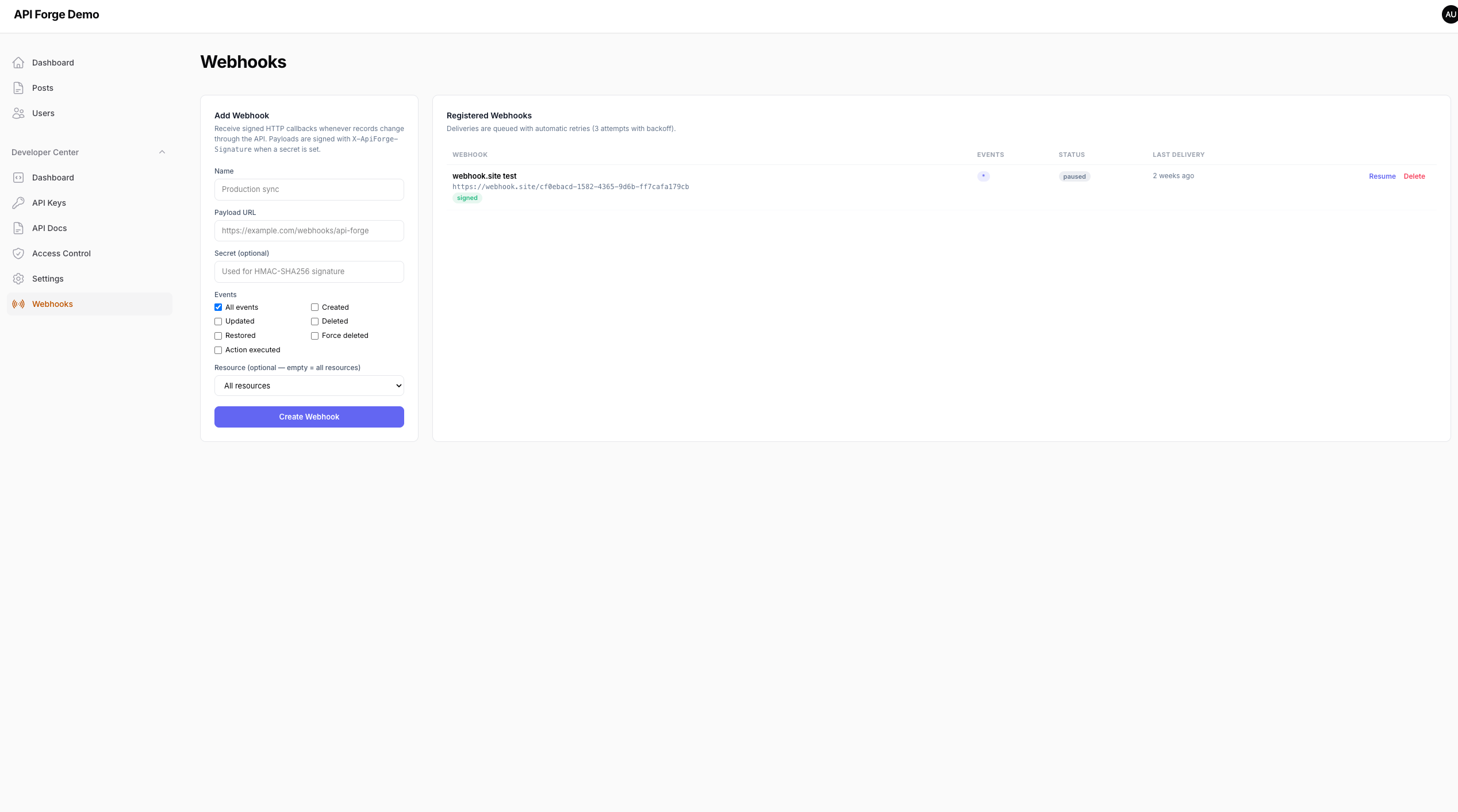
| Webhooks | Signed HTTP callbacks on API writes, managed from a dedicated panel page |
| Multi-Tenancy | Tenant-bound tokens automatically scope queries and stamp created records |
| API Versioning | Multi-version routing (/api/v1, /api/v2) with per-resource #[ApiVersion] |
| GraphQL | Optional /graphql endpoint with a schema generated from your resources |
| OpenAPI Docs | Dynamically generated OpenAPI 3.0 spec with interactive Swagger UI |
| Public Docs | Publish your API docs to a standalone public URL with a single click — light/dark mode included |
| Route Segment | Replace the panel ID in API paths with a custom segment (e.g. /filament/posts) |
| Request Counters | Per-token request count tracking with abbreviated display (1K, 2.4M) and one-click reset |
| Developer Center | Dashboard, API key management, documentation, access control, and settings — all in one panel group |
Requirements
- PHP 8.2+
- Laravel 12+
- Filament 5.x
- Spatie Laravel Query Builder 5, 6 or 7
- Spatie Media Library 11+ (optional — enables media collections for file uploads)
- webonyx/graphql-php 15+ (optional — enables the GraphQL endpoint)
Installation
composer require yusufgenc/filament-api-forge
Publish and run the migrations:
php artisan vendor:publish --tag="filament-api-forge-migrations"
php artisan migrate
Optionally publish the config file:
php artisan vendor:publish --tag="filament-api-forge-config"
Setup
1. Register the Plugin
Add FilamentApiForgePlugin to your panel provider:
use YusufGenc34\FilamentApiForge\FilamentApiForgePlugin;
public function panel(Panel $panel): Panel
{
return $panel
->plugin(
FilamentApiForgePlugin::make()
->apiKeys() // API key management
->docs() // API Docs + Access Control + Settings pages
->dashboard() // Developer Center dashboard
);
}
All three are enabled by default. You can disable any section:
FilamentApiForgePlugin::make()
->apiKeys()
->docs(false) // hide docs, access control, and settings pages
->dashboard(false) // hide the dashboard
2. Expose a Resource
Implement HasApi on any Filament Resource and define apiConfig():
use YusufGenc34\FilamentApiForge\Contracts\HasApi;
class PostResource extends Resource implements HasApi
{
public static function apiConfig(): array
{
return [
'allowed_methods' => ['index', 'show', 'store', 'update', 'destroy'],
'allowed_filters' => ['title', 'status', 'category_id'],
'allowed_sorts' => ['title', 'created_at', 'published_at'],
'allowed_includes' => ['author', 'category'],
'allowed_fields' => ['id', 'title', 'slug', 'body', 'status', 'published_at'],
'searchable' => ['title', 'body'],
'scopes' => ['read', 'write', 'delete'],
'validation_rules' => [
'title' => ['required', 'string', 'max:255'],
'body' => ['required', 'string'],
'status' => ['required', 'in:draft,published,archived'],
],
];
}
}
apiConfig() Reference
| Key | Type | Description |
|---|---|---|
allowed_methods |
string[] |
CRUD operations to expose: index, show, store, update, destroy |
allowed_filters |
string[] |
Columns clients can filter by (?filter[title]=foo) |
allowed_sorts |
string[] |
Columns clients can sort by (?sort=-created_at) |
allowed_includes |
string[] |
Eloquent relations to eager-load (?include=author) |
allowed_fields |
string[] |
Columns clients can select (?fields[posts]=id,title) |
searchable |
string[] |
Columns searched via ?search=query |
scopes |
string[] |
Required token scopes: read, write, delete |
validation_rules |
array |
Explicit rules for store/update. Falls back to allowed_fields → $fillable |
uploads |
array |
File upload fields — see File Uploads |
relations |
array |
Nested child resources — see Nested Resources |
batch |
array |
Per-resource batch overrides (max_size, allowed_operations) — see Batch Operations |
scope_map |
array |
Custom scope per method, e.g. ['show' => 'posts:read'] — see Custom Scopes |
tenant_column |
string |
Column used to scope queries to the token's tenant — see Multi-Tenancy |
allowed_methodsalso acceptsexport,restoreandforceDeleteto expose the export and soft delete endpoints.
3. Enrich the OpenAPI Docs (optional)
Decorate your Resource class with PHP 8 attributes to improve generated documentation:
use YusufGenc34\FilamentApiForge\Attributes\ApiTag;
use YusufGenc34\FilamentApiForge\Attributes\ApiDescription;
use YusufGenc34\FilamentApiForge\Attributes\ApiOperations;
use YusufGenc34\FilamentApiForge\Attributes\ApiIgnore;
#[ApiTag('Posts')]
#[ApiDescription('Manage blog posts and articles.')]
#[ApiOperations(
index: 'List all posts with filtering and sorting',
store: ['summary' => 'Create a post', 'description' => 'Requires **write** scope.'],
destroy: ['summary' => 'Delete a post', 'description' => 'Requires **delete** scope.'],
)]
class PostResource extends Resource implements HasApi { ... }
| Attribute | Description |
|---|---|
#[ApiTag('Name')] |
Groups endpoints under a named tag in the OpenAPI spec |
#[ApiDescription('...')] |
Sets the resource description |
#[ApiOperations(...)] |
Per-method summaries and descriptions |
#[ApiIgnore] |
Excludes the resource from the spec entirely |
Authentication
All API requests must include a Bearer token:
curl -H "Authorization: Bearer forge_xxxxxxxxxxxxxxxxxxxxxxxxxxxxxxxxxxxxxxxxxxxx" \
https://yourapp.com/api/v1/admin/posts
Token Format
Tokens use the forge_ prefix followed by 40 random characters (238 bits of entropy). The plain-text token is shown once at creation — only its SHA-256 hash is stored.
Scopes
| Scope | Allowed operations |
|---|---|
read |
GET (index, show) |
write |
POST, PUT, PATCH (store, update) |
delete |
DELETE (destroy) |
* |
Full access |
Tokens can also be restricted to specific resources via Resource Access in the API Keys page.
Custom Scopes
Scopes are plain strings — you can grant any custom scope to a token and require it per method with scope_map in apiConfig():
'scope_map' => [
'show' => 'posts:read',
'destroy' => 'posts:admin',
],
Methods not listed in scope_map fall back to the default read/write/delete mapping. #[ApiAction] attributes accept custom scopes the same way.
Token Refresh & Rotation
Enable refresh tokens to allow renewing access without re-issuing keys manually:
API_FORGE_REFRESH_TOKENS=true
Tokens created while enabled also return a one-time forge_refresh_ token. Exchange it at any time — even after the access token expired:
POST /api/v1/auth/token/refresh
{"refresh_token": "forge_refresh_..."}
# → {"token": "forge_...", "refresh_token": "forge_refresh_...", "expires_at": "..."}
Both tokens are rotated on every refresh. An authenticated client can also rotate its access token in place:
POST /api/v1/auth/token/rotate
Authorization: Bearer forge_...
# → {"token": "forge_...", "expires_at": "..."} (old token stops working immediately)
Expiry Notifications
Warn token owners before their tokens expire (mail + Filament database notification, channels configurable):
php artisan api-forge:notify-expiring --days=7
Schedule it daily; each token is only notified once per expiry window.
Making API Requests
The base URL pattern is:
{APP_URL}/api/v1/{segment}/{resource_slug}
Where {segment} is the panel ID (admin) by default, or a custom route segment if configured.
Examples
# List with filtering, sorting, and pagination
GET /api/v1/admin/posts?filter[status]=published&sort=-created_at&per_page=25
# Single record
GET /api/v1/admin/posts/1
# Create
POST /api/v1/admin/posts
Content-Type: application/json
{"title": "Hello World", "body": "...", "status": "draft"}
# Update
PUT /api/v1/admin/posts/1
Content-Type: application/json
{"status": "published"}
# Delete
DELETE /api/v1/admin/posts/1
Query Parameters
| Parameter | Example | Description |
|---|---|---|
filter[field] |
?filter[status]=published |
Filter by field value (partial match) |
sort |
?sort=-created_at |
Sort ascending or descending (prefix - for desc) |
include |
?include=author,category |
Eager-load relations |
fields[resource] |
?fields[posts]=id,title |
Sparse fieldsets |
search |
?search=laravel |
Full-text search across searchable columns |
per_page |
?per_page=50 |
Results per page (capped by max_per_page config) |
Response Format
Collection (index)
{
"data": [
{ "id": 1, "title": "Hello World", "status": "published" }
],
"links": {
"first": "/api/v1/admin/posts?page=1",
"last": "/api/v1/admin/posts?page=5",
"prev": null,
"next": "/api/v1/admin/posts?page=2"
},
"meta": {
"current_page": 1,
"last_page": 5,
"per_page": 15,
"total": 73,
"api_version": "v1",
"resource": "Posts"
}
}
Single record (show / store / update)
{
"data": {
"id": 1,
"title": "Hello World",
"status": "published",
"created_at": "2026-01-01T00:00:00.000000Z"
}
}
Error responses
| Status | error key |
Cause |
|---|---|---|
401 |
unauthenticated |
Missing or invalid token |
403 |
insufficient_scope |
Token lacks required scope |
403 |
resource_not_allowed |
Token restricted to other resources |
403 |
ip_forbidden |
Client IP is not whitelisted |
404 |
not_found |
Resource or record not found / disabled |
404 |
action_not_found |
Custom action is not defined on the resource |
405 |
method_not_allowed |
Method is disabled for this resource |
422 |
(validation) | Request data failed validation |
429 |
rate_limit_exceeded |
Too many requests |
Lifecycle Hooks & Events
Add the ApiForgeHooks trait to your Resource to intercept API write operations:
use YusufGenc34\FilamentApiForge\Traits\ApiForgeHooks;
class PostResource extends Resource implements HasApi
{
use ApiForgeHooks;
public static function beforeCreate(array $data): array
{
$data['slug'] = Str::slug($data['title']);
return $data;
}
public static function afterCreate(Model $record, array $data): void
{
// e.g. notify, sync, log…
}
}
Available hooks: beforeCreate, afterCreate, beforeUpdate, afterUpdate, beforeDelete, afterDelete. The before* hooks for create/update receive the validated data and must return it (modified or not).
Call PostResource::withoutHooks() to skip hooks for the next API call only — useful in seeding or test scenarios.
In addition to hooks, a Laravel event is dispatched for every write operation, so any listener can subscribe:
| Event | Dispatched |
|---|---|
ApiResourceCreating / ApiResourceCreated |
Around store |
ApiResourceUpdating / ApiResourceUpdated |
Around update |
ApiResourceDeleting / ApiResourceDeleted |
Around destroy |
ApiActionExecuting / ApiActionExecuted |
Around custom actions |
Hooks and events also fire for nested resource writes (events, with the child record) and for every row of a batch operation (hooks + events).
Both systems can be toggled via config: events.enabled (hooks + events) and events.dispatch_events (events only).
File Uploads
Declare uploadable fields in apiConfig() under the uploads key:
public static function apiConfig(): array
{
return [
// ...
'uploads' => [
'avatar' => [
'disk' => 'public', // storage disk (default: uploads.default_disk)
'directory' => 'avatars', // target directory (default: field name)
'rules' => 'image|max:2048', // validation rules (string or array)
'multiple' => false, // allow multiple files
'collection' => 'avatars', // Media Library collection (default: field name)
],
],
];
}
Then send multipart/form-data requests to the store / update endpoints:
curl -X POST /api/v1/admin/users \
-H "Authorization: Bearer forge_..." \
-F "name=Jane" -F "email=jane@example.com" \
-F "avatar=@/path/to/avatar.png"
How it works:
- If the model uses Spatie Media Library (
InteractsWithMedia), files go to the configured media collection and the response includes media UUIDs and URLs. - Otherwise files are stored via the Laravel Filesystem on the configured disk, and the file path is persisted to the model attribute (so Filament previews keep working).
- Upload rules are auto-merged into validation; file fields are stripped from the model fill.
- The response includes an
_uploadskey with the stored URLs:
{
"data": { "id": 1, "name": "Jane" },
"_uploads": {
"avatar": { "url": "https://yourapp.com/storage/avatars/xxx.png", "uuid": null }
}
}
The OpenAPI spec advertises these endpoints as multipart/form-data with format: binary fields automatically.
Custom Action Endpoints
Expose domain actions beyond CRUD with the #[ApiAction] attribute on a public static method of your Resource:
use YusufGenc34\FilamentApiForge\Attributes\ApiAction;
class PostResource extends Resource implements HasApi
{
#[ApiAction('publish', method: 'POST', scope: 'write')]
public static function publish(Model $record, array $data): array
{
$record->update(['status' => 'published']);
return ['status' => 'published'];
}
}
The action becomes available at:
POST /api/v1/admin/posts/{id}/actions/publish
{
"message": "Action 'publish' executed successfully.",
"action": "publish",
"result": { "status": "published" }
}
method(defaultPOST) — requests with a different HTTP verb get405.scope(defaultwrite) — tokens missing the scope get403 insufficient_scope.- The method receives the resolved record and the request payload; whatever it returns is serialized into
result. ApiActionExecuting/ApiActionExecutedevents fire around execution.- Actions are discovered via reflection and appear in the OpenAPI docs automatically.
- The
/actions/URL prefix is configurable viaactions.prefix.
Collection-Level Actions
Pass record: false to expose an action that operates on the whole collection instead of a single record:
#[ApiAction('sync', method: 'POST', scope: 'write', record: false)]
public static function sync(array $data): array
{
// e.g. trigger an import, recalculate aggregates…
return ['synced' => true];
}
POST /api/v1/admin/posts/actions/sync
Collection actions receive only the request payload (no record). Calling a record-level action on the collection URL — or vice versa — returns 404 action_not_found.
Nested Resources
Expose child relations with full CRUD under the parent's URL. Declare them in apiConfig() under the relations key:
public static function apiConfig(): array
{
return [
// ...
'relations' => [
'comments' => [
'relation_name' => 'comments', // Eloquent relation method on the model
'allowed_methods' => ['index', 'show', 'store', 'update', 'destroy'],
'allowed_filters' => ['status'],
'allowed_sorts' => ['created_at'],
'allowed_includes' => ['author'],
'allowed_fields' => ['id', 'body', 'status'],
'validation_rules' => [
'body' => ['required', 'string'],
],
],
],
];
}
Routes follow the pattern {parent}/{id}/{child}[/{childId}]:
GET /api/v1/admin/posts/1/comments # list (paginated, filterable)
GET /api/v1/admin/posts/1/comments/5 # show
POST /api/v1/admin/posts/1/comments # create through the relation
PUT /api/v1/admin/posts/1/comments/5 # update
DELETE /api/v1/admin/posts/1/comments/5 # delete
Binding is scoped: a child is always resolved through the parent's relation, so a comment belonging to another post returns 404. On update, validation rules are automatically relaxed with sometimes. Disabled methods return 405.
The index endpoint supports filter, sort, include and fields query parameters (driven by the per-relation allowed_* keys above), and show supports include/fields. Nested writes dispatch the same ApiResourceCreating/Created/Updating/Updated/Deleting/Deleted events as top-level endpoints, carrying the child record.
Batch Operations
Perform bulk create, update, and delete in a single transaction-wrapped request:
POST /api/v1/admin/posts/batch
Content-Type: application/json
{
"create": [
{ "title": "First", "status": "draft" },
{ "title": "Second", "status": "draft" }
],
"update": [
{ "id": 7, "status": "published" }
],
"delete": [3, 4]
}
Response:
{
"message": "Batch operation completed.",
"created": [12, 13],
"updated": [7],
"deleted": [3, 4],
"failed": []
}
Rows that cannot be processed are reported in failed with their operation, index and reason (plus per-field errors for validation failures). Limits and allowed operations come from config (batch.max_size, batch.allowed_operations) and can be overridden per resource via the batch key in apiConfig().
Every row goes through the full Eloquent pipeline: validation_rules are applied (relaxed with sometimes for updates), lifecycle hooks run, and ApiResource* events are dispatched per row — exactly as if each row had been sent to the standard CRUD endpoints. A withoutHooks() call suppresses hooks for the entire batch.
Soft Deletes
For models using the SoftDeletes trait, opt into the extra endpoints by listing them in allowed_methods:
'allowed_methods' => ['index', 'show', 'store', 'update', 'destroy', 'restore', 'forceDelete'],
GET /api/v1/admin/posts?trashed=only # only trashed records
GET /api/v1/admin/posts?trashed=with # trashed + live records
POST /api/v1/admin/posts/1/restore # restore (write scope)
DELETE /api/v1/admin/posts/1/force # permanent delete (delete scope)
restore/forceDelete fire their own hooks (beforeRestore, afterForceDelete, …) and events (ApiResourceRestored, ApiResourceForceDeleted, …). Calling them on a non-soft-deletable model returns 405.
Export
Add export to allowed_methods to stream the full (filtered, sorted, searched) result set:
GET /api/v1/admin/posts/export # CSV download
GET /api/v1/admin/posts/export?format=json # JSON payload
GET /api/v1/admin/posts/export?filter[status]=published # honors all index query params
Columns follow allowed_fields when declared, otherwise id + $fillable (+ timestamps). Row count is capped by export.max_rows (default 10 000). Requires the read scope.
Response Transformation
Define apiTransform() on a Resource to reshape every serialized record — single responses and collections alike:
public static function apiTransform(Model $record, array $data): array
{
$data['title'] = strtoupper($data['title']);
unset($data['internal_notes']);
return $data;
}
The transformer runs after Spatie field selection, on every REST endpoint of that resource.
Audit Log
Every API request is logged to api_forge_request_logs — token, resource, action, status, duration and IP. The Developer Center dashboard shows the most recent requests and the 24-hour average response time.
php artisan api-forge:prune-logs --days=30 # schedule this to keep the table lean
Disable with audit.enabled (or API_FORGE_AUDIT=false). Logging failures never break API responses.
Response Cache
Cache successful GET responses (index/show, top-level and nested):
API_FORGE_CACHE=true
Cache entries vary by full URL and token, live for cache.ttl seconds and are invalidated instantly when the resource changes — every create/update/delete/restore/force-delete/custom action (including batch and nested writes) bumps the resource's cache version. Responses carry an X-ApiForge-Cache: hit|miss header. Rate limiting and audit logging still apply to cache hits.
Webhooks
Register HTTP callbacks from Developer Center → Webhooks (or the ApiForgeWebhook model). Each webhook chooses its events (created, updated, deleted, restored, force_deleted, action_executed or *) and optionally a single resource.
Deliveries are queued jobs with 3 retries and exponential backoff. When a secret is set, the JSON payload is signed:
X-ApiForge-Event: created
X-ApiForge-Signature: sha256=<hmac-sha256 of the raw body>
{
"event": "created",
"resource": "PostResource",
"resource_class": "App\\Filament\\Resources\\PostResource",
"timestamp": "2026-07-08T12:00:00+00:00",
"record": { "id": 42, "attributes": { "title": "Hello" } }
}
Hide the panel page with FilamentApiForgePlugin::make()->webhooks(false); disable dispatching entirely with webhooks.enabled.
Multi-Tenancy
Bind a token to a tenant and declare which column scopes the resource:
// Token creation (ApiForgeTokenService::create)
['name' => 'Acme token', 'tenant_id' => 'acme', ...]
// Resource
public static function apiConfig(): array
{
return [
// ...
'tenant_column' => 'tenant_id',
];
}
When both are present, every query (index, show, update, delete, restore, force, export, GraphQL) is constrained to the token's tenant, and created records are stamped with it automatically. Tokens without a tenant_id see everything — ideal for admin keys.
API Versioning
Single-version mode (default) uses api_prefix. To serve multiple versions side by side:
// config/filament-api-forge.php
'versions' => ['v1', 'v2'],
'api_base' => 'api',
Routes are registered under /api/v1/... and /api/v2/.... Resources are available in every version unless restricted:
use YusufGenc34\FilamentApiForge\Attributes\ApiVersion;
#[ApiVersion('v2')]
class PostResource extends Resource implements HasApi { ... }
A v2-only resource returns 404 on /api/v1/.... The first configured version keeps the unprefixed route names for backwards compatibility.
GraphQL
An optional GraphQL endpoint generated from the same HasApi definitions:
composer require webonyx/graphql-php
API_FORGE_GRAPHQL=true
POST /api/v1/graphql
query { posts(page: 1, perPage: 20, search: "laravel", status: "published") {
total currentPage data { id title status } } }
query { post(id: 1) { id title } }
mutation { createPost(title: "Via GraphQL", status: "draft") { id } }
mutation { updatePost(id: 1, status: "published") { status } }
mutation { deletePost(id: 1) }
Queries require the read scope, mutations write/delete (including scope_map overrides). Mutations run the full validation + hooks + events pipeline, and tenant scoping applies. Without the library installed the endpoint responds 501 with install instructions.
Developer Center
The Developer Center is embedded in your Filament panel under the Developer Center navigation group.
| Page | URL | Description |
|---|---|---|
| Dashboard | /admin/developer/dashboard |
Stats overview (resources, endpoints, tokens, total requests with abbreviated counts), resource list, and quick-start examples |
| API Keys | /admin/developer/api-keys |
Create, inspect, and revoke tokens with scope and resource restrictions |
| API Docs | /admin/developer/api-docs |
Interactive OpenAPI documentation with try-it-out panel and Publish Docs button |
| Access Control | /admin/developer/access-control |
Enable/disable resources and individual methods; set rate limits and IP whitelists per resource or method |
| Settings | /admin/developer/settings |
Configure route segment, view route preview, and reset request counters |
| Webhooks | /admin/developer/webhooks |
Register, pause and delete signed webhook endpoints |
Access Control
The Access Control page lets you manage per-resource settings without touching code.
- Enable / Disable a Resource — toggle the resource on or off. Disabled resources return
404. - Enable / Disable Methods — toggle specific HTTP methods. Disabled methods return
405. - Rate Limiting — set limits at resource or method level. Method limits override resource limits, which override the global config value.
- IP Restrictions — whitelist IPs at resource or method level. Supports exact IPs, CIDR ranges (
10.0.0.0/8), and wildcards (192.168.1.*).
Public API Docs
The Publish Docs button on the API Docs page makes your documentation available at a public URL — no login required:
GET /api/v1/docs
The page uses Swagger UI with full light/dark mode support (default light, toggle persisted in localStorage). When unpublished, the URL returns 403.
The Copy Public URL button (visible when published) shows the URL in a notification for easy copying.
Route Segment
By default, API paths include the Filament panel ID:
/api/v1/admin/posts
You can replace admin with any custom segment from Developer Center → Settings, or via environment variable:
API_FORGE_ROUTE_SEGMENT=filament
Result:
/api/v1/filament/posts
Note: Both the original panel-ID paths and the new segment work simultaneously — no breaking changes to existing integrations.
The Settings page shows a live Route Preview table so you can see exactly how paths will appear in the docs before saving.
Request Counters
Every API call increments the request_count on the token used. The Dashboard displays the all-time total with abbreviated formatting (1.2K, 3.5M, 2.1B — hover for exact value).
From Settings → Request Counters you can:
- See per-token counts (top 10 by usage, with last-used time)
- Reset all counters to zero with a single click (useful after testing or a new release)
Configuration
// config/filament-api-forge.php
return [
'api_prefix' => env('API_FORGE_PREFIX', 'api/v1'),
'api_version' => env('API_FORGE_VERSION', 'v1'),
'rate_limit' => env('API_FORGE_RATE_LIMIT', 60), // global req/min
// Custom URL segment to replace the panel ID in API paths
// null = use panel ID (default)
'route_segment' => env('API_FORGE_ROUTE_SEGMENT', null),
'auth' => [
'enabled' => true,
'default_expiration_days' => 365,
'refresh_tokens' => env('API_FORGE_REFRESH_TOKENS', false),
],
'docs' => [
'enabled' => true,
'title' => 'API Documentation',
'description' => 'Auto-generated API documentation for Filament resources.',
'theme' => 'dark',
],
'discovery' => [
'auto_discover' => true,
'allowed_methods' => ['index', 'show', 'store', 'update', 'destroy'],
'middleware' => ['api'],
],
'pagination' => [
'default_per_page' => 15,
'max_per_page' => 100,
],
'query_builder' => [
'enable_filters' => true,
'enable_sorts' => true,
'enable_includes' => true,
'enable_fields' => true,
],
'events' => [
'enabled' => true, // master switch for hooks + events
'dispatch_events' => true, // dispatch Laravel events
],
'uploads' => [
'default_disk' => env('API_FORGE_UPLOAD_DISK', 'public'),
'max_file_size' => 10240, // KB
],
'actions' => [
'prefix' => 'actions', // {resource}/{id}/actions/{name}
],
'nested_resources' => [
'enabled' => true,
'max_nesting_depth' => 1,
],
'batch' => [
'enabled' => true,
'max_size' => 100,
'allowed_operations' => ['create', 'update', 'delete'],
],
'export' => [
'enabled' => true,
'max_rows' => 10000,
'formats' => ['csv', 'json'],
],
'audit' => [
'enabled' => env('API_FORGE_AUDIT', true),
'prune_days' => 30,
],
'notifications' => [
'channels' => ['mail', 'database'],
'expiry_days' => 7,
],
'cache' => [
'enabled' => env('API_FORGE_CACHE', false),
'ttl' => 60,
'store' => null, // null = default cache store
],
'webhooks' => [
'enabled' => true,
'timeout' => 10,
],
'multi_tenant' => [
'enabled' => true,
],
'versions' => null, // e.g. ['v1', 'v2'] for multi-version mode
'api_base' => env('API_FORGE_BASE', 'api'),
'graphql' => [
'enabled' => env('API_FORGE_GRAPHQL', false),
],
];
License
This package is open-sourced software licensed under the MIT license.
Credits
Built by Yusuf Genc.
Powered by Filament and Spatie Laravel Query Builder.