apartejs/laravel
| Install | |
|---|---|
composer require apartejs/laravel |
|
| Latest Version: | v0.14.1 |
| PHP: | ^8.3 |
| Laravel: | 12 · 13 |
| License: | MIT |
| Last Updated: | Nov 18, 2026 |
| Links: | GitHub · Packagist |
aparté for Laravel
An AI chat for Blade, Livewire and Filament pages, wired to the Laravel AI SDK. No React and no build step: replies stream with Markdown, tool calls show as they run, and a person can approve or refuse them.
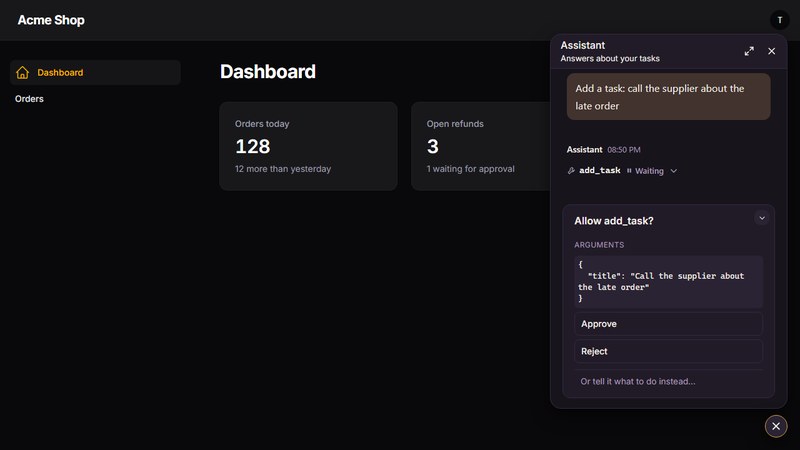
It is built on aparté, a chat UI made of web components, and needs PHP 8.3+, Laravel 12 or 13
and laravel/ai 1.3+.
Install
composer require apartejs/laravel
php artisan vendor:publish --provider="Laravel\Ai\AiServiceProvider"
php artisan migrate
The last two are the SDK's own setup: its configuration and the tables that keep conversations.
Use it
An agent that keeps its conversations:
namespace App\Ai\Agents;

use Laravel\Ai\Concerns\RemembersConversations;
use Laravel\Ai\Contracts\Agent;
use Laravel\Ai\Contracts\Conversational;
use Laravel\Ai\Promptable;

class Assistant implements Agent, Conversational
{
    use Promptable, RemembersConversations;

    public function instructions(): string
    {
        return 'You are a helpful assistant.';
    }
}
A route, and the chat in a view. Give it a height:
// routes/web.php
Route::aparte('/chat', App\Ai\Agents\Assistant::class);
<x-aparte::chat endpoint="/chat" style="height: 32rem" />
Inside a Livewire component it works as is: it is excluded from Livewire's re-renders.
Protect the route. It spends your model budget and runs your tools, so give it the middleware your app needs:
Route::aparte('/chat', App\Ai\Agents\Assistant::class)->middleware(['auth', 'throttle:20,1']);
A button in the corner of the page
<x-aparte::launcher endpoint="/chat" label="Help" />
The chat opens above the button under a header: a title (the button's label unless you set heading), a line
under it, and a ✕. Add maximizable for a button in the header that maximizes the chat to the whole window, or
maximizable="panel" for a full-height panel along the edge that keeps the page in view:
<x-aparte::launcher
    endpoint="/chat"
    label="Help"
    heading="Support"
    subheading="Usually answers in a minute"
    maximizable
/>
Escape brings a maximized chat back to its card. The launcher's page lists everything it takes, and the header's colours are yours to set in CSS.
Filament
use Aparte\Laravel\Filament\ApartePlugin;

$panel->plugin(ApartePlugin::make()->agent(App\Ai\Agents\Assistant::class)->label('Assistant'));
Works with Filament 4 and 5. Every page of the panel gets the button, for whoever is signed in to it. The route is added for you, behind the panel's authentication, and the chat follows the panel's light or dark mode.
The chat opens under a header titled with the label. A different title, a line under it and a maximize button are
options of the plugin; there is no maximize button unless you call maximizable():
$panel->plugin(
    ApartePlugin::make()
        ->agent(App\Ai\Agents\Assistant::class)
        ->label('Assistant')
        ->heading('Assistant')
        ->subheading('Answers about your data')
        ->maximizable(), // or ->maximizable('panel') to keep the page in view
);
To keep each person's conversations and give the chat its list, publish the table once and call conversations():
php artisan vendor:publish --tag=aparte-migrations
php artisan migrate
$panel->plugin(
    ApartePlugin::make()
        ->agent(App\Ai\Agents\Assistant::class)
        ->maximizable()
        ->conversations(),
);
The chat's header then names the open conversation and starts a new one, and a menu button opens the list: a drawer inside the chat's card, and a column beside the chat once it is maximized. The routes are added for you, behind the panel's authentication, and each panel keeps a list of its own: its conversations are not those of another panel, or of a chat on a page of your app. Conversations in your database says what is kept, and how to change it.
Approving tool calls
A tool that needs a person uses the SDK's approvals:
public function tools(): iterable
{
    return [(new SendInvoice)->requireApproval('Sending an invoice.')];
}
The chat asks before the tool runs. The model answers a refusal, and reads what the person typed in its place. A pending question comes back after a reload.
Slots
<x-aparte::chat endpoint="/chat" style="height: 32rem">
    <x-slot:empty-state><p>How can I help?</p></x-slot:empty-state>
    <x-slot:above-composer><p>Answers may be wrong.</p></x-slot:above-composer>
    <x-slot:toolbar><button type="button" style="margin-inline-start: auto">Help</button></x-slot:toolbar>
</x-aparte::chat>
A list of conversations
aparté's own elements go in the view around the chat, and follow it with no script of yours:
<div class="aparte-app-shell" style="height: 40rem" wire:ignore>
    <aparte-sidebar>
        <div class="aparte-sidebar__header">
            <button type="button" class="aparte-btn aparte-btn--surface" data-aparte-new-chat>New chat</button>
        </div>
        <div class="aparte-sidebar__search">
            <input type="search" class="aparte-field" placeholder="Search chats" aria-label="Search chats" data-aparte-sidebar-search>
        </div>
        <div class="aparte-sidebar__body">
            <aparte-conversation-list manage></aparte-conversation-list>
        </div>
    </aparte-sidebar>
    <header class="aparte-app-header">
        <button type="button" class="aparte-btn aparte-app-header__toggle" data-aparte-sidebar-toggle>Chats</button>
        <span class="aparte-app-header__title" data-aparte-title>New chat</span>
    </header>
    <div class="aparte-app-shell__main">
        <x-aparte::chat endpoint="/chat" style="height: 100%" />
    </div>
</div>
<aparte-conversation-list>shows the chat's conversations, grouped by date. A click opens one, and withmanagea row's menu renames or deletes it (its page).data-aparte-new-chaton a button opens an empty conversation.data-aparte-titleon an element names the open conversation; its own words stand while there is no name.<aparte-sidebar>, its search field and its toggle are aparté's (its page): on a narrow screen the sidebar becomes a drawer.
An element belongs to the chat in the same block as it. On a page with several chats, give each its own block, or name
the chat: give it an id, <x-aparte::chat id="support" endpoint="/chat" />, and write for="support" on the element.
wire:ignore keeps Livewire from redrawing what the elements draw.
The floating chat draws all of this itself when asked, in its card: a menu button in its header opens the list as a drawer, and it is a column beside the chat once the chat is maximized.
<x-aparte::launcher endpoint="/chat" label="Help" maximizable list />
The list shows what the chat keeps: by default, the conversations of this tab. Keep them in your database, or in a storage of your own.
Conversations in your database
A chat keeps its conversations for the tab. To keep them for the person signed in, on every device, publish the table:
php artisan vendor:publish --tag=aparte-migrations
php artisan migrate
Add the routes beside the chat's, behind the middleware that signs people in:
// routes/web.php
Route::middleware(['auth'])->group(function () {
    Route::aparte('/chat', App\Ai\Agents\Assistant::class);
    Route::aparteConversations('/chat/conversations');
});
And name them on the chat, on a page behind the same sign-in as the routes:
<x-aparte::chat endpoint="/chat" conversations="/chat/conversations" style="height: 32rem" />
The list then shows them, and a conversation opens as it was left, tool calls included.
The floating chat takes the same option, and then draws its list for whoever is signed in:
<x-aparte::launcher endpoint="/chat" conversations="/chat/conversations" label="Help" maximizable />
Two chats that answer with two agents keep two lists. The routes of the second one name its own, and chats whose routes share a name share their conversations:
Route::aparteConversations('/help/conversations', 'help');
Its words (Conversations, New chat, Search chats, Maximize, Close) go through Laravel's translator, in
ten languages already; your lang/*.json files win. In a Filament panel, ->conversations() does all of this.
- What is kept is what the chat shows, as the browser sends it after each reply, in the
aparte_conversationstable. Each person reads and writes their own only; a guest's conversations stay in the tab. - The model's memory stays with the Laravel AI SDK, under the same id. Deleting a conversation from the list
deletes both. Each conversation of a list is its own thread:
thread="..."is for a chat that has one conversation and no list, and is not used on a chat that has one. - Whatever answers the chat: with a runner of your own, the conversations are kept the same way.
- Limits are in
config/aparte.php(php artisan vendor:publish --tag=aparte-config):conversations.max_bytes, what one conversation may weigh (2 MB);conversations.list, how many the list gives (200);conversations.table. Your web server must let a request of that weight through: nginx stops at 1 MB unlessclient_max_body_sizesays otherwise. The routes take your own middleware, a rate limit among them:Route::aparteConversations('/chat/conversations')->middleware('throttle:120,1'). - Somewhere else than that table: bind your own
Aparte\Laravel\Conversations\ConversationRepositoryin a service provider. It has five methods: list, find, save, change, delete. - A reply still being written when its tab was closed is not in what is kept; the model remembers it.
- The same conversation open in two tabs is kept as the last of the two to save left it.
- If the server does not answer, the chat goes on. What is said is sent once it answers again: at the next message, when the network or the page comes back, and at longer and longer intervals in between.
- A conversation the server refuses is not kept: one heavier than
max_bytes, or anything once nobody is signed in any more. The chat says so with an event, on the page, for you to tell the person:
document.addEventListener('aparte-conversations-problem', (event) => {
    // event.detail.reason: 'too-large', 'signed-out', 'unreachable', 'refused' or 'gone' (deleted somewhere else).
    if (event.detail.reason === 'too-large') {
        alert('This conversation is too long to be kept. A new chat starts a fresh one.');
    }
});
A person takes over
Someone of your team can answer in the chat instead of the assistant: they take the conversation over, write under their own name, mark what they read, and hand it back. The visitor sees a line, "Marie joined the conversation", Marie's messages under her name and picture, "Read by Marie" under their own, and the assistant answering again once she hands it back, having read what she wrote. The package carries all of it between your server and the page. The desk, where your team sees and answers conversations, is yours: a Filament page, for one.
1. Who holds a conversation. Yours to keep, a ticket or a column; the package asks:
// app/Providers/AppServiceProvider.php, in boot()
use Aparte\Laravel\People;

People::heldBy(fn (string $conversationId) => Ticket::openFor($conversationId)?->agent?->only(['name', 'avatar']));
2. The routes, and the chat. Register the people routes beside the chat route, in routes/web.php, so the session
recognises the same person on both:
// routes/web.php
Route::aparte('/chat', App\Ai\Agents\Support::class)->middleware('throttle:20,1');
Route::apartePeople('/chat/people');
The people routes answer guests, so each POST is throttled already: 20 a minute per IP (config/aparte.php,
people.throttle; typing and "seen" get five times as much). A conversation's hand-off, e-mail address and rating are
kept in your cache for 90 days (people.keep_days): give it a store that lasts (database, Redis, files), not array.
People::forget($id) drops them, with the conversation's files; deleting a conversation from the chat's list does it.
<x-aparte::chat endpoint="/chat" people="/chat/people" style="height: 32rem" />
3. Broadcasting. What your team does reaches the page through Laravel's broadcasting (Reverb, Pusher…) and
Laravel Echo on the page (php artisan install:broadcasting); the chat uses window.Echo when it is there. A signed-in
person's conversation is sent on a private channel. Authorize it:
// routes/channels.php
use Aparte\Laravel\People;
use Illuminate\Support\Facades\Broadcast;

Broadcast::channel('aparte.conversations.{id}', fn ($user, string $id) => People::owns($user, $id));
A guest has no one to authorize: their conversation is sent on a public channel under a name made from its id and your app key, which only their browser is given.
4. Your desk.
use Aparte\Laravel\People;

$marie = ['name' => 'Marie', 'avatar' => 'https://example.com/marie.png'];

// Marie accepts the conversation: update what heldBy reads, then
People::takeOver($conversationId, $marie);  // "Marie joined the conversation"; the assistant stops answering
People::post($conversationId, $marie, 'I have checked: your order ships today.');
People::read($conversationId, $messageId, 'Read by Marie');
People::handBack($conversationId);          // "The assistant is back"; it answers the next message
What the visitor writes meanwhile comes to your desk as an event:
use Aparte\Laravel\Events\PersonWrote;
use Illuminate\Support\Facades\Event;

Event::listen(function (PersonWrote $event) {
    // $event->conversationId, $event->messageId (for People::read), $event->text
});
What the assistant reads: everything written during the takeover goes into its memory, Marie's messages as
Marie: …, so it answers knowing what she said. A message that reaches the chat route while someone holds the
conversation, sent a moment before the page heard of the takeover, is kept for your desk and not answered.
- Your own words.
takeOverandhandBacktake the notice as their last argument:People::takeOver($id, $marie, 'Marie a rejoint la conversation'). - The conversation the visitor reopens. When its conversations are kept by the package (
conversations="…"), what your team does is written there too, and is still there when the visitor comes back. With a repository of your own, keep it fromPersonWroteandConversationChanged. - Not Echo. Give the chat your own way to listen:
onAparteSetup((config, chat, options) => { options.people.subscribe = (id, onChange, channel) => { /* … */ return stop; }; }), wherechannelis{ name, private }andonChangetakes whatConversationChangedbroadcasts.
Typing and seen
While someone of your team is in the conversation, the chat tells your desk two things: that the person is typing
(People::visitorTyping($id) is true for a few seconds) and that they have seen your team's messages, the tab in
front of them (PersonSaw). Your desk tells the chat that someone of the team is typing, and the person reads
"Marie is typing…" above the composer:
People::typing($conversationId, ['name' => 'Marie']);
When the assistant hands over
Give your agent the AskForSomeone tool and the assistant can call your team itself: when the visitor asks for a
person, or when it cannot help. The chat says someone will answer, the assistant goes quiet, and your desk hears why:
use Aparte\Laravel\Tools\AskForSomeone;

public function tools(): iterable
{
    return [new AskForSomeone(when: 'Use it for refunds, or when the user asks for a person.')];
}

// AppServiceProvider::boot()
Event::listen(SomeoneWanted::class, fn (SomeoneWanted $e) => /* notify your team: $e->conversationId, $e->reason */);
People::wanted($id) gives the reason while the conversation waits (your desk's "to take" list). It stops waiting
when someone takes it over or hands it back. People::want($id, $reason) does the same from your own code; it hands a
conversation over once, and returns null when it waits already. The visitor never sees the tool's call itself, only
what the assistant and your team say.
When the visitor asks
The visitor can ask too, with a Talk to a person button beside send, while the assistant answers. A click hands
the conversation to your team at once, without the model: the same notice, the same SomeoneWanted, with the reason
"The visitor asked for a person". It is off until you turn it on, because something has to hear SomeoneWanted (your
desk, a notification), or the visitor would wait for nobody:
<x-aparte::chat endpoint="/chat" people="/chat/people" :people-button="true" />
<x-aparte::chat endpoint="/chat" people="/chat/people" :people-button="__('Talk to a person')" />
What the visitor reads when the conversation goes to your team, whoever asked, is yours to say once, in a service
provider's boot() (a desk can say when the team is back):
People::wantedNotice(fn (string $conversationId) => 'Someone of the team will answer you here.');
A chat with your team only
No assistant at all: leave out endpoint. Every message goes to your team through the people routes, and the first
one hands the conversation over, with that message as the reason: the same notice, the same SomeoneWanted, so your
desk or your notification hears it as it hears a hand-off. There is no model to configure and no Talk to a person
button, since everyone the visitor talks to is one:
<x-aparte::launcher people="/chat/people" label="Questions?" />
SomeoneWanted::$source tells your desk how a conversation came: tool (the assistant), button (the visitor's
button), message (this chat) or team_first (below), so it can word it, and offer no "hand back to the assistant"
where there is none.
The answer by e-mail too
While a guest waits for your team's answer, the chat can offer a field to get it by e-mail too: it goes once your team has answered, and comes back with the guest's next question. It is off until you turn it on, because something has to write to that address (your desk):
<x-aparte::launcher endpoint="/chat" people="/chat/people" :people-email="true" />
The address goes to POST {people}/{id}/email, People::email($id) returns it, and VisitorLeftEmail tells your desk;
the visitor reads "We will also answer you at …". The route takes one address a conversation, from a guest, while
your team is awaited; someone signed in is not asked: their account has an address.
Files
While someone of your team is in the conversation (and from the start in a chat with the team only), the person can
attach files; your team can send some back. It is off until your app turns it on, in .env, and the chat shows the
paperclip:
APARTE_PEOPLE_FILES=true
<x-aparte::launcher endpoint="/chat" people="/chat/people" :people-files="true" />
The server takes no file without the first: the attribute is the page's, which anyone can write.
They are kept on a private disk of your app (config/aparte.php, people.files: the disk, 10 MB and 5 files a
message by default, and the kinds taken, never one a browser would run: invoice.html whose content is text is kept
as invoice.txt), and opened at {people}/{id}/files/{file} (the route aparte.people.file) by
whoever may read the conversation. PersonWrote::$attachments tells your desk what came with a message. Your team's
files go out with People::post($id, $author, $text, [People::attach($id, $uploadedFile)]), and the person's chat shows
them as links.
How it went
When your team is done with a conversation, it can ask the person how it went: "How was this conversation?" with 👍 and 👎, above the composer, answered once. It is off until you turn it on, since something has to keep the answers (your desk):
<x-aparte::launcher endpoint="/chat" people="/chat/people" :people-rating="true" />
People::askRating($id) asks (your desk does it when it closes a conversation), POST {people}/{id}/rating takes up
or down, People::rating($id) returns it, and VisitorRated tells your desk.
Your team first, the assistant when it is away
With the assistant and the people routes both on the page, your team can answer new conversations itself while it is
there, and leave them to the assistant the rest of the time. Say when, once, in a service provider's boot():
People::teamFirst(fn (string $conversationId) => now()->isWeekday() && now()->hour >= 9 && now()->hour < 18);
It is asked at a conversation's first message. While it says yes, that message goes to your team (SomeoneWanted,
source team_first) and the assistant stays quiet there until someone hands it back; a conversation the assistant
began goes on with it. A desk can answer it for you, from its office hours and who has it open.
Route::apartePeople() is the one route this chat needs, and the visitor's first message creates the conversation
(the chat says it is one with the team only; a chat with an assistant never creates one there). Its POSTs are throttled
already (above); give a stricter limit if you want one.
Plugins
The package serves a built chat: Markdown, tool calls and approvals. To add aparté's plugins (cards, maths, diagrams, charts, code highlighting) or cards of your own, build the chat with your app's Vite instead, so that the plugins and the chat share one copy of aparté.
Tell the package to stop serving its own copy, in .env:
APARTE_ASSETS=vite
Install the chat and the plugins you want:
npm install @aparte/core@^1 @aparte/runner-ag-ui@^1 @aparte/plugin-marked@^1 marked
npm install @aparte/plugin-katex@^1 katex
Give the chat an entry of its own, which imports the package's script and adds each plugin to every chat with
onAparteSetup:
// resources/js/chat.js
import { onAparteSetup } from '../../vendor/apartejs/laravel/resources/js/aparte.js';
import 'katex/dist/katex.min.css';
import { setupKatex } from '@aparte/plugin-katex';

onAparteSetup((config) => setupKatex({}, config));
Add it to the inputs in vite.config.js, so that the production build has it:
laravel({ input: ['resources/css/app.css', 'resources/js/app.js', 'resources/js/chat.js'] }),
Load it on the pages that show a chat, with @vite('resources/js/chat.js'). In a Filament panel:
use Filament\View\PanelsRenderHook;
use Illuminate\Support\Facades\Blade;

$panel->renderHook(PanelsRenderHook::HEAD_END, fn (): string => Blade::render("@vite('resources/js/chat.js')"));
A separate entry keeps your app.js out of the panel: a second Alpine, or your app's styles, would break Filament's.
- The chat speaks the page's language, as the built one does, once you give it aparté's words:
npm install @aparte/locales@^1, then in the same entryimport * as locales from '@aparte/locales'; useLocales(locales);(useLocalescomes from the same import asonAparteSetup). Without it, the chat's own words stay English; the package's lines are translated either way. onAparteSetupreceives each chat's config, the chat element as its second argument, and its options as the third (below). What it returns, if a function, runs when the chat stops. Call it at the top level of that entry and keep it synchronous: a chat starts once the entry has run.- The import reads from
vendor/, so runcomposer installbeforenpm run build, in CI and Docker builds too. - If you install the package from a local path (a Composer path repository), Vite follows the link to the package's
own folder: add
resolve: { dedupe: ['@aparte/core', '@aparte/runner-ag-ui', '@aparte/plugin-marked', 'marked'] }tovite.config.jsso that every import resolves from your app. - After changing
APARTE_ASSETSin production, runphp artisan config:cacheagain.
Your own storage, your own runner
The chat keeps its conversations for the tab, and your Laravel agent answers it. Both are defaults: in
Vite mode, onAparteSetup hands you the chat's options before it starts.
// resources/js/chat.js
import { onAparteSetup } from '../../vendor/apartejs/laravel/resources/js/aparte.js';
import { createIdbStorage } from '@aparte/plugin-storage-idb';
import { createN8nRunner } from '@aparte/runner-n8n';

onAparteSetup((config, chat, options) => {
    // Where the conversations are kept: here in the browser, one database per user.
    options.storage = createIdbStorage({ name: `chat-${chat.dataset.aparteScope}-${chat.id}` });

    // What answers the chat: here an n8n workflow, in place of the package's endpoint.
    options.client.streamRunner = createN8nRunner({ webhookUrl: 'https://your-n8n.example.com/webhook/<id>/chat' });
});
options.storageis any aparté storage adapter: a few functions that load, save and delete a conversation. One that calls routes of yours keeps them in your database.options.clientis what the chat's client is built with. ItsstreamRunneris the package's when the chat has anendpoint: replace it with a runner of yours. Or delete it, register a provider onconfigand select its model, and aparté's own loop calls the model from the browser: with a key the page can read, so for a model on the person's machine, or a key made to be public.- A chat the package does not answer needs no endpoint:
<x-aparte::chat style="height: 32rem" />. - Both are read once, when the chat starts.
When the assistant can't answer
The chat tells the person, in their language, why the assistant couldn't answer, when the exception says it:
| The run ended on | The card says |
|---|---|
a provider's rate limit (RateLimitedException), Laravel's throttle, abort(429) |
Too many requests right now. Try again in a moment. |
a refusal: AuthorizationException, AuthenticationException, abort(401), abort(403) |
The assistant isn't allowed to answer right now. |
a provider with no credits left (InsufficientCreditsException) |
The assistant couldn't answer this request. |
a provider out of reach (ProviderConnectionException) |
The assistant can't be reached right now. Try again in a moment. |
an overloaded provider (ProviderOverloadedException), abort(503), any other exception |
The assistant couldn't answer. Try again in a moment. |
The browser gets one of aparté's error codes (USAGE_RATE_LIMIT,
CONFIG_INVALID_KEY…) and the card says its sentence. What went wrong is in two places:
- Your log. An exception while the agent runs (a missing API key, a model the provider does not know, a rate limit, an
error in your agent's code) is reported like any other exception of your app: in
storage/logs/laravel.logby default, with its stack trace, or wherever your app reports them. - The browser's console, as
[aparte] A turn failed (USAGE_RATE_LIMIT): …. WithAPP_DEBUG=true, the line names the exception and its message. Without it, the line only says that the run failed: an exception's message can name a table, a path or a key, and production pages do not show it.
An error the provider sends in its stream, such as a model that is overloaded, reaches the console as the provider wrote it, debug mode or not, and the SDK does not write it to the log.
Deciding what the browser learns
AparteProtocol::describeErrorsUsing() decides it, in a service provider's boot(). It receives the exception, the
request, and what the package would send (message, and code when the exception names one), and returns the keys it
changes, or null to keep them:
use Aparte\Laravel\Streaming\AparteProtocol;
use Filament\Facades\Filament;
use Illuminate\Http\Request;

AparteProtocol::describeErrorsUsing(function (Throwable $e, Request $request, array $default) {
    // People who can open the admin panel see the exception in their console, in production too.
    if ($request->user()?->canAccessPanel(Filament::getPanel('admin'))) {
        return ['message' => get_class($e).': '.$e->getMessage()];
    }

    // An exception of your app, read as one of aparté's codes: the card says "Too many requests right now…".
    if ($e instanceof App\Exceptions\DailyQuotaReached) {
        return ['code' => 'USAGE_RATE_LIMIT'];
    }

    return null;
});
- What you return reaches the browser and is stored with the conversation: keep secrets out of it.
- A
codeset tonullis not sent.USAGE_CONTEXT_EXCEEDEDmakes a chat that has a compactor shorten the conversation and send it again. - A function that throws is reported, and the package sends its own.
Changing what the card says
Each chat sends aparte:setup before it starts, with its config, so a plain script of the page can change it, with no
build (onAparteSetup and Vite mode are only needed to add aparté's plugins). The sentence of a code:
<script>
document.addEventListener('aparte:setup', ({ detail: { config } }) => {
    config.extendLocale({ errorRateLimited: "You've reached today's limit. It resets at midnight." });
});
</script>
Or the whole card, here with the message under the sentence for the people describeErrorsUsing gives it to:
<script>
document.addEventListener('aparte:setup', ({ detail: { config } }) => {
    config.setErrorRenderer(({ sentence, message }) => {
        const card = document.createElement('div');
        card.className = 'aparte-alert aparte-alert--danger';
        card.append(sentence ?? message);
        if (message !== 'An error occurred.') {
            const detail = document.createElement('pre');
            detail.textContent = message;
            card.append(detail);
        }
        return card;
    });
});
</script>
Put the script anywhere in the page's HTML, in your layout or a @push; one added after the page has loaded comes too
late. In a Filament panel, a render hook puts it there:
$panel->renderHook(PanelsRenderHook::BODY_END, fn (): string => view('chat-setup')->render()). Build the card with
textContent, as here, never with the message in HTML. The rest of the card is aparté's
error card.
Good to know
- The language is your page's:
app()->getLocale(). The chat's own words (the composer, its buttons) and this package's lines (the person button, the e-mail field, the notices) come in English, French, German, Spanish, Italian, Portuguese (Brazil), Russian, Japanese, Korean and Chinese (Simplified). The chat's own words takefr_CAas French; Laravel looks for this package's lines under the exact locale, so forfr_CAcopylang/fr.jsonto yourlang/fr_CA.json. Traditional Chinese and any language outside the list stay English. To change a line, or add a language, give it in yourlang/*.json: yours win. - The look is set with aparté's CSS variables. It follows the system's light or dark
mode;
follow-dark-classmakes it follow Tailwind'sdarkclass instead. - What is kept: the SDK keeps the conversation in your database, tied to the signed-in user, and the model's memory comes from there. What is on screen is kept for the tab: closing it starts a new conversation, unless you keep it in your database or in a storage of your own.
- A conversation is identified by an id the browser creates, or by
thread="..."on a chat that has one conversation and no list, for someone signed in: guests would all share it, and the model's memory with it, so a guest's chat ignores it. - Guests can chat if your route allows them. Their conversations belong to nobody, so the id is all that protects one.
- In production, replies stream through nginx and PHP-FPM with no configuration: the SDK tells nginx not to buffer them.
Each reply in progress holds a PHP worker until it ends, so count them in
pm.max_children. - The SDK's AG-UI stream, which this package reads, is not in its documentation yet, so a new
laravel/aiversion could change it. - The built chat follows aparté: within a day of a new aparté 1.x, a patch release of this package carries it, once the
rebuilt chat has passed its browser test.
composer update apartejs/laravelbrings it. In Vite mode, your ownnpm updatedoes.
Develop
composer install
vendor/bin/pest
npm install && npm run build   # rebuilds dist/, which is committed
cd tests/browser && npm install && node smoke.mjs   # the built chat in Chromium
The chat against a real Laravel app (testbench.yaml and workbench/), with its routes, a session and a database:
vendor/bin/testbench workbench:build
vendor/bin/testbench serve --port=8000 &
cd tests/browser && APP_URL=http://127.0.0.1:8000 node app.mjs
vendor/bin/testbench workbench:purge-skeleton puts the test app back as it was: served once, it would otherwise
give vendor/bin/pest another base address.
MIT license.
Related Packages
A beautiful AI chat widget plugin for Filament v3 with OpenAI integration
Livewire 4 chat UI for ai-kit: streaming RAG responses, markdown rendering, and...
A component kit (turn/event data model + Livewire chat UI) for laravel/ai agents...
Open Source Chat management plugin for FilamentPHP with model profiles, user set...
Version History
| Version | Released | PHP | Laravel | License |
|---|---|---|---|---|
| v0.14.1 | ^8.3 | ^12.0| | MIT | |
| v0.14.0 | ^8.3 | ^12.0| | MIT | |
| v0.13.0 | ^8.3 | ^12.0| | MIT | |
| v0.12.0 | ^8.3 | ^12.0| | MIT | |
| v0.11.0 | ^8.3 | ^12.0| | MIT | |
| v0.10.0 | ^8.3 | ^12.0| | MIT | |
| v0.9.1 | ^8.3 | ^12.0| | MIT | |
| v0.9.0 | ^8.3 | ^12.0| | MIT | |
| v0.8.0 | ^8.3 | ^12.0| | MIT | |
| v0.7.0 | ^8.3 | ^12.0| | MIT | |
| v0.6.0 | ^8.3 | ^12.0| | MIT | |
| v0.5.1 | ^8.3 | ^12.0| | MIT | |
| v0.5.0 | ^8.3 | ^12.0| | MIT | |
| v0.4.6 | ^8.3 | ^12.0| | MIT | |
| v0.4.5 | ^8.3 | ^12.0| | MIT | |
| v0.4.4 | ^8.3 | ^12.0| | MIT | |
| v0.4.3 | ^8.3 | ^12.0| | MIT | |
| v0.4.2 | ^8.3 | ^12.0| | MIT | |
| v0.4.1 | ^8.3 | ^12.0| | MIT | |
| v0.4.0 | ^8.3 | ^12.0| | MIT | |
| v0.3.2 | ^8.3 | ^12.0| | MIT | |
| v0.3.1 | ^8.3 | ^12.0| | MIT | |
| v0.3.0 | ^8.3 | ^12.0| | MIT | |
| v0.2.1 | ^8.3 | ^12.0| | MIT | |
| v0.2.0 | ^8.3 | ^12.0| | MIT | |
| v0.1.0 | ^8.3 | ^12.0| | MIT |