nsd7/laravel-activitylog-ui
| Install | |
|---|---|
composer require nsd7/laravel-activitylog-ui |
|
| Latest Version: | 1.2.1 |
| PHP: | ^8.0 |
| Laravel: | 9 – 12 |
| License: | MIT |
| Last Updated: | Oct 9, 2026 |
| Links: | GitHub · Packagist |
Laravel Activity Log UI
A beautiful, drop-in Tailwind CSS dashboard for Spatie Laravel Activitylog. Browse, filter, diff, analyse and export the audit trail of your Laravel application — with analytics charts, a timeline, saved views, dark mode and a read-only JSON API. No build step, no Node, no npm.





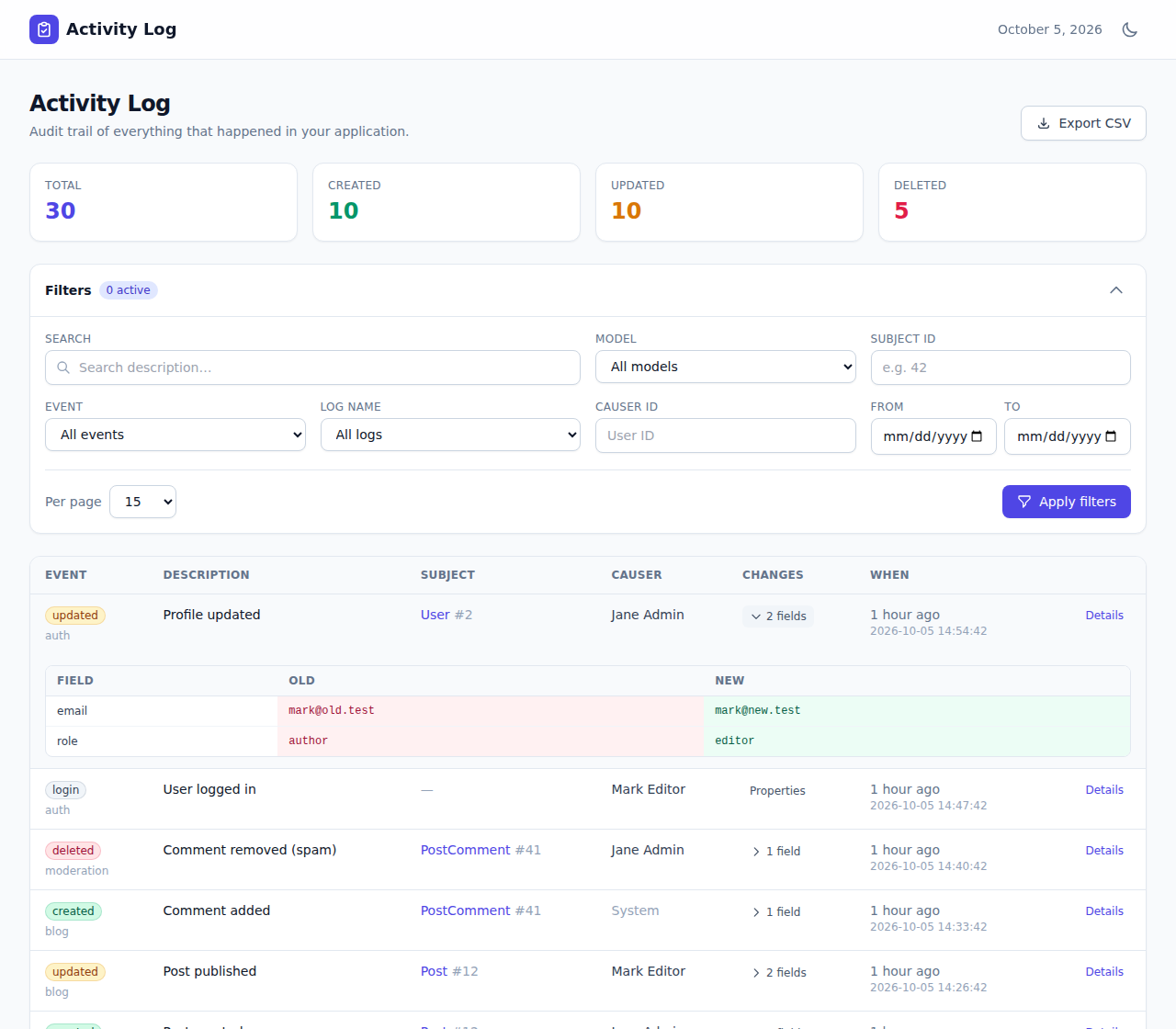
Table of contents
- Why this package
- Features
- Requirements
- Quickstart
- Configuration
- Analytics dashboard
- Timeline view
- Saved views
- Exports
- Performance indexes
- Authorization & access control
- JSON API
- Localization
- Custom activity model / connection
- Testing
- Changelog
- License
Why this package
- Zero build step. Tailwind and Alpine.js are loaded at runtime — nothing to compile, no
npm install. - Drop-in.
composer require, visit a URL, done. It reads your existingactivity_logtable. - Broad Laravel support. Laravel 9, 10, 11 and 12 on PHP 8.0+ — not just the latest release.
- Multi-database. MySQL, MariaDB, PostgreSQL, SQLite and SQL Server, all tested. Search works everywhere (portable
LIKEby default, optional MySQL fulltext). - Safe by default. Authorization gate + optional allow-lists,
noindexheaders, and CSV exports hardened against spreadsheet formula injection. - Fully tested. 80+ tests run against a Laravel 9→12 matrix on every push.
Features
- 📋 Activity list with event badges, subject & causer links, relative timestamps and pagination.
- 🔍 Inline change diff — expand any row to see the old/new value of every changed attribute.
- 📄 Detail page per activity: field diff, custom properties, raw JSON, batch link and the full history of the same record.
- 🧰 Rich filters — free-text search, model, subject ID, event, log name, causer, batch and date range, with quick date presets (Today, Last 7/30 days, This month). Active filters show as removable chips and persist across pages.
- 💾 Saved views — save a filter set and recall it in one click, scoped per user.
- 📊 Analytics dashboard — activity over time, breakdown by event and log name, and top causers/subjects, rendered with Chart.js and honouring your current filters.
- 🕒 Timeline view — a day-grouped vertical timeline as an alternative to the table.
- 📈 Statistics cards (total / created / updated / deleted) for the current filter, with optional live auto-refresh.
- ⬇️ Exports — CSV, JSON, Excel (XLSX) and PDF. Streamed, row-capped, and injection-safe.
- 🔐 Authorization gate, configurable route prefix/domain/middleware, plus optional user/role allow-lists.
- 🔌 Read-only JSON API (opt-in) over the same filters — consume the log from a SPA, dashboard or automated agent.
- 🌍 Localization — publishable language files.
- 🌓 Dark mode, responsive layout, accessible markup.
Requirements
- PHP
^8.0 - Laravel
^9.0,^10.0,^11.0or^12.0 - spatie/laravel-activitylog
^4.0, already logging activity - Optional:
maatwebsite/excelfor Excel export,barryvdh/laravel-dompdffor PDF export
Quickstart
composer require nsd7/laravel-activitylog-ui
That's it — visit /admin/activity-log while logged in.
Make sure Spatie's activity_log table exists (see the Spatie installation guide). Optionally publish the config and run the extras:
# Publish the config file (optional)
php artisan vendor:publish --tag=activitylog-ui-config

# Publish the views to customise the UI (optional)
php artisan vendor:publish --tag=activitylog-ui-views

# Publish language files (optional)
php artisan vendor:publish --tag=activitylog-ui-lang

# Publish migrations for saved views + performance indexes (optional)
php artisan vendor:publish --tag=activitylog-ui-migrations
php artisan migrate
By default the dashboard is protected by the web and auth middleware. Define a gate (below) to restrict it further.
Configuration
After publishing, everything lives in config/activitylog-ui.php:
| Key | Default | Description |
|---|---|---|
enabled |
true |
Master switch. When off, no routes are registered. |
route.prefix |
admin/activity-log |
URL prefix (env ACTIVITYLOG_UI_PATH). |
route.domain |
null |
Optional domain (env ACTIVITYLOG_UI_DOMAIN). |
route.middleware |
['web', 'auth'] |
Middleware applied to all routes. |
gate |
viewActivityLogUi |
Gate checked when defined. |
access.allowed_users |
[] |
Allow-list of user ids or emails (enforced when non-empty). |
access.allowed_roles |
[] |
Allow-list of role names (enforced when non-empty). |
features.analytics |
true |
Analytics dashboard + data endpoint. |
features.timeline |
true |
Timeline view toggle. |
features.saved_views |
true |
Saved views (needs the migration). |
features.live_counts |
false |
Background-refresh the statistics total. |
features.api |
false |
Read-only JSON API. |
per_page / per_page_options |
15 / [10,15,25,50,100] |
Pagination. |
search_driver |
like |
like (portable) or fulltext (MySQL/MariaDB). |
causer_display_attributes |
['name','full_name','username','email'] |
First non-empty wins. |
date_format |
Y-m-d H:i:s |
Timestamp display format. |
show_stats |
true |
Show the statistics cards. |
analytics.cache_ttl |
3600 |
Seconds to cache the analytics payload (0 = off). |
analytics.range_days |
30 |
Default window of the "activity over time" chart. |
live_counts.poll_interval |
15 |
Seconds between live-count refreshes. |
saved_views.max_per_user |
50 |
Cap per user. |
export.enabled |
true |
Allow exports. |
export.limit |
10000 |
Max rows written per export. |
export.formats |
['csv','json','xlsx','pdf'] |
Formats offered in the UI. |
Analytics dashboard
Open the Analytics tab for charts computed from the currently filtered logs: activity over time, counts by event and by log name, and the top causers and subjects. The payload is cached per filter set (analytics.cache_ttl) and the date grouping is portable across MySQL, PostgreSQL, SQLite and SQL Server. Disable with features.analytics => false.
Timeline view
The Timeline tab renders the same filtered activities as a day-grouped vertical timeline — handy for scanning what happened and when. Disable with features.timeline => false.
Saved views
Save the current filter set a name and recall it with one click later. Views are scoped to the authenticated user. Run the published migration to create the activitylog_ui_saved_views table; until then the feature degrades gracefully and simply stays hidden.
Exports (CSV / JSON / Excel / PDF)
Export the currently filtered result in any configured format from the Export menu:
- CSV and JSON work out of the box and are streamed.
- Excel (XLSX) uses
maatwebsite/excelwhen installed, and falls back to CSV when it isn't. - PDF uses
barryvdh/laravel-dompdfwhen installed, and falls back to JSON when it isn't.
All exports are capped at export.limit rows and string values are neutralised against CSV/formula injection.
Performance indexes
For large tables, publish and run the optional index migration (included in activitylog-ui-migrations). It adds indexes on event, created_at and a composite (log_name, created_at) on top of Spatie's defaults, which speeds up filtering and ordering. Building indexes can briefly lock the table, so run it in a maintenance window.
Authorization & access control
Access is layered:
-
Route middleware (
web,authby default). -
Gate — if a gate named by
gateis defined, it must pass:use Illuminate\Support\Facades\Gate; Gate::define('viewActivityLogUi', fn ($user) => $user->is_admin); -
Allow-lists (optional) — set
access.allowed_users(ids or emails) and/oraccess.allowed_roles(works withhasRole(),getRoleNames(), e.g. spatie/laravel-permission). Each list is only enforced when non-empty, so the defaults change nothing.
JSON API
Enable features.api => true for a read-only API under your prefix:
GET  {prefix}/api/activities           # paginated, accepts the same filters as the UI
GET  {prefix}/api/activities/{id}       # a single activity with its change diff
It honours the same authorization as the UI and is ideal for SPAs, dashboards and automated agents.
Localization
Publish the language files with --tag=activitylog-ui-lang and translate lang/vendor/activitylog-ui/{locale}/messages.php. The UI uses your app locale automatically.
Custom activity model / connection
The UI resolves the activity model through Spatie, so a custom model or database connection configured in config/activitylog.php (activity_model) is picked up automatically — including a custom table name.
Testing
composer install
composer test
The suite runs against a Laravel 9→12 / PHP 8.1→8.4 matrix in CI.
Changelog
See CHANGELOG.md for what changed in each release.
License
The MIT License (MIT). See LICENSE.
Related Packages
A beautiful, modern UI for Spatie's Activity Log with advanced filtering, analyt...
Universal change history and audit log for Laravel. Tracks who changed what and...
The semantic activity timeline for Filament. Turn technical activity logs into c...
An audit trail for Filament 5 on top of spatie/laravel-activitylog 5 that record...
Version History
| Version | Released | PHP | Laravel | License |
|---|---|---|---|---|
| 1.2.1 | ^8.0 | ^9.0 || | MIT | |
| 1.2.0 | ^8.0 | ^9.0 || | MIT | |
| 1.1.2 | ^9.0 || | MIT | ||
| 1.1.1 | ^9.0 || | MIT | ||
| 1.1.0 | ^9.0 || | MIT | ||
| 1.0.3 | ^9.0 || | MIT | ||
| v1.0.2 | ^9.0 || | MIT | ||
| v1.0.1 | ^9.0 || | MIT | ||
| v1.0.0 | ^9.0 || | MIT |