webplusm/gallery-json-media
| Install | |
|---|---|
composer require webplusm/gallery-json-media |
|
| Latest Version: | v5.5.0 |
| PHP: | ^8.2 |
| Laravel: | 11 · 12 · 13 |
| Older releases: | 10 |
| License: | MIT |
| Last Updated: | Oct 24, 2026 |
| Links: | GitHub · Packagist |
A Gallery media (Json) for Filament



This package add a json field media for images/documents to filament V3.x and fluents api for front-end in Laravel to display photos and url link for documents ...
It is a simple and easy way to manage media in your Laravel application using Filament.
V3x doc => Filament V3.x
Features
- Fluent API: A fluent API for managing media in your Laravel application.
- Blade Components: Blade components for displaying media in your Laravel application.
- Custom Properties: Custom properties for media, allowing you to add additional informations to your media.
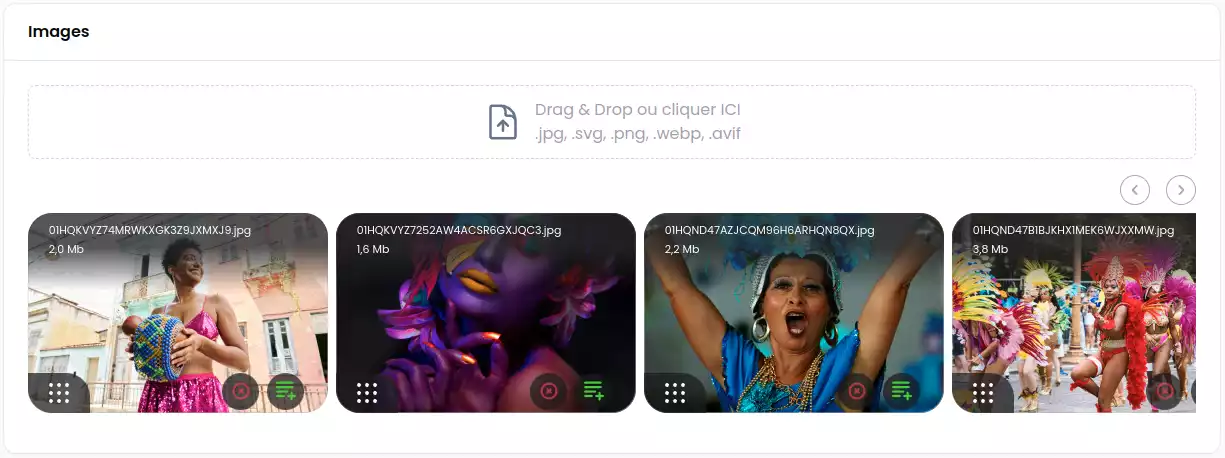
Requirements
V4.x => Filament V4.x (^PHP 8.2 need)
Installation
You can install the package via composer:
composer require webplusm/gallery-json-media
Configuration
Publish the config file with:
php artisan vendor:publish --tag="gallery-json-media-config"
You can change the driver for cropping :
use Spatie\Image\Enums\ImageDriver;
return [
    ...
    'images' => [
        'driver' => ImageDriver::Gd, // or ImageDriver::Imagick
    ],
    ...
]
Remote and private storage
Medias can be stored on any Laravel disk (S3, ...), publicly or privately. Set the defaults in the config :
return [
    'disk' => 's3',
    'visibility' => 'private', // 'public' by default
    ...
]
or for a single field :
JsonMediaGallery::make('images')
    ->disk('s3')
    ->visibility('private')
- The field values win over the config ones.
- Public files are linked with their direct url, private files with a temporary url. Set its lifetime in minutes with
images.temporary_url_ttl(5 by default). - On a remote disk, or for a private file, the thumbnails are generated by a signed route of your application on their first request, then the route redirects to the thumbnail on the disk.
- A private file on a local disk needs the
serve => trueoption of the disk, so that Laravel can build its temporary url. - The medias saved before this version have no recorded visibility : they stay public.
Translations
You can publish the translations :
php artisan vendor:publish --tag="gallery-json-media-translations"
CSS configuration
- You need to create a theme for your panel if you don't have one already,
- and then add the following to your
theme.cssfile:
@import '../../../../vendor/webplusm/gallery-json-media/resources/css/json-media.css';
Optionally, you can publish the views using, but please if you don't know what it is, don't do it.
php artisan vendor:publish --tag="gallery-json-media-views"
Discord
Find it on discord
Usage
Prepare your model
use GalleryJsonMedia\JsonMedia\Concerns\InteractWithMedia;
use GalleryJsonMedia\JsonMedia\Contracts\HasMedia;

class Page extends Model implements HasMedia
{
    use HasFactory;
    use InteractWithMedia;

    protected $casts =[
        'images' => 'array',
        'documents' => 'array',
    ];

    // for auto-delete media thumbnails
    protected function getFieldsToDeleteMedia(): array {
        return ['images','documents'];
    }
    ...

}
Cast to medias
Cast a field with AsJsonMedia to read it as a collection of Media (images) and Document (other files). The json stored in the database does not change, and the Filament field and the InteractWithMedia methods keep working.
use GalleryJsonMedia\JsonMedia\Casts\AsJsonMedia;

protected $casts = [
    'images' => AsJsonMedia::class,
    'documents' => AsJsonMedia::class,
];
$page->images; // Collection<Media|Document>
$page->images->first()->getCropUrl(400, 300);
$page->images->first()->getOriginalDimensions()?->width; // the size of the image, null when it is not recorded
The medias are read-only: to change a field, assign it new entries (arrays, Media or Document).
In Filament Forms
use GalleryJsonMedia\Form\JsonMediaGallery;
JsonMediaGallery::make('images')
    ->directory('page')
    ->reorderable()
    ->acceptedFileTypes()
    ->disk('s3') // any Laravel disk, the `gallery-json-media.disk` config by default
    ->visibility('private') // 'public' or 'private', see "Remote and private storage"
    ->maxSize(4 * 1024)
    ->minSize()
    ->maxFiles(2)
    ->minFiles(1)
    ->replaceTitleByAlt() // If you want to show alt customProperties  against file name
    ->image() // only images by default , u need to choose one method (image or document)
    ->document() // only documents (eg: pdf, doc, xls,...)
    ->downloadable()
    ->deletable()
    ->withCustomProperties(
       customPropertiesSchema: [
            ...some form fields here
        ],
       editCustomPropertiesOnSlideOver: true,
       editCustomPropertiesTitle: "Edit customs properties"
    )
    ->editableCustomProperties(bool|Closure) // if you want to enable/disable the custom properties edition ;
Each uploaded file is saved with its size, mime_type, disk and visibility, and an image also with its width and height (a svg has none). Only the header of the image is read, and a photo turned by its exif orientation is measured as its thumbnails show it.
Show your media in a grid way
You can now view your medias in grid list like this :
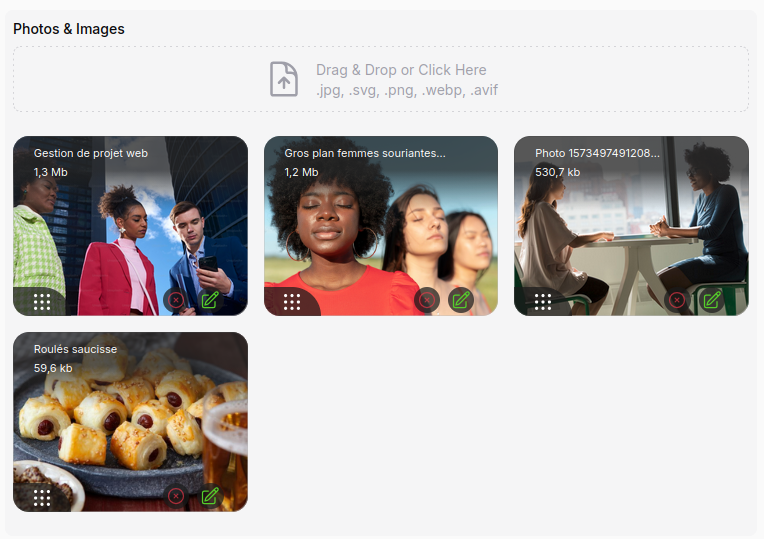
use GalleryJsonMedia\Tables\Columns\JsonMediaColumn;
JsonMediaGallery::make('images')
    ...
    ->displayOnGrid()
In Filament Tables

use GalleryJsonMedia\Tables\Columns\JsonMediaColumn;
JsonMediaColumn::make('images')
    ->avatars(bool|Closure)
In Filament Infolists
use GalleryJsonMedia\Infolists\JsonMediaEntry;
use GalleryJsonMedia\Infolists\JsonDocumentsEntry;
JsonMediaEntry::make('images')
    ->avatars()
    ->thumbHeight(100)
    ->thumbWidth(100)
    ->visible(static fn(array|null $state)=> filled($state))


// or for Documents, you can download them here
GalleryJsonMedia\Infolists\JsonDocumentsEntry::make('documents')
    ->columns(4)
    ->columnSpanFull()
In Blade Front-end
The image component renders a lazy <img> with the thumbnail of the requested size and the alt of the media. Without a size, it shows the original image. A thumbnail is never larger than its image: a smaller image keeps its size, cropped to the requested ratio. Your attributes are added to the tag and replace the defaults (alt, loading).
@foreach($page->images as $media)
    <x-gallery-json-media::image :media="$media" :width="400" :height="300" class="rounded" />
@endforeach
The format attribute converts the thumbnail (format="webp"). Without <picture>, there is no fallback for a browser that cannot read the format: keep it for webp, which every current browser reads.
Responsive images
The responsive-image component takes the same attributes and lets the browser choose the thumbnail it needs:
- the
srcsetoffers the thumbnails of the same ratio in the widths of theimages.responsive.widthsconfig, up to twice the displayed width for the high density screens, and up to the width of the image: the size recorded on upload replaces the larger widths; - the default
sizesis(max-width: 1200px) 100vw, 1200px, give your ownsizesattribute for your layout; - a
<picture>offers the thumbnails converted to theimages.responsive.formatsconfig (webpby default), or to theformatsof the component, by order of preference.
<x-gallery-json-media::responsive-image :media="$media" :width="1200" :height="600" sizes="(min-width: 1024px) 50vw, 100vw" />
Each thumbnail is generated only when a browser requests it, so a format or a width that no visitor needs is never created. A converted thumbnail keeps the extension of its image: photo-400x300.jpg.webp. AVIF (:formats="['avif', 'webp']") needs an image driver (GD or Imagick) built with AVIF support. Without a width, or for a svg, the component renders a single image like image.
Or with the InteractWithMedia methods :
<!-- for media -->
@foreach($page->getMedias('images') as $media)
    <div style="display: flex;gap: .5rem">
        {{ $media }}
    </div>
@endforeach

<!-- For documents -->
<div>
    <ul>
        @foreach($page->getDocuments('documents') as $document)
            <li>
                <a href="{{ $document->getUrl() }}" target="_blank">
                    {{ $document->getCustomProperty('title') }}
                </a>
            </li>
        @endforeach
    </ul>
</div>
You can also control the entire view to render the media by passing a blade file to your view like this :
@foreach($page->getMedias('images') as $media)
    <div style="display: flex;gap: .5rem">
        {{ $media->withImageProperties( width : 200,height: 180)->withView('page.json-media') }}
    </div>
 @endforeach


<!-- the json-media.blade.php -->
@php
   use GalleryJsonMedia\JsonMedia\Media;
   /** @var Media $media*/
   $media
@endphp
<figure class="" style="width: {{ $media->width }}px">
    <img class="object-cover w-full aspect-video" loading="lazy"
         src="{{ $media->getCropUrl(width: $media->width,height: $media->height) }}"
         alt="{{ $media->getCustomProperty('alt') }}"
         width="{{ $media->width }}"
         height="{{ $media->height }}"
    >
</figure>
Maintenance
Both commands work on the disk of the package config, give other disks with --disk=s3 --disk=public. They never touch a file outside the root_directory.
Clean the orphan files
php artisan gallery-json-media:clean --dry-run   # list the files to delete
php artisan gallery-json-media:clean             # delete them, after confirmation
php artisan gallery-json-media:clean --force     # without confirmation (cron, deployment)
It deletes the thumbnails whose image is missing. To also delete the files that no record uses, with their thumbnails, declare the json media fields of your models:
// config/gallery-json-media.php
'maintenance' => [
    'models' => [
        App\Models\Post::class => ['images', 'documents'],
    ],
],
Declare all of them: every other file of the root_directory is deleted, so the files of a forgotten field would be too. The soft deleted records keep their files.
Render the thumbnails again and record the size of the images
php artisan gallery-json-media:regenerate                     # both
php artisan gallery-json-media:regenerate --thumbnails-only   # only render the thumbnails again
php artisan gallery-json-media:regenerate --dimensions-only   # only record the size of the images
It renders every existing thumbnail again from its image, with the same size and format: run it after a change of quality or of driver. The thumbnails are generated when a browser requests them, so the command only renders the ones that already exist.
It also records the width and the height of the images that the declared models (maintenance.models, see above) saved without them, as the images uploaded before v5.5.0, so that their srcset stops at their size. Only the header of a local image is read, a remote one is downloaded. The records are written without their model events and keep their updated_at. An image that is missing or whose size cannot be read is listed, the command then fails.
Testing
composer test
Changelog
Please see CHANGELOG for more information on what has changed recently.
Contributing
Please see CONTRIBUTING for details.
Security Vulnerabilities
Please review our security policy on how to report security vulnerabilities.
Credits
License
The MIT License (MIT). Please see License File for more information.
Related Packages
A Filament infolist entry that renders Spatie Media Library collections with ima...
Tool and field that will let you managing files and add them to the posts
Version History
| Version | Released | PHP | Laravel | License |
|---|---|---|---|---|
| v5.5.0 | ^8.2 | ^11.28| | MIT | |
| v5.4.1 | ^8.2 | ^11.28| | MIT | |
| v5.4.0 | ^8.2 | ^11.28| | MIT | |
| v5.3.0 | ^8.2 | ^11.28| | MIT | |
| v5.2.0 | ^8.2 | ^11.28| | MIT | |
| v5.1.0 | ^8.2 | ^11.28| | MIT | |
| v5.0.1 | ^8.2| | ^10.0| | MIT | |
| v5.0 | ^8.2| | ^10.0| | MIT | |
| v4.3 | ^8.2| | ^10.0| | MIT | |
| v4.2.1 | ^8.2 | ^10.0| | MIT | |
| v4.2 | ^8.2 | ^10.0| | MIT | |
| v4.1.9 | ^8.2 | ^10.0| | MIT | |
| v4.1.8 | ^8.2 | ^10.0| | MIT | |
| v4.1.7 | ^8.2 | ^10.0| | MIT | |
| v4.1.6 | ^8.2 | ^10.0| | MIT | |
| v4.1.4 | ^8.2 | ^10.0| | MIT | |
| v4.1.3 | ^8.2 | ^10.0| | MIT | |
| v4.1.2 | ^8.2 | ^10.0| | MIT | |
| v4.1.01 | ^8.2 | ^10.0| | MIT | |
| v4.1.0 | ^8.2 | ^10.0| | MIT | |
| v4.0.10 | ^8.2 | ^10.0| | MIT | |
| v4.0.7 | ^8.2 | ^10.0| | MIT | |
| v4.0.6 | ^8.2 | ^10.0| | MIT | |
| v4.0.5 | ^8.2 | ^10.0| | MIT | |
| v4.0.4 | ^8.2 | ^10.0| | MIT | |
| v4.0.3 | ^8.2 | ^10.0| | MIT | |
| v4.0.2 | ^8.2 | ^10.0| | MIT | |
| v4.0.1 | ^8.2 | ^10.0| | MIT | |
| v4.0.0 | ^8.2 | ^10.0| | MIT | |
| v2.3.1 | ^8.1 | ^10.0| | MIT |
Showing the latest 30 of 43. See every release on Packagist