yousefaman/filament-autosave
| Install | |
|---|---|
composer require yousefaman/filament-autosave |
|
| Latest Version: | v1.0.0 |
| PHP: | ^8.2 |
| Laravel: | 11 · 12 · 13 |
| License: | MIT |
| Last Updated: | Oct 17, 2026 |
| Links: | GitHub · Packagist |
Filament Autosave



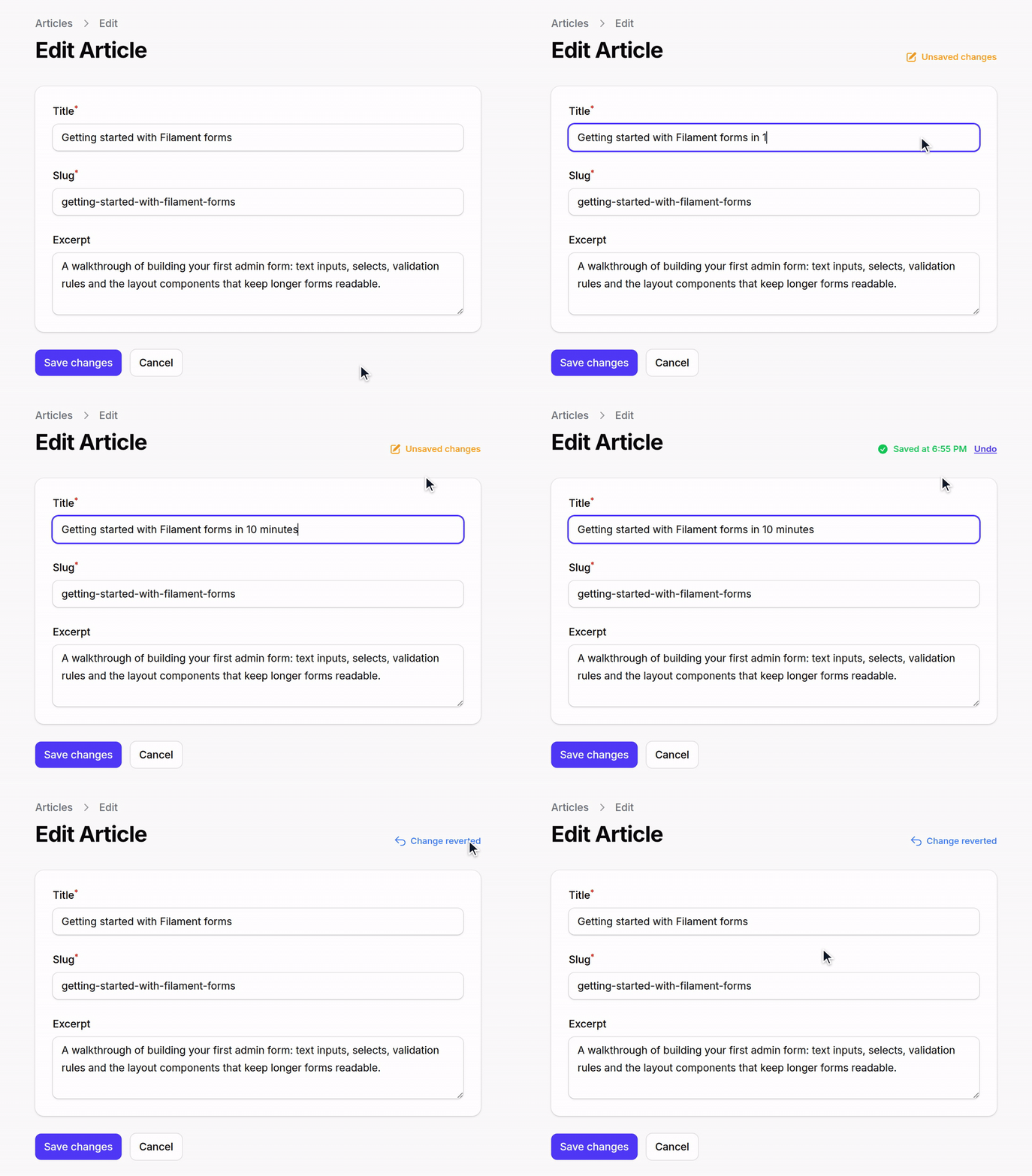
Automatic form saving for Filament v4 and v5 with a visual status indicator and one-step Undo on Edit pages.
- Edit pages — changes are written to the database after a debounce.
- Create and custom pages — unsubmitted changes are stored as a draft in Laravel Cache. When the user returns, they can Restore or Discard the draft.
If this package saves you time, a star on GitHub helps other Filament developers find it.
Requirements
- PHP 8.2+
- Filament v4 or v5
- Livewire v3 (with Filament v4) or v4 (with Filament v5)
Laravel is not constrained by this package; it comes from Filament, which accepts 11.28+, 12 and 13. CI covers Laravel 12 and 13 only — Composer 2.9+ refuses to install any Laravel 11 release, because the whole 11.x line is past its security-support window.
Tested combinations
| PHP | Filament | Laravel |
|---|---|---|
| 8.2, 8.3, 8.4 | v4, v5 | 12 |
| 8.4 | v4, v5 | 13 |
| 8.2 | v4.0 (lowest dependencies) | 12 |
Installation
composer require yousefaman/filament-autosave
Register the plugin in your panel provider:
use YousefAman\FilamentAutosave\AutosavePlugin;

public function panel(Panel $panel): Panel
{
    return $panel->plugin(AutosavePlugin::make());
}
The status indicator ships its own CSS/JS assets. If you copy Filament's assets
into public/ for production, re-run:
php artisan filament:assets
Publish the config (optional):
php artisan vendor:publish --tag="filament-autosave-config"
Publish the translations (optional):
php artisan vendor:publish --tag="filament-autosave-translations"
Publish the indicator view to customize its markup (optional):
php artisan vendor:publish --tag="filament-autosave-views"
Usage
Edit pages
use Filament\Resources\Pages\EditRecord;
use YousefAman\FilamentAutosave\HasAutosave;

class EditArticle extends EditRecord
{
    use HasAutosave;

    protected static string $resource = ArticleResource::class;
}
The form autosaves 1.5 s after the last keystroke. After each save, an Undo button appears briefly to revert that write.
Autosave persists the form's dehydrated state — the same values Filament would
write on a normal save (dehydrateStateUsing() transforms and casts applied,
dehydrated(false) fields skipped) — but without running validation, so an
incomplete form never blocks the save. What that means per field type:
| Field | Autosaved? |
|---|---|
| Plain column-backed field | ✓ |
Plain (non-relationship) Repeater, CheckboxList — stores to its own column |
✓ |
Single Select::relationship() (BelongsTo) — Filament dehydrates the foreign key |
✓ |
Multiple Select, BelongsToMany, Repeater::relationship(), and anything else Filament persists through saveRelationships() |
✗ — on explicit submit only |
->dehydrated(false) |
✗ |
Because validation is skipped, field-level rules (minLength, maxValue, etc.)
are not enforced during autosave — only on explicit submit. Two things are
always enforced, because skipping them would let autosave persist what a normal
save rejects:
- A
requiredfield left blank is skipped rather than written, so it never violates aNOT NULLcolumn. - A
Select,CheckboxListorToggleButtonsvalue outside the field's own options (including options scoped to the current tenant or team) is skipped.
You can enforce further rules non-blockingly via getAutosaveValidationRules()
(see below).
Fields nested under a state path
A field inside a Group/Section with a statePath(), or inside a Repeater,
lives under a nested key (settings.api_key, items.*.secret). That whole
top-level key is written as one column value, so autosave writes it only when
every field beneath it survived the rules above. If one nested field is skipped
— a password, an out-of-options Select, a blank required — the entire container
is left untouched rather than written back without it, which would destroy the
stored value of the skipped field.
Practically: a statePath()ed group or a Repeater that contains a
->password() field is never autosaved. The rest of the form still is.
Create-page drafts are re-filled into the form instead of written to a column, so there is nothing to destroy — a nested secret is pruned from the draft and its siblings are kept.
Create pages
use Filament\Resources\Pages\CreateRecord;
use YousefAman\FilamentAutosave\HasAutosaveForCreate;

class CreateArticle extends CreateRecord
{
    use HasAutosaveForCreate;

    protected static string $resource = ArticleResource::class;
}
Custom Filament pages
For pages without an Eloquent record. The form must use the default data
state path (->statePath('data')), which is what the status indicator watches:
use Filament\Pages\Page;
use YousefAman\FilamentAutosave\HasAutosaveForCreate;

class UserPreferences extends Page
{
    use HasAutosaveForCreate;

    public ?array $data = [];

    public function save(): void
    {
        $data = $this->form->getState();
        // ... persist however you like

        $this->clearAutosaveDraft();
    }
}
Call $this->clearAutosaveDraft() from your save handler to drop the draft once the user submits.
Configuration
Each option supports the levels listed below, merged so the later wins
(config → plugin → page), except except, which is unioned across all levels.
| Option | config | plugin | page |
|---|---|---|---|
debounce |
✓ | ✓ | ✓ |
except |
✓ | ✓ | ✓ |
cache_ttl |
✓ | ✓ | — |
show_timestamp |
✓ | ✓ | — |
indicatorPosition |
— | ✓ | — |
exceptPages |
— | ✓ | — |
Page-level options are methods. Do not redeclare a property the trait already defines (
$autosaveEnabled,$autosaveSnapshotHash,$autosaveDebounceMs,$autosaveCanUndo,$autosaveHasDraft): PHP treats a redeclaration with a different default as an incompatible trait composition and raises a fatal error.
Debounce
AutosavePlugin::make()->debounce(2000);       // plugin-wide

// per-page
protected function autosaveDebounce(): ?int
{
    return 2000;
}

// config/filament-autosave.php
'debounce' => 1500,
Exclude fields
AutosavePlugin::make()->except(['internal_notes']);

// per-page — unioned with the plugin and config lists
protected function autosaveExcept(): array
{
    return ['internal_notes'];
}

// config/filament-autosave.php
'except' => ['password', 'password_confirmation'],
Exclude specific pages
Suppress the indicator on individual pages that use one of the traits (an
alternative to shouldAutosave() on the page itself):
AutosavePlugin::make()
    ->exceptPages([EditPayment::class]);
Draft TTL (Create pages)
AutosavePlugin::make()->cacheTtl(48);         // hours
'cache_ttl' => 24,
Indicator
AutosavePlugin::make()
    ->showTimestamp(false)
    ->indicatorPosition('after');
indicatorPosition places the indicator before or after the page header actions.
A page that overrides getHeader(), or that has no heading, header actions and
breadcrumbs at all, renders no header — there the indicator falls back to the end
of the page rather than disappearing along with autosave.
Per-page disable
class EditSensitive extends EditRecord
{
    use HasAutosave;

    protected function shouldAutosave(): bool
    {
        return false;
    }
}
shouldAutosave() is authoritative on the server, so a disabled page cannot be
switched back on from the browser.
Lifecycle hooks
beforeAutosave() and getAutosaveValidationRules() apply to both Edit and
Create/custom pages. afterAutosave() runs on Edit pages only — it receives
the saved record, which Create pages don't have until submit.
protected function beforeAutosave(array $data): array
{
    return $data;
}

protected function afterAutosave(object $record): void
{
    Cache::forget("user-{$record->id}");
}

/** @return array<string, mixed> */
protected function getAutosaveValidationRules(): array
{
    return [
        'slug' => ['required', 'string', 'max:120'],
    ];
}
Every rule whose field is part of the payload is checked; a field that fails is silently skipped so autosave never blocks the user. Full form validation still runs at submit time.
Rule keys may target nested paths ('items.*.qty' => ['integer', 'min:1']). A
failure there skips the whole top-level key (items) for the same reason nested
containers are all-or-nothing — see above.
Autosave runs mutateFormDataBeforeSave() and writes inside a database
transaction, matching Filament's save(). It deliberately does not fire
Filament's beforeSave/afterSave hooks or the RecordUpdated/RecordSaved
events — use afterAutosave() for work that should run on every autosave. It
re-baselines Filament's unsaved-changes tracking whenever the write covered every
filled field, so a panel using ->unsavedChangesAlerts() won't warn about changes
autosave already wrote.
Undo (Edit pages)
After a successful autosave, the indicator shows an Undo button for 5 seconds. Clicking it:
- Reads the pre-save values from a short-lived cache entry (30 min by default, override via
protected function getUndoTtlMinutes(): int). - Writes them back through
handleRecordUpdate(). - Re-fills the form.
- Clears the undo snapshot.
Undo only replays a snapshot created by the same live page instance, so a snapshot left behind by an earlier page load can't roll back an edit made since. The snapshot covers real columns only — an accessor/mutator-backed field is not undoable.
Files and sensitive data
Dropped from every autosave payload automatically:
TemporaryUploadedFileinstances (pending file uploads).- Any
TextInputmarked->password()or->type('password'), at any depth. On an Edit page autosave would otherwise commit a half-typed secret; on a Create page it would sit in the draft cache in plain text. - The
exceptlist (config + plugin + page), applied to both the autosave write and the draft restore. - Client-submitted keys that don't map to a declared form field — at every depth, so a crafted payload cannot smuggle extra keys into a JSON column either.
except matches top-level field names only; to drop a field nested inside a
Repeater row or a statePath()ed group, mark it ->password() or
->dehydrated(false).
Because a skipped field is genuinely unsaved, an autosave that had to skip a field
the user actually filled in does not re-baseline Filament's unsaved-changes
tracking — so ->unsavedChangesAlerts() still warns before navigation instead of
reporting the typed secret as saved.
->dehydrated(false) keeps a field out of Edit-page writes, but not out of
Create-page drafts — those are built from raw form state precisely so the user
gets back exactly what they typed. For a secret on a Create page, use except (or
->password(), which is handled for you).
Translations
Publish translations with --tag="filament-autosave-translations" to customize any of the indicator labels (unsaved, saving, saved, saved_at, undo, undone, error, draft_available, restore, discard, restored).
Testing
composer test                          # everything
vendor/bin/pest --testsuite=Unit       # traits and manager, no panel
vendor/bin/pest --testsuite=Integration  # real EditRecord/CreateRecord in a booted panel
License
MIT
Related Packages
Column-by-column autosave for Filament forms: nothing is lost on a closed tab, t...
Filament v4 plugin: fully functional dynamic form builder (create, render, colle...
Version History
| Version | Released | PHP | License |
|---|---|---|---|
| v1.0.0 | ^8.2 | MIT |