mammesat/filament-ethiopic-calendar
Ethiopian Calendar & Time Engine for Filament
Finally, Ethiopian dates and time — done right in Filament.
Production-ready Ethiopian calendar and Ethiopian time support for Laravel + Filament v5.



🚀 Quick Start (30 seconds)
Install
composer require mammesat/filament-ethiopic-calendar
Use
use Mammesat\FilamentEthiopicCalendar\Fields\EthiopicDateTimePicker;

EthiopicDateTimePicker::make('appointment_at')
    ->label('Appointment Date')
    ->ethiopic()
    ->withTime()
    ->required();
That's it. No configuration required. Works out of the box.
🧠 What ->ethiopic() does
Calling ->ethiopic() automatically configures:
| Setting | Value | Effect |
|---|---|---|
displayMode |
ethiopic_amharic |
Ethiopian date labels in Amharic |
timeMode |
ethiopian |
Ethiopian time system (6-hour shift) |
calendarLocale |
am |
Amharic month/day names in the calendar popup |
You do not need to set these manually. One method handles everything.
👀 Expected UI
After adding ->ethiopic()->withTime(), you should see:
- ✅ Ethiopian calendar popup with Amharic month and day names
- ✅ Ethiopian time display (e.g.,
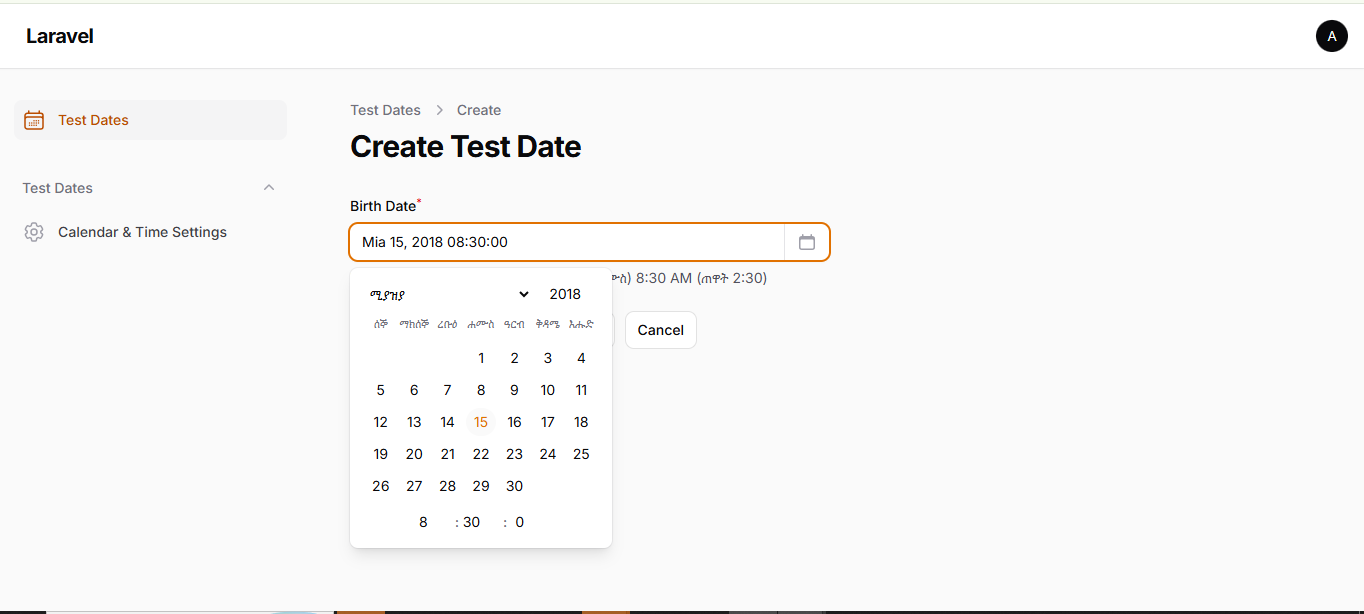
ጠዋት 4:00instead of10:00 AM) - ✅ Helper preview below the field showing the Ethiopian date/time
- ✅ "Stored as: Gregorian" note so developers know the DB format
- ✅ Standard Filament DateTimePicker UI (no custom dropdowns)
📦 All Three Component Types
Form Field
use Mammesat\FilamentEthiopicCalendar\Fields\EthiopicDateTimePicker;

EthiopicDateTimePicker::make('birth_date')
    ->label('Birth Date')
    ->ethiopic()
    ->withTime()
    ->required();
Table Column
use Mammesat\FilamentEthiopicCalendar\Tables\Columns\EthiopicDateColumn;

EthiopicDateColumn::make('birth_date')
    ->label('Birth Date')
    ->ethiopic()
    ->withTime();
Infolist Entry
use Mammesat\FilamentEthiopicCalendar\Infolists\Components\EthiopicDateEntry;

EthiopicDateEntry::make('birth_date')
    ->label('Birth Date')
    ->ethiopic()
    ->withTime();
All three share the same API. Use ->ethiopic(), ->dual(), or ->gregorian() on any of them.
✨ Interactive Tooltips
Instantly provide context without cluttering your UI. Enable a hover tooltip that shows the "opposite" calendar system.
- Displaying Gregorian? Hover to see Ethiopic date + Ethiopian time.
- Displaying Ethiopic? Hover to see Gregorian equivalent.
Available on EthiopicDateColumn and EthiopicDateEntry.
use Mammesat\FilamentEthiopicCalendar\Tables\Columns\EthiopicDateColumn;

EthiopicDateColumn::make('created_at')
    ->ethiopic()
    ->tooltipAlternate(); // Hover shows Greg equivalent
use Mammesat\FilamentEthiopicCalendar\Infolists\Components\EthiopicDateEntry;

EthiopicDateEntry::make('birth_date')
    ->gregorian()
    ->tooltipAlternate(); // Hover shows Ethiopic equivalent
[!NOTE] Tooltips are automatically disabled in
dual()mode since both calendar systems are already visible.
⚙️ Optional Customization
Most users only need ->ethiopic(). But if you need more control:
Dual mode (Ethiopian + Gregorian side by side)
EthiopicDateTimePicker::make('date')
    ->dual()
    ->withTime();
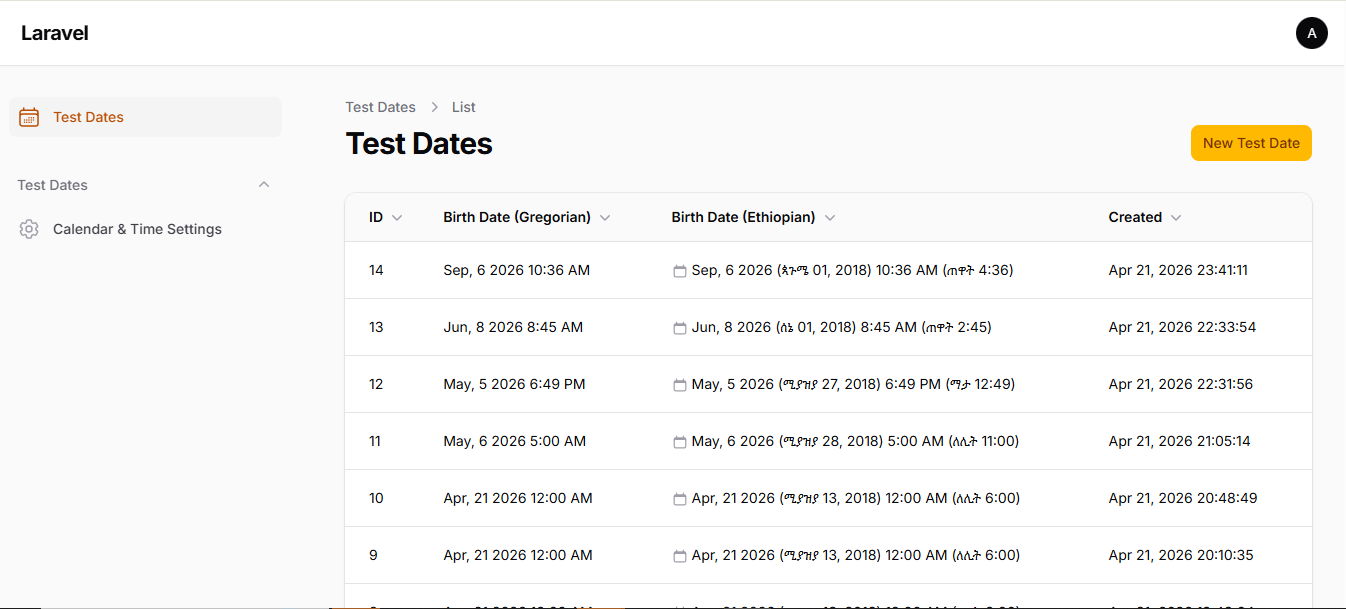
Output: Apr 21, 2026 (ሚያዝያ 13, 2018) 10:00 AM (ጠዋት 4:00)
Gregorian mode
EthiopicDateTimePicker::make('date')
    ->gregorian();
English transliteration
EthiopicDateTimePicker::make('date')
    ->ethiopic()
    ->calendarLocale('en');
Custom helper text
EthiopicDateTimePicker::make('date')
    ->ethiopic()
    ->showEthiopicHelper(false)  // disable built-in helper
    ->helperText(fn ($state, $component) =>
        $state
            ? 'Displayed as: ' . $component->getFormattedPreview($state)
            : null
    );
Date only (no time picker)
EthiopicDateTimePicker::make('date')
    ->ethiopic();  // no ->withTime() = date only
🔧 Global Configuration (Optional)
Most projects don't need this. But if you want to set defaults globally:
php artisan vendor:publish --tag="filament-ethiopic-calendar-config"
This publishes config/ethiopic-calendar.php where you can set:
display_mode— default display mode (ethiopic_amharic,ethiopic_english,gregorian,dual)calendar_system— which picker grid to render (ethiopic,gregorian)time_mode— default time system (gregorian,ethiopian,dual)calendar_locale— default popup language (am,en)with_time— enable time globally (true/false)timezone— defaults toAfrica/Addis_Ababa
Per-field settings (e.g., ->ethiopic()) always override global config.
Per-tenant calendars (multi-tenant apps)
calendar_system and display_mode can both be resolved per request with
a closure, so each tenant sees its own calendar. Register them once, for
example in a service provider:
use Mammesat\FilamentEthiopicCalendar\Support\EthiopicConfig;

EthiopicConfig::set('calendar_system', fn () => tenant()->usesGregorian() ? 'gregorian' : 'ethiopic');
EthiopicConfig::set('display_mode',    fn () => tenant()->usesGregorian() ? 'gregorian' : 'ethiopic_english');
calendar_system switches the date picker; display_mode switches every
column, entry and formatter call that has no explicit mode. Stored values are
always Gregorian, whichever calendar is displayed.
❗ Common Mistakes
Using Filament's DateTimePicker instead of EthiopicDateTimePicker
// ❌ Wrong — this is Filament's standard picker, no Ethiopian support
DateTimePicker::make('date');

// ✅ Correct
EthiopicDateTimePicker::make('date')->ethiopic();
Assets not loading
If the calendar doesn't render properly after install:
php artisan filament:assets
php artisan optimize:clear
Manually configuring what ->ethiopic() already does
// ❌ Unnecessary — don't do this
EthiopicDateTimePicker::make('date')
    ->displayMode('ethiopic_amharic')
    ->timeMode('ethiopian')
    ->calendarLocale('am');

// ✅ Just use the preset
EthiopicDateTimePicker::make('date')
    ->ethiopic();
📐 Formatter API
For use outside Filament components (e.g., Blade views, exports, notifications):
use Mammesat\FilamentEthiopicCalendar\Services\EthiopicFormatter;

// Date only
EthiopicFormatter::formatDate('2026-04-21', 'ethiopic_amharic');
// → "ሚያዝያ 13, 2018"

// Date + time
EthiopicFormatter::formatDateTime('2026-04-21 10:00:00', 'dual', 'dual');
// → "Apr 21, 2026 (ሚያዝያ 13, 2018) 10:00 AM (ጠዋት 4:00)"

// Ethiopian time only
EthiopicFormatter::formatEthiopianTime('10:00');
// → "ጠዋት 4:00"
🔄 Backward Compatibility
Legacy display mode values (e.g.,
amharic_no_week,clean_gregorian,hybrid) are still fully supported and automatically normalized at runtime. You do not need to migrate existing database records or settings.
📸 Screenshots
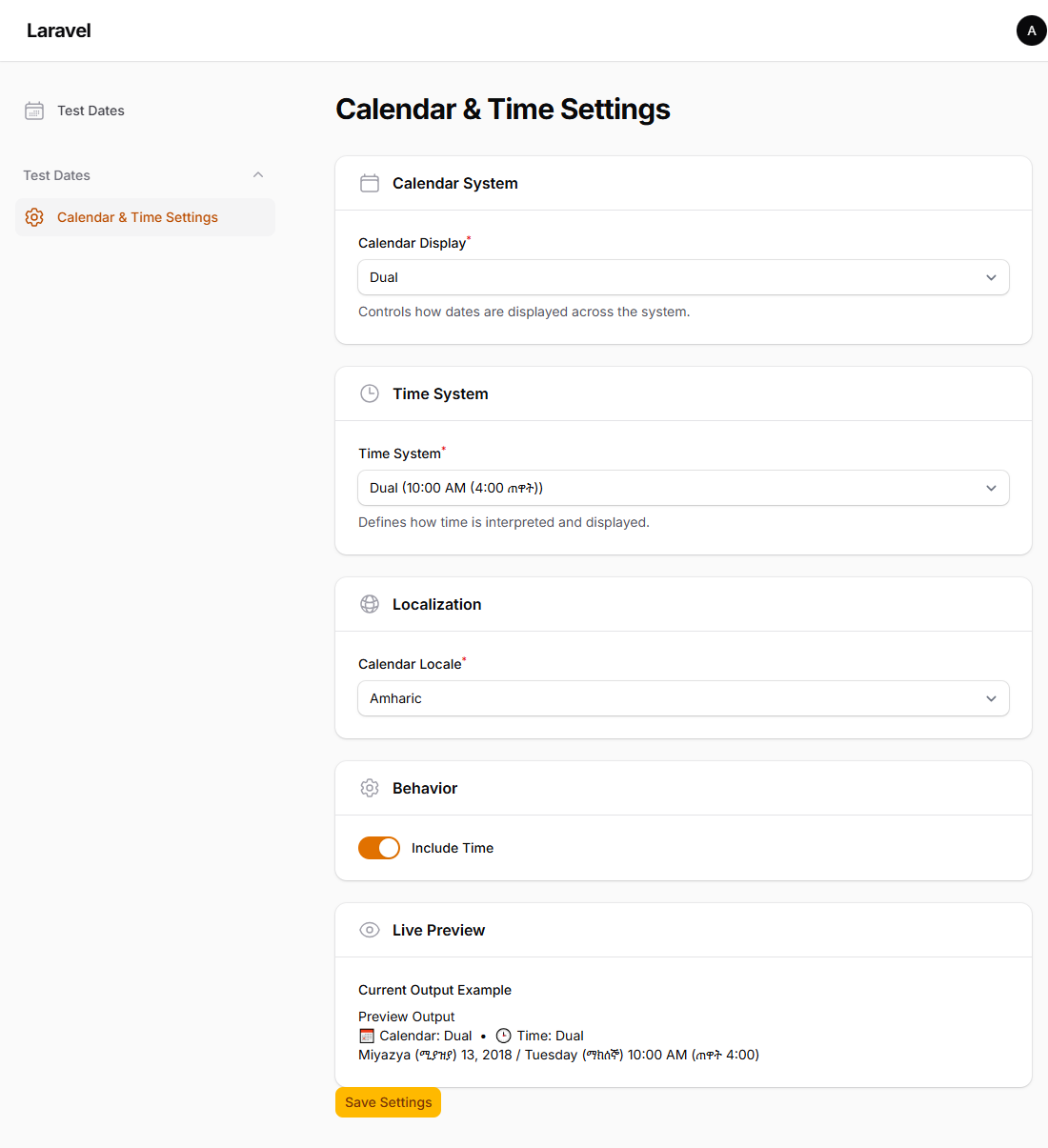
-
Settings / Configuration Panel
-
Form Picker + helper output
-
Table output with dual display
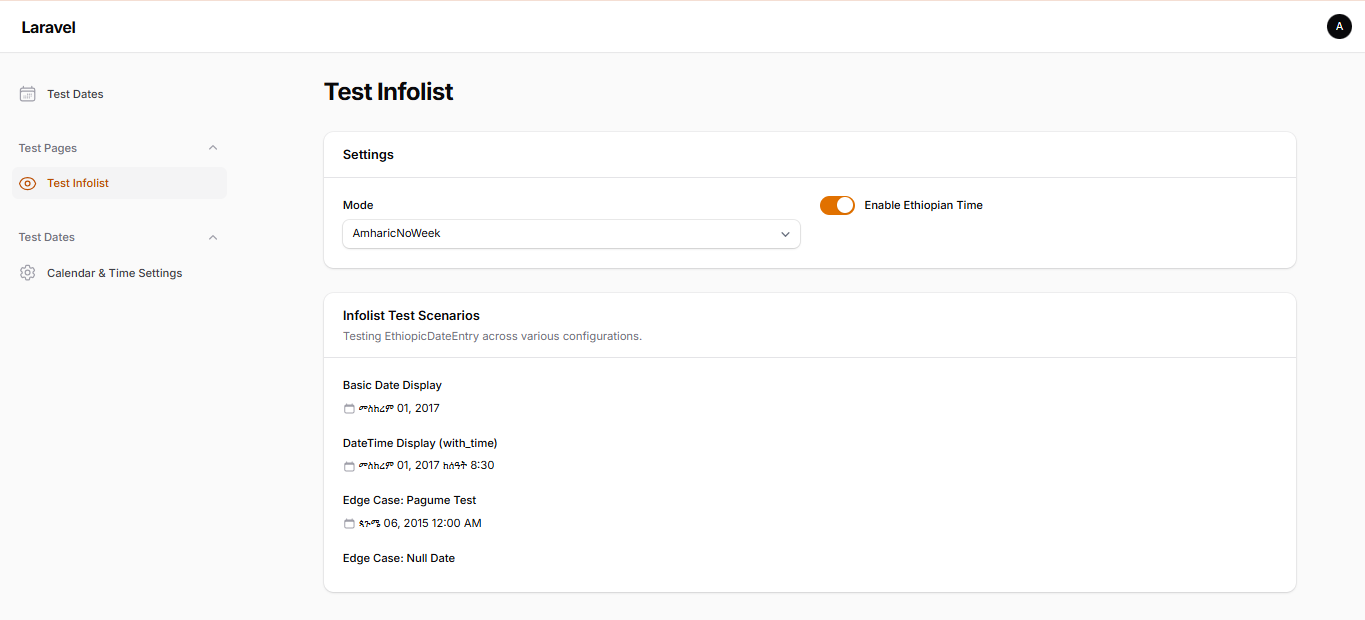
-
Infolist scenarios
License
MIT
Related Packages
Resource locking for Filament edit pages via Livewire heartbeat or broadcast.
A calendar widget for Filament admin panels, powered by Livewire and Alpine.js.
Allow users to create & customize their own FilamentPHP pages composed of Livewi...
Share passwords and secrets from your Filament panel through self-destructing si...
Version History
| Version | Released | PHP | License |
|---|---|---|---|
| v2.1.0 | ^8.2 | MIT | |
| v2.0.0 | ^8.2 | MIT | |
| v1.1.0 | ^8.2 | MIT | |
| v1.0.0 | ^8.2 | MIT |